Search the Community
Showing results for tags 'customizable'.
Found 16 results
-

Version 1.1.0
103 downloads
Black Market Rotating NPC Black Market Trader Bring a High Stake, black market trader to your server. A mysterious NPC trader spawns and broadcasts their arrival and vanishes after a configurable amount of time. Players interact with a modern CUI shop to buy limited Stock, and players can get top teir items by completing delivery style contracts to the Black market ai. Why should you buy this? Works on PVP, PVE, Vanilla+, Modded and RP Servers Fully Configurable Stock, Missions, Cooldowns, spawn settings, marker, warnings, bodyguards, messages and sounds. Clean UI with pagination, cooldown indicators, affordability states and a live balance display Features Trader System Random Spawns with configurable interval + lifetime of NPC Base Safe Spawning (avoids construction + deployed entities so it wont appear inside bases) Flat ground checking (extra slops checks to reduce awkward spawns) Trader is non-lootable and cannot be damaged Contracts/Missions Players accept jobs and turn in required items to unlock higher-tiered purchases Active contracts shown in a dedicated UI section Admins can reset players progress Map Marker + Countdown Warnings Optional map marker for trader location Optional departure warnings (configurable warning times) Bodyguards (Optional) Enable guards, set count/health/prefab/radius Hostile or passive behaviour toggle in config Permissions blackmarketai.use (optional gate, config controlled) blackmarketai.admin blackmarketai.vip (reduced cooldowns) blackmarketai.nocooldown (bypass all cooldowns) Commands player /bm info - trader status /bm missions - view active missions Admin (blackmarketai.admin) /bm spawn - force spawn trader /bm despawn - remove all black market traders /bm tp - teleport to trader /bm reset [Name] - reset a player (or all players if no name is included) /bm stats - Npc trader stats Developer Hooks (for integration) CanBlackMarketTrade(player, position) OnBlackMarketPurchase(player, itemShortname, quantity, costAmount) OnBlackMarketPurchaseComplete(player, itemShortname, quantity) OnBlackMarketMissionAccepted(player, missionId) OnBlackMarketMissionCompleted(player, missionId) OnBlackMarketTraderSpawned(position, grid) OnBlackMarketTraderDespawned(position)$6.99 -
Version 2.0.1
57 downloads
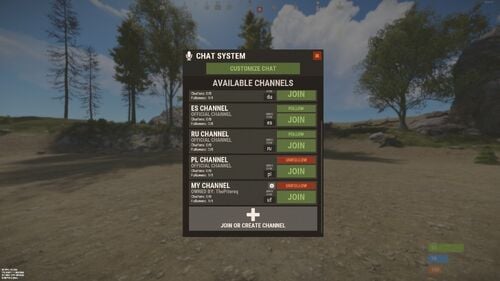
RUST Plugin Test Server TEST MY PLUGINS THERE! connect play.thepitereq.ovh:28050 Chat Nations creates new connection between players on chat by splitting chat into more channels that can be assigned for languages, teams and more. It contains detailed RUST-like UI, private messages, huge chat customization tool, private channels and many other useful features. Split your chat into smaller language channels Add private chats for your teams, friends, admins and more Customize which channels you want to see Select which channels you want to follow and see messages Global chat for server-wide messages Local chat for players near you RUST-like UI design Channel selection based on your localization Customizable primary rank display on chat Toggleable clan tag visibility option (Clans plugin) Nickname and message color customization with gradient support Titles support (PlayerChallenges plugin) Customizable prefix option for each individual player, also with full color support Voice and chat mute with full UI support Different chat message sizes based on permission Highly customizable chat display Full language support Private messages to other players Secured chat formatting Nickname re-format with ads in nickname removal API for developers /ch - Main chat customization menu (Configurable) /pm <nick> <message> - Private message command (Configurable) /r - Respond to last private message (Configurable) /mute /unmute - Opens mute UI mute <c/v/b> <userId> <duration> <reason> - Console mute command (c - chat, v - voice, b - both) (duration in format: d h m s) Example: mute b 76561198083939668 3d Test Mute unmute <c/v/b> <userId> - Console unmute command (c - chat, v - voice, b - both) Example: mute b 76561198083939668 3d Test Mute Switchable (Requirement of them can be disabled/enabled in config file) chatnations.option.prefix - Allows user to change prefix chatnations.option.clantag - Allows user to change clan tag visibility chatnations.option.colorclantag.static - Allows user to change clan tag color to static color chatnations.option.colorclantag.custom - Allows user to change clan tag color to static custom color chatnations.option.colorclantag.gradient - Allows user to change clan tag color to gradient color chatnations.option.colornick.static - Allows user to change nickname color to static color chatnations.option.colornick.custom - Allows user to change nickname color to static custom color chatnations.option.colornick.gradient - Allows user to change nickname color to gradient color chatnations.option.colormessage.static - Allows user to change message color to static color chatnations.option.colormessage.custom - Allows user to change message color to static custom color chatnations.option.colormessage.gradient - Allows user to change message color to gradient color chatnations.option.titles - Allows user to change and select title (Requires PlayerLeaderboards or PlayerChallenges) chatnations.option.customprefix - Allows user to set custom chat prefix chatnations.option.customprefix.custom - Allows user to set custom chat prefix color Other permissions chatnations.mute - Allows to use the mute and unmute command Plugin fully support plugins like Clans and PlayerChallenges. If you need some plugin implementation, feel free to ask! WARNING! This plugin doesn't work with BetterChat! PlayerChallenges Set "Maximum tags to display (Requires BetterChat)" to high value like 30 so all player tags will be available in configuration section. Dictionary<string, int> API_GetPlayersInChannels() - Returns Dictionary<string, int> with channel code as Key and online player count as Value. List<ulong> API_GetChannelPlayers(string channel) - Returns list of playerIds from channel. List<BasePlayer> API_GetChannelPlayersFull(string channel) - Returns players that belong to channel. bool IsMuted(ulong userId, bool chat = true) - Returns if player is muted. object OnNationsChat(BasePlayer player, string modifiedMessage, int channel, string channelKey, bool global, bool isOfficial) - Ran on each chat message sent. If non null returned, cancels sending message. If you need anything more, message me! { "Commands": [ "chat", "ch" ], "Private Message Commands": [ "pm", "msg" ], "Private Message Respond Commands": [ "r", "respond" ], "PopUpAPI Profile Name": "ChatNations", "Message Start Symbol": " »", "Clan Tag Default Color": "#aaee32", "Clan Tag Format": "[{0}]", "Different Tags For Clan Stages": true, "Enable Local Chat": true, "Leader Clan Tag Format": "[**{0}]", "Council Clan Tag Format": "[**{0}]", "Mod Clan Tag Format": "[*{0}]", "Leader Title Default Color": "#f2db74", "Leader Title Format": "[{0}]", "Channel Format": "<color=#aaee32>[{0}]</color>", "Global Format": "<color=#aaee32>[Global]</color>", "Team Format": "<color=#aaee32>[Team]</color>", "Local Format": "<color=#aaee32>[Local]</color>", "Private Channel Format": "<color=#aaee32>[{0}]</color>", "Custom Prefix Format": "[{0}]", "Custom Prefix Default Color": "#55aaff", "Default Custom Prefix": "CUSTOM", "Check Custom Prefix For Formatting Abuse": true, "Require Permission For": { "Switch Prefix": false, "Switch Clan Tag Visibility": false, "Nickname Color - Gradient": true, "Nickname Color - Static": true, "Nickname Color - Static Custom": true, "Message Color - Gradient": true, "Message Color - Static": true, "Message Color - Static Custom": true, "Clan Tag Color - Gradient": true, "Clan Tag Color - Static": true, "Clan Tag Color - Static Custom": true, "Switch Title": false, "Custom Prefix - Text": true, "Custom Prefix - Color Input": true, "Custom Prefix - Color": true }, "Max Custom Channels Created Per Player": 1, "Max Custom Channel Name Length": 24, "Max Custom Prefix Length": 24, "Permission Chat Message Sizes": { "chatnations.fontsize.15": 15, "chatnations.fontsize.16": 16, "chatnations.fontsize.17": 17 }, "Max Private Channel Ownership Permissions": { "chatnations.privchannels.2": 2, "chatnations.privchannels.3": 3, "chatnations.privchannels.4": 4 }, "Remove Ads In Nicknames": true, "Nick Ads List": [ "hellcase.com", "rustypot.com", "Rustchance.com" ], "Options Display Order": [ "displayed_rank", "clan_tag_visibility", "clan_tag_color", "nickname_color", "message_color", "displayed_title", "custom_prefix" ], "Static Colors - Clan Tag": [ "#eb4d4d", "#ebae4d", "#bceb4d", "#72eb4d", "#4deb5f", "#4debc1", "#4dceeb", "#4d72eb", "#6d4deb", "#bc4deb", "#eb4de0", "#eb4d94", "#eb4d50", "#e8e8e8", "#a6a6a6", "#737373" ], "Static Colors - Nickname": [ "#eb4d4d", "#ebae4d", "#bceb4d", "#72eb4d", "#4deb5f", "#4debc1", "#4dceeb", "#4d72eb", "#6d4deb", "#bc4deb", "#eb4de0", "#eb4d94", "#eb4d50", "#e8e8e8", "#a6a6a6", "#737373" ], "Static Colors - Message": [ "#ffbaba", "#ffdaba", "#f2ffba", "#d1ffba", "#baffc8", "#baffed", "#bae7ff", "#bac4ff", "#c6baff", "#debaff", "#ffbafe", "#ffbae0", "#ffbacf" ], "Static Colors - Custom Prefix": [ "#eb4d4d", "#ebae4d", "#bceb4d", "#72eb4d", "#4deb5f", "#4debc1", "#4dceeb", "#4d72eb", "#6d4deb", "#bc4deb", "#eb4de0", "#eb4d94", "#eb4d50", "#e8e8e8", "#a6a6a6", "#737373" ], "Valid Title Keys": [ "treesCut", "rocksDestroyed", "barrelsDestroyed", "botsKilled", "animalKills", "boxesLooted", "plantsGathered", "fishesCaught", "levelUps", "headshots", "helicopterKills", "bradleyKills", "dungeonsRan", "giftsOpened", "airDropsThrown", "collectiblesGathered", "rocketsFired", "explosivesThrown", "longestKill", "ammoUsed", "customCrafts", "craftedItems", "structuresBuilt", "structuresRepaired" ], "Default Channels": { "en": { "Default Follow": true, "Default Quick Code": "en", "Channel Format": "<color=#aaee32>[EN]</color>" }, "de": { "Default Follow": false, "Default Quick Code": "de", "Channel Format": "<color=#aaee32>[DE]</color>" }, "es": { "Default Follow": false, "Default Quick Code": "es", "Channel Format": "<color=#aaee32>[ES]</color>" }, "ru": { "Default Follow": false, "Default Quick Code": "ru", "Channel Format": "<color=#aaee32>[RU]</color>" }, "pl": { "Default Follow": false, "Default Quick Code": "pl", "Channel Format": "<color=#aaee32>[PL]</color>" } }, "Group Chat Formatting": { "admin": { "Is Enabled": true, "Prefix": "<color=#00e0e8>[ADMIN]</color>", "Nickname Color": "#55aaff", "Message Color": "white" }, "mod": { "Is Enabled": true, "Prefix": "<color=#00e0e8>[MOD]</color>", "Nickname Color": "#55aaff", "Message Color": "white" }, "helper": { "Is Enabled": true, "Prefix": "<color=#00e0e8>[HELPER]</color>", "Nickname Color": "#55aaff", "Message Color": "white" }, "vip": { "Is Enabled": true, "Prefix": "<color=#00e0e8>[VIP]</color>", "Nickname Color": "#55aaff", "Message Color": "white" }, "default": { "Is Enabled": true, "Prefix": "", "Nickname Color": "#55aaff", "Message Color": "white" } }, "Channel Country Assign": { "en": [ "United Kingdom", "Australia", "New Zealand", "United States", "India", "Pakistan", "Nigeria", "Philippines", "South Africa", "Tanzania", "Kenya", "Sudan", "Canada", "Ghana", "Cameroon", "Malawi", "Zambia", "Zimbabwe", "South Sudan", "Burundi", "Papua New Guinea", "Sierra Leone", "Singapore", "Ireland", "Liberia", "Jamaica", "Cyprus" ], "ru": [ "Russian Federation", "Russia", "Belarus", "Kazakhstan", "Kyrgyzstan", "Tajikistan", "Ukraine", "Moldova", "Uzbekistan" ], "de": [ "Germany", "Belgium", "Austria", "Switzerland", "Luxemburg", "Liechtenstein" ], "es": [ "Spain", "Mexico", "Colombia", "Argentina", "Peru", "Venezuela", "Chile", "Guatemala", "Ecuador", "Bolivia", "Cuba", "Dominican Republic", "Honduras", "Paraguay", "El Salvador", "Nicaragua", "Costa Rica", "Panama", "Uruguay", "Puerto Rico" ], "pl": [ "Poland" ] } }$25.00 -
Version 1.4.2
1,209 downloads
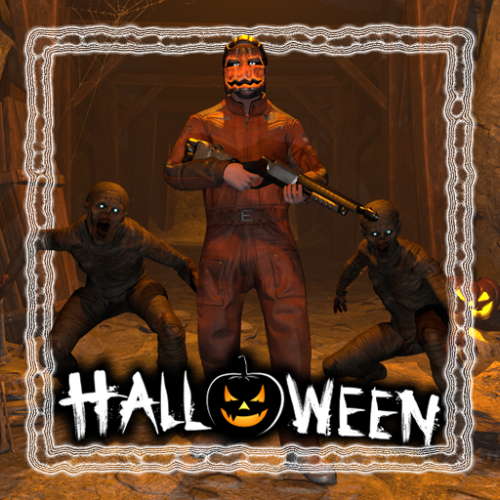
Get your server ready for Halloween! This plugin adds several options to make your server more spooky, including jumpscares when looting a crate, customizable NPC clothing and graveyards with zombies that spawn at night. Features: Graveyards with loot guarded by zombies Play spooky sound effects at night Jumpscares when looting a crate Custom NPC clothing Junk pile decorations New with version 1.4.0: Pumpkin Launcher & Zombie Grenade Pumpkin rockets are only visual and do not affect rocket damage. In order to fire pumpkin rockets, players need the permission halloween.pumpkinlauncher The zombie grenade is a regular smoke grenade that spawns zombies inside the smoke circle when deployed. The smoke duration and zombie count can be adjusted in the config file. To obtain a zombie grenade, use the command halloween.give grenade <optional amount> <optional player> with permission halloween.give . The skin id of the zombie grenade is 3578690997 New with version 1.3.0: Random jumpscares An NPC will randomly appear behind a player and make noises to get the players attention. When the player turns around, a configurable sound is played. The NPC will follow the player until it gets killed or destroyed by a timer. Video: https://imgur.com/a/1IsYXKV Command to manually scare players: jumpscare <playerNameOrSteamId?> Permission: halloween.scare - Required to use the jumpscare command Graveyards: The plugin comes with one graveyard built-in, you can also create custom grave yards. Graveyards spawn at night and are guarded by zombies. Inside you can find coffins with loot. They will burn down as soon as the sun rises. To create a custom graveyard you first have to build one. Any deployable in the game can be added to a graveyard with some serving a special purpose: Snowman: Placing a snowman in the graveyard will create a zombie spawn point at that position Coffin: Every coffin will be filled with loot when the graveyard spawns. The loot can be changed in the config To save a graveyard, go to the center of your graveyard and type /gy new . Now hit every object you want to include in your graveyard with a hammer. When you are done use /gy save <name> to save the graveyard. To spawn the graveyard at night you have to add the name to the config field "Grave yard configurations to spawn". Junkpiles: Every junk pile can be customized with decorations. Out of the box the plugin comes with a default configuration for each junk pile. To edit the decorations of a junk pile, use the command /jp <type> where type is a letter from a to j each representing a different junk pile. A junk pile will spawn at your current position. To add objects to the junk pile just hit them with a hammer and use /jp save when you are done. Custom jumpscare sounds: There are 2 default sounds for jumpscares: _scream and _laugh, you can also record custom sounds. To record a custom sound using the in-game voice chat, type /hrec to start the recording and /hrec again to stop the recording. You can check you current recording by using the command /hrec test. A ghost will spawn next to you and play the sound you just recorded. To save your recording use /hrec save <name>. Now you can add the name of the recording to the config field "Jumpscare sounds". Permissions: halloween.edit - Required to edit junk piles and graveyards halloween.record - Reqired for recording new sounds Configuration: { "Enable lightnings at night": true, "Enable fog at night": true, "Enable junk pile decorations": true, "Max decorations per junk pile": 2, "Max total junk pile decorations (set lower to reduce performance impact)": 2000, "Enable grave yards": true, "Enable fire when grave yards despawn (impacts performance)": false, "Show graveyards on the map (requires https://codefling.com/plugins/marker-api)": true, "Map marker settings": { "Name": "A Graveyard", "Radius": 0.2, "Color (hex format)": "#FFFF00" }, "Spawn graveyards during this time": { "start": 19, "end": 7 }, "Grave yard zombie health": 120.0, "Grave yard population at night": 20, "Allow grave yards on roads": true, "Grave yard despawn time (seconds)": 40.0, "Minimum distance between grave yards": 50.0, "Grave yard configurations to spawn": [ "_default" ], "Grave yard loot table": // Removed for readability "Grave yard zombie configuration": { "Npc name": "Zombie", "Health": 150.0, "Attack range multiplier": 1.0, "Sense range (m)": 50.0, "Vision cone (degrees)": 135.0, "Damage scale (1 = 100%)": 1.0, "Memory duration (seconds)": 60.0, "Roam range (m)": 30.0, "Chase range (m)": 50.0, "Remove corpse on death and drop bag": false, "Kit (requires Kits plugin)": "", "Clothing items": // Removed for readability }, "Enable sound effects at night": true, "Minimum time between sound effects (per player, in minutes)": 5.0, "List of sound effects": [ "assets/bundled/prefabs/fx/player/beartrap_scream.prefab", "assets/bundled/prefabs/fx/player/howl.prefab" ], "Custom NPC Clothing": { "stables_shopkeeper": [ { "Item shortname": "pumpkin", "Skin id": 0 }, { "Item shortname": "gloweyes", "Skin id": 0 } ] // Removed for readability }, "Custom NPC clothing ignored NPC skins": [ 11162132011012 ], "Loot jumpscare configuration": { "Enabled": true, "Jumpscare NPC name": "Ghost", "Jumpscare chance (%)": 5.0, "Minimum time between jumpscares (per player, in minutes)": 30, "Jumpscare sounds - played when the player is looking at the npc": [ "_scream" ] }, "Random jumpscare configuration": { "Enabled": true, "Jumpscare NPC name": "Ghost", "Jumpscare chance (%)": 5.0, "Minimum time between jumpscares (per player, in minutes)": 30, "Jumpscare sounds - played when the player is looking at the npc": [ "_laugh", "_scream" ], "Attention sound effects - played when the player is not looking at the npc": [ "assets/prefabs/deployable/reactive target/effects/snd_knockdown.prefab", "assets/prefabs/clothes/halloween.scarecrow/effects/soul_release_effect.prefab", "assets/bundled/prefabs/fx/item_break.prefab", "assets/prefabs/building/door.hinged/effects/door-wood-knock.prefab", "assets/prefabs/weapons/cleaver big/effects/hit.prefab", "assets/prefabs/weapons/sword big/effects/hit.prefab", "assets/bundled/prefabs/fx/player/gutshot_scream.prefab" ] }, "Recording command name": "hrec", "Grave yard command name": "gy", "Junk pile decoration command name": "jp", "Jumpscare command name": "jumpscare" }$24.00- 111 comments
- 10 reviews
-
- 6
-

-

-
- #halloween
- #zombie
- (and 8 more)
-
Version 1.6.6
1,908 downloads
The plugin offers a wide range of weapon customization options, allowing you to adjust parameters such as damage, durability and magazine capacity depending on the module or resolution you are carrying. With the ability to create custom items and define unique damage types, the plugin easily works in all areas with weapons, including turrets, npc and bosses. What I can do with this plugin? The plugin allows you to create weapons that are effective against certain types of players. You can also create NPCs or bosses with weapons that deal significant damage to regular players, while applying special armor from another plugin (CustomizableProtection) to reduce the impact of this type of damage. To improve gameplay, you can use crafting to add armor. In addition, thanks to the plugin, you can create a weapon improvement system from +1 to +20 levels, offering the ability to gradually increase strength with each level. Ultimately, the customization possibilities are endless and limited only by your imagination. Features: Customizability Item setup files are all separately in their own file and folder, making it easy to customize items Support for NPCs, turrets, etc. Ability to create your own items Nice UI, allowing players to see items as best as possible Permissions: customizableweapons.give - Permission to issue weapons customizableweapons.icon.show customizableweapons.icon.hide customizableweapons.***** any permissions you configure, the default with the examples goes vip1, vip2 Console Commands: cw.give <custom item name> - give yourself a custom item cw.give <steamid> <custom item name> - give the player a custom item cw.create <new unique shortname> <shortname> - Add a custom item based on the image of another item cw.reload - Quick reloading of items File Hierarhy: • CustomizableWeapons ↳ • Custom ↳ admin.lr.json ↳ • Permissions ↳ • [0] vip2 ↳ rifle.lr300.json ↳ • [1] vip1 ↳ rifle.lr300.json ↳ • Default ↳ bow.compound.json ↳ bow.hunting.json ↳ crossbow.json ↳ hmlmg.json ↳ lmg.m249.json ↳ multiplegrenadelauncher.json ↳ pistol.eoka.json ↳ pistol.m92.json ↳ pistol.nailgun.json ↳ ... etc. Custom item settings: { "Name": "Admin LR300", "Description": "Powerful admin gun", "UI Settings": { "Name Color (or use <color></color> in name)": "1 0 0 1", "Frame Color": "1 0 0 1" }, "Unique SkinId": 2400056213, "Shortname": "rifle.lr300", "Unbreakable": true, "Durability": 1000000.0, "Magazine Capacity": 10000, "Effects when hit": { "Maximum and minimum values in the accumulation": { "Max Radiation Poison": 500.0, "Max Bleading": 100.0, "Min Temperature": -100.0, "Max Temperature": 100.0, "Max Wetness": 100.0 }, "Radiation Poison": 0.0, "Bleading": 0.0, "Temperature": 0.0, "Hunger": 0.0, "Thirst": 0.0, "Wetness": 0.0, "Number of electric balls (recommended to 10)": 0 }, "Base damage by type & ammo": { "ammo.rifle": { "Hunger": 1000000.0, "Thirst": 1000000.0, "Cold": 1000000.0, "Drowned": 1000000.0, "Heat": 1000000.0, "Bleeding": 1000000.0, "Poison": 1000000.0, "Bullet": 1000000.0, "Slash": 1000000.0, "Blunt": 1000000.0, "Radiation": 1000000.0, "Bite": 1000000.0, "Stab": 1000000.0, "Explosion": 1000000.0, "ElectricShock": 1000000.0, "Arrow": 1000000.0, "AntiVehicle": 1000000.0, "Collision": 1000000.0 }, "ammo.rifle.explosive": { "Hunger": 1000000.0, "Thirst": 1000000.0, "Cold": 1000000.0, "Drowned": 1000000.0, "Heat": 1000000.0, "Bleeding": 1000000.0, "Poison": 1000000.0, "Bullet": 1000000.0, "Slash": 1000000.0, "Blunt": 1000000.0, "Radiation": 1000000.0, "Bite": 1000000.0, "Stab": 1000000.0, "Explosion": 1000000.0, "ElectricShock": 1000000.0, "Arrow": 1000000.0, "AntiVehicle": 1000000.0, "Collision": 1000000.0 }, "ammo.rifle.incendiary": { "Hunger": 1000000.0, "Thirst": 1000000.0, "Cold": 1000000.0, "Drowned": 1000000.0, "Heat": 1000000.0, "Bleeding": 1000000.0, "Poison": 1000000.0, "Bullet": 1000000.0, "Slash": 1000000.0, "Blunt": 1000000.0, "Radiation": 1000000.0, "Bite": 1000000.0, "Stab": 1000000.0, "Explosion": 1000000.0, "ElectricShock": 1000000.0, "Arrow": 1000000.0, "AntiVehicle": 1000000.0, "Collision": 1000000.0 }, "ammo.rifle.hv": { "Hunger": 1000000.0, "Thirst": 1000000.0, "Cold": 1000000.0, "Drowned": 1000000.0, "Heat": 1000000.0, "Bleeding": 1000000.0, "Poison": 1000000.0, "Bullet": 1000000.0, "Slash": 1000000.0, "Blunt": 1000000.0, "Radiation": 1000000.0, "Bite": 1000000.0, "Stab": 1000000.0, "Explosion": 1000000.0, "ElectricShock": 1000000.0, "Arrow": 1000000.0, "AntiVehicle": 1000000.0, "Collision": 1000000.0 } } } Default item settings: { "Shortname": "multiplegrenadelauncher", "Unbreakable": false, "Durability": 200.0, "Magazine Capacity": 6, "Effects when hit": { "Maximum and minimum values in the accumulation": { "Max Radiation Poison": 500.0, "Max Bleading": 100.0, "Min Temperature": -100.0, "Max Temperature": 100.0, "Max Wetness": 100.0 }, "Radiation Poison": 0.0, "Bleading": 0.0, "Temperature": 0.0, "Hunger": 0.0, "Thirst": 0.0, "Wetness": 0.0, "Number of electric balls (recommended to 10)": 0 }, "Base damage by type & ammo": { "ammo.grenadelauncher.buckshot": { "Hunger": 0.0, "Thirst": 0.0, "Cold": 0.0, "Drowned": 0.0, "Heat": 0.0, "Bleeding": 0.0, "Poison": 0.0, "Bullet": 15.0, "Slash": 0.0, "Blunt": 0.0, "Radiation": 0.0, "Bite": 0.0, "Stab": 0.0, "Explosion": 0.0, "ElectricShock": 0.0, "Arrow": 0.0, "AntiVehicle": 0.0, "Collision": 0.0 }, "ammo.grenadelauncher.he": { "Hunger": 0.0, "Thirst": 0.0, "Cold": 0.0, "Drowned": 0.0, "Heat": 0.0, "Bleeding": 0.0, "Poison": 0.0, "Bullet": 0.0, "Slash": 0.0, "Blunt": 55.0, "Radiation": 0.0, "Bite": 0.0, "Stab": 0.0, "Explosion": 35.0, "ElectricShock": 0.0, "Arrow": 0.0, "AntiVehicle": 0.0, "Collision": 0.0 }, "ammo.grenadelauncher.smoke": { "Hunger": 0.0, "Thirst": 0.0, "Cold": 0.0, "Drowned": 0.0, "Heat": 0.0, "Bleeding": 0.0, "Poison": 0.0, "Bullet": 0.0, "Slash": 0.0, "Blunt": 0.0, "Radiation": 0.0, "Bite": 0.0, "Stab": 0.0, "Explosion": 0.0, "ElectricShock": 0.0, "Arrow": 0.0, "AntiVehicle": 0.0, "Collision": 0.0 } } } Defaut Config: { "Icon Position (0 - Off | -1 - left by 1 slot, 1 - right by 1 slot | ..)": -2, "Global Settings": { "Give Options": { "Attachments": { "weapon.mod.8x.scope": false, "weapon.mod.burstmodule": false, "weapon.mod.extendedmags": false, "weapon.mod.flashlight": false, "weapon.mod.holosight": false, "weapon.mod.lasersight": false, "weapon.mod.muzzleboost": false, "weapon.mod.muzzlebrake": false, "weapon.mod.simplesight": false, "weapon.mod.silencer": false, "weapon.mod.small.scope": false } }, "Disable the mechanics of unloading ammunition when removing the magazine?": false, "Disable the magazine bonus when you change capacity?": false, "Limit the number of bullets loaded in the weapon to the capacity of the magazine set for the player holding the weapon?": true } }$30.00- 107 comments
- 3 reviews
-
- 6
-
-
-
- #custom
- #customizable
- (and 5 more)
-
Version 1.8.10
480 downloads
Transform your Rust server's storage experience with intelligent automation, overflow chains, and PvP-safe raid protection. Why SmartSorter? For Players: Stop manually sorting hundreds of items after raids, monuments and roams Never lose loot to overflowing boxes again Create custom filter categories for your skinned gear sets Set up once, automate forever For Server Owners: Reduce player frustration and improve retention Performance-optimized for high-pop servers PvP-friendly with raid/combat blocking Admin-defined custom item categories for skinned items Zero dependencies - works out of the box What Makes It Unique? Drop Box Automation Mark any container as a "Drop Box" - toss items in and watch them automatically route to nearby filtered containers. No manual sorting needed. Sorting Chains (Overflow System) Link unlimited containers together. When one fills up, items automatically overflow to the next in the chain. Perfect for massive loot rooms. Custom Item Categories Admins define custom categories for skinned items like "Raid Gear", "VIP Kits", or "Event Loot". Players filter containers by these categories just like vanilla ones. Category definitions persist across wipes while templates let players reapply setups instantly. Raid & Combat Protection Full integration with RaidBlock, NoEscape, and CombatBlock - prevent sorting abuse during raids with granular control over what gets disabled. Essential for PvP servers. Defense Auto-Fill One-click filling of turrets, SAM sites, flame turrets, and shotgun traps. Set your preferred ammo/fuel amounts once and forget it. Smart Template System Save filter configurations as templates, load them onto any container, and share setups across your base in seconds. Core Features Automatic Sorting Drop Box system for hands-free organization Category and item-specific filters (granular control) Custom item categories for skinned items (admin-defined) Works with 50+ container types Intelligent handling of furnaces, refineries, recyclers, and vending machines Smart routing with sorting chains Manual Control Tools Send Near - Distribute inventory to nearby filtered containers within radius Send to Box - Fill the specific container you're looting Dump All - Empty your entire inventory instantly Loot All - Grab everything from a container (supports backpacks!) In-Container Sort - Organize by name or category with one click Inventory and backpack Sorting Sorting Chains (Overflow System) Link unlimited containers for automatic overflow routing Visual chain inspection with in-game colored lines and spheres Cycle detection prevents infinite loops Per-player chain ownership Configurable visualization duration and appearance Custom Item Categories 🏷 Admins create categories via /sscustomcat (e.g. "Custom Currency", "Custom Fuel", "Event Items") Add specific skinned items by skin ID and display name Players access custom categories through the "Custom" button in the filter panel Toggle entire categories or individual items on/off Custom button reflects active state (green when filtering, gray when inactive) Category definitions stored in config and persist across wipes Per-container selections included in template save/load Defense Management Auto-fill Auto Turrets, SAM Sites, Flame Turrets, Shotgun Traps Customizable ammo/fuel amounts per defense type Radius-based batch filling Automatic weapon mounting for turrets Per-player preferences saved Raid & Combat Protection Integrates with RaidBlock, NoEscape, and CombatBlock Granular control - disable specific features during raids/combat Optional chat notifications when actions are blocked Essential for PvP servers - prevents sorting abuse Template System Save filter configurations by name Load templates onto any container instantly Share setups between boxes Per-player template ownership with admin override Easy template management (delete, rename) Player Preferences Toggle auto-opening of filter panels (/ssautofilters) Minimize UI to compact button mode Per-player defense ammo/fuel settings Settings persist across sessions Visual Interface Dynamic context-aware UI (changes based on container type) Built-in help system with full-color image guides Fully customizable layouts, colors, and button positions Responsive design adapts to 1-column or 2-column layout ImageLibrary support for item icons Technical Specifications Supported Containers (50+) Storage boxes, large boxes, coffins, barrels, fridges, lockers, tool cupboards, vending machines, furnaces (all types), refineries, recyclers, BBQs, campfires, lanterns, mannequins, drop boxes, wall cabinets, beehives, chicken coops, composters, cauldrons, stashes, and all defense entities. Performance Optimized Configurable processing intervals Batch processing limits (MaxDirtyBoxesPerTick) Optimization mode for high-population servers Efficient memory pooling throughout Automatic cleanup of deleted container data Framework Compatible Full support for uMod/Oxide Native Carbon framework support No external dependencies required Works out of the box Safety Features Wall-check system (prevent looting through walls) Building privilege requirement Configurable item blacklist/whitelist Automatic cleanup of old container data (configurable grace period) Permission-based access control Configuration Highlights 1000+ Customization Options UI Customization: Every color, position, size, and text label Button Layouts: 4 preset layouts (Default, DropBox, Awaiting, HasChain) Timing: Sort delays, cooldowns, debounce intervals Distances: Default radius, visualization settings Category Overrides: Reclassify any item into any category Custom Items: Define skinned item categories with skin ID and display name Furnace/Refinery: Custom fuel and smeltable item lists Support & Updates Documentation: Built-in visual help system Active Development: Regular updates and improvements Bug Reports: Fast response on CodeFling Feature Requests: Always welcome What's Included Plugin file (.cs) Default configuration Built-in help system with images Full permissions setup 50+ container support Custom item categories system Raid/combat block integration Template system Performance optimization Extensive customization options Perfect For: Large Base Builders - Automate loot rooms with chains PvP Servers - Raid block integration prevents abuse High-Pop Servers - Performance optimized Casual Servers - Quality of life improvement Modded Servers - Works with custom items PLAYER COMMANDS /ss or /smartsorter Opens the visual help guide UI /sshelp Opens the visual help guide UI (same as /ss) /sscommands Shows a list of all available chat commands /sstoggle Shows or hides the SmartSorter UI completely /ssremovechains Removes ALL sorting chains you own /ssautofilters [on|off] Toggles whether the filters panel auto-opens when looting filtered containers /ssrefresh Refreshes the UI if it gets stuck or doesn't display properly /ssshowchains Visually displays your sorting chains for 15 seconds using colored lines and spheres /ssdefense Opens the defense configuration panel to set ammo/fuel amounts for turrets and traps ADMIN COMMANDS /sscustomcat Opens the custom item category admin UI /ssdebug on|off Enables or disables debug logging in console /ssreloadconfig Reloads the configuration file from disk /ssclearfilters <containerID> Clears all filters on a specific container by NetworkID /ssconfig [setting] [value] Opens the config UI, or sets a specific config value ━━━━━━━━━━━━━━━━━━━━━━━━━━━━━━━━━ smartsorter.use - Required for all features smartsorter.admin - Admin commands and config access ━━━━━━━━━━━━━━━━━━━━━━━━━━━━━━━━━ DEPENDENCIES None required. Optional ImageLibrary support for enhanced item icons. ━━━━━━━━━━━━━━━━━━━━━━━━━━━━━━━━━ Give your players the gift of time. Install Smart Sorter today.$24.99- 120 comments
- 6 reviews
-
- 2
-
-
- #sorting
- #auto-sort
- (and 67 more)
-
Version 2.1.12
646 downloads
This is a powerful tool that allows you to customize the protection of wearable items in the game. With this plugin, admins can create their own items with their own protection values and customize the protection of existing items. This means that players can adjust the protection to their playing style, which gives them an advantage in combat. One of the distinguishing features of the plugin is its ability to allow players to take damage from NPCs on PVE servers depending on the equipment worn. This adds a new level of realism to the game, as players must carefully consider their defense when interacting with NPCs. It also encourages players to invest time and resources into building better gear, as better gear means better protection. The ability to customize protection values, create custom items, and enable NPC damage on PVE servers makes it an indispensable tool for any Rust server. Features Appearance of item protection for players on PVE servers from NPC damage Detailed adjustment of protection for any wearable item Item setup files are all separately in their own file and folder, making it easy to customize items Setting up a defense for a player without everything The ability to create your own items, with their own protection, name and skinid Permissions customizableprotection.give for give command customizableprotection.icon.show customizableprotection.icon.hide Console Commands cp.give <custom item name> - Give yourself a custom item cp.give <steamid> <custom item name> - Give the player a custom item cp.create - Add a custom item based on the image of another item cp.reload - Quick reloading of items File hierarhy: • CustomizableProtection ↳ • Custom ↳ example1.json ↳ example1.json ↳ • Default ↳ attire.banditguard.json ↳ attire.bunny.onesie.json ↳ attire.bunnyears.json ↳ attire.egg.suit.json ↳ attire.hide.boots.json ↳ attire.hide.helterneck.json ↳ attire.hide.pants.json ↳ attire.hide.poncho.json ↳ attire.hide.skirt.json ↳ ... etc. Custom item settings: { "Shortname": "partyhat", "Unique SkinId": 111, "Name": "Cap of Fortune", "Description": "Even though it looks silly, it can save!", "UI Settings": { "Name Color (or use <color></color> in name)": "1 1 1 1", "Frame Color": "0.94 0.75 0.15 1" }, "Protection": { "Hunger": 0.0, "Thirst": 0.0, "Cold": 0.0, "Drowned": 100.0, "Heat": 0.0, "Bleeding": 0.0, "Poison": 0.0, "Suicide": 0.0, "Bullet": 0.0, "Slash": 0.0, "Blunt": 0.0, "Fall": 100.0, "Radiation": 0.0, "Bite": 0.0, "Stab": 0.0, "Explosion": 0.0, "RadiationExposure": 100.0, "ColdExposure": 100.0, "ElectricShock": 0.0, "Arrow": 0.0, "OxygenExposure": 100.0 } } Default item settings: { "Hunger": 0.0, "Thirst": 0.0, "Cold": 0.0, "Drowned": 0.0, "Heat": 0.0, "Bleeding": 0.0, "Poison": 0.0, "Suicide": 0.0, "Bullet": 10.0, "Slash": 15.0, "Blunt": 15.0, "Fall": 0.0, "Radiation": 0.0, "Bite": 45.0, "Stab": 10.0, "Explosion": 0.0, "RadiationExposure": 2.0, "ColdExposure": 25.0, "ElectricShock": 0.0, "Arrow": 10.0, "OxygenExposure": 0.0 } Default Config: { "Icon Position (0 - Off | -1 - left by 1 slot, 1 - right by 1 slot | ..)": -1, "Lock values at normal values": true, "Protection Multipliers": { "Common": 1.0, "Types": { "Hunger": 1.0, "Thirst": 1.0, "Cold": 1.0, "Drowned": 1.0, "Heat": 1.0, "Bleeding": 1.0, "Poison": 1.0, "Suicide": 1.0, "Bullet": 1.0, "Slash": 1.0, "Blunt": 1.0, "Fall": 1.0, "Radiation": 1.0, "Bite": 1.0, "Stab": 1.0, "Explosion": 1.0, "RadiationExposure": 1.0, "ColdExposure": 1.0, "ElectricShock": 1.0, "Arrow": 1.0, "OxygenExposure": 1.0 } }, "Default Protection": { "Hunger": 0.0, "Thirst": 0.0, "Cold": 0.0, "Drowned": 0.0, "Heat": 0.0, "Bleeding": 0.0, "Poison": 0.0, "Suicide": 0.0, "Bullet": 0.0, "Slash": 0.0, "Blunt": 0.0, "Fall": 0.0, "Radiation": 0.0, "Bite": 0.0, "Stab": 0.0, "Explosion": 0.0, "RadiationExposure": 0.0, "ColdExposure": 0.0, "ElectricShock": 0.0, "Arrow": 0.0, "OxygenExposure": 0.0 } }$20.00- 38 comments
- 3 reviews
-
- 6
-
-
-
- #custom
- #protection
- (and 6 more)
-
Version 1.1.7
95 downloads
Add a whole new level of excitement to your Rust server with Lucky Crates! This customizable loot crate plugin randomly spawns crates around the map, giving players a shot at discovering unique items and valuable loot. Whether you're aiming for thrilling high-stakes loot runs or just want to drop some fun surprises, Lucky Crates is designed to fit seamlessly into your server. With easy-to-tweak settings, you have full control over how often the crates spawn, what kind of loot they contain, and how long they stick around. You can even set it up so the whole server gets notified when a crate spawns, turning it into a server-wide event that gets everyone racing for the prize. Lucky Crates not only reward players with valuable loot but also create hot spots for potential PvP encounters, making every crate spawn a thrilling event. Want to make it easier for players to find the crates? No problem—just enable map markers! Whether your server is all about intense PvP action or focuses more on community-driven PvE, Lucky Crates will keep things fresh and fun for your players. Config: The configuration is fully customizable to fit your preferences and performance needs. Please note that these values have been tested on a 1000x1000 'small' map, so be sure to adjust them as needed for different map sizes. Log player looting to file - Logs Lucky Crate's loot interaction to file for admins. Destroy Lucky Crate on looting - Instantly destroy the Lucky Crate after it has been looted, or allow it to remain for the entire duration. Max number of slots in a container - The number of item slots available in each Lucky Crate. Always fill all container slots - This will always fill all container slots in the Lucky Crate. Prevent duplicate items - This will make sure each item is unique in the Lucky Crate. Note: this will override "always fill container slots", meaning it's best to use if you have a large loot table. If the loot table length is lower than the container size, it will result in empty slots. Container type to use - Choose whether to spawn Lucky Crate in large or small wooden boxes. Large box skin id - The skin ID for the large wooden box. By default, this uses a custom-made Lucky Crate skin. Small box skin id - The skin ID for the small wooden box. By default, this uses a custom-made Lucky Crate skin. Debug mode - Enables detailed feedback in the console for troubleshooting. Broadcast Lucky Crate spawn to all player - Sends a global message to all players when a Lucky Crate spawns. Broadcast message - This customizable global message uses placeholders: {x}, {y}, {z} for coordinates, {grid} for the grid location, {distance} for how far the player is from the Lucky Crate, and {direction} for the direction in compass terms. Total maximum number of Lucky Crates that can exist: Defines the overall maximum Lucky Crates allowed across the server. Set to -1 for unlimited. Number of Lucky Crates to spawn each interval - Controls how many Lucky Crates are spawned per spawn interval. Maximum number of Lucky Crates on the map at any given time: The maximum number of Lucky Crates that can exist simultaneously on the map. Duration of Lucky Crates in seconds - The lifespan of each Lucky Crate before it is automatically removed. Lucky Crate spawn frequency in seconds - How often the system will attempt to spawn new Lucky Crates. If a player loots a crate, this will trigger a new spawn attempt after one minute (up to the maximum number of crates allowed). Lucky Crate spawn attempts - The number of attempts the system will make to find a valid spawn location for each Lucky Crate. Enable map marker - Displays a map icon at the spawn location of each Lucky Crate to encourage PvP or help players find the crates. Map marker duration in seconds - The lifespan of the map marker. If "Destroy Lucky Crate on looting" is set to false, the marker can encourage PvP by keeping players aware of crate locations. Map marker name - The name of the map marker when you hover it / click on it. Check Lucky Crates to destroy interval in seconds - The interval at which the plugin checks to see if crates should be destroyed. Higher intervals can improve performance, but the interval should not exceed the crate's lifespan. Default config: { "Log player looting to file": true, "Destroy Lucky Crate on looting": true, "Max number of slots in a container": 1, "Always fill all container slots": true, "Prevent duplicate items": true, "Container type to use": "box.wooden.large", "Large box skin id": 3346528269, "Small box skin id": 3346533967, "Debug mode": false, "Broadcast Lucky Crate spawn to all players": true, "Broadcast message": "<color=#FF9900>[LuckyCrate]</color> A Lucky Crate has spawned at {x}, {y}, {z} in grid {grid}, {distance}m away to the {direction}!", "Total maximum number of Lucky Crates that can exist": 50, "Number of Lucky Crates to spawn each interval": 1, "Maximum number of Lucky Crates on the map at any given time": 10, "Duration of the Lucky Crate in seconds": 300.0, "Lucky Crate spawn frequency in seconds": 60, "Lucky Crate spawn attempts": 10, "Maximum allowed slope angle for crate spawning": 45.0, "Enable map marker": true, "Show Lucky Crates items on the map marker": true, "Map marker duration in seconds": 300.0, "Map marker name": "Lucky Crates", "Check Lucky Crates to destroy interval in seconds": 60.0 } Loot table: You can keep the standard setup or use your imagination to add a wide variety of items that fit your server's theme. Whether it's high-tier weapons, rare resources, or fun and quirky surprises, the choice is yours! Add more items to make every Lucky Crate spawn feel unique and rewarding for players. The weight system determines the likelihood of each item appearing in a Lucky Crate. Items with higher weights are more likely to spawn compared to items with lower weights. For example, if an item has a weight of 50 and another item has a weight of 1, the item with weight 50 is much more likely to appear. This allows you to control the rarity of specific items, creating a balanced and engaging loot experience for your players. { "LootTable": [ { "ItemName": "rifle.ak", "Weight": 1, "AmountMin": 1, "AmountMax": 1 }, { "ItemName": "weapon.mod.holosight", "Weight": 5, "AmountMin": 1, "AmountMax": 1 }, { "ItemName": "ammo.pistol", "Weight": 50, "AmountMin": 10, "AmountMax": 10 }, { "ItemName": "scrap", "Weight": 75, "AmountMin": 50, "AmountMax": 100 }, { "ItemName": "metal.fragments", "Weight": 50, "AmountMin": 200, "AmountMax": 250 }, { "ItemName": "supply.signal", "Weight": 3, "AmountMin": 1, "AmountMax": 1 }, { "ItemName": "wood", "Weight": 100, "AmountMin": 500, "AmountMax": 500 }, { "ItemName": "metal.refined", "Weight": 15, "AmountMin": 50, "AmountMax": 100 }, { "ItemName": "rifle.bolt", "Weight": 2, "AmountMin": 1, "AmountMax": 1 }, { "ItemName": "explosive.timed", "Weight": 1, "AmountMin": 1, "AmountMax": 1 }, { "ItemName": "weapon.mod.silencer", "Weight": 10, "AmountMin": 1, "AmountMax": 1 }, { "ItemName": "leather", "Weight": 50, "AmountMin": 100, "AmountMax": 100 }, { "ItemName": "sulfur.ore", "Weight": 75, "AmountMin": 200, "AmountMax": 300 } ] } The logging format: Each time a player loots a Lucky Crate, the plugin logs the event in a file, making it easy for admins to track interactions. Here’s an example of what the log file might look like: [ "Matt looted a Lucky Crate at (1262.12, 10.45, 522.40) on 10/11/2024 03:40:00", "Matt looted a Lucky Crate at (782.73, 8.85, 1693.96) on 10/11/2024 03:40:14", "Matt looted a Lucky Crate at (754.21, 22.18, 79.26) on 10/11/2024 03:53:53", "Matt looted a Lucky Crate at (314.68, 48.28, -224.63) on 10/11/2024 03:54:06", "Matt looted a Lucky Crate at (-1121.76, 11.11, -240.14) on 10/11/2024 03:57:48", "Matt looted a Lucky Crate at (-475.64, 16.85, -208.04) on 10/11/2024 03:57:57", "Matt looted a Lucky Crate at (-236.99, 32.97, 349.00) on 10/11/2024 03:58:07" ] Hooks SpawnLuckyCrate This hook allows you to spawn a crate at any given location. It takes a Vector3 position and spawns a container at those coordinates. Server owners can use this to manage custom crate placement. [HookMethod("SpawnLuckyCrate")] private BaseEntity SpawnLuckyCrate(Vector3 position) { return SpawnContainer(position); } With Lucky Crates, server owners have a powerful tool to inject excitement and unpredictability into their world, keeping players engaged and eager for the next crate to appear.$7.99- 14 comments
- 2 reviews
-
- 1
-
-
- #lucky
- #lucky crates
- (and 20 more)
-
Version 1.0.8
619 downloads
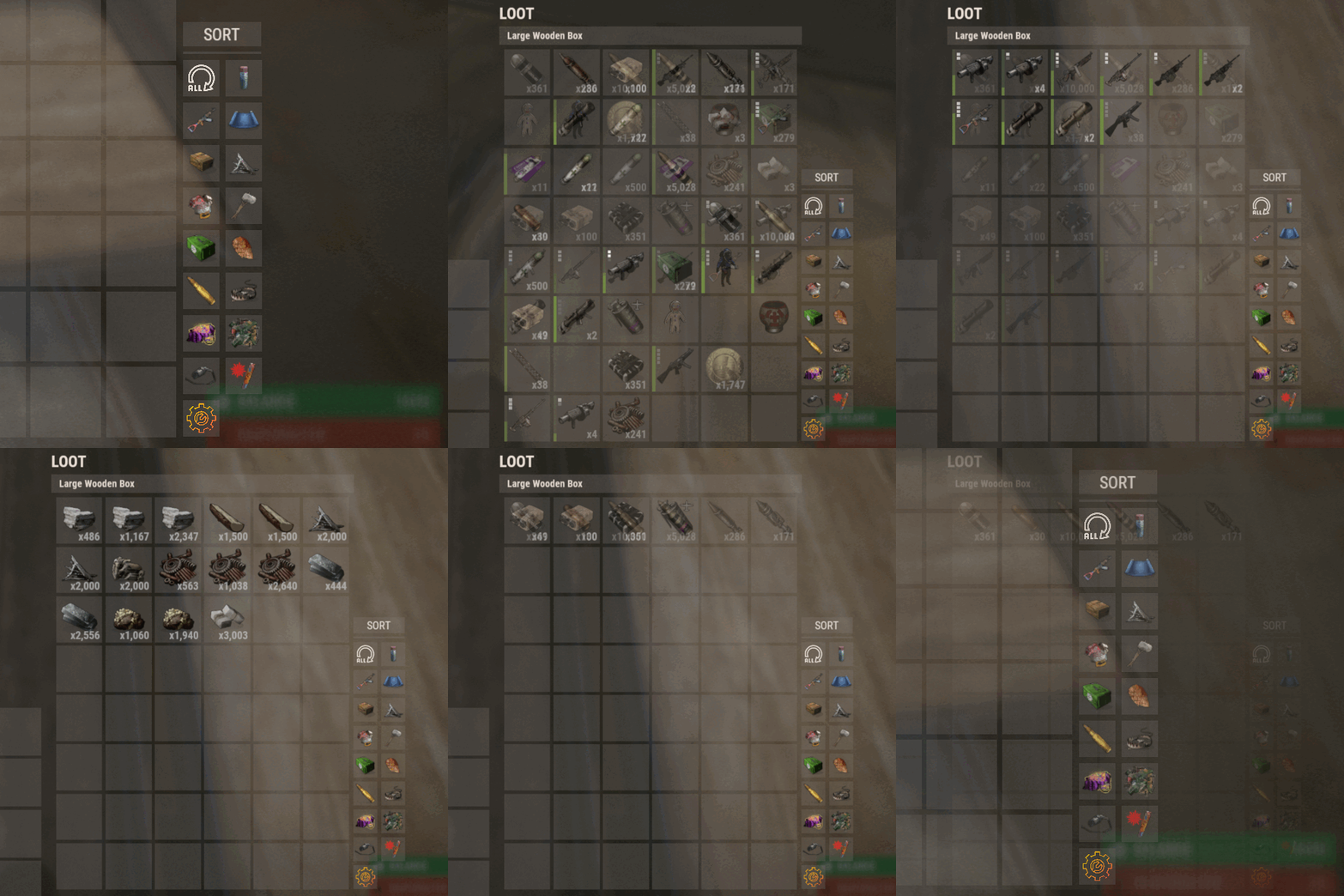
Introducing Sortify, the best plugin for making it easy to sort and filter boxes and containers from various plugins, all without the need for complex integrations. Sortify offers an intuitive solution to easily categorize your items, all within an elegant and efficient Rust-style user interface. Key Features: Custom Categories: With Sortify, you can create and customize your own categories to suit your unique needs. Rust style user interface: The plugin has a minimalistic and aesthetic Rust style user interface. Ease of Use: Sortify is designed with ease of use in mind. Whether you're a beginner or an experienced user, you'll find Sortify incredibly easy to use. It does not require complex training or any action on the part of the player, which allows the player to immediately begin organizing elements effectively. Permissions: sortify.allow - permission to use the plugin Video at moment version 1.0.0 (after the sorting scheme was changed, see gif):$15.00- 27 comments
- 3 reviews
-
- 3
-
-
- #sorting
- #filtering
- (and 6 more)
-
Version 1.0.0
139 downloads
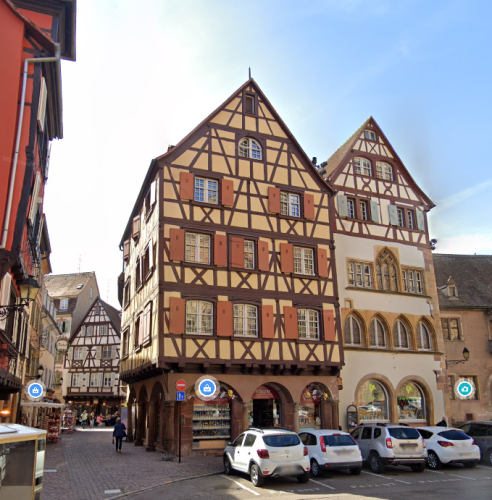
Versatile Colmar Architecture Building by Mondays. Pl. de la Cathédrale located in the heart of Colmar. France, this digital model captures the whimsy architecture of one of Europe's most picturesque towns! (As seen in films like "Howls Moving Castle") Prefab Count: 1236 Empty Interior for full customization More colors coming soon! This free download took me around 6-7 hours to model. If you enjoy, please look out for my fully built Monument based on the magical City of Colmar! (coming soon)Free- 1 comment
-
- 6
-
-
-
- #prefab
- #buildable
- (and 3 more)
-
Version 1.2.0
50 downloads
"Skin Popup & Command" enhances the item pickup experience by providing special notifications and commands for items with specific skins. The plugin offers a more immersive and interactive experience for players when they acquire skinned items in the game. Need help, please join my discord @ The Cantina Main Features: Custom Command Execution: The plugin will automatically execute predefined commands from the config (set by owner/admin) when players picks up the skinned items, allowing for instant activation of server events, announcements, and more. Customizable Popups: Create your own popup backgrounds using your own images (Currently is https://postimg.cc/8JZnvgvp). Plugin Integration: If you want a more visual creativity you can set the notification to use popular plugins such as UINotify, Notify, and Toastfy. This allows for more themed integration into your server. Easy Configuration: Customize your notification timing, message content, and popup amount through the config file (Example Below). Simple Notifications: If you do not want to use any fancy popup or Notification plugin you can simply just send the message to the chat. EXAMPLE CUSTOM CONFIG (NOT THE DEFAULT): { "Show notification via: TOASTIFY | NOTIFY | POPUP | CHAT": "POPUP", "Alert ID when using NOTIFY/UINotify?": 0, "Alert ID when using TOASTIFY?": "success", "Duration of alerts (ONLY FOR POPUP & TOASTIFY)?": 5.0, "POPUP Background Image URL": "https://i.postimg.cc/SR40wyNM/paper.png", "List of Skins": [ { "Skin ID?": 2420097877, "Item Name Used for Skin ID": "Cash", "How many Times to show alert?": 100, "Message on Special Item Skin Pickup?": "<color=black>Hey {player}, you just picked up some <color=orange>CASH</color>, use it to buy items and upgrades. Use your <color=orange>CASH</color> to upgrade your TC, BackPacks and much more!</color>", "Run a Command on pickup?": false, "If enable, what command to run?": null }, { "Skin ID?": 2834920066, "Item Name Used for Skin ID": "Epic Scrap", "How many Times to show alert?": 10, "Message on Special Item Skin Pickup?": "<color=white>Hey {player}, you just picked up some <color=orange>EPIC SCRAP</color>, use it to buy items and upgrades. Use your <color=orange>EPIC SCRAP</color> to upgrade your TC, BackPacks and much more!</color>", "Run a Command on pickup?": true, "If enable, what command to run?": "say This message was sent through console command, {player} after you picked up skin id:2834920066" } ], "Popup Co-ordinates": { "Anchor Min X": 0.78, "Anchor Max X": 0.98, "Anchor Min Y": 0.5, "Anchor Max Y": 0.62 } } Features to be implemented: Permissions Set Images per each skinned it popup$5.99 -
Version 0.0.5
183 downloads
This plugin allows you to remove the gibs from almost everything in the game whenever it gets destroyed. It is also fully customizable for the best server/user experience. Note: I personally recommend just using default config unless you want certain things to have gibs while not wanting certain other things to have gibs. Default Config: { "Remove ALL gibs from destroying/removing everything. (Including decaying things)": true, "Remove gibs from ent killed entities.": false, "Remove gibs from entities killed by cargo driving through base.": false, "Remove gibs from modular car being hurt.": false, "Remove gibs from loot containers after being looted fully by a player.": false, "Remove gibs from loot containers killed by Patrol Heli/Bradley.": false, "Remove gibs from entities when using a hammer to demolish them.": false, "Remove gibs from entities when not enough Stability.": false, "Remove gibs from tool-cupboard when placing in another building privilege zone.": false, "Remove gibs from entities when their ground is missing.": false, "Remove gibs from traincars when they die.": false, "Remove gibs from barricades blocking the train (EX: the blockades in tunnels underground).": false, "Remove gibs from boats when the pool they are in get destroyed.": false } Video Demo:$1.99 -

Version 1.0.2
42 downloads
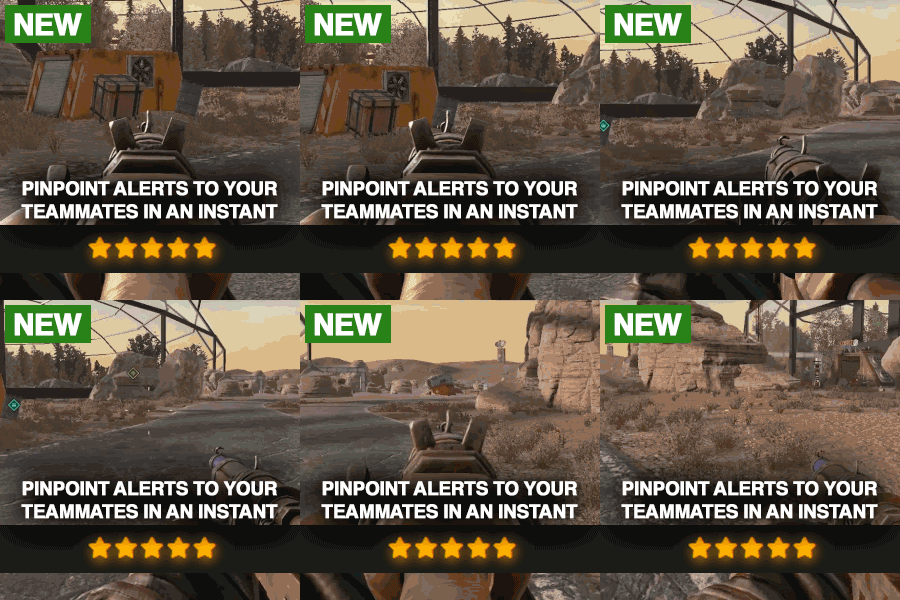
Description Elevate your Rust server with PVP Ping, the ultimate plugin for strategic combat and advanced map tracking between teams! This plugin empowers players to mark key locations on the map, allowing for enhanced coordination and tactical planning. Whether you're organizing an ambush or tracking enemy movements, PVP Ping ensures your players stay one step ahead. With customizable ping types, you can tailor the plugin to fit your server's needs. Players can set markers with unique icons, colors, and areas of effect, making it easy to strategize in real time. Use the native UI to view and manage active pings. Add a dynamic layer of strategy to your server and let players experience the thrill of precision combat. Watch as they adapt to new tactics and utilize pings during raids. Instead of yelling at which box the meds are in, they can now just ping it. PVP Ping is designed to integrate seamlessly with a players Rust experience. All you have to do is aim and press the use key to send the ping. It feels so good it should be native to Rust. Config Options You can change the icon colors and icons within the config. Also you can change the min/max distance, ping cooldowns, durations, and sound effect of ping. The available colors are: Green, Teal, Red, Purple, Blue, Yellow The available icons are: Default, Dollar, House, AirDrop, Hostile, Shield, Death, Bed, Sleep, Gun, Node, Loot, Tool Here is an example: "prefab-shortname": { "Icon": "Loot", "Color": "Teal" } Watch Video$9.99 -
Version 1.0.0
6 downloads
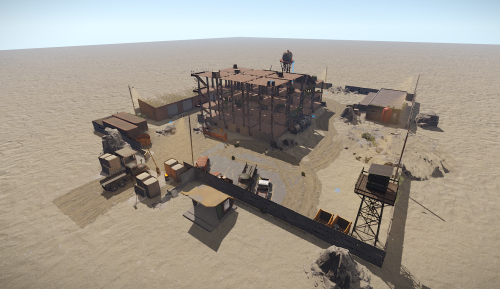
Introducing The Abandoned Construction Site, an intense, high-stakes environment where loot and combat opportunities await! This desolate site is filled with valuable resources and guarded by scientists, creating the perfect mix of danger and reward. Players can engage in thrilling PvP battles as they scavenge for loot. Whether you're hunting for good loot or looking for a pulse-pounding firefight, the Abandoned Construction Site offers the ultimate looting and PvP experience for adventurous players. Prepare to explore, fight, and survive!$6.49 -

Version 1.0.2
29 downloads
Invoices - Made by Murder#0845 Bot Features ➤ Fully customisable - See customisability options below ➤ Create unlimited customers - Unlimited customers, made through the bot, added to your Stripe dashboard ➤ Create unlimited invoices - Unlimited invoices, made by the bot , added to your stripe dashboard for the user to pay, along with logging the invoice and notifying the user ➤ Easy to use slash commands - Slash Commands that can be used just by typing / and selecting the required command, with parameter descriptions to help you along with way ➤ Duplicate chat commands - Chat commands to accompany the slash commands, for people who aren't familiar with Slash Commands ➤ Integration with Stripe for invoicing - Direct communication with your stripe dashboard ➤ Able to give role once a user has payed their invoice - Automatically assign a role to a user one payment of a invoice has been completed successfully ➤ Automatic logging of invoice paid, voided, failed - Quickly send to the server logging channel important information about invoices ➤ Automatic logging for the user in there DM's of invoice paid, voided and failed - Quickly send to the users DMs important information about invoices ➤ Option to set email or not - The bot will give you the option to set an email when creating a customer, this is strongly recommended, but not required ➤ Extensive error handling - The bot can automatically handle errors and respond with the appropriate response Commands ➤ help - Display the help message ➤ createcustomer - create a customer for the supplied discord user ➤ createinvoice - create a invoice for the supplied discord user ➤ retrievecustomer - Search for a customer Note that all of these command names can be changed via the config.json file! Customisation ➤ Custom Prefix ➤ Custom default days till due ➤ Custom currency ➤ Custom status ➤ Custom command names ➤ Custom role to give once user has completed purchase ➤ Among other things within the config and future updates Config { "Bot Token" : "", "Stripe API Secret Key (https://dashboard.stripe.com/apikeys)": "", "Prefix" : "", "Guild ID" : "", "Default Days Till Due": 2, "Logging Channel ID" : "", "Status Type (Playing, Watching, Listening) Default is Playing" : "Watching", "Status" : "", "Staff Role": "", "Currency ISO code (MUST BE LOWERCASES)": "usd", "Currency symbol": "$", "OPTIONAL SETTINGS (LEAVE THESE BLANK TO KEEP THEM TO DEFAULTS)": { "Create Invoice Command Name (NO CAPS OR SPACES, ONLY LETTERS FROM ALPHABET OR A ERROR WILL SHOW)": "", "Create Customer Command Name (NO CAPS OR SPACES, ONLY LETTERS FROM ALPHABET OR A ERROR WILL SHOW)": "", "Help Command Name (NO CAPS OR SPACES, ONLY LETTERS FROM ALPHABET OR A ERROR WILL SHOW)": "", "Retrieve Customer Command Name (NO CAPS OR SPACES, ONLY LETTERS FROM ALPHABET OR A ERROR WILL SHOW)": "", "Invoice Check Loop Timer Seconds(Checks for new events in invoices)": "", "ROLE SETTINGS": { "Enable Give Role When User Pays": true, "Role To Give": "" } } } Setup This bot is super simple to set up, simply follow these steps: ➤ Upload all files in "Murder Ticket System.zip" to your bots hosting. ➤ Fill out details in the config,json file. ➤ Turn the bot on (If your using online hosting, press "Start") ➤ Enjoy the bot Make sure your bot is setup like this: Support Notice If you need support I more than welcome you to reach out to me on discord. My discord is: Murder#0845 and I am open for any questions or inquiries! Thank you for reading this description and I hope that you enjoy! Note: I will always be constantly updating and developing this bot, if you find any bugs or have any feature requests, feel free to DM me on discord (Murder#0845). - Murder$9.99 -
Version 0.0.7
386 downloads
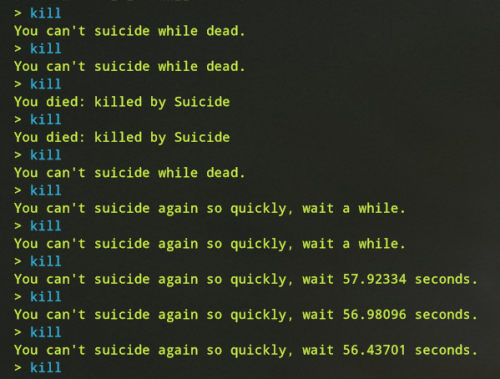
A plugin that allows server owners to prevent their staff from bypassing suicide cooldown, along with adding configurable suicide cooldowns. Working on a better unload and load process. Documentation Just use the config to enable/disable the default respawn cooldown of 60 seconds, if you put false for the Default Suicide Cooldown, then it will follow whatever cooldown value you put into Suicide Cooldown. This can be however long you want, from 0-9999999. Initalization Upon loading the plugin, it will update the users cooldown if the default cooldown is disabled and the cooldown is less than 60 seconds (the default). This means if you have it set to 40 seconds, and the users cooldown is at 50, it will be set to 40 instead. However, if the cooldown happens to be 120 seconds, the plugin during loading will do nothing because I have no fair way of making a user who suicided prior to loading the plugin wait longer after already waiting a while. Unloading Upon unloading this plugin, if the cooldown for the user is longer than the default cooldown, it will update their cooldown to the default cooldown. However, if your suicide cooldown is less than typical respawn times, it does nothing since I couldn't find a fair way to set it to 60 without knowing that they did or didn't just wait 50 seconds to try to suicide (ie, if the suicide cooldown happened to be 55), and then the plugin got unloaded and the user now has to wait another 60 seconds. Config (Default Config) { "Default Suicide Cooldown": false, "Suicide Cooldown": 10, "Round the suicide cooldown to a whole number when displaying to user": true, "Send responses to the user via F1 Console": true, "Send responses to the user via chat": true }Free -
Version 1.0.8
2,919 downloads
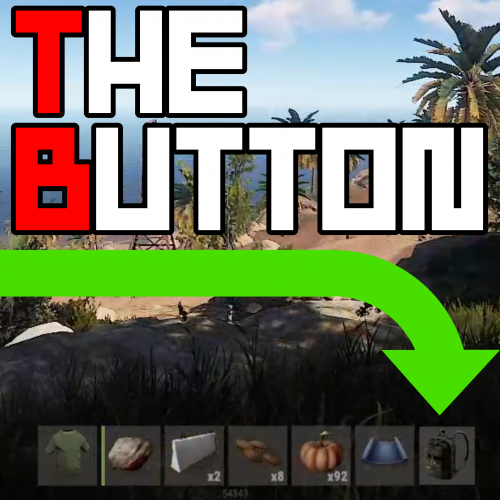
Customizable 7th Button. Easy to setup, Default is a backpack image and command Use any command that would usually require a slash e.g. "/Backpack" becomes "Backpack" in the config Permissions TheButton.use << Required to use The Button Command /button << toggles button on or off. Configuration { "GlobalSettings": { "Image Url for The Button": "https://i.imgur.com/7L1uDrs.png", "Command For The Button": "backpack", "Background color of Button RGBA format": "0.3 0.3 0.3 0.8", "Open By Default true/false": true }, "AlignmentSettings": { "AnchorMin": "0.645 0.023", "AnchorMax": "0.688 0.095" } } AnchorMin And Max are set roughly to the position right of the hot-bar but can appear slightly different depending on the players resolution. The default value in the Config is for 16:10.... theres 16:9: AnchorMin": "0.645 0.029", AnchorMax": "0.691 0.104" theres also to the left 16:9: AnchorMin": "0.295 0.029", AnchorMax": "0.341 0.104", Color Examples blackSolid black. RGBA is (0 0 0 1). blueSolid blue. RGBA is (0 0 1 1). clearCompletely transparent. RGBA is (0 0 0 0). cyanCyan. RGBA is (0 1 1 1). grayGray. RGBA is (0.5 0.5 0.5 1). greenSolid green. RGBA is (0 1 0 1). greyEnglish spelling for grey. RGBA is the same (0.5 0.5 0.5 1). magentaMagenta. RGBA is (1 0 1 1). redSolid red. RGBA is (1 0 0 1). whiteSolid white. RGBA is (1 1 1 1). The Last digit dictates Alpha channel... so for an opaque appearance select a value below 1 E.g. 0.7 Updates 1.0.2 Added background color to config, added open or close by default to config, fixed errors on server load, added hook to hide button if using furnace splitter. 1.0.3 Removed Debug message and fixed force load on default being true 1.0.4 error on server load fixed.... for real this time 1.0.5 Loosing the will to live.... Changed red text stuff again, changed methods that call the ui, simplified code, expanded brackets, drank coffee.. if its still broken after this i'm removing the plug and stating again! 1.0.6 Not given up on life yet.. another possible fix for red text spamage. 1.0.7 I just broke everything 1.0.8 Set the permission to the GUI... if the player doesnt have the perm they dont see the buttonFree



.thumb.png.ccf8a947948c9eb1445ad21a7931247b.png)