Search the Community
Showing results for tags 'cheaters'.
Found 8 results
-

Version 1.0.8
102 downloads
Want to troll cheaters you have on your server? Maybe you have taken a clip of them cheating, or want to rick roll them. Maybe you want to show an advertisement to your players? Then this is the plugin for you! A friend had wanted to know how he could send a video to play on a cheaters screen, because this person was streaming while cheating, and he had clipped it. This plugin integrates with Rust's built in "client.playvideo" command, but with the added benefit of being able to just supply a Youtube URL, or a Twitch URL. The integration with the Twitch and Youtube API is offloaded onto my web server, to minimize outside web calls, and to minimize load on your server. WARNING! Be careful of the length of the video that you add! Player will have NO input, will NOT be able to F1 kill, or even log out of server until the video is completed! They will need to ALT+F4 if they want to leave before video finishes. Known Issues: Video "could” be closed by a player if they know the client commands and send a video to themselves thinking of implementing a "close” button that you can enable on ads etc to allow the user to close the video Any comments, concerns, questions, or suggestions are greatly appreciated To show video on first join of wipe: Config set both Show a welcome video, Show welcome video ONLY on first join of the wipe to true. Make sure to delete the file "data/AdminVideo.json" each wipe "Show a welcome video": true, "Show welcome video ONLY on first join of the wipe": true, "Welcome Video URL": "https://www.youtube.com/shorts/hT5BqdjT1Hs", Links Supported: Direct .mp4 link - eg. https://archive.org/download/rick-roll/Rick Roll.mp4 Youtube Video Link - eg. https://www.youtube.com/watch?v=OvQkif96CTg - Currently fixing due to an api change Youtube Shorts Link - eg. https://www.youtube.com/shorts/8sTHiZI_tus - Currently fixing due to an api change Twitch Clip Link - eg. https://www.twitch.tv/camomo_10/clip/NastySleepyCockroachFutureMan-ihrWpONnkxv4ayv4 Command works from both ingame console, and RCON console. Safety Checks: Commands with safety checks will only send video if the player is: In a SafeZone AND not mounted (such as on a mini) OR TC Authorized and INSIDE AND not mounted (such as on a mini) AND Has not been in combat for at least 20 seconds These are to limit the possibility of players being killed while frozen and unable to move. Additional safety checks can be added if needed Command format: Send a forced video to a player (no safety checks, perfect for forcing on cheaters): adminvideo {steam_id|displayname} {url|shortname} Send a video to all players (has some safe checks): adminvideo all {url|shortname} Send a video to all players (has NO safe checks): adminvideo allunsafe {url|shortname} Send an ad video to a player (has some safe checks): adminvideo ad {steam_id|displayname} {url|shortname} Send an ad video to all players (has some safe checks): adminvideo ad all {url|shortname} Add a video shortname into the config: adminsavevideo add {shortname} {url} Remove a video shortname from the config: adminsavevideo remove {shortname} eg. Send video to specified steamID (no safety checks) adminvideo 123456789 https://www.youtube.com/shorts/8sTHiZI_tus Send video to player name (no safety checks) adminvideo sickness https://www.youtube.com/shorts/8sTHiZI_tus Send RickRoll video to player name based on saved shortname adminvideo sickness rickroll Send RickRoll video to all online players based on saved shortname (has safety checks) adminvideo all rickroll Send ad video to specific player (has safety checks) adminvideo ad sickness https://www.youtube.com/shorts/8sTHiZI_tus Send ad video to all online players (has safety checks) adminvideo ad all https://www.youtube.com/shorts/8sTHiZI_tus Add a video shortname into the config: adminsavevideo add boom https://www.youtube.com/shorts/8sTHiZI_tus Remove a video shortname from the config: adminsavevideo remove boom Permissions: adminvideo.use - to be able to issue videos to players adminvideo.admin - allows you to use the shortname creation command adminvideo.adbypass - allows you to bypass "ad" videos Default Config: { "Admin Bypass Ads/Welcome": false, "Show a welcome video": false, "Show welcome video ONLY on first join of the wipe": false, "Welcome Video URL": "https://www.youtube.com/watch?v=ScMzIvxBSi4", "ShortNameVideos": { "rickroll": "https://archive.org/download/rick-roll/Rick Roll.mp4" } } (Note: Video player auto resizes to fit the content aspect ratio) Shoutout to @ELF for the original idea and for some live testing NOTICE: The backend API for converting youtube/twitch videos, is to be used by the Admin Video Plugin. Using it for any other purposes, eg. integrating into a bot, or integrating it into another plugin, without express consent/permission from SiCkNeSs, can result in blocking of access to the IP address's/services that are integrating it, with no notice, or refund.$10.00 -

Version 0.2.3.2
419 downloads
DemoPro: The Anti Cheat That Works DemoPro turns F7 reports into a single evidence bundle with timeline markers + jump points, so you can jump straight to the key moments fast. It captures footage Before / during / after the f7 report is made Cheaters can’t hide from this system — no more relying on outdated anti-cheat plugins. This is clear video evidence that makes decisions easier, faster, and fairer. 100% accurate, No False Positives Key Features Converts **F7 reports** into a single evidence bundle Records BEFORE, DURING, and AFTER every F7 report. You NEVER miss what happens. Saves you and your admins loads of time. No more wasting hours spectating players Smart sorts demos with Timeline markers + jump points to reach key moments fast Private portal access for you and your admins with **Steam sign-in** Assignments, notes, outcomes (keeps reviews organised) Server-friendly: all data is stored off-site on your account, not on your game server, keeping things lightweight and smooth. Can be use as a content tool, you can make cinematic videos from the demos you receive. Fully compatible with all Rust server setups. Proof it works: join our Discord and check out the #cheater-clips channel https://discord.gg/2DCfVFFgvW 7-day free trial: https://rustdemopro.com RustAdmin Integration: https://www.rustadmin.com Visual snippet of recoil mapping with each attack in timeline Shareable filtered portal links Discord ban feed + global portal search Redesign the portal + dashboard for a more modern and fluid feel New portal is now live Future Updates AI Integration Introduce an AI/ML system that analyses demo files to learn the difference between normal players behaviour vs a cheaters behaviour All Seeing Eye An AI powered monitoring layer that automatically flags suspicious players and triggers evidence capture without relying on F7 reports. Set Up Guide Step 1 — Create Your DemoPro Space Sign in at https://rustdemopro.com using your Steam account Create your community space Choose monthly or annual billing (includes a 7-day free trial) Step 2 — Install the Harmony Mod Copy the DLL into: server_root/HarmonyMods/ Start the server once to generate: server_root/HarmonyConfig/ (this contains the config) After editing the config, run: rdm.reloadcfg to apply changes Step 3 — Connect Your Server In the portal, generate a Server Key Paste the key into the plugin config Make sure uploads are enabled in the config Reload the config, enter this command in your console rdm.reloadcfg Step 4 — Reports Create Cases When an in-game report (F7) happens, DemoPro automatically builds an evidence bundle The bundle is uploaded to your portal as a case for review Step 5 — Review & Decide Open the case, assign it, and add notes Download the bundle, jump to the timeline markers Mark the outcome as Reviewed (Clear) or Reviewed (Cheating) with notes for your team If you need any help setting up DemoPro, please open a ticket on our Discord. How it works Server records players in 15-minute chunks with ~30 minutes rolling history. When someone is F7 reported, Demo Pro grabs the “before” buffer and keeps recording. 15 minutes later it adds the “after” clip and uploads everything to the portal. If a player disconnects/reconnects, chunk lengths can be shorter than 15 minutes—that’s normal. Portal statuses Players reported → Clip uploaded → Needs Review → Admin downloads → Admin reviews → Mark result Needs Review — new or reset incidents. Downloaded (Needs Review) — someone pulled the bundle but hasn’t finished. Reviewed — Clear / Reviewed — Cheating — finished decisions. Opening & assigning a report Click Open on a card to see details. Assign it to yourself immediately and add notes as you investigate. Set the review state to Reviewed (Clear) or Reviewed (Cheating) when done. Assignments and outcomes keep other moderators from duplicating work. Finding the action fast Timeline dots: hits/shots, kills, report moment. Use the event feed to jump to notable damage or kill events. Report marker shows where the F7 report landed inside the clip. Downloading the bundle Use Download bundle for a ZIP containing .dem files and a README. The README points to the first demo and the timestamp to jump to—start there. Clip lengths can vary if players disconnect; that’s expected. Load demos into Rust Copy the suggested .dem into C:\Program Files (x86)\Steam\steamapps\common\Rust\demos. If the demos folder doesn’t exist, create it (restart Rust once if needed). Playing + controls From Rust main menu, open the Demo browser, refresh, pick the file, and play. Use Alt to toggle cursor, Tab for UI, and debugcamera to free-fly. Cycle nearby players with Spacebar; pause/rewind/fast-forward as needed. Review guidance Use the README timestamps as a starting point; check other demos if nothing obvious. If cheating is confirmed: capture proof, upload to the usual place, mark Reviewed (Cheating), and leave clear notes. If clean: mark Reviewed (Clear) and add a quick note (e.g., desync, valid prefire). long story short, when someone f7 reports, you can get a clip, you replay in rust of exactly why, and it shows footage before and during the report. For tips and useful keybinds to help you get the most out of DemoPro, check out the dedicated channels in our Discord. Discord: https://discord.gg/2DCfVFFgvW Website: https://rustdemopro.com/ Youtube: https://www.youtube.com/@RustDemoPro Cheater VideosFree- 5 comments
- 5 reviews
-
- 2
-

-
- #anticheat
- #demo
- (and 5 more)
-

Version 0.1.0
19 downloads
Don’t ban cheaters… Troll them. Entertain your server. Control the chaos. TrollCengo is the most advanced moderation/punishment plugin that unifies discipline, trolling, and humor mechanics for your Rust server under one professional package. You can give unique troll penalties to players who misbehave, defend cheaters, start arguments, or ignore server rules—while ensuring they stay entertained instead of quitting the game. Unlike the old Oxide version, it has been completely redesigned from scratch for Carbon: modular, lightweight, and fully extensible. Features All troll punishment systems below are permission-based, meaning you have full control over which troll effect applies to which player. 1. DropWeapon — Forced Weapon Drop Mode When a player with this permission attacks any player, NPC, or animal: ✔ Their weapon is instantly dropped to the ground ✔ All damage becomes 100% ineffective (0 damage) ✔ The weapon cannot be picked up for a set duration (only by the attacker or by everyone — configurable) ✔ Cooldown, chance %, whitelist/blacklist options ✔ Visual effects & custom message support In short: “Think twice before you swing.” 2. YouKill — ‘If You Kill, You Die’ Mode If enabled, the player dies immediately after killing any NPC or player. ✔ PvP troublemakers ✔ Preventing base campers ✔ Anti-toxic behavior training ✔ Perfect punishment tool for roleplay servers 3. NoRaid — Raid Blocking Mode Players with this permission: ✔ Can never deal structural damage ✔ Explosives deal zero damage ✔ All raid attempts are instantly cancelled ✔ Works silently — no error messages, no warnings Ideal for admins who want to say, “You’re temporarily raid-banned.” 4. ChickenWeapon — Chicken Bullet System (Next-Gen Troll) When the player fires a gun, a chicken spawns instead of a bullet. Chickens: ✔ Survive for 5 seconds ✔ Take no damage ✔ Create hilarious visual chaos on targets ✔ Can be limited per player ✔ Cooldown and chance % are fully configurable The first fully featured chicken-bullet troll system ever seen in Rust. 5. NoApproach — Proximity-Block Zone When active, other players and all NPCs cannot come within a certain radius. ✔ 20-meter exclusion zone ✔ Anything approaching is pushed back automatically ✔ Server–client synchronized physics ✔ Anti-shake cooldown to prevent bugs Players receiving this punishment will scream: “Why can’t anyone come near me??” Pure chaos. 6. ShuffleInventory — Inventory Scrambler Automatically shuffles all items in the player’s inventory at intervals. ✔ Belt + main bag supported ✔ Fisher–Yates algorithm (smooth shuffling) ✔ Pure client-side confusion ✔ A troll punishment that mentally disorients PvP players 7. FakeCraft — Fake Crafting System (Unique) When a player starts crafting: ✔ 70% chance the craft bar slows down by 1.5×–3× ✔ 25% chance the craft completes as the wrong item (e.g., stone) ✔ Remaining cases: the craft simply disappears with no output ✔ Fully automatic penalty logic ✔ Optional funny messages when crafting fails Perfect for watching players send tickets saying, “Bro, the game is broken.” 8. FireChair — Flaming Punishment Chair (New) When the player respawns or connects, they are forced into a locked punishment chair. ✔ Cannot stand up for 10 seconds ✔ Upon timeout, they are blasted upward with fire effects ✔ Chair deletes itself automatically ✔ Even on disconnect, cleanup is safely handled ✔ Both hilarious and extremely effective A premium system never before seen in Rust, adding personality and chaos to any server. Permissions trollcengo.dropweapon The player automatically drops their weapon when attacking and cannot deal damage. trollcengo.youkill If the player kills someone, they instantly die. trollcengo.noraid The player cannot deal building damage or perform any raid actions. trollcengo.chickenweapon When shooting, bullets are replaced with chickens (0 damage). trollcengo.noapproach Other players/NPCs cannot approach them; anything that gets close is pushed back. trollcengo.shuffleinventory The player’s entire inventory is periodically shuffled. trollcengo.fakecraft Crafting actions are sabotaged—slowed down or produce incorrect items. trollcengo.firechair When the player connects or respawns, they are forced into a punishment chair.$15.00 -
Version 1.0.4
28 downloads
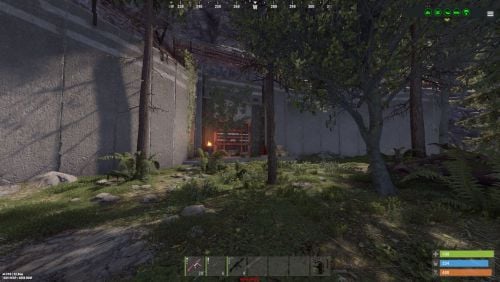
A little bunker that you can hide in any hill / cliff face. The limit is your imagination. It has various rooms to perform different tasks. I would recommend you don't place it to close to a safe zone if you are "storing sleepers" like I do. I have also included a teeny tiny map in the download so you can see how the prefab looks inside some terrain. THE DOORS ETC. DON'T COME SKINNED. IT JUST MAKES A BETTER SCREENSHOT. Includes: garage front entrance viewing room for sleepers / cheaters - this leads onto a tool room (work benches) custom build area all main doors can have locks added so that you can limit access a (not very well hidden) button outside for public entry and a smart switch inside for door pairing 3 Security camera's for offline monitoring. Alpha, Splat and Height Mask included. I have also included a teeny tiny map in the download so you can see how the prefab looks inside some terrain. prefab count 530 "ish".$12.00 -

Version 1.0.5
78 downloads
About Limit FPS LimitFPS is a plugin with almost no performance impact meant for administration (and maybe trolling). It has 2 very powerful features You can limit the FPS of other players You can see the FPS and RAM usage of other players Demo Requirement LimitFPS uses Harmony so you need to disable the Oxide sandbox [see how to do it] Permissions There are 2 oxide permissions that LimitFPS uses limitfps.limit.use - Allows the use of /limitfps command limitfps.fps.use - Allows the use of /playerfps command Add the permissions with the console command: oxide.grant <group|user> <name|id> <permission> Commands There are 2 commands that LimitFPS has /limitfps <playername or steamid> <target fps> - Limit the FPS of a player, set target fps to 0 to remove the limit /playerfps <playername or steamid> - See the player's FPS and RAM usage All of these 2 commands can be used from the server console (or RCON) and they work exactly the same just without the forward slash. If you are an admin in the server you can use them from the Rust console too. Config FPS Query interval - How often will the plugin check the player's FPS in order to adjust it PD Controller P value - How fast to jump to the target FPS, if this is too high it can overshoot PD Controller D value - How much to respect the error difference from the FPS measurement, if higher it can overshoot the target FPS Non linear control - If set to true it will be more responsive (reaching target FPS faster) at low FPS values (30 and below) FPS Limit dampening - If set to true it will stop adjusting the player's FPS once it reaches the target, if this is false, when the player presses ESCAPE or ALT+TAB's and then come back their FPS will be way lower/higher than the target FPS Limit dampening range - When the FPS is within this value to the target FPS it will stop adjusting the FPS I recommend leaving everything to default except maybe FPS Query interval, if you want to get the user's FPS faster/slower. For developers LimitFPS exposes everything you need to control other player's performance with hooks & API calls I strongly recommend if you want to use the API or the Hooks see the demo plugin that uses all of them, its extremely detailed and everything is within 1 file, you can find it here: Hooks: object OnFPSQueryStart(BasePlayer command_initiatior, BasePlayer target, int request_id) { return null; // allow the query } void OnFPSQueryTimeout(BasePlayer command_initiatior, BasePlayer target, int request_id) { } void OnFPSQueryFinished(BasePlayer command_initiatior, BasePlayer target, ClientPerformanceReport report) { } object OnLimitFPSStart(BasePlayer command_initiatior, BasePlayer target, float targetFps) { return null; // allow the limitting } object OnLimitFPSTick(BasePlayer command_initiatior, BasePlayer target, float targetFps, ClientPerformanceReport report) { return null; // allow the tick } API: Interface.Oxide.CallHook("API_PlayerFPSCommand", ulong_steamid); Interface.Oxide.CallHook("API_LimitFPSCommand", ulong_steamid, float_targetFps); Contact If you have any suggestions, want to report a bug or need help, you can contact me on Discord: turner#7777$12.69 -

Version 1.0.0
6 downloads
Punish misbehaving players and cheaters! More Curses to be added in future! follow for more updates! Installation: - Load into oxide.plugins - Grant permission to Admin NexusCurse.Admin Curses: - AfricanDelight (set thirst to 0) - Cancer (300 radiation points) - Weakness (sets health to 5) Commands /NCurse (playername) (cursename) Have fun, enjoy and please be sure to like and follow!$3.99 -
Version 2.0.1
214 downloads
Features: This bot runs api scans on each player that joins and displays a warning on discord if they might be breaking your rules. It searches for players with: EAC Banned alt accounts Battlemetrics banned alt accounts Low Battlemetrics hours and boosted steam hours Temp banned accounts Recently created steam or battlemetrics accounts Steam accounts that aren't set up Each alert is displayed only once (if used with Mysql or MongoDB (MongoDB can be hosted for free), so your channels won't be spammed with the same players over and over. You can set different channels for each category. Alt detection system: If someone connects from 10+ different IPs it will only mark other accounts as alt if they share more than one ip. It will only mark accounts as alts if 6 or less players connected from that ip. Support If you need help or If you have any issues or suggestions you can contact me by joining my discord server: https://discord.gg/efVKDG6z6F or by adding me on discord: Farkas#6006$19.90- 6 comments
- 2 reviews
-
- 1
-
-
- #eac
- #battlemetrics
- (and 18 more)
-
Version 0.1.0
382 downloads
What is it ZPunisher is a utility for punishing cheaters or bad players a better/funnier way Permissions zpunisher.use -- Gives you access to all commands Commands zpunisher -- Opens a GUI where you can choose a player and then punish him zpunisher {playerNameOrID} -- Opens punish menu with already selected player zpunisher.freeze {playerNameOrID} -- Freezes the player zpunisher.unfreeze {playerNameOrID} -- Unfreezes the player zpunisher.lag {playerNameOrID} -- Start lagging the player zpunisher.stoplag {playerNameOrID} -- Stops lagging the player zpunisher.kill {playerNameOrID} -- Kills the player zpunisher.rocket {playerNameOrID} -- Starts rocketing the player zpunisher.stoprocket {playerNameOrID} -- Stops rocketing the player zpunisher.ignite {playerNameOrID} -- Ignites the player zpunisher.extinguish {playerNameOrID} -- Extinguishes the player zpunisher.stop {playerNameOrID} -- Stops all effects on the player All these commands except the main one with GUI can be used even in console Features Target's info: Target's Name Target's ID Target's IP Address Target's Ping Target's Status (Alive/Dead) Target's XYZ pos with TP button Refresh button Freezer: Once you execute this command on the player he won't be able to move untill you stop the effect Lagger: Once you execute this command on the player his game will start lagging soon untill he won't be able to do anything/untill his game crashes Rocketboy: Once you execute this command on the player an hv rockets are gonna start spawning in him Simple Kill: Once you execute this command on the player he will die Igniter: Once you execute this command a fire will spawn on a player and will follow it untill it disappears Stop All Effects Button: You think that the player had enough? Or have you forgot which effects you gave him? No worries just click the button and all the effects are gone! Localization: { ["noPlayer"] = "There's not such a player", ["stopAllSyntax"] = "Syntax: /zpunisher.stop player", ["stoppedAll"] = "Stopped all effects on: {0}", ["freezeSyntax"] = "Syntax: /zpunisher.freeze player", ["startFreeze"] = "Starting to freeze: {0}", ["unfreezeSyntax"] = "Syntax: /zpunisher.unfreeze player", ["stoppedFreezing"] = "Stopped freezing: {0}", ["lagSyntax"] = "Syntax: /zpunisher.lag player", ["startLag"] = "Starting to lag: {0}", ["stopLagSyntax"] = "Syntax: /zpunisher.stoplag player", ["stoppedLag"] = "Stopped lagging: {0}", ["killSyntax"] = "Syntax: /zpunisher.kill player", ["killMsg"] = "You have killed: {0}", ["rocketSyntax"] = "Syntax: /zpunisher.rocket player", ["startRocket"] = "Started rocketing: {0}", ["stopRocketSyntax"] = "Syntax: /zpunisher.stoprocket player", ["stopRocket"] = "Stopped rocketing: {0}", ["igniteSyntax"] = "Syntax: /zpunisher.ignite player", ["startIgnite"] = "Ignited: {0}", ["extSyntax"] = "Syntax: /zpunisher.extinguish player", ["startExt"] = "Poured water on: {0}", ["infoTitle"] = "Target's Info:", ["infoName"] = "Name: {0}", ["infoID"] = "ID: {0}", ["infoIP"] = "IP Address: {0}", ["infoPing"] = "Ping: {0}ms", ["infoStatusAlive"] = "Status: <color=#52bd36>Alive</color>", ["infoStatusDead"] = "Status: <color=#c70000>Dead</color>", ["infoPos"] = "XYZ Position: {0},{1},{2}", ["infoTPBttn"] = "TP", ["infoRefresh"] = "Refresh", ["choosePl"] = "Choose a player:", ["dsc"] = "..........Description..........", ["freezer"] = "Freezer", ["freezerDsc"] = "Once you execute this command on the player he won't be able to move untill you stop the effect", ["enable"] = "Enable", ["disable"] = "Disable", ["kill"] = "Kill", ["lagger"] = "Lagger", ["lagDsc"] = "Once you execute this command on the player his game will start lagging soon untill he won't be able to do anything/untill his game crashes", ["lagPS"] = "P.S. If you enable this on yourself you must disable it via console - zpunisher.stoplag {Your nick}", ["rocketer"] = "Rocketboy", ["rocketerDsc"] = "Once you execute this command on the player an hv rockets are gonna start spawning in him", ["ignite"] = "Ignite", ["pw"] = "Pour Water", ["killTitle"] = "Simple Kill", ["killDsc"] = "Once you execute this command on the player he will die", ["igniterTitle"] = "Igniter", ["igniterDsc"] = "Once you execute this command a fire will spawn on a player and will follow it untill it disappears", ["stopAllEffects"] = "Stop All Effects!", ["previous"] = "Previous", ["Next"] = "Next" }Free