Search the Community
Showing results for tags 'list'.
Found 5 results
-

Version 2.0.12
442 downloads
Adds a list of players to your server with convenient options for interacting with them Commands players (open interface) Permissions Permission to use: you can set permission in config, for example: "Permission (ex: playerlist.use)": "playerlist.use", playerlist.hide (hides a player from the player list) Web Config Editor Manage the PlayerList settings in our web config editor. You change the config in a browser form instead of editing files on the server by hand. P.S. The web config editor is open to members of the "PlayerList" group in our Discord server. Join at https://discord.gg/mevent and ask for the group. FAQ Q: Where can I see an example of a config? A: Config$19.95 -
Version 1.0.1
48 downloads
AdminRadar.cs Description : - This plugin provides a real-time radar system allowing instant tracking of Players, Cupboards, Patrol helicopters and Bradleys, with customizable display options. Display for the player : Player name - Health - Distance - Team Display for the cupboard : TC tag - Distance - List of authorized players Display for the patrol : Patrol tag - Health - Distance Display for the bradley : Bradley tag - Health - Distance Settings : - HUD colors (for the radar switch button) - Radar distance - Radar refresh - Player name color - Cupboard tag color - Patrol tag color - Bradley tag color - Distance color - Health >50hp color (for player/patrol/bradley) - Health <50hp color (for player/patrol/bradley) F1 Commands : - radar <all/player/tc/patrol/bradley> (on/off) Chat Commands : - /radar <all/player/tc/patrol/bradley> (on/off) Permissions : - oxide.grant user <steamID/user> adminradar.use WuyZar's Discord : https://discord.gg/NVwRcQwGwh Game interface :$7.50 -

Version 1.0.0
8 downloads
xOnlinePlayers lets players use a command to open a compact, scrollable list of everyone currently online. It displays each players name, Steam avatar, and current session time. Preview Chat Commands /players$6.90 -
Version 1.2.2
26 downloads
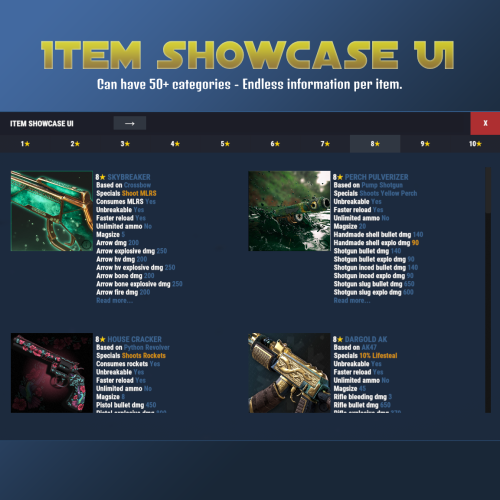
Browse and showcase your custom items in-game with categories, search and themed UI. Features • Unlimited categories • Color formatted text (<color> tags supported) • Search by name, shortname or skin ID • Item images via ImageLibrary (shortname or URL) • Designed for modded servers with custom items Admin Command /additem <category> • Registers the item you are currently holding • Works with exact category name from config • Also works if you type the category without color tags • Example: 1<color=#FFD700>★</color> can be added using /additem 1★ • Automatically sets shortname, SkinID (0 if none) and the lowest available unique ID How to open ItemShowcaseUI Use /items Optional Dependency ImageLibrary - only required for item images Example of adding more categories and different colors to both UI and info text. Endless Info text Easy to find items with searchbar Data Example { "Id": 1, "DisplayName": "<color=#FF66CC>Bubblegum Armor</color>", "Category": "<color=#FFD700>ARMOR</color>", "Shortname": "metal.plate.torso", "SkinID": 0, "Url": null, "Description": [ "Colored text example", "Gold, cyan and lime colors supported" ], "Drops": [ "Elite Crate", "Dungeon Boss" ] } Config Example { "General": { "Browser Title": "Custom Item Browser", "Categories": [ "<color=#FFD700>ARMOR</color>", "<color=#FFD700>WEAPONS</color>", "<color=#FFD700>CONSUMABLE</color>" ] }, "Override UI Theme (None, Blue, Teal, Purple, Green, Yellow, Orange, Red, Pink, Swamp, Oak)": "None" }$14.99 -

Version 1.0.1
1,016 downloads
Simply lists players and sleepercount to chat with permissions Permissions : playerlisting.players Commands : /players Localisation : English language file included to use a diffrent language just make a new file in the language folder. { "Info": "<color=green>List of current Players/sleepers</color>\n\n", "NoPermission": "<color=red>You do not have permission to use that command!</color>", "Online": ":coffeecan:<color=orange>Online</color> : {0}/{1}\n\n", "Prefix": "[<color=yellow>PlayerListing</color>] ", "Sleepers": ":bed:<color=orange>Sleepers</color> : {0}\n\n", "Spacing": "==============\n", "Allive": "<color=orange>Allive</color> : {0}" }Free- 3 comments
-
- 1
-

-
- #playerlist
- #krungh crow
- (and 4 more)