
Summary: In this tutorial, you will learn how to use the SQLite BETWEEN operator to test whether a value is in a range of values.
Introduction to SQLite BETWEEN Operator #
The BETWEEN operator is a logical operator that tests whether a value is in a range of values.
If the value is in the specified range, the BETWEEN operator returns true. The BETWEEN operator can be used in the WHERE clause of the SELECT, DELETE, UPDATE, and REPLACE statements.
The following illustrates the syntax of the SQLite BETWEEN operator:
test_expression BETWEEN low AND highIn this syntax:
test_expressionis an expression to test for in the range defined bylowandhighexpressions.lowandhighare any valid expressions that specify the low and high values of the range. Thelowshould be less than or equal tohigh, or theBETWEENis always returnsfalse.- The
ANDkeyword is a placeholder which indicates thetest_expressionshould be within the range specified bylowandhigh.
Note that the BETWEEN operator is inclusive. It returns true when the test_expression is less than or equal to high and greater than or equal to the value of low:
test_expression >= low AND test_expression <= highTo specify an exclusive range, you use the greater than (>) and less than operators (<):
test_expression > low AND test_expression < highNote that if any input to the BETWEEN operator is NULL, the result is NULL, or unknown, to be precise.
To negate the result of the BETWEEN operator, you use the NOT BETWEEN operator as follows:
test_expression NOT BETWEEN low AND highThe NOT BETWEEN returns true if the value of test_expression is less than the value of low_expression or greater than the value of high_expression:
test_expression < low OR test_expression > highSQLite BETWEEN operator examples #
We will use the invoices table from the sample database for the demonstration:
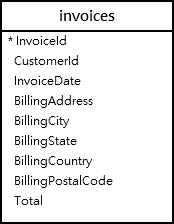
SQLite BETWEEN numeric values example #
The following statement finds invoices whose total is between 14.91 and 18.86:
SELECT
InvoiceId,
BillingAddress,
Total
FROM
invoices
WHERE
Total BETWEEN 14.91 and 18.86
ORDER BY
Total;
Here is the output:
InvoiceId | BillingAddress | Total
-----------+--------------------------------------+-------
193 | Berger Straße 10 | 14.91
103 | 162 E Superior Street | 15.86
208 | Ullevålsveien 14 | 15.86
306 | Klanova 9/506 | 16.86
313 | 68, Rue Jouvence | 16.86
88 | Calle Lira, 198 | 17.91
89 | Rotenturmstraße 4, 1010 Innere Stadt | 18.86
201 | 319 N. Frances Street | 18.86
(8 rows)
As you can see, the invoices whose total is 14.91 or 18.86 are included in the result set.
SQLite NOT BETWEEN Numeric values example #
To find the invoices whose total is not between 1 and 20, you use the NOT BETWEEN operator as shown in the following query:
SELECT
InvoiceId,
BillingAddress,
Total
FROM
invoices
WHERE
Total NOT BETWEEN 1 and 20
ORDER BY
Total;
The following picture shows the output:
InvoiceId | BillingAddress | Total
-----------+------------------------------------------+-------
6 | Berger Straße 10 | 0.99
13 | 1600 Amphitheatre Parkway | 0.99
20 | 110 Raeburn Pl | 0.99
27 | 5112 48 Street | 0.99
34 | Praça Pio X, 119 | 0.99
41 | C/ San Bernardo 85 | 0.99
48 | 796 Dundas Street West | 0.99
55 | Grétrystraat 63 | 0.99
...
The result includes the invoices whose total is less than 1 and greater than 20.
SQLite BETWEEN dates example #
The following example finds invoices whose invoice dates are from January 1 2010 and January 31 2010:
SELECT
InvoiceId,
BillingAddress,
InvoiceDate,
Total
FROM
invoices
WHERE
InvoiceDate BETWEEN '2010-01-01' AND '2010-01-31'
ORDER BY
InvoiceDate;
Here is the output:
InvoiceId | BillingAddress | InvoiceDate | Total
-----------+--------------------------------------+---------------------+-------
84 | 68, Rue Jouvence | 2010-01-08 00:00:00 | 1.98
85 | Erzsébet krt. 58. | 2010-01-08 00:00:00 | 1.98
86 | Via Degli Scipioni, 43 | 2010-01-09 00:00:00 | 3.96
87 | Celsiusg. 9 | 2010-01-10 00:00:00 | 6.94
88 | Calle Lira, 198 | 2010-01-13 00:00:00 | 17.91
89 | Rotenturmstraße 4, 1010 Innere Stadt | 2010-01-18 00:00:00 | 18.86
90 | 801 W 4th Street | 2010-01-26 00:00:00 | 0.99
(7 rows)
SQLite NOT BETWEEN dates example #
The following statement finds invoices whose dates are not between January 03, 2009, and December 01, 2013:
SELECT
InvoiceId,
BillingAddress,
date(InvoiceDate) InvoiceDate,
Total
FROM
invoices
WHERE
InvoiceDate NOT BETWEEN '2009-01-03' AND '2013-12-01'
ORDER BY
InvoiceDate;
The output is as follows:
InvoiceId | BillingAddress | InvoiceDate | Total
-----------+------------------------------------------+-------------+-------
1 | Theodor-Heuss-Straße 34 | 2009-01-01 | 1.98
2 | Ullevålsveien 14 | 2009-01-02 | 3.96
406 | 801 W 4th Street | 2013-12-04 | 1.98
407 | 69 Salem Street | 2013-12-04 | 1.98
408 | 319 N. Frances Street | 2013-12-05 | 3.96
409 | 796 Dundas Street West | 2013-12-06 | 5.94
410 | Rua dos Campeões Europeus de Viena, 4350 | 2013-12-09 | 8.91
411 | Porthaninkatu 9 | 2013-12-14 | 13.86
412 | 12,Community Centre | 2013-12-22 | 1.99
(9 rows)
SQLite NOT BETWEEN strings example #
The following example shows how to use the BETWEEN operator to get the artists whose initials are between 'X' and 'Z':
SELECT
name,
substr(name, 1, 1) initial
FROM
artists
WHERE
initial BETWEEN 'X' AND 'Z'
ORDER BY
name;Output:
Name | initial
----------------+---------
Xis | X
Yehudi Menuhin | Y
Yo-Yo Ma | Y
Youssou N'Dour | Y
Zeca Pagodinho | Z
(5 rows)How it works.
- First, the
SUBSTRfunction returns the first character of the name of each artist. - Second, assign the column alias initial to the result of the
SUBSTRfunction. - Third, use the
BETWEENoperator to compare the initial with the letters ‘X’ and ‘Z’.
Summary #
- Use the SQLite
BETWEENoperator to test whether a value is in a range of values. - The
BETWEENoperator is inclusive.
Thank you for your feedback!
