
Summary: In this tutorial, you will learn about the SQLite subquery to construct more readable and complex queries.
Introduction to SQLite subquery #
A subquery is a SELECT statement nested in another statement. See the following statement.
SELECT column_1
FROM table_1
WHERE column_1 = (
SELECT column_1
FROM table_2
);The following query is the outer query:
SELECT column_1
FROM table_1
WHERE colum_1 =And the following query is the subquery.
(SELECT column_1
FROM table_2)You must use a pair of parentheses to enclose a subquery. Note that you can nest a subquery inside another subquery with a certain depth.
Typically, a subquery returns a single row as an atomic value, though it may return multiple rows for comparing values with the IN operator.
You can use a subquery in the SELECT, FROM, WHERE, and JOIN clauses.
SQLite subquery examples #
We will use the tracks and albums tables from the sample database for the demonstration.
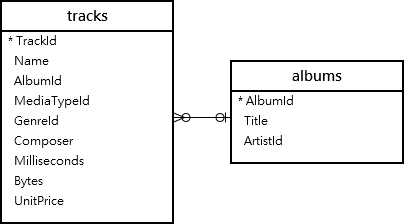
1) SQLite subquery in the WHERE clause example #
You can use a simple subquery as a search condition. For example, the following statement returns all the tracks in the album with the title Let There Be Rock
SELECT trackid,
name,
albumid
FROM tracks
WHERE albumid = (
SELECT albumid
FROM albums
WHERE title = 'Let There Be Rock'
); TrackId | Name | AlbumId
---------+------------------------------+---------
15 | Go Down | 4
16 | Dog Eat Dog | 4
17 | Let There Be Rock | 4
18 | Bad Boy Boogie | 4
19 | Problem Child | 4
20 | Overdose | 4
21 | Hell Ain't A Bad Place To Be | 4
22 | Whole Lotta Rosie | 4
(8 rows)
The subquery returns the id of the album with the title 'Let There Be Rock'. The query uses the equal operator (=) to compare albumid returned by the subquery with the albumid in the tracks table.
If the subquery returns multiple values, you can use the IN operator to check for the existence of a single value against a set of values.
See the following employees and customers table in the sample database:
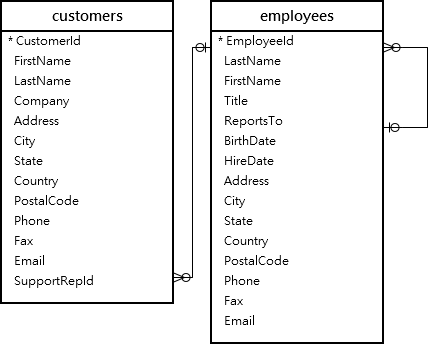
For example, the following query returns the customers whose sales representatives are in Canada.
SELECT customerid,
firstname,
lastname
FROM customers
WHERE supportrepid IN (
SELECT employeeid
FROM employees
WHERE country = 'Canada'
);
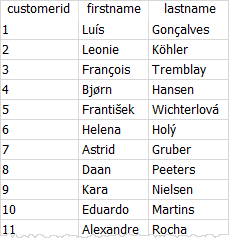
The subquery returns a list of ids of the employees who are located in Canada. The outer query uses the IN operator to find the customers who have the sales representative id in the list.
2) SQLite subquery in the FROM clause example #
Sometimes you want to apply aggregate functions to a column multiple times. For example, first, you want to sum the size of an album and then calculate the average size of all albums. You may come up with the following query.
SELECT AVG(SUM(bytes)
FROM tracks
GROUP BY albumid;This query is not valid.
To fix it, you can use a subquery in the FROM clause as follows:
SELECT
AVG(album.size)
FROM
(
SELECT
SUM(bytes) SIZE
FROM
tracks
GROUP BY
albumid
) AS album; AVG(album.size)
-------------------
338288920.3170029
(1 row)
In this case, SQLite first executes the subquery in the FROM clause and returns a result set. Then, SQLite uses this result set as a derived table in the outer query.
SQLite correlated subquery #
All the subqueries you have seen so far can be executed independently. In other words, it does not depend on the outer query.
The correlated subquery is a subquery that uses the values from the outer query. Unlike an ordinal subquery, a correlated subquery cannot be executed independently.
The correlated subquery is not efficient because it is evaluated for each row processed by the outer query.
The following query uses a correlated subquery to return the albums whose size is less than 10MB.
SELECT
albumid,
title
FROM
albums
WHERE
10000000 > (
SELECT
sum(bytes)
FROM
tracks
WHERE
tracks.AlbumId = albums.AlbumId
)
ORDER BY
title;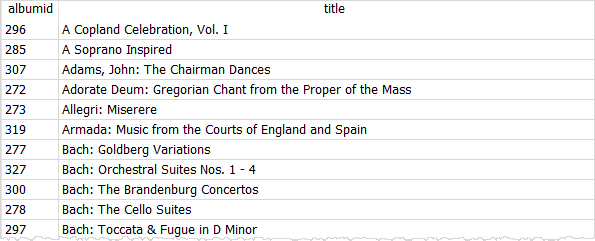
How the query works.
- For each row processed in the outer query, the correlated subquery calculates the size of the albums from the tracks that belong to the current album using the
SUMfunction. - The predicate in the
WHEREclause filters the albums that have the size greater than or equal to 10MB (10000000 bytes).
SQLite correlated subquery in the SELECT clause example #
The following query uses a correlated subquery in the SELECT clause to return the number of tracks in an album.
SELECT albumid,
title,
(
SELECT count(trackid)
FROM tracks
WHERE tracks.AlbumId = albums.AlbumId
)
tracks_count
FROM albums
ORDER BY tracks_count DESC;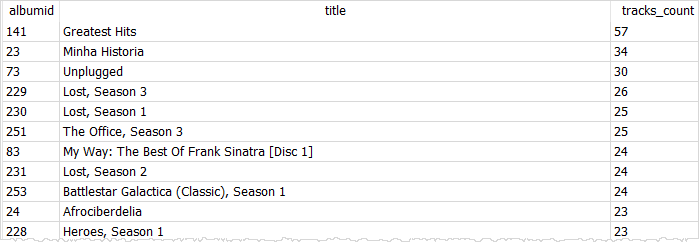
In this tutorial, we have introduced you to the subquery and shown various ways to use a subquery in a query to select data from tables.
Thank you for your feedback!
