
Summary: In this tutorial, you will learn how to use the SQLite IN operator to determine whether a value matches any value in a list of values or a result of a subquery.
Introduction to the SQLite IN operator #
The SQLite IN operator determines whether a value matches any value in a list or a subquery. The syntax of the IN operator is as follows:
expression [NOT] IN (value_list|subquery);The expression can be any valid expression or a column of a table.
A list of values is a fixed value list or a result set of a single column returned by a subquery. The returned type of the expression and the values in the list must be the same.
The IN operator returns true or false depending on whether the expression matches any value in a list of values or not. To negate the list of values, you use the NOT IN operator.
SQLite IN operator examples #
We will use the Tracks table from the sample database for the demonstration.
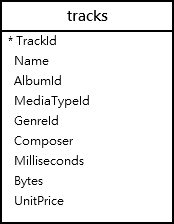
The following statement uses the IN operator to query the tracks whose media type id is 1 or 2.
SELECT
TrackId,
Name,
Mediatypeid
FROM
Tracks
WHERE
MediaTypeId IN (1, 2)
ORDER BY
Name ASC; TrackId | Name | MediaTypeId
---------+--------------------------------------------------------------+-------------
3027 | "40" | 1
3412 | "Eine Kleine Nachtmusik" Serenade In G, K. 525: I. Allegro | 2
109 | #1 Zero | 1
3254 | #9 Dream | 2
602 | 'Round Midnight | 1
1833 | (Anesthesia) Pulling Teeth | 1
570 | (Da Le) Yaleo | 1
3045 | (I Can't Help) Falling In Love With You | 1
...
This query uses the OR operator instead of the IN operator to return the same result set as the above query:
SELECT
TrackId,
Name,
MediaTypeId
FROM
Tracks
WHERE
MediaTypeId = 1 OR MediaTypeId = 2
ORDER BY
Name ASC;The query that uses the IN operator is much shorter.
If you have a query that uses many OR operators, you can consider using the IN operator instead to make the query more readable.
SQLite IN operator with a subquery example #
The following query returns a list of album id of the artist id 12:
SELECT albumid
FROM albums
WHERE artistid = 12; AlbumId
---------
16
17
(2 rows)
To get the tracks that belong to the artist id 12, you can combine the IN operator with a subquery as follows:
SELECT
TrackId,
Name,
AlbumId
FROM
Tracks
WHERE
AlbumId IN (
SELECT
AlbumId
FROM
Albums
WHERE
ArtistId = 12
); TrackId | Name | AlbumId
---------+----------------------------------------+---------
149 | Black Sabbath | 16
150 | The Wizard | 16
151 | Behind The Wall Of Sleep | 16
152 | N.I.B. | 16
153 | Evil Woman | 16
154 | Sleeping Village | 16
155 | Warning | 16
156 | Wheels Of Confusion / The Straightener | 17
...
In this example:
- First, the subquery returns a list of album ids that belong to the artist id 12.
- Then, the outer query returns all tracks whose album id matches the album id list returned by the subquery.
SQLite NOT IN examples #
The following statement returns a list of tracks whose genre id is not in a list of (1,2,3).
SELECT
trackid,
name,
genreid
FROM
tracks
WHERE
genreid NOT IN (1, 2,3); TrackId | Name | GenreId
---------+--------------------------------------------------------------+---------
99 | Your Time Has Come | 4
100 | Out Of Exile | 4
101 | Be Yourself | 4
102 | Doesn't Remind Me | 4
103 | Drown Me Slowly | 4
104 | Heaven's Dead | 4
105 | The Worm | 4
106 | Man Or Animal | 4
...
Summary #
- Use the SQLite
INoperator to match a value with a list of values or a subquery. - Use the
NOToperator to negate theINoperator.
Thank you for your feedback!
