
Summary: In this tutorial, you will learn how to use the SQLite SELECT statement to query data from a single table.
The SELECT statement allows you to retrieve data from a table. It is one of the most commonly used statements in SQLite.
Simple uses of the SELECT statement #
The following example shows how to use the SELECT statement to perform a simple calculation:
SELECT 1 + 1; 1 + 1
-------
2
(1 row)
You can use multiple expressions in the SELECT statement as follows:
SELECT
10 / 5,
2 * 4 ; 10 / 5 | 2 * 4
--------+-------
2 | 8
(1 row)
Querying data from a table using the SELECT statement #
We often use the SELECT statement to query data from one or more tables. In this tutorial, we’ll focus on the simplest form of the SELECT statement that allows you to query data from a single table.
Here’s the syntax of the SELECT statement that retrieves data from a table:
SELECT column_list
FROM table_name;Even though the SELECT clause appears before the FROM clause, SQLite evaluates the FROM clause first and then the SELECT clause, therefore:
- First, specify the table from which you want to get data in the
FROMclause. Notice that you can have more than one table in theFROMclause. We’ll discuss it in the subsequent tutorial. - Second, specify a column or a list of comma-separated columns in the
SELECTclause.
The semicolon (;) is optional. If you have multiple statements, you can use a semicolon to terminate one statement.
SQLite SELECT statement examples #
Let’s take a look at the tracks table in the sample database.
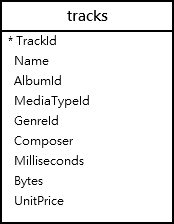
The tracks table contains columns and rows, like a spreadsheet:
TrackId | Name | AlbumId | MediaTypeId | GenreId | Composer | Milliseconds | Bytes | UnitPrice
---------+--------------------------------------------------------------+---------+-------------+---------+--------------------------------------------------------------+--------------+----------+-----------
1 | For Those About To Rock (We Salute You) | 1 | 1 | 1 | Angus Young, Malcolm Young, Brian Johnson | 343719 | 11170334 | 0.99
2 | Balls to the Wall | 2 | 2 | 1 | NULL | 342562 | 5510424 | 0.99
3 | Fast As a Shark | 3 | 2 | 1 | F. Baltes, S. Kaufman, U. Dirkscneider & W. Hoffman | 230619 | 3990994 | 0.99
4 | Restless and Wild | 3 | 2 | 1 | F. Baltes, R.A. Smith-Diesel, S. Kaufman, U. Dirkscneider &… | 252051 | 4331779 | 0.99
5 | Princess of the Dawn | 3 | 2 | 1 | Deaffy & R.A. Smith-Diesel | 375418 | 6290521 | 0.99
6 | Put The Finger On You | 1 | 1 | 1 | Angus Young, Malcolm Young, Brian Johnson | 205662 | 6713451 | 0.99
7 | Let's Get It Up | 1 | 1 | 1 | Angus Young, Malcolm Young, Brian Johnson | 233926 | 7636561 | 0.99
8 | Inject The Venom | 1 | 1 | 1 | Angus Young, Malcolm Young, Brian Johnson | 210834 | 6852860 | 0.99
...To retrieve data from the tracks table such as track id, name, composer, and unit price, you use the following statement:
SELECT
trackid,
name,
composer,
unitprice
FROM
tracks;In this statement, you specify a list of column names from which you want to get data in the SELECT clause and the tracks table in the FROM clause. SQLite returns the following result:
TrackId | Name | Composer | UnitPrice
---------+--------------------------------------------------------------+--------------------------------------------------------------+-----------
1 | For Those About To Rock (We Salute You) | Angus Young, Malcolm Young, Brian Johnson | 0.99
2 | Balls to the Wall | NULL | 0.99
3 | Fast As a Shark | F. Baltes, S. Kaufman, U. Dirkscneider & W. Hoffman | 0.99
4 | Restless and Wild | F. Baltes, R.A. Smith-Diesel, S. Kaufman, U. Dirkscneider &… | 0.99
5 | Princess of the Dawn | Deaffy & R.A. Smith-Diesel | 0.99
6 | Put The Finger On You | Angus Young, Malcolm Young, Brian Johnson | 0.99
7 | Let's Get It Up | Angus Young, Malcolm Young, Brian Johnson | 0.99
8 | Inject The Venom | Angus Young, Malcolm Young, Brian Johnson | 0.99
...
To get data from all columns, you specify all the columns of the tracks table in the SELECT clause as follows:
SELECT
trackid,
name,
albumid,
mediatypeid,
genreid,
composer,
milliseconds,
bytes,
unitprice
FROM
tracks;For a table with many columns, the query would be so long that it is time-consuming to type.
To avoid this, you can use the asterisk (*), which is the shorthand for all columns of the table as follows:
SELECT * FROM tracks;The query is shorter and cleaner now.
However…
You should use the asterisk (*) for testing purposes only, not in application development.
Because…
When you develop an application, you should control what SQLite returns to your application. Suppose a table has 3 columns, and you use the asterisk (*) to retrieve the data from all three columns.
What if someone removes a column, your application would not be working properly, because it assumes that there are three columns returned, and the logic to process those three columns would be broken.
If someone adds more columns, your application may work, but it gets more data than needed, which creates more I/O overhead between the database and application.
So try to avoid using the asterisk (*) as a good habit when you use the SELECT statement.
Summary #
- Use the
SELECTstatement to retrieve data from a table. - SQLite evaluates the
FROMclause first, then theSELECTclause.
Thank you for your feedback!
