
Summary: In this tutorial, you will learn how to use the SQLite INTERSECT operator to combine the result sets of two queries and return distinct rows that appear in both queries.
Introduction to the SQLite INTERSECT operator #
SQLite INTERSECT operator allows you to combine the result sets of two queries and returns distinct rows that appear in both result sets of the queries.
The following illustrates the syntax of the INTERSECT operator:
SELECT select_list1
FROM table1
INTERSECT
SELECT select_list2
FROM table2;The basic rules for combining the result sets of two queries are as follows:
- First, the number and the order of the columns in all queries must be the same.
- Second, the data types must be comparable.
For the demonstration, we will create two tablest1 and t2 and insert some data into both tables:
CREATE TABLE t1(
c1 INT
);
INSERT INTO t1(c1)
VALUES(1),(2),(3);
CREATE TABLE t2(
c2 INT
);
INSERT INTO t2(c2)
VALUES(2),(3),(4);The following statement illustrates how to use the INTERSECT operator to compare result sets of two queries:
SELECT c1 FROM t1
INTERSECT
SELECT c2 FROM t2;Here is the output:
c1
--
2
3The following picture illustrates the INTERSECT operation:
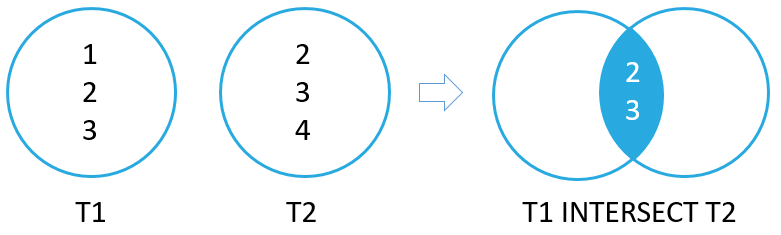
SQLite INTERSECT operator example #
For the demonstration, we will use the customers and invoices tables from the sample database.
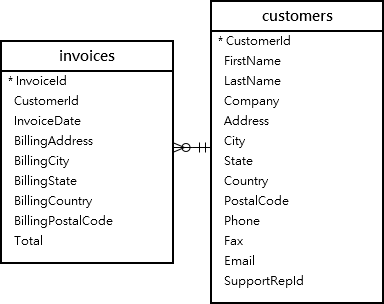
The following statement uses the INTERSECT operator to find customers who have invoices:
SELECT
CustomerId,
FirstName,
LastName
FROM
customers
INTERSECT
SELECT
CustomerId,
FirstName,
LastName
FROM
invoices
INNER JOIN customers USING (CustomerId)
ORDER BY
CustomerId;The following picture shows the partial output:
CustomerId FirstName LastName
---------- --------- ------------
1 Luís Gonçalves
2 Leonie Köhler
3 François Tremblay
4 Bjørn Hansen
5 František Wichterlová
...How it works.
- The first query returns all customers from the
customerstable. - The second query returns customers who have invoices by joining the
customerstable with theinvoicestable. - The
INTERSECToperator returns customers who have invoices.
Summary #
- Use the SQLite
INTERSECToperator to combine two queries and return distinct rows that appear in both queries.
Thank you for your feedback!
