
Quick answer: Use input() for one interactive line and sys.stdin when a program must consume piped or redirected text. Decide whether to strip newlines, handle EOF, and process the stream lazily before choosing how much input to read.
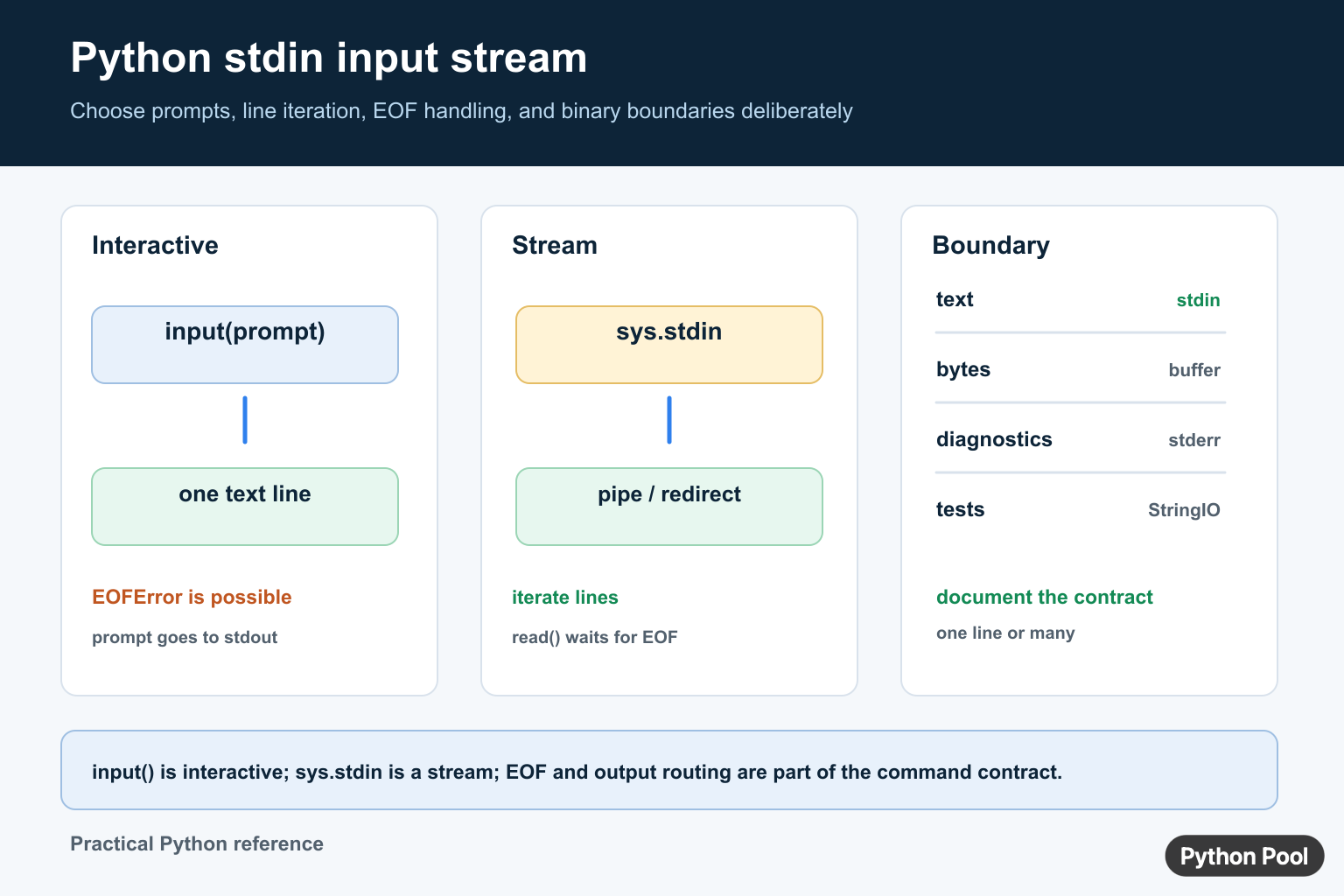
stdin is the standard input stream for a Python process. It is where text arrives when a user types into a terminal, pipes data into a command, or redirects a file into a script. Python gives you several ways to read it, depending on whether you need one prompt, one line, or a stream of many lines.
Use input() for interactive prompts. Use sys.stdin when input may come from a pipe or a redirected file. Use fileinput when a script should read either named files or standard input with the same loop.
The right choice depends on how the program is called. A teaching script may ask one question and stop. A command-line utility may receive hundreds of lines from another command. A test may replace the stream with a small in-memory object. Treat those cases separately instead of forcing every script through one pattern.
The official input documentation covers interactive reads, the sys.stdin documentation describes the standard stream, the fileinput documentation covers file-or-stdin loops, and the unittest.mock documentation helps with tests.
Read One Interactive Value
input() reads one line from standard input, removes the trailing newline, and returns a string.
name = input("Name: ")
message = f"Hello, {name}"

print(message)
This is best for interactive scripts where a person is expected to type a response. It is less convenient for large piped input because it reads one line at a time.
Use prompts only when a human is present. If the script will run in automation, prefer reading from sys.stdin or accepting file paths so the caller can provide input without manual typing.
Read One Line With sys.stdin
Use sys.stdin.readline() when you want direct access to the stream.
import sys

line = sys.stdin.readline()
clean_line = line.rstrip("\n")

print(clean_line.upper())
readline() keeps the newline unless you remove it. Use rstrip("\n") when only the final newline should be removed.
Be careful with strip() when leading or trailing spaces matter. For structured text, removing only the newline is often safer than removing all surrounding whitespace.
Read All Input At Once
For small inputs, sys.stdin.read() loads the entire stream into memory.
import sys

text = sys.stdin.read()
lines = text.splitlines()

print("line count:", len(lines))
print("character count:", len(text))
This is simple for short redirected files or test data. Avoid it for very large streams because it waits for all input and stores the full content.
Iterate Over stdin
For streaming data, iterate over sys.stdin. This processes one line at a time.
import sys

for line_number, line in enumerate(sys.stdin, start=1):
    text = line.strip()
    if text:
        print(line_number, text)
This pattern is good for logs, lists, and command pipelines. It starts producing output as lines arrive and does not need the whole stream in memory.
Line-by-line processing is also easier to recover from. If one line is invalid, the script can report the problem to stderr and continue with the next line when that behavior makes sense.
Use fileinput For Files Or stdin
The fileinput module can read file names supplied to a script, or standard input when no file names are supplied.
import fileinput

for line in fileinput.input():
    clean = line.strip()
    if clean:
        print(clean.lower())
This is useful for Unix-style tools where users expect the same program to accept piped input or file paths.
Test Code That Reads stdin
Patch sys.stdin with io.StringIO when testing code that reads from standard input.
import io
from unittest.mock import patch

def read_first_line():
    return input().strip()

with patch("sys.stdin", io.StringIO("alpha\n")):
    result = read_first_line()

print(result)
This makes tests repeatable without waiting for real terminal input. It also lets you cover empty input, multiple lines, and whitespace cases.
Practical Guidance
Choose the smallest API that matches the job. Use input() for one human prompt, readline() for one stream line, read() for a small full payload, and iteration for large or ongoing streams.
Keep normal output on stdout and diagnostics on stderr. That way a script can read from stdin, produce clean output, and still show warnings without breaking another program that consumes the result.
Always decide how empty input should behave. Some scripts should print nothing, some should show a helpful error, and some should use defaults. Make that choice explicit so command-line behavior is predictable.
If input may be binary, use sys.stdin.buffer instead of text APIs. For ordinary command-line text, the examples above are the usual starting point.
For reliable tools, document what the program expects from stdin: one line, many lines, JSON text, CSV rows, or raw bytes. Clear input rules make the script easier to use in terminals, CI jobs, and other Python programs.
Handle EOF explicitly
Interactive users may send EOF, and a pipe may end normally without producing the number of records you expected. Catch EOFError around one input() call, or let iteration over sys.stdin finish naturally and validate the record count afterward.
try:
    name = input("Name: ")
except EOFError:
    name = "anonymous"

print(name)
Read all input only when it fits
sys.stdin.read() is convenient for a small document, but it waits for EOF and stores the complete input in memory. For large streams, iterate line by line and process each record as it arrives. Use readline() when the protocol has a clear one-line boundary.
Separate text and binary streams
sys.stdin is a text stream with decoding and newline behavior. If a tool must consume raw bytes, use sys.stdin.buffer when available. Keep decoding policy at the boundary, and remember that test doubles may not provide a buffer attribute.
Test stdin without hanging
Inject a string stream in tests instead of waiting for a real terminal. Save and restore sys.stdin with a fixture, and test empty input, one line, multiple lines, and EOF. Keep normal output on stdout and diagnostics on stderr.
For command-line input, compare reading stdin with Python -m flags and argparse booleans. Read python m flag and python argparse boolean for the related workflow.
Frequently Asked Questions
How do I read one line from stdin in Python?
Use input() for an interactive prompt or sys.stdin.readline() when you need direct control over the standard input stream.
How do I read all stdin in Python?
Call sys.stdin.read() for small inputs when loading the entire stream is acceptable, or iterate over sys.stdin for streaming data.
How do I handle end-of-file when using input()?
Catch EOFError for interactive input, or prefer a stream loop when the command is expected to receive piped or redirected data.
How can I test code that reads stdin?
Replace sys.stdin with io.StringIO or another file-like object in the test so the code can consume deterministic input without a real terminal.
