
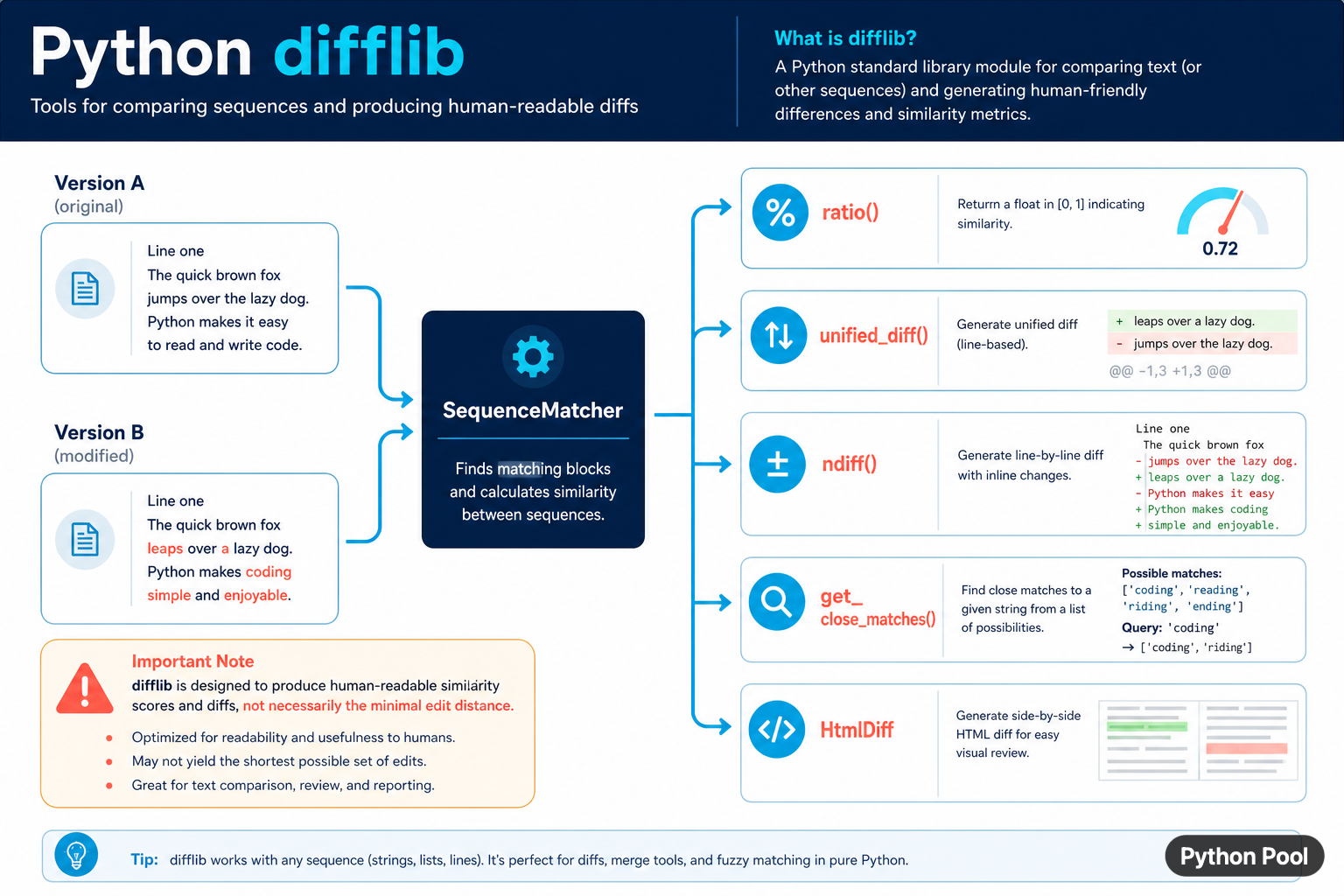
Python's difflib module compares sequences and produces human-readable differences. It can compare strings, lines, lists, and other sequences whose elements are hashable. The module includes similarity scoring, unified and context diffs, inline ndiff() output, close-match suggestions, and HTML comparison tables. It is excellent for review tools and diagnostics, but its goal is readable output rather than a guaranteed minimal edit sequence.
Quick answer
Use SequenceMatcher for matching blocks and a similarity ratio, unified_diff() for compact line-oriented patches, ndiff() for readable inline changes, get_close_matches() for suggestions, and HtmlDiff for a side-by-side HTML report. Choose the function from the output that a person or another program needs.
The official Python difflib documentation describes the sequence-matching algorithm and its tradeoffs. The module can compare files and generate several diff formats, but it should not be treated as a version-control system or as a minimal edit-distance implementation.
Compare sequences with SequenceMatcher
SequenceMatcher finds matching blocks between two sequences. For strings, it can provide a similarity ratio between zero and one. The score is a useful signal for suggestions and diagnostics, but the threshold should be chosen from the application rather than treated as a universal definition of “same.”
from difflib import SequenceMatcher

before = "The quick brown fox"
after = "The quick red fox"

matcher = SequenceMatcher(None, before, after)
print(matcher.ratio())
print(matcher.get_matching_blocks())
The first argument can be a function that marks junk elements. The automatic junk heuristic can also be disabled with autojunk=False when repeated values are meaningful and the sequence is large enough for that heuristic to affect the match.
Show a unified diff
A unified diff is compact and works well in logs, pull requests, and terminal output. Give the function lists of lines, usually with line endings preserved, and include filenames so the result has useful context.
from difflib import unified_diff

before = ["alpha\n", "beta\n", "gamma\n"]
after = ["alpha\n", "delta\n", "gamma\n"]

diff = unified_diff(
    before,
    after,
    fromfile="before.txt",
    tofile="after.txt",
)
print("".join(diff), end="")
unified_diff() returns a generator. Materialize it only when the full result must be stored. For streaming logs, write each line as it is produced. Preserve newline conventions when the diff will be applied by another tool.
Use ndiff for readable line changes
ndiff() returns a Differ-style delta. Lines beginning with - belong to the first input, + belong to the second, and ? lines guide the eye toward intraline differences. The guide lines can be confusing when input contains significant whitespace.
from difflib import ndiff

before = "one\ntwo\nthree\n".splitlines(keepends=True)
after = "one\ntoo\nthree\n".splitlines(keepends=True)

for line in ndiff(before, after):
    print(line, end="")
Use unified diff when compact patch notation is more important than character-level explanation. Use ndiff() when a person needs to understand a small text change without opening another diff viewer.
Suggest close matches
get_close_matches() finds the best candidates in a list of possibilities. The n argument limits the number of results and cutoff sets the minimum similarity score. It is useful for spelling suggestions and command correction, not for authorization or identity matching.
from difflib import get_close_matches

commands = ["install", "inspect", "init", "include"]
query = "instal"

matches = get_close_matches(query, commands, n=3, cutoff=0.5)
print(matches)
Always show suggestions as suggestions. Do not silently replace a user's command or account name because it happens to be similar. A false positive can be more damaging than an empty suggestion list.
Generate an HTML comparison
HtmlDiff creates a table or a complete HTML document with side-by-side changes. The class is useful for internal review pages, but descriptions passed to make_file() are interpreted as HTML. Escape untrusted labels before inserting them.
from difflib import HtmlDiff

before = ["alpha\n", "beta\n"]
after = ["alpha\n", "delta\n"]

document = HtmlDiff().make_file(
    before,
    after,
    fromdesc="Before",
    todesc="After",
    context=True,
)
print(document[:80])
For a web application, sanitize or escape user-controlled descriptions and decide whether the generated table can be trusted in the response. The diff data itself may contain markup that needs to be handled according to the application's output context.
Compare words instead of characters
The module works with any sequence, so splitting text into words can produce a more useful comparison than comparing every character. Keep punctuation and whitespace intentionally if they matter to the review.
from difflib import SequenceMatcher

before = "Python makes text comparison readable".split()
after = "Python makes sequence comparison readable".split()

matcher = SequenceMatcher(None, before, after)
for tag, i1, i2, j1, j2 in matcher.get_opcodes():
    print(tag, before[i1:i2], after[j1:j2])
get_opcodes() exposes equal, replace, delete, and insert operations. This is a useful intermediate form when building a custom report, because it lets the UI choose how to display each operation rather than parsing formatted diff text.
Know the performance tradeoff
The matching algorithm can become expensive for large inputs, and its result depends on the structure of the sequences. For large files or directory trees, use specialized comparison tools or a domain-specific diff strategy. For small developer-facing text, readability often matters more than theoretical minimality.
- Use
SequenceMatcherfor similarity and matching blocks. - Use unified or context diffs for compact line changes.
- Use
ndiff()for a readable character-level explanation. - Use
get_close_matches()for non-authoritative suggestions. - Escape HTML descriptions and handle untrusted content carefully.
The pragmatic approach is to treat difflib output as a presentation or diagnostic layer. Preserve the original sequences, choose the format that fits the reader, and state that the score or patch is a human-friendly comparison rather than a formal proof of minimal edits.
Choose a diff format from the consumer
A terminal user may prefer a unified diff, a reviewer may prefer an HTML table, and an autocomplete field may need only a ranked list of close matches. Do not generate every format by default. Keeping the output choice near the presentation boundary reduces work and makes tests less coupled to difflib's formatting.
For files, read with a known encoding and decide how newline characters are represented before comparing. Two files can contain the same visible lines but produce noisy changes when one input retains line endings and the other does not. Normalize only when the format says those differences are not meaningful.
For large or sensitive inputs, bound the size and avoid returning full source text to an untrusted client. Similarity scores and structured opcodes can provide the needed signal without exposing the complete content.
For text comparison, compare difflib with regex groups and string-length checks. Read regex optional group and python string length for the related workflow.
Frequently Asked Questions
Frequently Asked Questions
What is Python difflib used for?
difflib compares sequences and creates human-readable differences in formats such as unified diffs, ndiff output, and HTML tables.
How do I compare two strings with difflib?
Use SequenceMatcher(None, left, right) and read ratio(), matching blocks, or get_opcodes() for structured changes.
Does difflib calculate minimal edit distance?
No. Its matching algorithm is designed for readable matches and deltas, not a guarantee of the shortest edit sequence.
How do I find close string matches?
Use get_close_matches() with a list of possibilities, a maximum result count, and a cutoff similarity threshold.
