Search the Community
Showing results for tags 'update'.
Found 10 results
-

Version 4.6.4
26,646 downloads
Plugin updates Every plugin you run, watched from one Discord message Nobody checks forty product pages by hand, so servers run months-old builds and find out from a bug report. This reads your plugin folder, works out where each one came from across thirteen marketplaces, and tells you what's behind — in console and in Discord, as a single message it keeps editing instead of a feed of pings. Nothing to register: install it and the list builds itself. 13 Marketplaces searched 1 Discord message, edited in place 60 Minutes between checks, configurable 0 Dependencies, and nothing to register by hand ✓ The list builds itself — every plugin on the server, matched to its store page automatically ✓ Unloaded plugins are checked too — a .cs file sitting there disabled is still read and tracked ✓ One Discord message, not a feed — it edits itself, so the channel stays a status board ✓ Finds orphaned config files — leftovers from plugins you deleted months ago, moved to a backup folder on command ✓ In-game browser for the whole list — colour-coded, searchable, one click to ignore or correct a plugin Video See it in action 01 — Discovery It already knows what you're running There is no list to fill in. The first check enumerates everything on the server and works out where each plugin lives. Thirteen marketplaces, and any new one it meets uMod, Codefling, Lone.Design, Chaos, RustWorkshop, GitHub, ModPulse, RustPlugins, ServerArmour, ImperialPlugins, MyVector, SkyPlugins and Game4Freak are searched out of the box, each one switchable. If a store shows up that isn't in your config yet, it's added automatically. Disabled plugins count as plugins A .cs file that isn't loaded is opened and read directly — name, author and version come out of the file itself, for Oxide, Carbon and Covalence plugins alike. The one you disabled "until it's fixed" still gets told when the fix ships. Matching that survives renames A plugin is matched by author and name first, then by store name, page slug and tags — because the file is called NPCShop and the page says "NPC Shop". When a guess is still wrong, paste the correct URL once and it's pinned there for good. Version numbers that aren't version numbers Authors write v2.1, 1.0.4b or just 3. All of it is parsed down to something comparable instead of being reported as an update every single hour. 02 — Discord A status board, not a notification feed A webhook is the only setup. What arrives is one grouped, linked, timestamped report. One message that keeps itself current Give it a message id and every check edits that same message instead of posting a new one. Hourly checks stop being hourly noise, and the channel becomes a board anyone can glance at. Grouped by store, with the version jump and a link Each line reads [Codefling] NPCShop 2.11.5 → 2.11.6 with the version linking straight to the page, under a timestamp in your own timezone and 12- or 24-hour format. Links can be turned off if you'd rather keep it plain. Green when there's nothing to do "All plugins are up to date" arrives with a green bar; anything else uses the accent colour you set. Don't want the good news at all? One switch and it only speaks up when something is behind. Test it before you trust it One chat command fires a test message through the webhook, and a broken hook or a wrong message id is reported in console in plain words rather than failing silently. 03 — In game The whole list on one screen Everything the plugin knows is browsable in game, and everything you'd want to correct is corrected there too. Colour tells you the state at a glance Green for matched to a store page, red for not found anywhere, orange for deliberately ignored. Unmatched plugins are sorted to where you'll see them. Search, then fix Type part of a name or an author to filter. Click a plugin and you get its author, version, detected store and URL — the URL being an editable field, so a wrong match is a paste away from correct. Ignore what shouldn't be checked Private commissions and your own code never have a store page. One toggle drops them out of the checks and out of the report, without deleting anything. 04 — Housekeeping The configs nobody deleted Every server that has run for a year has a config folder full of files belonging to plugins that left. Since the plugin already knows exactly what you run, it can tell you which ones those are. List first, act second One console command prints every orphaned config by name. Nothing is touched until you run the second one. Moved, never deleted Cleanup relocates the files into a backup folder inside your config directory. Reinstall the plugin next week and its settings are still there, one move away. Reliability Built to be left alone ✓ No dependencies — and no account, key or token anywhere ✓ Rate limits are handled — it waits and retries the same plugin rather than skipping it or hammering the API ✓ Checks run spread out, never blocking — requests are made one at a time in the background, and stop the moment the plugin unloads ✓ A manual check can't stack — asking for one while a scan is running is refused with a warning instead of doubling the requests ✓ The config prunes itself — plugins you removed drop off the list automatically, so it never grows into a graveyard ✓ Discord's message limit is respected — an oversized report is trimmed with a notice instead of silently failing to send Commands & permission Two in chat, three in console Chat commands need updatechecker.setup; admins have access anyway. Every command name is configurable. /ucsetup Open the plugin browser /uctest Send a test message to your Discord webhook checkupdates Server console — run a check now instead of waiting for the timer uc_check_config Server console — list config files with no plugin behind them uc_clean_config Server console — move those files to the backup folder Hooks & API For plugin developers void OnUpdateCheckerUpdateFound(string name, string currentVersion, string latestVersion, string url, string marketplace) Fired once per outdated plugin, as the check finds it. Enough to build your own alerting — a panel notice, a Telegram message, an auto-download queue. Questions Before you buy Do I have to use Discord? No. Without a webhook the report is printed in server console on every check. Discord just makes it something the whole team can see. Do I need to list my plugins first? No. The list is built from the server itself on the first check and kept in sync from then on — new plugins are added, deleted ones fall off. What about my private or custom plugins? They won't be found anywhere, which is expected. Either flip them to ignored so they drop out of the report, or hide the whole not-found section with one config switch. It matched a plugin to the wrong page. Can I fix it? Open the browser in game, click the plugin, paste the right URL into the field. From then on it's checked against that page only. Will it spam my Discord channel every hour? Not if you give it a message id — then it edits that one message forever. You can also silence the "everything is up to date" report so it only writes when something actually needs doing. Is the config cleanup safe? It moves files into a backup folder inside your config directory, never deletes them, and the listing command shows you exactly what it would move before you commit. Does it slow the server down? Checks are network requests made one after another in the background, on an interval you choose — hourly by default, and the check on startup can be switched off too.Free- 306 comments
- 31 reviews
-
- 33
-

-

-

-
- #updates checker
- #plugin
- (and 5 more)
-

Version 2.0.0
112 downloads
Check "Updates" for more details! This prefab will receive many updates in the future! The DrugBoat was made for rpg servers, but you can use it wherever you want. Discord: andreianty Remember, if you buy this product, I would appreciate it if you could leave me a review as honest as possible!Free -

Version 2.1.3
144 downloads
Effortlessly manage plugin updates across all your Rust Servers with a single command. Upload files to a Discord thread and watch them instantly sync across your servers, with full support for Oxide and Carbon, and any OS. Also allowing any trusted Staff Members to use FEATURES Effortlessly check for required updates across all your Rust servers via RCON, with minimal server overhead. Fully Compatible with Oxide and Carbon, and works seamlessly on both Windows and Linux. Optional Automatic Update Checks on a timer schedule that fits your needs. Easy-to-use Buttons that quickly direct you to the plugins needing an update. A Dedicated Upload Thread to send plugins directly to the server(s). Smart Server Separation: Upload all plugins in a single thread, with automatic delivery, to the servers that need the update. File Validation to ensure only plugin files from the update list are uploaded and sent. Easily add as many servers as you want - just configure them in the "SERVERS" folder. Supports a wide range of plugin sites: uMod, Codefling, Lone.Design, Chaos Code, RustWorkshop, ModPulse, RustPlugins, ImperialPlugins, MyVector, SkyPlugins, Game4Freak. Simple one button press updates for plugins hosted on uMod.org and codefling! MAIN CONFIGURATION { "BOT_ID": "DiscordBotClientID", "DISCORD_TOKEN": "https://discord.com/developers/applications", "CODEFLING_API_KEY": "https://codefling.com/settings/apps/", "GUILDS": ["DiscordServerID"], "AUTO_UPDATE_CHECK": true, "COMMANDS_ROLES": ["RoleID"], "UPDATE_CHANNEL": "ChannelID", "UPDATE_CHECK_FREQUENCY": 60, "EMBED_HEX": "0099FF", "GLOBAL_EXCLUDED_PLUGINS": [ "" ] } SERVER(S) CONFIGURATION { "ENABLED": true, "TYPE": "Oxide", "NAME": "", "IP": "", "RCON_PORT": 28016, "RCON_PASS": "", "EXCLUDED_PLUGINS": [ "" ] } APPRECIATION Thank you @Pho3niX90 for making the Server Armour API which supports this bot. Thank you @shady14u for his help making the Magic Updater plugin which does the automatic plugin updating. Thank you @KevinX8 for his help making the Bot.$14.99 -
Version 3.1.1
193 downloads
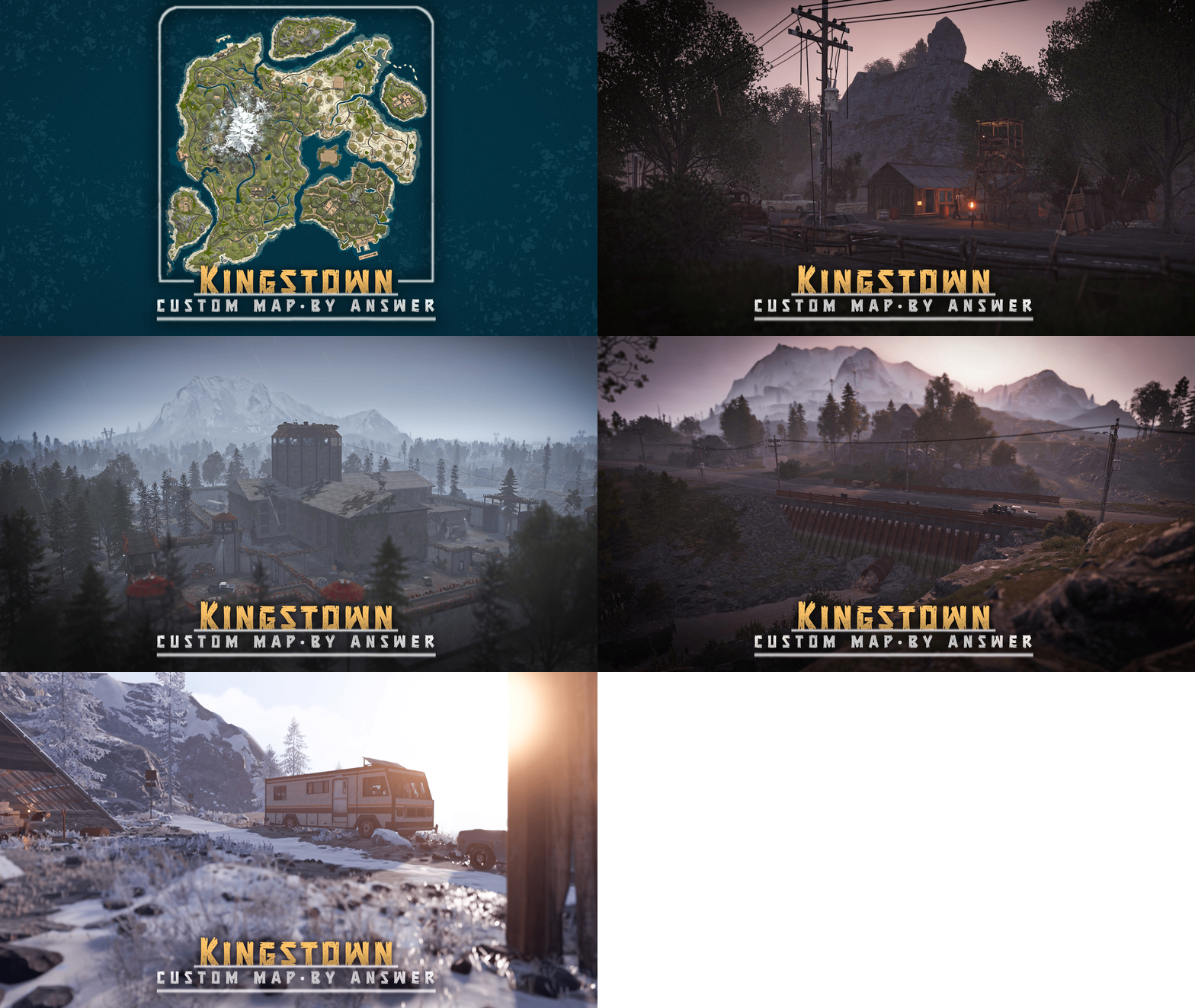
A high-quality custom map at the 2850 size, Inspired by the Mayor of Kingstown series: In this storyline, inmates at the Kingstown Penitentiary revolt against the guards, successfully overthrowing them. Escaping to the wilderness, these inmates form groups, building camps and hideouts scattered throughout the map: Latest Updates v3.1.0 - Added 2 new bridges, a few new monuments, minor adjustments to splat, rock formations & cliffs v3.0.0 - Video available here > Original trailer from 2024, showcasing more of the penitentiary monument: Kingstown: Custom Map FEATURES - Multiple bridges and ziplines to ensure easy access between islands - Mission NPCs around the map - Config for BetterNpc is included - Buildable bus stops - Ring rail (1 lane) - Recyclers and marketplaces at fishing villages - Road tunnels through the mountain - Waterfalls, rivers CUSTOM MONUMENTS Kingstown Penitentiary - This monument's layout was designed to be intuitive, so players won't need a guide. Requires 1x green and 1x blue keycard to reach the top helipad, the main attraction being the hackable crate. Inmate cabin Mini Launch Site Mini Airfield Desert Military Camp Train Station Deserted Town Inmate Hideout Inmate Barn Arctic Inmate campsite Large Inmate Camp Inmate campsites Sunken Sulfur/Stone quarries: fully functional Sunken Junkyard: fully functional Shore Wrecks HQM Quarry cave 2x Garage - Roadside monument featuring a functional vehicle lift, encouraging players to use modular cars Mini Powerplant 2x Abandoned Farm: build spot Bandit Fishing Village: this safe zone contains the best from both outpost and bandit camp Inmate Camp Inmate RV Camp Ranch Trailer VANILLA MONUMENTS - Jungle Ziggurat - Jungle Ruins - Train Yard - Arctic Research base - Stables (ranch) - Water Well - Radtown - Harbors (2/2) - Ferry terminal - Satelite Dish - Dome - Lighthouse - Vanilla caves - Oxum Gas Station - Mining Outpost - Supermarket - Missile Silo - Small Oil Rig - Large Oil Rig - Underwater Labs NOTES – Need help? You can always contact me on my discord server @ discord.gg/TJxwpKT2Ge – The password for the editor is included with the map. - Shoutout to Bxrflip for the arch bridge model! - Size: 2850 // Prefab count: ∼28k$38.90- 6 comments
- 2 reviews
-
- 4
-
-
-
- #answer
- #kingstown
- (and 12 more)
-
![More information about "[OLD VERSION] The DrugBoat - TugBoat (laboratory)"](https://codefling.com/uploads/monthly_2023_08/1.thumb.png.57e00527af92acf99ab8ff0a0ae98816.png)
Version 1.0.0
24 downloads
Check the V.2: The DrugBoat - TugBoat (laboratory) 2.0.0 This prefab will receive many updates in the future! The DrugBoat was made for rpg servers, but you can use it wherever you want. Discord: andreianty Remember, if you buy this product, I would appreciate it if you could leave me a review as honest as possible!Free -

Version 1.0.0
15 downloads
xDisablePlayerBoats + Timed Event for Player-made Boat Building/Editing xDisablePlayerBoats lets you block players from building/editing player made boats (Rust's NAVAL Update) either completely or only during a configurable ingame time window (perfect for “boat building events”). This plugin hooks into Rust’s build system and prevents placement of key boat-building items, including: Boat Building Station Boat Building Plan Steering Wheel Small Boat Engine Sail When blocked, players receive a clear chat message explaining whether boat building/editing is fully disabled or only allowed during event hours. Permission xdisableplayerboats.bypass - Players with this permission can build boats even when restrictions are active. Config { "EventEnabled": false, "StartHour": 18, "EndHour": 23, "EventStartMessageText": "» Boat building event is now active! You can build/edit boats now.", "EventEndMessageText": "» Boat building event is now over! Boat building/editing is disabled now." } EventEnabled = false → Boat building is always disabled (INGAME-TIME!) EventEnabled = true → Boat building is only allowed between StartHour–EndHour (INGAME-TIME!) Supports wrap-around hours (example: 22 → 06) Ideal for: Servers that want to reduce water/boat spam PvP servers that want controlled boat availability Running scheduled boat-building events Enforcing progression/economy balance$8.99 -
Version 1219 210326E
263 downloads
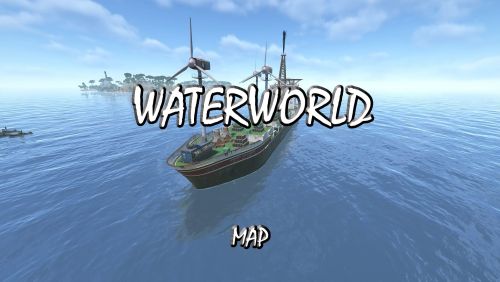
IMPORTANT – Please read this description fully before purchase Waterworld Custom Map by Niko. This is the 3rd full update and has been optimised to take advantage of the Navel update Feb 2026 Changes from V2 to V3 At some point facepunch changed the visuals of water and since then looking through glass has ruined the effect of living on the ocean floor because of this most windowed buildings have had them removed, the ones that still exist have been "fudged" to give a similar effect and in very few cases the effect is not there. Its a limitation of the game we now have to deal with. It was originally based on the movie WaterWorld, however changes have resulted in "Dry Land" now being in the centre of the map (covers garbage collection) to improve performance. You now have a number of smaller islands. Game Mechanics - You can now build on the coast if you wish but no building is allowed in the interior of the islands, this is to allow for the building of Ships. Space is limited. You can live on the ocean floor, small structures exist. They are effectively tugboats, sunk with concrete around them with a moonpool access. You can authorise yourself on the tugboat and live within it. The only island you cannot build at all on is the one with the lighthouse, that's the centre of the map. Your start location is as before, floating on a plank of wood, a box nearby will have all your starting gear. Lets say your the last survivors of a plane crash. Most of the monuments are on the surface of the ocean and most are direct cross overs from the previous map but not all. The ocean floor is not so deep now, you can fly over the map if you can get hold of a helicopter. Ore is very limited on the islands, you will need to trade for building supplies. Deep ocean lava pools have some ore around them Safezones are Atoll and Smokers, however Smokers has patrol boats near it so you will need to navigate access. Finally make yourself aware of the T&C and a special thanks to the following for there support and contributions.$49.95- 8 comments
-
- 9
-
-
-

-
- #map
- #custom map
- (and 5 more)
-
Hi, how do I increase the harvest price in a new city or product amount? I'm getting too much for 150 scrap: 200 potatoes, 74 pumpkins, 184 corns I waited about 10 minutes and the harvest can be collected again, this is nonsense, you can farm as much food as you want for 150 scrap Moreover, I was able to collect even after going outside the fence, if I climbed over the fence

-
Version 2.3
120 downloads
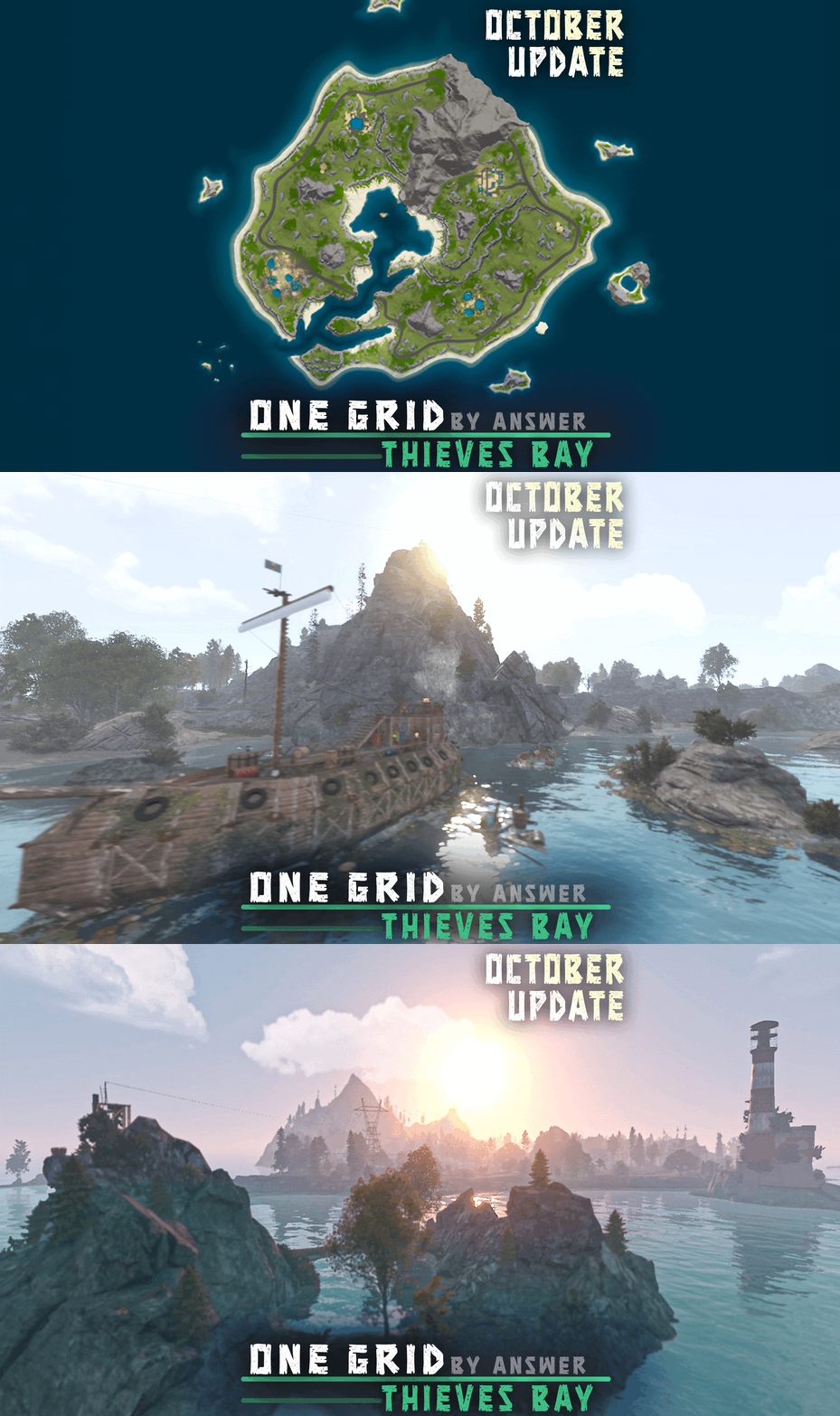
This map was designed for action packed 'one grid' servers & is constantly supported and updated for the current version of the game with all updates. NOTES - All cliffs and rock formations were updated – If you need support, I'm most active on my discord server @ discord.gg/TJxwpKT2Ge – The password for the editor is included with the map. CUSTOM MONUMENTS > Stranded Vessel - Inspired from the game Sea of Thieves // Recycler, Green Keycard Puzzle (Blue Keycard spawns inside) > Improvised Airfield - Bradley APC, Recycler, Blue Keycard Puzzle (Red Keycard spawns inside) > Active Crash Site - MLRS, 2 scientists > Water Fountain - "Hidden" loot on the buttom, custom zipline tower on top // the rocks inside are climbable > Mini Outpost (Safe-zone) - All outpost vending machines, fortune wheel, recyclers > Sunken Treasure - Loot & Green Keycard Puzzle underwater // Custom zipline tower that leads to mainland > Hijacked Rafts - Around 7 scientists, custom zipline tower in the middle CUSTOM PREFABS > Custom tunnel through the mountain > Custom bridge > Custom zipline towers > Waterfall - Custom zipline tower that leads to stranded vessel > Custom Islands for players to build on > The entire map is manually made. FACEPUNCH MONUMENTS > Dive sites > Underwater Lab > Small Oil Rig > Large Oil Rig > Fishing Village > Lighthouse$21.90 -

Version 1.0.1
931 downloads
Features Restart your server when you want (SET_TIME or COOLDOWN) Restart your server when an update is available (UpdateNotice plugin required) Dependencies THIS PLUGIN REQUIRE THE DISCORD EXTENTION TO WORK! Compatible with Update Notice for restart on update CarbonUpdate OxideUpdate ServerUpdate Permissions rebootscheduler.admin - Allows player to use the plugin commands Commands rs cancel - Cancel the ongoing restart rs discord - Send a test message to discord rs help - Display the help message rs restart <time in seconds> - Initiate a restart (10s if no time given) rs status - Display the current restart status Configuration Default configuration: { "Default chat avatar": 0, "Enable UpdateNotice plugin (required for hooks)": true, "Hooks configuration (require UpdateNotice)": { "When the Server Restart (COOLDOWN | DAILY_TIME)": "COOLDOWN", "Cooldown time before restart (in seconds)": 300, "Enable restart OnCarbonUpdate": false, "Enable restart OnOxideUpdate": true, "Enable restart OnServerUpdate": true }, "Restart messages cooldown": [ 3600, 1800, 900, 300, 120, 60, 30, 10, 5, 4, 3, 2, 1 ], "Enable daily restart": false, "Daily restart time (13:30:00 as example for 1:30 pm UTC)": "04:00:00", "Daily restart cooldown (for message visibility)": 300, "Enable discord notifications": false, "Discord webhook url": "https://support.discordapp.com/hc/en-us/articles/228383668-Intro-to-Webhooks", "Discord role id to mention (0 = no mention)": 0 } Default chat avatar - SteamID of the avatar to use for the chat messages Enable UpdateNotice plugin (required for hooks) - Enable the UpdateNotice plugin hooks Hooks configuration (require UpdateNotice) - Configuration for the UpdateNotice plugin hooks When the Server Restart (COOLDOWN | DAILY_TIME) - When the server should restart (on hook triggered) COOLDOWN - Restart when the cooldown time is reached DAILY_TIME - Restart on the daily restart time (even if not activated) Cooldown time before restart (in seconds) - Cooldown time before restart (only if the **COOLDOWN** is selected) Enable restart OnCarbonUpdate - Initiate restart when CarbonUpdate is triggered Enable restart OnOxideUpdate - Initiate restart when OxideUpdate is triggered Enable restart OnServerUpdate - Initiate restart when ServerUpdate is triggered Restart messages cooldown - Cooldown time for chat messages (in seconds) Enable daily restart - Enable daily restart Daily restart time (13:30:00 as example for 1:30 pm UTC) - Time of the daily restart (in UTC) Daily restart cooldown (for message visibility) - Cooldown time for chat messages (in seconds) Enable discord notifications - Enable discord notifications (restartCancelled, restartInitiated, restartIminent) Discord webhook url - Discord webhook url (https://support.discordapp.com/hc/en-us/articles/228383668-Intro-to-Webhooks) Discord role id to mention (0 = no mention) - Discord roleId for mention on message embed Localization Default localization: { "Help": "\nCommands:\t\t\t\tExplanations:\n\n- rs cancel\t\t\t\tCancel the ongoing restart\n- rs discord\t\t\t\tSend a test message to discord\n- rs help\t\t\t\tDisplay the help message\n- rs restart <time in seconds>\t\tInitiate a restart (10s if no time given)\n- rs status\t\t\t\tDisplay the current restart status", "KickReason": "The server is restarting for update.", "NativeRestartCancel": "Native restart was cancelled.", "NoPermission": "You are not allowed to run this command!", "NoRestartOnGoing": "There is no restart on going!", "RestartCancelMessage": "The restart has been cancelled.", "RestartGlobalMessage": "The server is restarting in {0} due to {1}!", "RestartGlobalMessageShort": "The server is restarting in {0}!", "RestartInitialized": "Restart has been initialize.", "Status": "Status: {0}", "StatusWithTime": "Status: {0} - {1}", "UnknownCommand": "Unknown command!", "UpdateNoticeMissing": "The plugin \"UpdateMissing\" was not found. Check on UMod: https://umod.org/plugins/update-notice", "WrongNumberOfElements": "Wrong number of elements! Please check the help command.", "WrongTimeFormat": "Wrong time format! Please use \"hh:mm:ss\" for a planned time OR xxx (in seconds) for a cooldown" } PLEASE MAKE SURE TO KEEP THE {x} PARAMETERS STARTING FROM 0 AND INCREASING WITH THE ASCENDING ORDER!! Credits Inspired from SmoothRestarter HandyS11 - AuthorFree