Search the Community
Showing results for tags 'information'.
Found 12 results
-

Version 1.1.2
5 downloads
nanoInfoModule - an information module for your server! Required - the nanoModalMenu plugin must be installed Feature list: Unlimited page support: All page categories support scrolling, allowing you to create as many pages as you need for each information category! Multilingual text support: Specify text in any language, and each player will be able to see information that matches their language! Minimalist information design: You can keep all text in a consistent style or use HTML tags to change the text size, highlight text, or set custom text colors. Color theme support: Examples of color themes with nanoInfoModule open and links to them: White Included with Plugin Dark View Theme Purple View Theme Blue View Theme Simple and easy-to-use module that allows you to provide your players with all the information they need! Module demonstration in the White theme: Configuration JSON { "Header menu settings": { "Multilingual translation for the menu title": { "ru": "ИНФОРМАЦИЯ", "en": "INFORMATION" }, "Multilingual translation for the menu description": { "ru": "Тут ты узнаешь насколько интересный наш сервер и каким правилам придерживаться", "en": "Here you will learn what makes our server interesting and which rules you should follow" }, "List of items for menu decoration [Shortname] (no more than 9 items)": [ "spraycan", "documents", "tool.binoculars", "building.planner", "advancedblueprintfragment", "campfire", "map", "note", "wallpaper.tool" ] }, "Menu content settings": { "Category settings [UniqueKey] = Settings": { "rules": { "Image file name from `/data/nanoSystem/nanoInfoModule/Images` [Do not include the extension]": "RULES_ICON", "Multilingual category translation [LanguageKey] = Translation": { "ru": "ПРАВИЛА", "en": "RULES" }, "List of category content": [ { "Multilingual translation of the text block title [LanguageKey] = Translation": { "ru": "БУДЬ ВЕЖЛИВЫМ", "en": "BE RESPECTFUL" }, "Multilingual translation of the text block [LanguageKey] = Translation": [ { "ru": "1. Уважайте других игроков и общайтесь без оскорблений, унижений и провокаций\n2. Запрещены токсичное поведение, травля, угрозы и дискриминация в любом виде\n3. Не засоряйте чат флудом, спамом, капсом или бессмысленными сообщениями\n4. Используйте голосовой и текстовый чат адекватно, без шума, криков и намеренного раздражения других игроков\n5. Если возник конфликт, решайте его спокойно или обращайтесь к администрации сервера", "en": "1. Respect other players and communicate without insults, humiliation, or provocation\n2. Toxic behavior, harassment, threats, and discrimination in any form are prohibited\n3. Do not flood the chat with spam, caps, or meaningless messages\n4. Use voice and text chat appropriately, without noise, screaming, or intentionally annoying other players\n5. If a conflict arises, resolve it calmly or contact the server administration" } ] }, { "Multilingual translation of the text block title [LanguageKey] = Translation": { "ru": "ЧЕСТНАЯ ИГРА", "en": "FAIR PLAY" }, "Multilingual translation of the text block [LanguageKey] = Translation": [ { "ru": "1. Запрещено использовать читы, макросы, скрипты или стороннее ПО, дающее игровое преимущество\n2. Использование багов, дюпов и уязвимостей сервера для личной выгоды запрещено\n3. Не пытайтесь обходить правила сервера через альтернативные аккаунты, VPN или иные способы сокрытия нарушений\n4. Запрещено выдавать себя за администрацию, модераторов или других игроков\n5. Любая нечестная игра, нарушающая баланс сервера, может привести к наказанию", "en": "1. Cheats, macros, scripts, or third-party software that provide an in-game advantage are prohibited\n2. Exploiting bugs, dupes, or server vulnerabilities for personal gain is forbidden\n3. Do not attempt to bypass server rules using alternate accounts, VPNs, or other methods to hide violations\n4. Impersonating administrators, moderators, or other players is prohibited\n5. Any unfair gameplay that disrupts the server balance may result in punishment" } ] }, { "Multilingual translation of the text block title [LanguageKey] = Translation": { "ru": "СТРОЙКА И РЕЙДЫ", "en": "BUILDING AND RAIDS" }, "Multilingual translation of the text block [LanguageKey] = Translation": [ { "ru": "1. Не стройте объекты, которые намеренно мешают спавну, проходу или нормальной игре других игроков\n2. Запрещено злоупотреблять постройками, шкафами, турелями и ловушками для нечестной блокировки территории вне правил сервера\n3. Уважайте лимиты сервера на количество построек, турелей, членов клана и других игровых объектов\n4. Если на сервере действуют ограничения на рейды новичков или специальные PvP/PvE зоны, их необходимо соблюдать\n5. Постройки и рейды, создающие чрезмерную нагрузку на сервер или нарушающие его правила, могут быть удалены администрацией", "en": "1. Do not build structures that intentionally block spawns, movement, or normal gameplay for other players\n2. Abusing buildings, tool cupboards, turrets, or traps to unfairly block territory outside server rules is prohibited\n3. Respect the server limits on buildings, turrets, clan members, and other in-game objects\n4. If the server has raid restrictions for beginners or special PvP/PvE zones, those rules must be followed\n5. Buildings and raids that create excessive server load or violate server rules may be removed by the administration" } ] } ] }, "nanoSettingModule": { "Image file name from `/data/nanoSystem/nanoInfoModule/Images` [Do not include the extension]": "SETTINGS_MODULE_ICON", "Multilingual category translation [LanguageKey] = Translation": { "ru": "НАСТРОЙКИ", "en": "SETTINGS" }, "List of category content": [ { "Multilingual translation of the text block title [LanguageKey] = Translation": { "ru": "О ПЛАГИНЕ", "en": "PLUGIN" }, "Multilingual translation of the text block [LanguageKey] = Translation": [ { "ru": "Плагин nanoSettingModule предназначен для управления и настройки других модулей системы nanoModalMenu\nС его помощью игроки могут изменять доступные параметры, взаимодействовать с подключёнными модулями и подстраивать отдельные функции под свои предпочтения\nЭтот модуль выступает как единая точка доступа к пользовательским настройкам и делает работу с интерфейсом более удобной и понятной", "en": "The nanoSettingModule plugin is designed to manage and configure other modules in the nanoModalMenu system\nWith it, players can change available settings, interact with connected modules, and adjust certain features to match their preferences\nThis module acts as a central access point for user settings and makes the interface more convenient and easier to use" } ] } ] }, "nanoWelcomeModule": { "Image file name from `/data/nanoSystem/nanoInfoModule/Images` [Do not include the extension]": "WELCOME_MODULE_ICON", "Multilingual category translation [LanguageKey] = Translation": { "ru": "ПРИВЕТСТВИЕ", "en": "WELCOME" }, "List of category content": [ { "Multilingual translation of the text block title [LanguageKey] = Translation": { "ru": "ПРИВЕТСТВЕННЫЙ МОДУЛЬ", "en": "WELCOME MODULE" }, "Multilingual translation of the text block [LanguageKey] = Translation": [ { "ru": "nanoWelcomeModule - это модуль, который помогает игрокам быстро получить важную информацию о сервере сразу в одном месте\nВ нём можно разместить краткую информацию, преимущества сервера, ссылки на социальные сети, полезные сведения, а также любой дополнительный текст по желанию\nПомимо этого, модуль поддерживает быстрый доступ через кнопки и может отображать информацию, полученную из других подключённых плагинов", "en": "nanoWelcomeModule is a module that helps players quickly access important server information all in one place\nIt can be used to display a server description, its advantages, social media links, useful details, and any additional custom text if desired\nIn addition, the module supports quick access buttons and can display information received from other connected plugins" } ] } ] }, "nanoKitsModule": { "Image file name from `/data/nanoSystem/nanoInfoModule/Images` [Do not include the extension]": "KITS_MODULE_ICON", "Multilingual category translation [LanguageKey] = Translation": { "ru": "НАБОРЫ", "en": "KITS" }, "List of category content": [ { "Multilingual translation of the text block title [LanguageKey] = Translation": { "ru": "НАБОРЫ СЕРВЕРА", "en": "SERVER KITS" }, "Multilingual translation of the text block [LanguageKey] = Translation": [ { "ru": "nanoKitsModule - это модуль, это простой и удобный плагин на наборы для вашего сервера.\nНичего лишнего, отличная оптимизация и только нужный функционал!\nПродавайте привилегии с наборами и наслаждайтесь интегрированным интерфейсом в меню nanoModalMenu", "en": "nanoKitsModule is a simple and convenient kits plugin for your server.\nNothing unnecessary, excellent optimization, and only the features you need!\nSell privileges with kits and enjoy the integrated interface in the nanoModalMenu" } ] } ] }, "nanoChat": { "Image file name from `/data/nanoSystem/nanoInfoModule/Images` [Do not include the extension]": "CHAT_MODULE_ICON", "Multilingual category translation [LanguageKey] = Translation": { "ru": "ЧАТ", "en": "CHAT" }, "List of category content": [ { "Multilingual translation of the text block title [LanguageKey] = Translation": { "ru": "ЧАТ СЕРВЕРА", "en": "SERVER CHAT" }, "Multilingual translation of the text block [LanguageKey] = Translation": [ { "ru": "nanoChat - даннный плагин сделан для простого контроля и настройки чата для ваших игроков\nИспользуйте цвет ника и отдельные префиксы по разрешениям\nРазделяйте их на привилегии и зарабатывайте с помощью этого\nВместе с nanoSettingsModule - ваши игроки получат еще больший контроль над системой чата, данный модуль будет дополнять возможности nanoChat", "en": "nanoChat is a plugin designed for simple chat control and configuration for your players.\nUse nickname colors and separate prefixes based on permissions.\nDivide them into privileges and monetize them.\nTogether with nanoSettingsModule, your players will get even more control over the chat system, and this module will expand nanoChat's capabilities" } ] }, { "Multilingual translation of the text block title [LanguageKey] = Translation": { "ru": "ЦВЕТА НИКА", "en": "NICKNAME COLORS" }, "Multilingual translation of the text block [LanguageKey] = Translation": [ { "ru": "А ещё вы можете создавать различные <color=#33232FF>цвета</color> для ников игроков и даже задавать градиент, используя несколько цветов", "en": "You can also create different <color=#33232FF>colors</color> for players' nicknames and even set a gradient by using multiple colors.\n" } ] } ] } } } }$15.99 -
Version 1.0.4
31 downloads
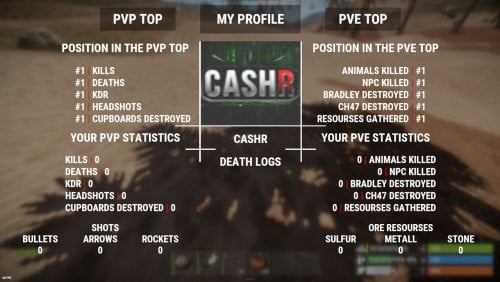
CStats - statistics for your server that does not require any intervention from administrators, such as config settings and other things, is made in a unique style and does not load your server! This plugin also implements the idea of the player's death logs, that is, the player can see the profile of the player who killed him.$10.00- 2 comments
- 1 review
-
- 5
-

-

-
- #rust
- #information
- (and 5 more)
-

Version 2.0.44
17,755 downloads
ServerPanel adds a player information menu to your server. Use it to share useful information with your players and to integrate your plugins into it. Features User-Friendly Interface: A GUI that is easy to navigate. Economy Integration: Works with different economy plugins. Dynamic Menu Categories: Group features into categories you can customize. Extensive Configuration Options: Almost every part of the plugin can be customized, including messages, colors, sizes and fonts. Auto-Open Menu: Opens the menu automatically when a player connects (configurable in the settings). Block Settings: Block the menu while a player is building, raiding or in combat. Multiple Economy Head Fields: Show several economy values, such as balance, server rewards and bank information. Permission Management: Set permissions for different user roles to control who can use which features. Localization Support: Translate and edit all messages for different languages. Performance Optimized: Built to keep server lag to a minimum. Customizable Hooks: Connect existing economy systems through configurable hooks for adding, removing and showing balances. Editor Position Change: Admins can move the editor to the left, center or right with one click. Command Enhancements: Commands accept multiple arguments separated by "|", so several commands can run at once. Commands /info: open menu /sp.install (or) /welcome.install: open installer menu sp.migrations: console command that updates the plugin data structure when you upgrade to a new version. It creates backups before making any changes. sp.migrations list: shows available migrations and whether they need to run sp.migrations run <version>: runs specific migration (e.g., "1.3.0") sp.migrations run <version> force: forces migration even if not detected as needed Permissions serverpanel.edit: allows players to edit the plugin settings and open the edit menu serverpanelinstaller.admin: required to access the plugin installation functions Video Showcase Templates Template V1 Template V2 Template V3 Template V5 Editor Installer TEST SERVER Join our test server to try all the features yourself. Copy the IP address below to start playing. connect 155.103.86.38:28015 Update Fields ServerPanel supports update fields: placeholders for your templates that show live information. They update automatically and work in text components, headers and other interface elements. Player Information {online_players}: Number of currently online players {sleeping_players}: Number of sleeping players {all_players}: Total number of players (online + sleeping) {max_players}: Maximum server capacity {player_kills}: Player's kill count (requires KillRecords, Statistics, or UltimateLeaderboard) {player_deaths}: Player's death count (requires KillRecords, Statistics, or UltimateLeaderboard) {player_username}: Player's display name {player_avatar}: Player's Steam ID for avatar display Economy {economy_economics}: Economics plugin balance {economy_server_rewards}: ServerRewards points {economy_bank_system}: BankSystem balance Note: Economy fields can be customized in "oxide/config/ServerPanel.json" under "Economy Header Fields". You can add support for any economy plugin by configuring the appropriate hooks (Add, Balance, Remove). Custom keys can be created and used in templates just like the default ones. Server Information {server_name}: Server hostname {server_description}: Server description {server_url}: Server website URL {server_headerimage}: Server header image URL {server_fps}: Current server FPS {server_entities}: Number of entities on server {seed}: World seed {worldsize}: World size {ip}: Server IP address {port}: Server port {server_time}: Current server time (YYYY-MM-DD HH:MM:SS) {tod_time}: Time of day (24-hour format) {realtime}: Server uptime in seconds {map_size}: Map size in meters {map_url}: Custom map URL {save_interval}: Auto-save interval {pve}: PvE mode status (true/false) Player Stats {player_health}: Current health {player_maxhealth}: Maximum health {player_calories}: Calorie level {player_hydration}: Hydration level {player_radiation}: Radiation poisoning level {player_comfort}: Comfort level {player_bleeding}: Bleeding amount {player_temperature}: Body temperature {player_wetness}: Wetness level {player_oxygen}: Oxygen level {player_poison}: Poison level {player_heartrate}: Heart rate Player Position {player_position_x}: X coordinate {player_position_y}: Y coordinate (height) {player_position_z}: Z coordinate {player_rotation}: Player rotation (degrees) Player Connection {player_ping}: Connection time in seconds {player_ip}: Player's IP address {player_auth_level}: Authorization level (0=Player, 1=Moderator, 2=Admin) {player_steam_id}: Steam ID {player_connected_time}: Connection start time {player_idle_time}: Idle time (HH:MM:SS) Player States {player_sleeping}: Is sleeping (true/false) {player_wounded}: Is wounded (true/false) {player_dead}: Is dead (true/false) {player_building_blocked}: Is building blocked (true/false) {player_safe_zone}: Is in safe zone (true/false) {player_swimming}: Is swimming (true/false) {player_on_ground}: Is on ground (true/false) {player_flying}: Is flying (true/false) {player_admin}: Is admin (true/false) {player_developer}: Is developer (true/false) Network & Performance {network_in}: Network input (currently shows 0) {network_out}: Network output (currently shows 0) {fps}: Server FPS {memory}: Memory allocations {collections}: Garbage collections count Usage Example: Use these fields in any text component, for example: "Welcome {player_username}! Server has {online_players}/{max_players} players online." API Documentation for Developers ServerPanel provides an API for plugin developers to integrate their plugins into the menu system. Required Methods API_OpenPlugin(BasePlayer player): Main integration method that returns CuiElementContainer OnServerPanelClosed(BasePlayer player): Called when panel closes (cleanup) OnServerPanelCategoryPage(BasePlayer player, int category, int page): Called when category changes (cleanup) OnReceiveCategoryInfo(int categoryID): Receives your category ID Integration Example [PluginReference] private Plugin ServerPanel; private int _serverPanelCategoryID = -1; private void OnServerInitialized() { ServerPanel?.Call("API_OnServerPanelProcessCategory", Name); } private void OnReceiveCategoryInfo(int categoryID) { _serverPanelCategoryID = categoryID; } private void OnServerPanelCategoryPage(BasePlayer player, int category, int page) { // Cleanup when player switches categories } private CuiElementContainer API_OpenPlugin(BasePlayer player) { var container = new CuiElementContainer(); // Create base panels (required structure) container.Add(new CuiPanel() { RectTransform = {AnchorMin = "0 0", AnchorMax = "1 1"}, Image = {Color = "0 0 0 0"} }, "UI.Server.Panel.Content", "UI.Server.Panel.Content.Plugin", "UI.Server.Panel.Content.Plugin"); container.Add(new CuiPanel() { RectTransform = {AnchorMin = "0 0", AnchorMax = "1 1"}, Image = {Color = "0 0 0 0"} }, "UI.Server.Panel.Content.Plugin", "YourPlugin.Background", "YourPlugin.Background"); // Add your plugin's UI elements here container.Add(new CuiLabel { RectTransform = {AnchorMin = "0.1 0.8", AnchorMax = "0.9 0.9"}, Text = {Text = "Your Plugin Interface", FontSize = 16, Align = TextAnchor.MiddleCenter, Color = "1 1 1 1"} }, "YourPlugin.Background", "YourPlugin.Title"); // Add buttons, panels, etc. using "YourPlugin.Background" as parent return container; } private void OnServerPanelClosed(BasePlayer player) { // Cleanup when panel closes } Header Update Fields API_OnServerPanelAddHeaderUpdateField(Plugin plugin, string updateKey, Func<BasePlayer, string> updateFunction): Registers a per-player string provider for a header placeholder. Returns true on success. API_OnServerPanelRemoveHeaderUpdateField(Plugin plugin, string updateKey = null): Unregisters a specific updateKey for your plugin, or all keys for your plugin when updateKey is null. Returns true on success. Usage Example [PluginReference] private Plugin ServerPanel; private void OnServerInitialized() { // Register a dynamic header field for each player ServerPanel?.Call("API_OnServerPanelAddHeaderUpdateField", this, "{player_kdr}", (Func<BasePlayer, string>)(player => GetKdr(player))); } private string GetKdr(BasePlayer player) { // Compute and return the value to display in the header for this player return "1.23"; } Using in UI: Place your key (e.g., {player_kdr}) directly in Header Field texts. Your function updates the value for each player. FAQ Q: Why can't I open the menu? A: Make sure that the plugin is installed and activated on your server. If the problem persists, contact the server administrator. Q: How do I enable Expert Mode? (disables automatic template updates) A: In the data file "Template.json", turn on the "Use an expert mod?" option: "Use an expert mod?": true, P.S. "Template.json" is located in the "oxide/data/ServerPanel" directory (if you use Oxide) or in the "carbon/data/ServerPanel" directory (if you use Carbon) Q: I see black images with Rust logo or get error 429 when loading images. What should I do? A: This happens when images fail to download from the internet. To fix it, enable Offline Image Mode, which uses local images instead: Enable the mode in config: Open "oxide/config/ServerPanel.json" (or "carbon/config/ServerPanel.json" for Carbon) Set "Enable Offline Image Mode": true Set up the images: Create folder "TheMevent" in "oxide/data" (or "carbon/data" for Carbon) Download PluginsStorage (click "CODE" → "Download ZIP") Extract the ZIP and copy all contents to the "TheMevent" folder Reload the plugin: Type o.reload ServerPanel (Oxide) or c.reload ServerPanel (Carbon) Note: If using a hosting service, you may need to use their file manager or FTP to upload the files. Q: Does ServerPanel work only with Mevent's plugins? A: Currently, ServerPanel integrates with Mevent's plugins (Shop, Kits, Daily Rewards, etc.). Other developers can use the API to add their own plugins to the menu. Q: Why do integrated plugins (Shop, Kits) have different window sizes? A: Different plugins may use different templates for integration. Make sure all your integrated plugins use the same template version (V1, V2, etc.) that matches your ServerPanel template. Update the template in each plugin so the sizes match. Q: The panel displays differently for different players. How can I make it show the same on everyone's screen? A: This happens when players have different UI scale settings. To make it look the same for everyone: Open the "Template.json" file located in "oxide/data/ServerPanel" (or "carbon/data/ServerPanel" for Carbon) Find the "Parent (Overlay/Hud)" setting in the "Background" section Change the value from "Overlay" to "OverlayNonScaled" Save the file and restart your server or reload the plugin Q: How can I change the video displayed in the ServerPanel interface to my own custom video? A: You can replace the default video with your own using this command: serverpanel_broadcastvideo [your_video_url] Replace [your_video_url] with the direct link to your video. For best compatibility, we recommend hosting your video on imgur.com. Q: My custom images are not loading or show as blank/question marks. What image hosting should I use? A: For custom images, we recommend using imgbb.com for image hosting. Avoid Imgur and services without direct access to the image. The most reliable option is Offline Image Mode with local images. Q: How can I make plugin UIs open outside of the ServerPanel menu instead of inside categories? A: You can configure buttons to execute chat commands that open plugin UIs independently. To do this: In your button configuration, set "Chat Button": true Set the "Commands" field to "chat.say /command" (replace "command" with the actual plugin command) Example: To open the Cases plugin outside the menu: "Chat Button": true "Commands": "chat.say /cases" The command runs as if the player typed it in chat, and the plugin's interface opens on its own, outside the ServerPanel menu. Q: Text in V4 template is shifting or sliding out of place. How can I fix this? A: This happens when the text width is not set correctly. The "TITLE LOCALIZATION" settings in ServerPanel control text width for categories and pages: Open the ServerPanel editor (click the "ADMIN MODE" button to open the edit menu) Select the category or page you want to edit (click to "EDIT CATEGORY" or "EDIT PAGE" button) In the editor, find the "TITLE LOCALIZATION" section For each language (en, ru, etc.), you'll see three columns: LANGUAGE: The language code TEXT: The localized text content WIDTH (px): The width setting in pixels Adjust the "WIDTH (px)" value to match your text length. Longer text requires larger width values Save your changes and test in-game Tip: Start with a width value around 100-150 pixels for short text, and increase it for longer titles. You can adjust this value until the text displays correctly without shifting.$40.00- 165 comments
- 72 reviews
-
- 19
-
-
-

-
- #serverpanel
- #info
- (and 33 more)
-

Version 1.2.12
1,533 downloads
The HUD Info Panel System is a customizable HUD for your Rust server that players can adjust to their liking. It shows server stats and running events in a clean, simple design, and other plugins can connect to it through the API. There are enough settings to fit any play style. Features of HUD Info Panel System Fully customizable HUD panels with drag-and-drop positioning Real-time tracking of 24+ server events and entities Built-in economics display (supports Economics/ServerRewards) Custom button system with image/command binding Dynamic event icons with color customization Multi-anchor positioning (UpperLeft/UpperRight) Automatic panel hiding system Optimized for performance Showcase Commands /panel hide - hide panel /panel show - show panel Permissions The plugin registers permissions for different features and settings. Players need the matching permission to use a given customization option. Panel Anchors UpperLeft UpperRight API Other plugins can report the status of a custom event through an API method. Here is an example call from another plugin: public class EmptyPlugin : RustPlugin { [PluginReference] private Plugin PanelSystem; private void OnServerInitialized() { EventChangeStatus("UserNotify", true); } private void Unload() { EventChangeStatus("UserNotify", false); } private void EventChangeStatus(string key, bool spawned) { PanelSystem.Call("OnEventChangeStatus", key, spawned); } } And the corresponding configuration in PanelSystem: { "Enabled": true, "Image": "https://i.imgur.com/asflpJe.png", "Permission": "", "Type": 7, "Panel Settings": { "Enabled": true, "Permission": "", "Switch": true, "Color": true, "Size": true }, "Size Settings": { "Sizes": [ { "Size": 25.0, "Lang Key": "sizeBig", "Permission": "" }, { "Size": 20.0, "Lang Key": "sizeMedium", "Permission": "" }, { "Size": 15.0, "Lang Key": "sizeSmall", "Permission": "" } ], "Default Size (index)": 0 }, "Color Settings": { "Default Active Color ID": 0, "Default Inactive Color ID": 2 }, "Key (MUST BE UNIQUE)": "UserNotify" } Available Panel Types The HUD Info Panel System has these panel types for server stats and events: Online Sleepers Time CH47 Helicopter Bradley Airdrop Economics Custom CargoShip Button WipeBlock Convoy ArmoredTrain Sputnik SpaceEvent AirEvent ArcticBaseEvent GasStationEvent ShipwreckEvent HarborEvent JunkyardEvent SatDishEvent WaterEvent PowerPlantEvent KillBoss TravellingVendor Caravan DungeonEvents Web Config Editor Manage the PanelSystem settings in our web config editor. You change the config in a browser form instead of editing files on the server by hand. P.S. The web config editor is open to members of the "PanelSystem" group in our Discord server. Join at https://discord.gg/mevent and ask for the group. FAQ Q: How do I make the buttons hide when I click on the logo? A: In the logo settings, specify the command to hide the buttons (panelsystem.buttons). Example: https://pastebin.com/Ksggh718$21.95 -

Version 2.3.5
21,616 downloads
GUI with personal stats, leaderboard, per-category stats, and #1 player custom chat titles Tables with personal bests per category, top scoring player per category, and top-30 players per category. The same tables can be viewed for clans, rather than players. Server-wide top-list per category can be advertised on a timer. Tables have clickable headers for ascending/descending sort Multiple leaderboard snapshots (top single player for each category) can be taken for SQL/web use. Can also issue rewards (in command format) either on your command or automatically after wipe. Rewards are in a separate PlayerRanksRewards.json data file. Multiple commands issued as one reward should, be, comma, separated. Use {id} as a placeholder for player's Steam ID. Optional uMod dependencies. Clans. Economics. EventManager. Friends. PlaytimeTracker. BetterChat. (for titles) Permissions. playerranks.use - Allows players to use GUI, if 'RequiresPermission' is true. playerranks.admin - Allows admin UI and command access. playerranks.excludefromstats - Allows players to toggle /pr optout - taking their stats out of public displays. playerranks.excludedfromstats - Force a player to be excluded from stats playerranks.optout - Used behind the scenes for user preference persistence across wipes. By default, stats for admins are not publicised. Chat commands. The plugin will respond to whatever commands you have specified in the config for `chatCommandAliases` The defaults are { "pr", "ranks", "rank" }; This documentation will use 'pr' for its examples. Player commands. /pr - Open PlayerRanks GUI /pr chat - Enable/Disable chat announcements. /pr optout - Have your stats removed from, or included in, public displays. /pr reward <category name> - Issues rewards for the category. /pr reward - Issues rewards for all categories. Requires playerranks.excludefromstats permission. Admin commands. /pr save - Save the database /pr wipe - Wipe the database /pr del - Remove all stats for that player's steamID /pr wipecategory <categoryname> - Remove all of user stats for that category Console commands. playerranks.save - Save the database playerranks.wipe - Wipe the database playerranks.reward <category name> - Issues rewards for the category. playerranks.reward - Issues rewards for all categories. SaveLeaderboard - Takes a snapshot of the current #1 players for all categories. Configuration. General options. displayClanStats - True/False record_ClanMate_Kills - Toggle killing of clan-members contributing to PVPKills. record_FriendsAPI_Kills - Toggle killing of 'Friends' contributing to PVPKills. record_RustIO_Friend_Kills - Toggle killing of RustIO friends contributing to PVPKills. record_Rust_Teams_Kills - Toggle killing of Rust team mates contributing to PVPKills. blockEvents - Toggle EventManager contributing to ranks. statCollection - True/False RequiresPermission - Makes user /pr access by 'playerranks.use' permission only. allowadmin - Toggle admin stats in public displays. chatCommandAliases - { "pr", "ranks", "rank" } useTimedTopList - Toggle public broadcast rotation. TimedTopListAmount TimedTopListTimer TimedTopListSize - Font size for chat output. TimedTopListNumbered - Adds ordered numbering to chat output (1st,2nd,etc). deleteOnBan - true/false PVPHeadshotsOnly - true/false CountHeadshotsOnlyIfKill - true/false saveTimer (minutes) lastLoginLimit - in days.Deletes data for users who haven't logged in since X days ago. Value of 0 means disabled. wipeOnDeath - true/false WipeOnNewMap - Wipes PlayerRanks data base when a new map is detected. CommandOpensTop30 = false KDRExcludesSuicides = false PVPKillsCountsSleeperKills = false PlayTime_HH_MM = false CountPlantsOnlyFromPlanters = true GlobalTitleBroadcast = true - Tells everyone (true) or just the taker and loser of a title (false) useIntenseOptions - Enable/disable.Toggle gathering of information, and displays, relating to: StructuresBuilt ItemsDeployed ItemsCrafted EntitiesRepaired StructuresDemolished Resources Gathered GUI. UiTextColourStrong = "<color=#b3522b>"; UiTextColourWeak = "<color=#bdbdbd>"; ChatTextColourStrong = "<color=#d4d3d3>"; ChatTextColourWeak = "<color=#bdbdbd>"; ButtonColour = "0.7 0.32 0.17 1"; CategorySortButtonColour = "0.48 0.2 0.1 1"; GuiTransparency = 0.9; Useful tool for picking CUI colours - RGB Decimal. Titles (requires BetterChat) EnablePlayerTitles = false; MaxDisplayedTitles = 3; MaxTitlesBeforeLineBreak = 3; TitleStart = "["; TitleEnd = "]"; AddTitleHoldersToGroup = true; DestroyGroupOnUnload = false; Categories. Each category has the following options in config. "PVPKills": { "EnabledInPersonal": true, "EnabledInTop1": true, "EnabledInTop30": true, "IncludeInChatBroadcast": true, "Title": "[Killer]", "ShowTitleInPlayerChatMessages": true, "ChatPriority": 1, "BroadcastTitleChanges": true }, Title. Leave blank to have no title. Players with titles are automatically placed in a group of the category name. Players are removed when they lose #1, and all groups are emptied on unload. SQL - optional. Database Name Host Password Port Username tablename - Main data table name that PR will create. LBtableName - Leaderboards table name that PR will create. Use MySQL - true/false autoWipe - true/false (wipes SQL with main database) The SQL database will be created on the first save, whether automatic or manually with command /pr save. Category List. PVPKills PVPDistance PVEKills PVEDistance NPCKills NPCDistance Sleepers Killed HeadShots Deaths Suicides KDR (kill to death ratio) SDR (suicide to death ratio) SkullsCrushed TimesWounded TimesHealed HeliHits HeliKills APC Hits APCKills BarrelsDestroyed Explosives Thrown Arrows Fired Bullets Fired Rockets Launched MLRS Fired WeaponTrapsDestroyed Drops Looted Fish Caught Structures Built Structures Demolished Items Deployed Items Crafted Entities Repaired Resources Gathered Plants Gathered Structures Upgraded Economics** ServerRewards** PlayTime** (DD:HH:MM:SS) MySQL Only. Online/Offline Status** ActiveDate - Player's last login date. ** - These options are reported by Player Ranks, but not incremented or maintained by Player Ranks. Resetting Player Ranks database will not set these entries to zero, as they are read from elsewhere. Wipe Playtime Tracker data and/or Economics data to set these to zero. API ResetClan(string clanname) ResetPlayer(ulong ID) Key Binds. Personal stats and leader board can be bound to toggle as follows, using H J as examples: bind h callPersonalStatsUI bind j callLeaderBoardUI Notes. Data for banned players is automatically removed. Heli Kills are attributed to the player who hit the heli the most - not the last hitter. If a player dies from his wounds, the person who wounded him gets the PVP kill. PVP distance is recorded based on the wounding shot.Free- 465 comments
- 15 reviews
-
- 24
-
-
-
- #statistics
- #leaderboard
- (and 12 more)
-

Version 1.2.1
108 downloads
If you have much custom items, and players always ask you "What is it?" or "What I can do with that?" - this plugin for you ! Features Scanning the player's inventory and the storage that the player loot Description, information about the item You can set skinId or itemId for scaning Tagging system Command to show all custom items from config Adding your containers for scanning (read the config carefully) Styles of interface Detailed configuration MultiLang support Command /items - show all custom items from config For admins /ii - get active item (name|skinId) and add to config ii.convert.lang - convert items info from config to lang Styles (config option 'Interface style') StyleA StyleB Suggest your ideas for improving the plugin Video Config v1.1.0 { "Lootable containers for scaning, use only containers without block(grey) slots and and where the number of slots is a multiple of 6 (6, 12, 18, 24)": { "coffinstorage": 48, "box.wooden.large": 48, "woodbox_deployed": 18, "storage_barrel_b": 48, "storage_barrel_c": 48, "fridge.deployed": 48, "dropbox.deployed": 12, "small_stash_deployed": 6 }, "All items menu command": "items", "Permission to open UI with all items": "itemsinfo.items", "Interface style": "StyleB", "Items info settings (key - skinId)": { "2365330645": { "Item name": "Gather gloves", "Search item by skinId(false) or ItemId(true)": false, "Item description": [ "<size=18>Gloves up your gather</size>", "You need to put this on" ], "Item info": [ "<size=20>Bonus</size>", "• <color=#387338>Stones +50%</color>", "• <color=#387338>Metal +30%</color>", "• <color=#387338>Sulfur +20%</color>" ], "Item tags": [ 3, 4 ] }, "2852472024": { "Item name": "Ticket", "Search item by skinId(false) or ItemId(true)": false, "Item description": [ "<size=18>Ticket for take super loot</size>", "you can change it for some loot" ], "Item info": [ "<size=20>Commands</size>", "<color=#FFCC00>/ticket</color> - Server's shop" ], "Item tags": [ 1 ] }, "3000086667": { "Item name": "Kibble", "Search item by skinId(false) or ItemId(true)": false, "Item description": [ "<size=18>Kibble for animals</size>", "Find wild animal and drop near" ], "Item info": [ "<size=20>Effects</size>", "• Tame animal", "• Kill and gather x10" ], "Item tags": [ 1, 2 ] } }, "Tags settings": [ { "Tag size": 45.0, "Tag color": "#34753B", "Tag text": "Event", "Tag text color": "#6FAC76", "Tag id": 1 }, { "Tag size": 65.0, "Tag color": "#1C34AC", "Tag text": "Economy", "Tag text color": "#57A2F9", "Tag id": 2 }, { "Tag size": 55.0, "Tag color": "#932214", "Tag text": "Custom", "Tag text color": "#E44530", "Tag id": 3 }, { "Tag size": 110.0, "Tag color": "#9D9D9D", "Tag text": "Unbreakable", "Tag text color": "#FFF4F4", "Tag id": 4 } ], "UI settings": { "Inventory Image Icon": "https://i.ibb.co/TMxWBHJ2/scan.png", "Image for scan item": "https://i.ibb.co/zVwhtYGS/search.png", "Button ? settings": { "AnchorMin": "0.5 0", "AnchorMax": "0.5 0", "OffsetMin": "189 18", "OffsetMax": "249 78" } }, "Config version": { "Major": 1, "Minor": 1, "Patch": 0 } }$13.50 -
Version 1.0.3
96 downloads
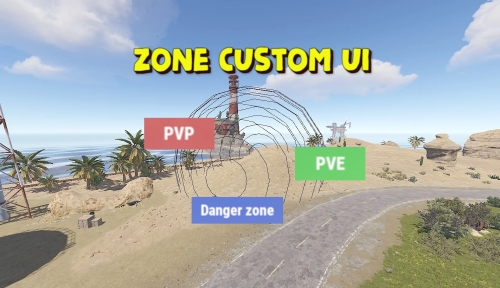
Displays the name of the zone the player is in. You can customize text, text color, background color, etc. This plugin takes information about zones from zonemanager, all information is saved in a config file, after which you can customize information about these zones, which will be displayed Commands: /rzinfo - update zone information Config file: { "Settings outside the zone": { "Id": "0", "Name": "Outside", "AnchorMin": "0.649 0.041", "AnchorMax": "0.695 0.081", "Color_Background": "0.1 0.1 0.8 0.8", "Color_Text": "1 1 1 1", "TextSize": "16", "TextPlaceHolder": "Outside" }, "Default settings for the new zone": { "Id": "0", "Name": "Default", "AnchorMin": "0.649 0.041", "AnchorMax": "0.695 0.081", "Color_Background": "0.1 0.8 0.1 0.8", "Color_Text": "1 1 1 1", "TextSize": "16", "TextPlaceHolder": "Default" }, "Zones list": [] }$3.99 -
Version 1.0.4
728 downloads
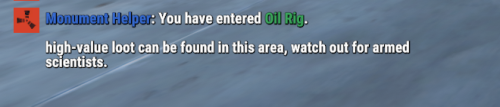
About: Displays custom messages with informative information for players when entering or leaving monuments. Full customizable bounds, display names and messages. More feature planned: Display recent combat history ex: death and players nearby count. Custom loot spawns. Permission: monumenthelper.use Chat Command: Toggle on/off notifications. /mh Lang: { "Prefix": "<color=#3669CF>Monument Helper</color>: ", "MonumentEnter": "You have entered <color=#3BA55C>{0}</color>.\n\n{1}", "MonumentLeave": "You left <color=#ED4245>{0}</color>", "ToggleEnabled": "<color=#3BA55C>Enabled</color>", "ToggleDisable": "<color=#ED4245>Disabled</color>", "Toggled": "was {0}" } Config: { "Chat command": "mh", "Display message prefix": true, "Display message when players enter a monument": true, "Display message when players a leave monument": true, "Wipe player toggles on new map save": true, "Monuments": { "Satellite Dish": { "DisplayName": "Satellite Dish", "Description": "A useful monument for loot, key cards and recycling items.", "Enabled": true, "Center": { "x": 8.0, "y": 1.0, "z": 8.0 }, "Bounds": { "x": 150.0, "y": 150.0, "z": 150.0 } }, "Oil Rig": { "DisplayName": "Oil Rig", "Description": "High-value loot can be found in this area. Watch out for armed scientists.", "Enabled": true, "Center": { "x": 25.0, "y": 0.0, "z": 0.0 }, "Bounds": { "x": 140.0, "y": 100.0, "z": 140.0 } }, "Mining Outpost": { "DisplayName": "Mining Outpost", "Description": "Low-value loot and a recycler can be found here.", "Enabled": true, "Center": { "x": 0.0, "y": 0.0, "z": 0.0 }, "Bounds": { "x": 50.0, "y": 50.0, "z": 50.0 } } } }Free- 6 comments
-
- 1
-
-
- #monument
- #announcment
- (and 2 more)
-

Version 2.0.1
3,521 downloads
RulesGUI displays a screen overlay on connect or command that a player must agree to, to continue playing on your server. This is a fork of the original work done by Pain Under his MIT Licence. V2 Full Rewrite, Backup and delete your config content. Features Customiseable overlay that the player HAS to accept to continue playing on your server. Chat command so that players can remind them selfs on the server rules at any time Admin command to force player to re-read the rules Variables Version 2.0.0 has a very easy to understand config. Background Image: True/False < Color or image as background Background Color RGBA: "0 0 0 1" < BG Color if ^ is set to false (RGBA examples at bottom) Background Image URL : << URL Of Background image if ^ is true Font Size << Size of font... duh Message Text: The message that will be displayed. Display on every connection: True/False << Display the message on first connection only or every connection. Disagree Kick Reason << If you disagree to the rules you get kicked from the server and the this will be displayed as the reason why Formatting As I have updated the code there is now more space to add text.. and as the text is no longer in a list format there is some formatting that needs to be applied. For new line us \n (not /). To make it look closer to the original use two \n\n Color tags etc all still work. Permissions rulesgui.usecmd Required to use /rulesto command Chat Commands /rules Will display rules on screen /rulesto "NameOrID" Will display rules on players screen. Console Command sendrules "PlayerName/ID" Will display the rules to selected player Configuration The settings and options for this plugin can be configured in the RulesGUI.json file under the oxide/config directory. The use of a JSON editor or validation site such as jsonlint.com is recommended to avoid formatting issues and syntax errors. { "Background Image true/false": true, "Background Color RGBA": "0.1 0.1 0.1 0.7", "Background Image URL": "https://i.ytimg.com/vi/yaqe1qesQ8c/maxresdefault.jpg", "Text Font Size": 22, "Message text": "<color=#00FFFF>Welcome!</color> <color=#ff0000>The following in-game activities are prohibited in the Game:</color>\n\n<color=#FFFF00>1.</color> Use of bots, use of third-party software, bugs.\n\n<color=#FFFF00>2.</color> Pretending to be a member of Administration.\n\n<color=#FFFF00>3.</color> Fraud, other dishonest actions.\n\n<color=#FFFF00>4.</color> Flooding, flaming, spam, printing in capital letters (CAPS LOCK).\n\n<color=#FFFF00>5.</color> Creating obstructions for other users, Greifing and bullying\n\n<color=#FFFF00>6.</color> Advertisement, political propaganda.\n\n<color=#ff0000>7. Racism! </color>\n\n<color=#0000FF>8. Failure to comply will land you in prison, continuing to break rules will land you a Ban!</color>", "Display on every connection true/false": true, "Disagree Kick Reason": "You disagreed with the rules!" } Color Examples blackSolid black. RGBA is (0 0 0 1). blueSolid blue. RGBA is (0 0 1 1). clearCompletely transparent. RGBA is (0 0 0 0). cyanCyan. RGBA is (0 1 1 1). grayGray. RGBA is (0.5 0.5 0.5 1). greenSolid green. RGBA is (0 1 0 1). greyEnglish spelling for gray. RGBA is the same (0.5 0.5 0.5 1). magentaMagenta. RGBA is (1 0 1 1). redSolid red. RGBA is (1 0 0 1). whiteSolid white. RGBA is (1 1 1 1). The Last digit dictates Alpha channel... so for an opaque appearance select a value below 1 E.g. 0.7 If you have any questions or problems, join my discord https://discord.gg/2ftdtaTQ6SFree- 22 comments
- 2 reviews
-
- 2
-
-
-
- #gui
- #information
- (and 4 more)
-
Version 1.0.1
15 downloads
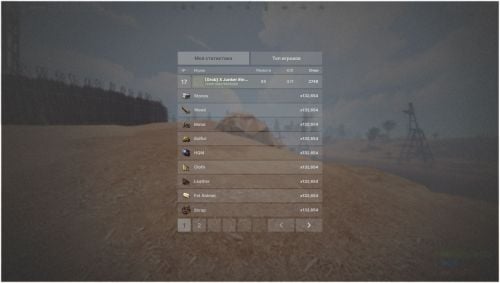
About Minimalistic Player Stats System A minimalistic player statistics system for your rust server, contains a simple and beautiful top players, as well as a personal profile displaying your own statistics. Features: Beautiful design The player can check self and other statistics All titles can be changed Shows all the necessary information about the player and his survival$10.00 -

Version 1.0.7
4,347 downloads
Simple set of CUI info pages for Rust servers. InfoScreens offers multi-page, and multi-subpage,information viewable by command and also automatically presented when a user joins the server. Permission infoscreens.show - Enables ability to show info screens to other players. ChatCommand /infoscreen with permission : /infoscreen <playername> /infoscreen <playername <pagename> ConsoleCommand ISWipe – This clears InfoScreens' record of players who have joined the server. Configuration Global. PermaUIButton = false; Creates a permanent 'I' button at screen top right. SideNav = false; - Toggles navigation between top and side. OnlyShowOnce = false; - If true, info is only shown automatically on first-join. NeverAutoShow = false; - Never display automatically on first-join. NumberOfPages = 4; - Automatically creates nav and config entries on reload. GuiTransparency = 0.95; ButtonColour = "0,100,0,1"; ButtonColourSelected = "0,200,0,1"; CommandAlias = "is"; - Alternative, customisable, chat command. Colours accept RGBA – maximums 255/255/255/1 Per-Page. VisibleTo - "default,somegroup" Makes a page only visible to the listed groups. This is comma separated, with no spaces. Each page, by default, has three elements. Two are text and one is image. Each element has the following options. Text Elements Only. "Content": "Some Text Here", - use \n line break for multi-line "FontSize": 16, "FontColour": "255,255,255,1", "AlignTopMiddleBottom": "top/middle/botton", "AlignLeftMiddleRight": "left/middle/right", Image Elements Only "URL": "https://...", All Elements "GoBehindNav": false, "ShowOnSubPages": "0", "PosBottomToTop": "0.0,1.0", "PosLeftToRight": "0.0,1.0" Usage Info. The 'Pos...' entries are on a scale 0-1. Examples. "PosLeftToRight": "0.0,1.0” is full width, left to right. "PosLeftToRight": "0.0,0.5” is half width, left to centre. "PosBottomToTop": "0.0,1.0 is full height, bottom to top "PosBottomToTop": "0.5,1.0" is half height, centre to top Additional elements can be added by copying/pasting/editing name. 'ShowOnSubPages' can be altered and will automatically create next/previous buttons. For example, you could have a background image with "ShowOnSubPages": "0,1,2", then have three content elements showing on "0”, "1”, "2” respectively. This will give three sub-pages with different content and the same background, under one nav-heading.Free -
Version 1.5.1
1,047 downloads
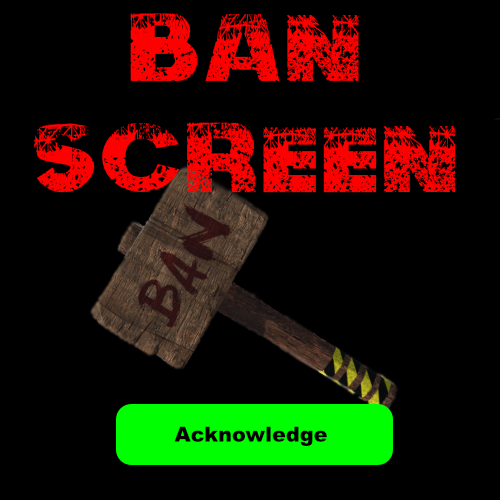
BanScreen displays a screen overlay to lock out a player and force them to acknowledge that they are being banned or warned. Updating it 1.5.1 Back up Your Config Features Customiseable overlay that the player is greeted with when banning Chat and console command so that a player can be banned from in game or rcon Variables Background Color "255 0 0 1" << If Background image is false then you can select the color and transparency of the GUI in RGBA format (Examples at bottom) Enabled True/False << Sets a background or color screen ImageURL URL << Set Background Image Messages "BAN_MESSAGE": "Failed to follow rules" << Message that will be displayed after player is banned and when they attempt to join the server FontSize "22" << Size of text on overlay "BAN_MESSAGES" ["line one","line two","line three"] << Text that will be displayed on Ban Screen "LC_MESSAGES" ["line one","line two","line three"] << Text that will be displayed of Last Chance Ban Acknowledge Button Enabled True/False << Display button on Ban Screen Seconds till close if button is false: 10 << Amount of seconds the Ban screen is displayed before banning player if button is set to false Warn Acknowledge Button Enabled True/False << Display button on Warning Screen Seconds till close if button is false: 10 << Amount of seconds the Warning screen is displayed before closing if button is set to false Permissions BanScreen.usecmd Required to use /BanScreen & /LastChance command Chat Commands /BanScreen "Player/ID" Will display Ban Screen to player /LastChance "Player/ID" Will display Last Chance Screen to player Console Command BanScreen "PlayerName/ID" Will display Ban Screen to player LastChance "Player/ID" Will display Last Chance Screen to player Configuration The settings and options for this plugin can be configured in the BanScreen.json file under the oxide/config directory. The use of a JSON editor or validation site such as jsonlint.com is recommended to avoid formatting issues and syntax errors. { "Background": { "Color": "255 0 0 1", "Enabled": false, "ImageURL": "https://i.ytimg.com/vi/yaqe1qesQ8c/maxresdefault.jpg" }, "Ban Acknowledge Button": { "Enabled": true, "Seconds till close if button is false": 10 }, "Messages": { "BAN_MESSAGE": "Failed to follow rules", "BAN_MESSAGES": [ "<color=#000000>STOP!</color> <color=#FFFF00>You have not followed the rules of this server:</color>", "As a result,", "It is the opinion of the staff that you are issued with", "A SERVER BAN", "If you feel the ban is unfair, you may appeal the ban via the following methods", "Discord", "Website", "<color=#0000FF>Note that appeals are at the discretion of the server owner</color>", "<color=#0000FF>And may take up to 48 hours to complete </color>" ], "FontSize": "22" }, "Warn Acknowledge Button": { "Enabled": true, "Seconds till close if button is false": 10 }, "WarningMsgs": { "FontSize": "22", "LC_MESSAGES": [ "<color=#000000>STOP!</color>", "This is a warning.", "Continue to not follow the rules and we will issue you", "A SERVER BAN", "Your actions are in violation of the server rules", "If you need to be remided of the rules", "Use /Rules ", "<color=#0000FF>If you continue in this manner you will be removed from the server</color>", "<color=#0000FF>This is your final warning </color>" ] } } Color Examples blackSolid black. RGBA is (0 0 0 1). blueSolid blue. RGBA is (0 0 1 1). clearCompletely transparent. RGBA is (0 0 0 0). cyanCyan. RGBA is (0 1 1 1). grayGray. RGBA is (0.5 0.5 0.5 1). greenSolid green. RGBA is (0 1 0 1). greyEnglish spelling for gray. RGBA is the same (0.5 0.5 0.5 1). magentaMagenta. RGBA is (1 0 1 1). redSolid red. RGBA is (1 0 0 1). whiteSolid white. RGBA is (1 1 1 1). The Last digit dictates Alpha channel... so for an opaque appearance select a value below 1 E.g. 0.7 Thanks to my moderator and friend MrBytedk for being banned about a hundred times while testing functionality If you have any questions or problems, join my discord https://discord.gg/2ftdtaTQ6SFree- 4 comments
- 1 review
-
- 2
-
-
- #information
- #informational
- (and 5 more)