Quick Answer
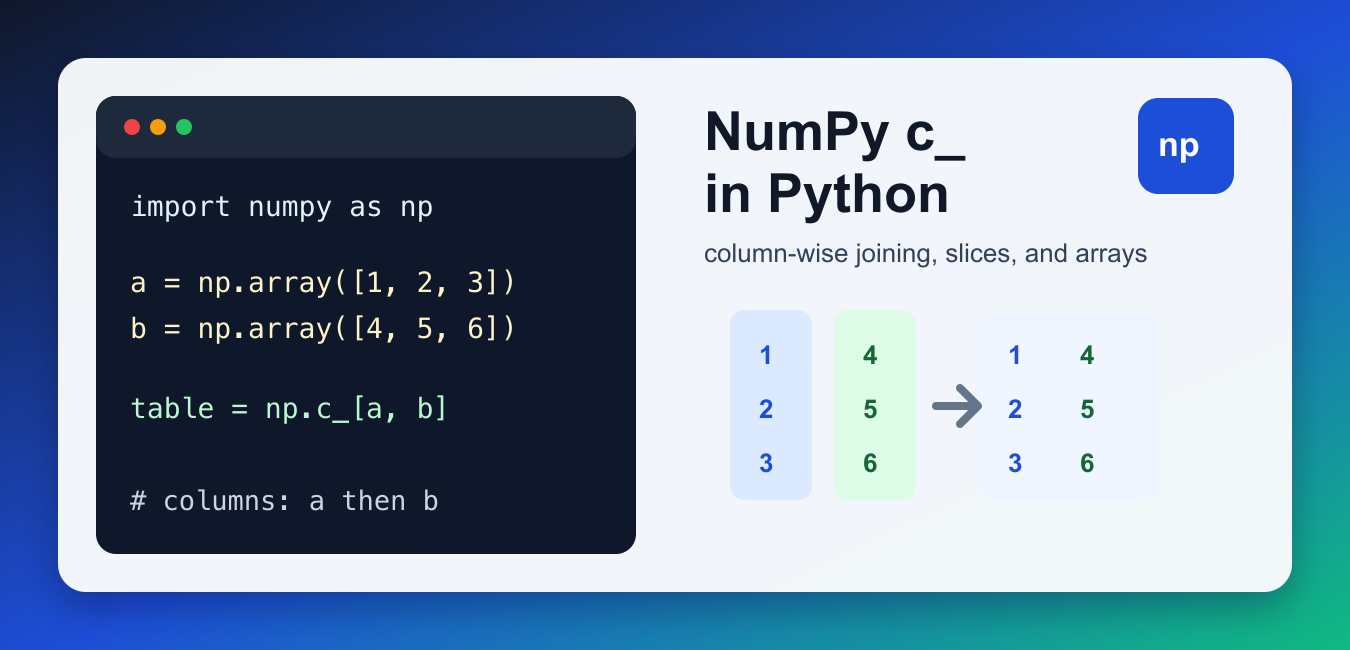
For equal-length one-dimensional arrays a and b, np.c_[a, b] creates a two-dimensional array with the inputs as columns and shape (n, 2). Use column_stack((a, b)) when you want the intent to be explicit, and use np.r_ for row-wise concatenation.
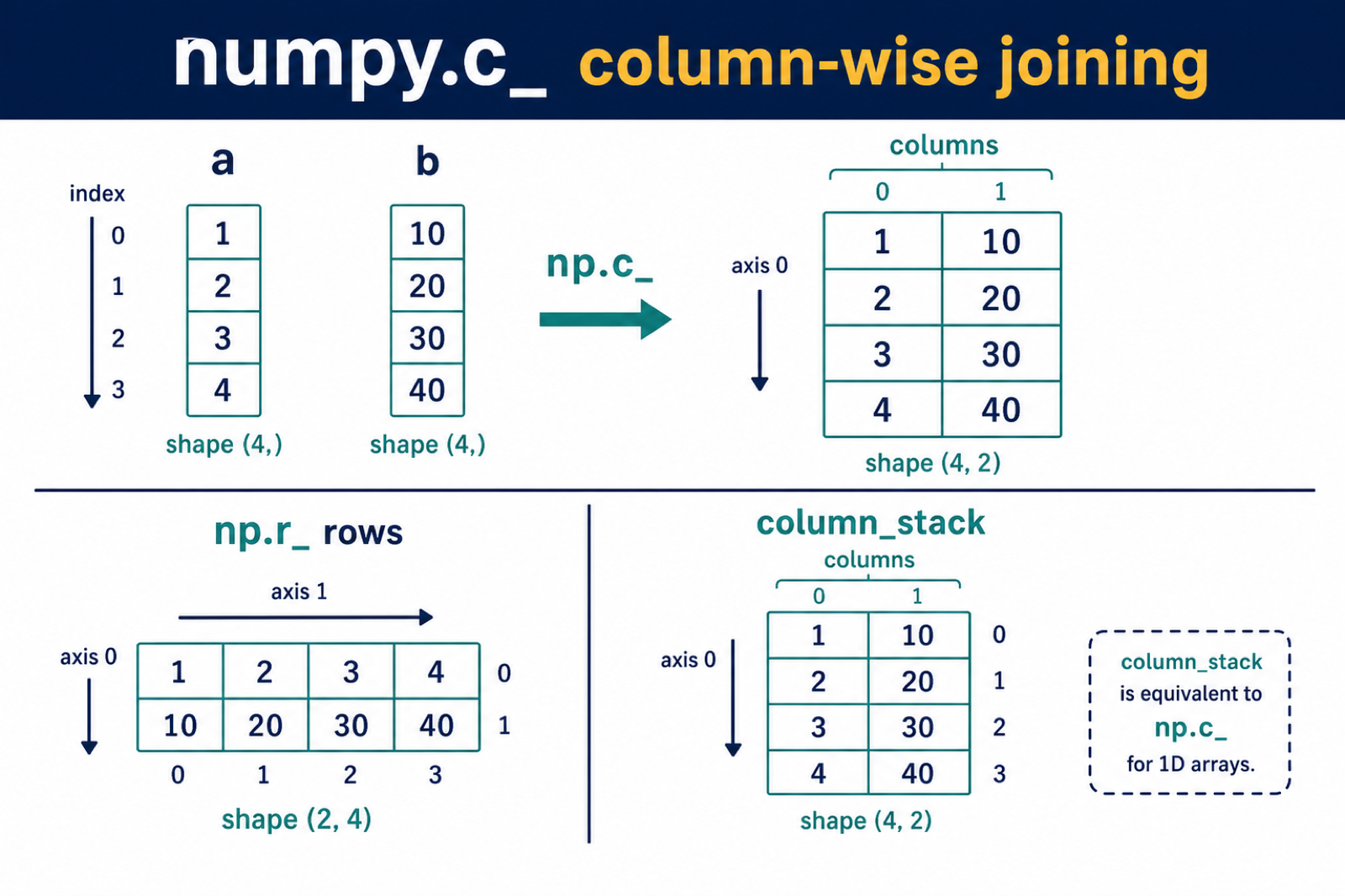
NumPy c_ is a shortcut object that joins arrays column-wise. It is useful when you have one-dimensional arrays and want to build a two-dimensional table where each input becomes a column. The expression np.c_[a, b] is often easier to read than reshaping each array manually.
The name looks unusual because c_ is not a normal function. It is an index-tricks object, so you use square brackets instead of parentheses. Inside those brackets, NumPy accepts arrays, lists, and slice expressions, then converts them into a joined array.
Use np.c_ for quick column construction in examples, notebooks, and small scripts. In larger application code, np.column_stack() may be more explicit, especially for readers who are not familiar with NumPy index tricks. The main goal is to make the final shape obvious.
Think of c_ as a quick way to make a small table. If a contains x values and b contains y values, np.c_[a, b] produces rows where each row keeps the matching x and y together.
Join Two One-Dimensional Arrays as Columns
The most common use is joining two one-dimensional arrays into a two-column array. Each input array becomes one column in the result. Joining complete columns differs from inserting at a position; NumPy insert: Add Values to Arrays covers index-based insertion and its copy semantics.
import numpy as np

a = np.array([1, 2, 3])
b = np.array([4, 5, 6])

table = np.c_[a, b]
print(table)
The output has shape (3, 2). The first column comes from a, and the second column comes from b. If you expected a flat array instead, use a different join method such as np.r_ or np.concatenate(). Always check the result with table.shape when the next calculation depends on exact dimensions. np.c_ offers column-oriented joining syntax; NumPy hstack: Stack Arrays Horizontally explains hstack’s one-dimensional special case and shape requirements.
Join Lists Without Creating Arrays First
np.c_ can also accept plain Python lists. NumPy converts them to arrays before joining them.
import numpy as np

left = [10, 20, 30]
right = [1, 2, 3]

result = np.c_[left, right]
print(result)
This is convenient for quick examples. For production code, converting to arrays explicitly can make dtype and shape behavior clearer. If you are building numeric vectors first, see Python vector with NumPy. Explicit arrays also make it easier to catch mixed data types before they spread through later calculations. Column-wise joining is one orientation; NumPy vstack: Stack Arrays Vertically stacks compatible arrays vertically by rows.
Use c_ With Slice Syntax
Because c_ is an index-tricks object, it supports slice expressions. A slice such as 1:5 can create a range-like column.
import numpy as np

result = np.c_[1:5, 10:14]
print(result)
This creates columns from the slice values. It is compact, but it can be surprising to readers who expect slice notation only for indexing existing arrays. Use it when the brevity helps more than it hurts readability. If the generated sequence is important, consider creating it with np.arange() first and then joining the arrays.
Compare c_ With column_stack()
The official numpy.column_stack() function is a clearer named alternative for stacking one-dimensional arrays as columns.
import numpy as np

a = np.array([1, 2, 3])
b = np.array([4, 5, 6])

same_result = np.column_stack((a, b))
print(same_result)
For many teams, column_stack() is easier to understand than c_. Use c_ when you value compact notation, and use column_stack() when explicit names matter more. The official NumPy c_ documentation describes the shortcut behavior.
Compare c_ With r_ and concatenate()
numpy.r_ joins row-wise or along the first axis, while c_ joins column-wise. numpy.concatenate() is the more general function when you want direct control over the axis.
import numpy as np

a = np.array([1, 2, 3])
b = np.array([4, 5, 6])

row_joined = np.r_[a, b]
column_joined = np.c_[a, b]

print(row_joined)
print(column_joined)
If shape is the main problem, inspect the array dimensions before joining. The NumPy reshape 3D to 2D guide covers related shape reasoning. Use concatenate() when you already have arrays with compatible dimensions and need to choose an axis deliberately.
Watch Array Lengths and Shapes
Arrays joined with np.c_ must be compatible along the row dimension. If one input has three values and another has four, NumPy cannot form a clean two-column table.
import numpy as np

a = np.array([1, 2, 3])
b = np.array([4, 5, 6])

if len(a) == len(b):
    print(np.c_[a, b])
else:
    print("Arrays must have the same length")
That length check is simple but useful when arrays come from user input or separate data sources. If you are concerned about whether a result shares memory with its inputs, see NumPy view(). In most simple uses, treat the joined output as a new array that should be validated before reuse.
When Should You Use NumPy c_?
Use np.c_ when you need a quick two-dimensional array built from columns. It is especially handy for creating sample matrices, pairing x and y values, or passing columns into numerical calculations. For statistical workflows, the result can feed functions such as NumPy cov().
Choose column_stack() when code clarity is more important than compact syntax. Choose concatenate() when you need explicit axis control. The right tool is the one that makes the resulting shape obvious to the next person reading the code. Avoid c_ in APIs where callers may not expect index-trick syntax.
References
Check the Resulting Shape
np.c_ is an index-tricks helper that converts one-dimensional inputs into columns before concatenating them. Every column must have a compatible length.
import numpy as np

a = np.array([1, 2, 3])
b = np.array([10, 20, 30])

result = np.c_[a, b]
print(result)
print(result.shape)  # (3, 2)
If the lengths differ, NumPy raises a shape-related error instead of silently inventing missing values. Inspect array.shape before combining data from separate sources.
Choose c_, column_stack, or r_ Deliberately
column_stack((a, b)) communicates the column operation directly and is often easier to discover in a code review. np.r_[a, b] concatenates along the first axis and produces one longer row-like array for one-dimensional inputs.
import numpy as np

a = np.array([1, 2, 3])
b = np.array([10, 20, 30])

print(np.c_[a, b].shape)              # (3, 2)
print(np.column_stack((a, b)).shape)  # (3, 2)
print(np.r_[a, b].shape)              # (6,)
Use slice syntax with c_ only when its compact notation improves readability. For reusable library code, an explicit stacking function can make axis intent clearer.
Frequently Asked Questions
What does NumPy c_ do?
np.c_ joins inputs as columns. For equal-length one-dimensional arrays it creates a two-dimensional array with shape (n, 2).
What is the difference between np.c_ and np.r_?
np.c_ builds columns for one-dimensional inputs, while np.r_ concatenates along the first axis and commonly produces one longer one-dimensional result.
Is np.c_ the same as column_stack?
For one-dimensional arrays, np.c_[a, b] and np.column_stack((a, b)) produce equivalent column-shaped results, though column_stack states the intent more explicitly.
Why does np.c_ raise a shape error?
The input columns must have compatible lengths or dimensions. Inspect each array’s shape before joining data.
