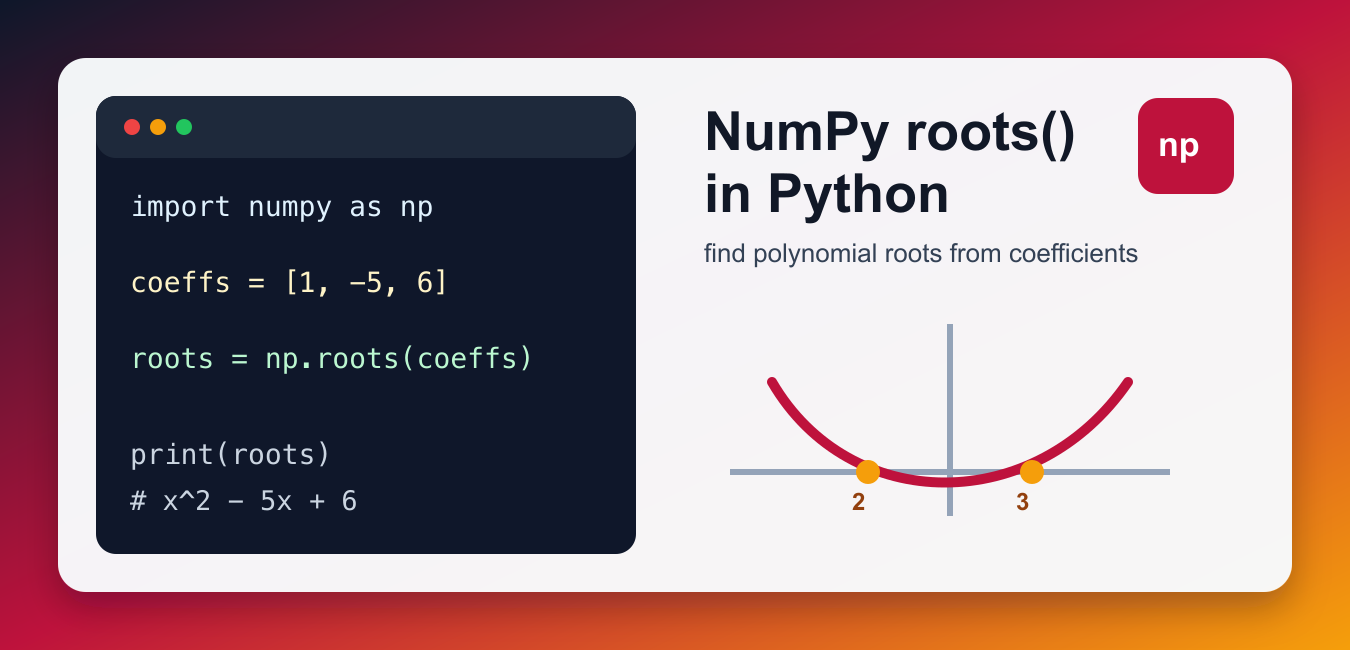
Quick answer: np.roots() returns polynomial solutions from coefficients ordered from the highest degree to the constant term. Results may be real or complex and can be sensitive to coefficient scaling. Evaluate the polynomial at each candidate and inspect residuals instead of assuming every returned value is exact.

NumPy roots() finds the roots of a polynomial from its coefficients. A root is an x value where the polynomial evaluates to zero. For example, the polynomial x^2 - 5x + 6 has roots 2 and 3 because both values make the expression equal zero. Polynomial roots and element-wise nth roots are different operations; Find the Nth Root in Python with NumPy handles scalar and array nth roots, including negative inputs.
The most important detail is coefficient order. The classic np.roots() function expects coefficients from the highest power down to the constant term. That means [1, -5, 6] represents x^2 - 5x + 6, not 1 - 5x + 6x^2.
Use roots() when you already have the polynomial coefficients and need the zero points. If you need to evaluate the polynomial at known x values instead, use polyval(). If you need to fit coefficients from data, fit the polynomial first and then find its roots. Keeping those tasks separate makes numerical code easier to check.
Root-finding can return real numbers, complex numbers, repeated roots, or approximate floating-point values. Treat the output as numerical data, not as exact algebra text. That means you should verify important roots and format them carefully before showing them to users.
Find Roots of a Quadratic Polynomial
The official numpy.roots() function takes a one-dimensional coefficient array and returns the roots.
import numpy as np

coefficients = [1, -5, 6]

roots = np.roots(coefficients)
print(roots)
This returns roots close to 3 and 2. The order of the returned roots is not something your program should rely on; sort them if display order matters. For reports, it is common to sort real roots after checking whether the imaginary part is effectively zero. NumPy roots handles polynomial coefficients, while Solve Nonlinear Equations with SciPy fsolve solves general nonlinear equations from callable functions and starting guesses.
Check the Roots With polyval()
You can verify roots by evaluating the original polynomial at each root. Values very close to zero confirm the result within floating-point precision.
import numpy as np

coefficients = [1, -5, 6]
roots = np.roots(coefficients)

values = np.polyval(coefficients, roots)
print(values)
The output may contain tiny values such as 8.881e-16 instead of exact zero. That is normal floating-point behavior. The refreshed NumPy polyval() guide explains polynomial evaluation in more detail. Verification is especially useful when roots are complex or when coefficients come from earlier calculations.
Use the Correct Coefficient Order
Coefficient order controls the polynomial that NumPy solves. The first coefficient belongs to the highest degree, and the last coefficient is the constant.
import numpy as np

# 2x^3 - 3x^2 + 0x - 5
coefficients = [2, -3, 0, -5]

roots = np.roots(coefficients)
print(roots)
Include zero coefficients for missing powers. In the example above, the 0 keeps the x term in the correct position. Omitting it would describe a different polynomial. Avoid leading zero coefficients too; they can make the intended degree unclear.
Handle Complex Roots
Some polynomials do not have real roots. NumPy returns complex values when needed.
import numpy as np

# x^2 + 1 has roots i and -i
coefficients = [1, 0, 1]

roots = np.roots(coefficients)
print(roots)
Complex roots are expected for many valid polynomials. Do not discard the imaginary part unless your problem specifically requires real roots only and you have checked the result carefully. If you only want real-looking roots, use a tolerance instead of comparing the imaginary part to exactly zero.

Use poly1d for Readable Output
numpy.poly1d can make a polynomial easier to print and reuse while still relying on the same coefficient order.
import numpy as np

polynomial = np.poly1d([1, -5, 6])

print(polynomial)
print(polynomial.r)
The .r attribute returns the roots of the polynomial object. This is convenient in notebooks and short scripts where readable output matters. For application code, plain coefficient arrays are often easier to serialize, test, and pass between functions.
Compare With the New Polynomial API
NumPy’s newer polynomial namespace uses coefficients in ascending order for functions such as polyroots().
import numpy as np
from numpy.polynomial import polynomial as P

classic_roots = np.roots([1, -5, 6])
new_api_roots = P.polyroots([6, -5, 1])

print(classic_roots)
print(new_api_roots)
Both examples describe x^2 - 5x + 6, but the coefficient order is reversed. Mixing the two APIs without comments is a common source of wrong answers. If a project uses both APIs, name variables clearly, such as descending_coeffs and ascending_coeffs.
Common Mistakes
The most common mistakes are reversing coefficient order, forgetting zero placeholders for missing powers, and expecting exact zeros when verifying roots. Floating-point arithmetic often gives tiny residuals. Use rounding only for display; the NumPy round() guide covers formatting.
If you are passing many coefficient arrays around, document the convention near the data. For array basics, see Python vector with NumPy. For matrix-style numerical summaries, see NumPy cov().
Also remember that repeated roots may appear more than once in the output, and small numerical differences can make repeated roots look slightly different. When comparing roots in tests, use tolerances instead of exact equality.
References
- NumPy docs: numpy.roots()
- NumPy docs: numpy.polyval()
- NumPy docs: numpy.poly1d
- NumPy docs: polyroots()
Pass Coefficients In Descending Order
For x squared minus 5x plus 6, pass [1, -5, 6]. The first coefficient multiplies the highest power and the final value is the constant term. A wrong order solves a different polynomial without necessarily raising an error.
import numpy as np

coefficients = [1, -5, 6]
print(np.roots(coefficients))
Expect Complex Roots
A polynomial with real coefficients can have complex solutions. Inspect real and imaginary parts and apply a tolerance before converting a nearly-real result to a scalar real value. Do not discard the imaginary part merely because the plot or input looks real.
import numpy as np

roots = np.roots([1, 0, 1])
for root in roots:
    print(root.real, root.imag)
Verify With A Polynomial Evaluation
Evaluate the original polynomial at each root and measure the residual. Floating-point algorithms return approximations, so use an appropriate absolute or relative tolerance. A large residual can indicate a coefficient-order error, ill-conditioning, or an unsuitable numerical formulation.
import numpy as np

coefficients = [1, -5, 6]
roots = np.roots(coefficients)
residuals = np.polyval(coefficients, roots)
print(residuals)
print(np.allclose(residuals, 0))
Prefer The New Polynomial APIs For New Work
np.roots belongs to NumPy’s older polynomial API. The numpy.polynomial namespace offers clearer domain-specific classes and functions for many new applications. Keep the coefficient convention documented when passing between APIs and test a known polynomial before integrating data-driven coefficients.
from numpy.polynomial import Polynomial

polynomial = Polynomial([-6, 5, -1])
print(polynomial.roots())
NumPy’s official roots() reference defines coefficient order, complex results, and the newer polynomial API note. Verify numerical roots rather than comparing floating-point values with exact equality.
For related numerical methods, compare NumPy polynomial fitting, element-wise nth roots, and SciPy equation solving before selecting a polynomial API.
Frequently Asked Questions
What does NumPy roots() do?
It returns the roots of a polynomial described by a one-dimensional sequence of coefficients.
What order should polynomial coefficients use?
Pass coefficients from the highest power down to the constant term, such as [1, -5, 6] for x² – 5x + 6.
Why does roots() return complex numbers?
A polynomial may have complex roots even when its coefficients are real; inspect the imaginary part before treating a solution as real.
How do I verify NumPy roots?
Evaluate the polynomial at each candidate with polyval or the newer polynomial APIs and check the residual against an appropriate tolerance.
