Search the Community
Showing results for tags 'node'.
Found 7 results
-
Version 1.0.0
38 downloads
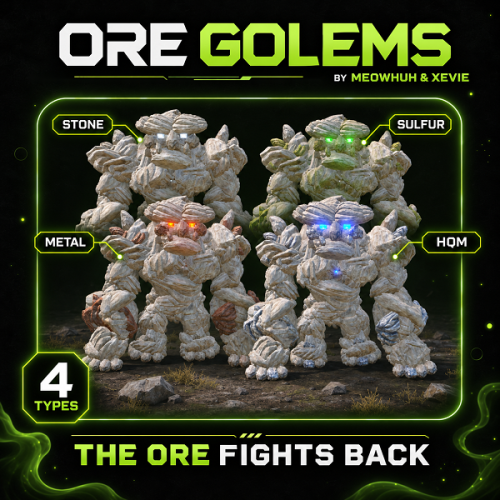
Turn ordinary ore nodes into massive, animated boss encounters in Rust. Mining resources should not always be a predictable activity. Sometimes, the rocks you are mining should fight back. OreGolems introduces powerful, animated ore golems that can awaken from resource nodes and attack nearby players. Each golem is constructed from Rust entities and features custom animations, multiple attack abilities, destructible armor, and rewarding loot when defeated. Server owners can customize different golem types, health, damage, spawn chances, attack behavior, fixed spawn locations, rewards, health bars, map markers, and performance settings. Perfect for PvE, PvP, Vanilla+, modded, RPG/RP, survival, custom progression, and boss-event Rust servers. Features Adds massive, animated ore golems that players can encounter while mining resources. Four configurable golem types: Stone, Sulfur, Metal, and HQM. Unique appearances for different golem types using matching ore nodes, collectables, and colored lights. Golems are assembled from Rust entities using a custom bone, model, and animation system. Natural spawning system with configurable awakening chances for each ore type. Ore nodes can shake and display warning effects before a golem awakens. Configurable number of warning hits before awakening. Configurable maximum number of active golems for automatic awakening. Optional fixed spawn points with configurable ore types and respawn delays. In-game admin commands to create, remove, and list fixed spawn points. Admin commands to spawn golems manually and remove active golems. Custom animations for walking, waking, punching, ground slamming, grabbing, throwing rocks, staggering, sleeping, and dying. Four configurable attack abilities: Grab and Throw, Rock Throw, Ground Slam, and Punch. Separate damage, range, and cooldown settings for each attack. Per-golem-type attack damage multipliers. Rock throwing with configurable projectile speed, size, and target movement prediction. Grab and Throw attack that can pick up players and throw them through the air. Ground Slam attack with configurable area damage and impact effects. Destructible armor that breaks away as the golem loses health. Configurable armor-breaking stages based on remaining health. Heavy hits can stagger golems and interrupt their attacks. Custom targeting, movement speed, chasing distance, and sleeping behavior. Golems can return to a sleeping ore node while preserving their remaining health. Custom reward ore nodes appear when a golem is defeated. Configurable reward node amounts and resource contents for each golem type. Reward crates with configurable skins and vanilla or custom loot. Custom loot supports item amounts, drop chances, skin IDs, names, and text. Optional economy payouts to the player credited with defeating a golem. Optional UltimateLeaderboard integration for recording golem victories. Configurable lifetimes for reward nodes, debris, and loot crates. Optional in-game health bar displaying the golem type and remaining HP. Optional map markers with configurable radius or shop-style icons. Configurable animation update rate and distance-based network update optimization. Automatic cleanup of golem entities, temporary objects, and expired rewards. Plugin hooks for controlling targeting, awakening, and defeated events. No additional NPC framework required. Golem Types OreGolems includes four different golem types, each with its own appearance, health, damage multiplier, rewards, and loot settings. Golem Type Default Health Resource Type Stone Golem 12,000 HP Stone Sulfur Golem 18,000 HP Sulfur Metal Golem 24,000 HP Metal Ore HQM Golem 32,000 HP High Quality Metal Ore Stone Golem The Stone Golem is the lowest-health default golem type. Health: 12,000 HP. Appearance: Stone ore body with standard industrial lights. Default reward: Stone resource nodes. Default crate loot: Normal crate loot. Sulfur Golem A stronger golem made from sulfur ore resources. Health: 18,000 HP. Appearance: Sulfur ore body with green industrial lights. Default reward: Sulfur Ore and Stones. Default crate loot: Normal crate loot. Metal Golem A powerful golem made from metal ore resources. Health: 24,000 HP. Appearance: Metal ore body with red industrial lights. Default reward: Metal Ore and Stones. Default crate loot: Normal crate loot. HQM Golem The strongest default golem type, offering a more challenging encounter. Health: 32,000 HP. Appearance: HQM ore body with blue industrial lights. Default reward: High Quality Metal Ore and Stones. Default crate loot: Elite crate loot. Tip Custom Golem Difficulty Each golem type has its own configuration for health, attack damage multiplier, reward nodes, reward items, loot crates, and awakening chance. This allows server owners to create different difficulty and reward levels for each resource type. Golem Attacks OreGolems includes four animated combat abilities with separate settings for damage, cooldowns, range, and additional attack behavior. Attack Default Damage Cooldown Range Grab and Throw 20 15 seconds 6.5 m Rock Throw 35 10 seconds 35 m Ground Slam 40 8 seconds 7 m Punch 25 4 seconds 7 m Grab and Throw The golem can grab nearby players and throw them away. Animated grabbing and throwing sequence. Configurable grab damage. Configurable attack range and cooldown. Configurable reach distance from the golem's hand. Adjustable forward and upward throwing speeds. Player throwing uses Rust's ragdoll mechanics. Rock Throw The golem can attack distant players by throwing large rocks. Animated rock pickup and throwing sequence. Configurable minimum and maximum attack ranges. Configurable rock damage and cooldown. Adjustable projectile speed. Configurable rock size. Target movement prediction to help aim at moving players. Rock impact detection and damage. Ground Slam The golem can slam the ground to damage nearby players. Animated ground slam attack. Configurable attack damage. Adjustable attack range and hit radius. Configurable cooldown. Ground impact visual effects. Optional custom impact effect prefab. Punch The golem can attack nearby players using animated punches. Animated punching sequence. Configurable damage and cooldown. Adjustable attack range. Configurable hit radius. Directional hit detection. Tip Example: Increase the Ground Slam damage to 60 and reduce its cooldown to 5 seconds to create a more aggressive boss encounter. Each attack can also be enabled or disabled separately in the configuration. Destructible Armor & Staggering OreGolems features an armor-breaking system that makes fights more visually dynamic as the golem takes damage. Instead of remaining visually unchanged throughout the fight, golems can lose parts of their outer armor as their health decreases. Armor Stage Remaining Health Stage 1 75% HP Stage 2 50% HP Stage 3 25% HP Armor pieces detach when configured health thresholds are reached. Detached pieces fall away from the golem. Armor stages can be customized in the configuration. Powerful hits can trigger a stagger animation. Configurable minimum hit damage required to stagger a golem. Configurable stagger cooldown. Staggering can interrupt the golem's current actions. Tip Example: Set [Armor] Damage in one hit needed to stagger the golem (0.04 = 4% of max health) to 0.04 to allow individual hits dealing at least 4% of the golem's maximum health to trigger a stagger, subject to the configured cooldown. For a Stone Golem with 12,000 HP, this means a hit dealing at least 480 damage can trigger a stagger. Awakening & Natural Spawning OreGolems can turn normal resource gathering into unexpected boss encounters. When a player mines an eligible ore node, the plugin can randomly select that node to become a sleeping golem. Once selected, the ore node begins displaying warning effects as the player continues mining. After the configured warning hits, the golem awakens and begins attacking. Awakening Settings Setting Default Wake chance per ore type 1% Warning hits before awakening 3 Maximum active golems 3 Target radius 30 meters Chase radius 40 meters Different wake chances can be configured for each ore type. Warning effects indicate that a selected ore node may awaken. Golems emerge from their corresponding ore nodes. Golems automatically search for nearby valid player targets. Natural awakening is limited by the configured maximum active golem count. The spawning system checks surrounding terrain and obstacles before selecting natural spawn locations. Note Natural Spawn Notes The default wake chance is 0.01, equal to 1%. The chance applies when an eligible ore node is first considered for awakening. Selected nodes display warning effects during subsequent mining hits. Natural spawn checks avoid unsuitable locations such as monuments, water, nearby Tool Cupboards, steep terrain, and obstructed areas. When fixed spawns are enabled, the plugin uses the fixed-spawn system instead of random awakening from ordinary ore nodes. Fixed Spawn Points Server owners can optionally create permanent golem encounter locations. Fixed spawn points create sleeping ore nodes at configured positions, allowing players to trigger golem encounters by mining them. Enable or disable fixed spawning. Create spawn points directly in-game. Select the ore type for each spawn point. Assign a unique name to each location. Automatically save spawn coordinates to the configuration. List all configured spawn locations. Remove unwanted spawn locations. Configurable respawn delay. Fixed spawn nodes can return after their encounter has ended. Fixed Spawn Commands /golem point add <name> [type] - Saves a fixed spawn point at your current position. /golem point remove <name> - Removes a saved spawn point. /golem point list - Lists all saved spawn points and their coordinates. Command Examples /golem point add StoneBoss stone /golem point add SulfurBoss sulfur /golem point add MetalBoss metal /golem point add HQMBoss hqm /golem point list /golem point remove StoneBoss Note Fixed Spawn Setup Fixed spawns are disabled by default. Set [Fixed Spawns] Enabled to true under Fixed spawns in the configuration. The default respawn delay is 900 seconds (15 minutes). You can create spawn points while the system is disabled, but they will not become active until fixed spawning is enabled and the plugin is reloaded. Golem Behavior OreGolems includes configurable movement and targeting behavior. Setting Default Target radius 30 m Chase radius 40 m Walk speed 1.3 m/s Time without target before sleeping 30 seconds Sleeping node lifetime 1,800 seconds Searches for nearby valid players. Moves toward its target using animated walking. Uses configured attacks depending on the player's distance. Limits how far it can chase players from its awakening location. Can return toward its original position. Can return to a sleeping ore node after losing its target. Preserves remaining health when returning to sleep. Sleeping nodes can awaken again when mined. Temporary sleeping nodes expire after their configured lifetime. Tip Example: Increase [Behavior] Walk speed (meters per second) to 2.0 and [Behavior] Maximum chase distance from where the golem woke up (meters) to 60 to make golems move faster and pursue players across a larger area. Rewards & Loot Defeating a golem can reward players with collectible resource nodes, loot crates, and optional economy payouts. Reward Ore Nodes Each golem type supports custom reward nodes containing configurable resource items. Golem Type Default Resource Contents per Node Stone 1,000 Stones Sulfur 600 Sulfur Ore + 300 Stones Metal 600 Metal Ore + 300 Stones HQM 60 HQM Ore + 300 Stones By default, each golem can produce up to 3 reward nodes when defeated, depending on available ore parts. Reward nodes can be mined to collect their configured resources. Loot Crates Each defeated golem also creates a reward crate. Configurable crate skin for each golem type. Option to use vanilla loot. Configurable vanilla loot source crate. Optional custom loot tables. Configurable item shortnames. Minimum and maximum item amounts. Individual item drop chances. Custom item skin IDs. Custom item display names. Custom item text, including personalized messages on notes. Tip Example: Configure a special HQM Golem reward crate using custom loot instead of the default elite crate loot. You can add valuable items, set custom chances, and customize how much loot players receive when defeating the boss. The default custom loot examples include Scrap with a configurable drop chance and a custom-named Golem Hunter's Note containing a message. Note Custom Loot Settings Each golem type has its own custom loot list. You can configure item shortnames, amounts, chances, skins, names, and text. The included examples contain Scrap with a 50% chance and a Golem Hunter's Note with a 100% chance. Standard Rust crate loot is enabled by default. Custom loot is used only when standard Rust loot is disabled for that golem type. Reward Lifetimes Reward Object Default Lifetime Reward ore nodes 900 seconds Golem debris 60 seconds Loot crates 900 seconds These values can be customized in the configuration. Economy & Leaderboard Integration OreGolems supports optional integrations for rewarding and tracking boss victories. Economy Payouts Server owners can configure economy rewards for each golem type. Configurable economy plugin name. Configurable balance addition hook. Separate payout amount for each golem type. Set the amount to 0 to disable economy rewards. Payouts are awarded to the player credited with defeating the golem. The default economy plugin name is Economics, using the Deposit hook. Other economy plugins can be configured using their supported balance hooks. UltimateLeaderboard OreGolems includes optional UltimateLeaderboard integration. When a golem is defeated, the plugin can record an event victory for the credited player through UltimateLeaderboard's API. Note Integration Notes Economy integration is optional. Economy payouts are disabled by default. UltimateLeaderboard integration is optional. The plugin determines the credited killer using recorded damage contributions. Both integrations require their respective plugins to be installed and compatible. Health Bar & Map Markers OreGolems includes optional visual information to help players identify and track active golems. Health Bar Configurable in-game health bar. Shows the golem's ore type. Displays current and maximum health. Automatically updates during combat. Configurable display distance. Shows nearby active golems without requiring a chat command. Default health bar distance: 50 meters. Map Markers Optional map markers for active golems. Supports a radius-style map marker. Optional shop-style map icon. Configurable marker radius. Markers are removed when the golem is defeated or removed. Note Default Settings Health bars are enabled by default. Map markers are disabled by default. Both features can be configured separately. Performance Settings OreGolems includes configurable performance settings for controlling animation and network updates. Configurable animation ticks per second. Distance-based update behavior. Reduced network update frequency for distant golems. Configurable distance for far update rates. Configurable distance beyond which pose network updates are suppressed. Automatic removal of temporary combat effects and objects. Configurable maximum active golem count for automatic awakening. Setting Default Animation ticks per second 20 Far update distance 80 m Far update rate 10 updates/second Network update cutoff distance 200 m Tip Performance Tip For servers expecting frequent boss encounters, adjust the maximum active golems, animation tick rate, and distance-based update settings to suit your server performance. Admin Commands /golem spawn <type> - Spawns the selected golem type in front of the admin. /golem play <sequence> - Plays an animation sequence on the nearest active golem. /golem clear - Removes all active golems. /golem point add <name> [type] - Creates a fixed spawn point at the admin's current location. /golem point remove <name> - Removes a fixed spawn point. /golem point list - Lists all configured fixed spawn points. Command Examples /golem spawn stone /golem spawn sulfur /golem spawn metal /golem spawn hqm /golem play wake /golem play punch /golem play slam /golem play grab /golem play rock /golem play stagger /golem play sleep /golem play death /golem play walk /golem clear /golem point add StoneBoss stone /golem point add SulfurBoss sulfur /golem point add HQMBoss hqm /golem point list /golem point remove StoneBoss Note Command Notes All /golem commands require oregolems.admin. The spawn command defaults to Stone when no ore type is provided. The play command targets the nearest active golem. The clear command removes active golems. Fixed spawn points are saved in the plugin configuration. The default ore type for new fixed spawn points is Stone. Console Commands oregolems.spawn <type> - Spawns the selected golem type in front of the player using the client console. oregolems.clear - Removes all active golems. Note Console Access The spawn console command requires a player context and oregolems.admin. The clear console command supports authorized players and the server console. Permissions oregolems.admin - Grants access to all OreGolems admin commands, including spawning, animation playback, clearing golems, and managing fixed spawn points. Normal players do not need permissions to encounter, fight, or collect rewards from ore golems. Installation OreGolems supports both Oxide (uMod) and Carbon. The downloaded ZIP contains two required files: OreGolems.cs - Main plugin file. data/OreGolems/Golem.json - Golem model, parts, poses, and animation data. Installation Steps Extract the downloaded ZIP archive. Upload OreGolems.cs to your server's plugin folder: Oxide: oxide/plugins/ Carbon: carbon/plugins/ Upload Golem.json to your server's data folder: Oxide: oxide/data/OreGolems/ Carbon: carbon/data/OreGolems/ Make sure both files are in the correct directories. Load or reload the OreGolems plugin. Edit the generated configuration: Oxide: oxide/config/OreGolems.json Carbon: carbon/configs/OreGolems.json Grant the admin permission if you want to use the management commands. Oxide File Structure oxide/ ├── plugins/ │ └── OreGolems.cs ├── data/ │ └── OreGolems/ │ └── Golem.json └── config/ └── OreGolems.json Carbon File Structure carbon/ ├── plugins/ │ └── OreGolems.cs ├── data/ │ └── OreGolems/ │ └── Golem.json └── configs/ └── OreGolems.json Warning Important Installation Requirement The Golem.json data file is required for OreGolems to function. This file contains the custom model and animation definitions used to construct and animate the golems. If the file is missing or cannot be loaded, the plugin will report an error and unload. Do not upload only the .cs file. Make sure to include the supplied data folder. Example Configuration { "Ore types": { "stone": { "[Ore] Wake chance on the first hit of a natural ore node (0.50 = 50%)": 0.01, "[Ore] Maximum health (HP)": 12000.0, "[Ore] Attack damage multiplier": 1.0, "[Ore] Maximum ore nodes dropped on death": 3, "Items in each dropped ore node": [ { "Item shortname": "stones", "Amount": 1000 } ], "Loot crate dropped on death": { "[Loot] Crate skin ID": 2538049119, "[Loot] Use standard Rust crate loot": true, "[Loot] Rust crate prefab to copy loot from (e.g. crate_normal)": "crate_normal", "Custom loot (used when standard Rust loot is disabled)": [ { "Item shortname": "scrap", "Minimum amount": 25, "Maximum amount": 50, "Chance to include this item (0.5 = 50%)": 0.5, "Skin ID": 0, "Custom name": "", "Custom text": "" }, { "Item shortname": "note", "Minimum amount": 1, "Maximum amount": 1, "Chance to include this item (0.5 = 50%)": 1.0, "Skin ID": 0, "Custom name": "Golem Hunter's Note", "Custom text": "You defeated an Ore Golem. The loot is yours!" } ] }, "Economy reward for the player who dealt the most damage": { "[Economy] Economy plugin name": "Economics", "[Economy] Economy plugin hook that adds to the player's balance": "Deposit", "[Economy] Reward amount (0 = no payout)": 0.0 }, "[Ore] Ore node prefab used for the golem body": "stone-ore", "[Ore] Ore collectible prefab used for body parts and thrown rocks": "stone-collectable", "[Ore] Lamp prefab used for the golem's eyes": "industrial.wall.lamp.deployed" }, "sulfur": { "[Ore] Wake chance on the first hit of a natural ore node (0.50 = 50%)": 0.01, "[Ore] Maximum health (HP)": 18000.0, "[Ore] Attack damage multiplier": 1.0, "[Ore] Maximum ore nodes dropped on death": 3, "Items in each dropped ore node": [ { "Item shortname": "sulfur.ore", "Amount": 600 }, { "Item shortname": "stones", "Amount": 300 } ], "Loot crate dropped on death": { "[Loot] Crate skin ID": 2517917450, "[Loot] Use standard Rust crate loot": true, "[Loot] Rust crate prefab to copy loot from (e.g. crate_normal)": "crate_normal", "Custom loot (used when standard Rust loot is disabled)": [ { "Item shortname": "scrap", "Minimum amount": 25, "Maximum amount": 50, "Chance to include this item (0.5 = 50%)": 0.5, "Skin ID": 0, "Custom name": "", "Custom text": "" }, { "Item shortname": "note", "Minimum amount": 1, "Maximum amount": 1, "Chance to include this item (0.5 = 50%)": 1.0, "Skin ID": 0, "Custom name": "Golem Hunter's Note", "Custom text": "You defeated an Ore Golem. The loot is yours!" } ] }, "Economy reward for the player who dealt the most damage": { "[Economy] Economy plugin name": "Economics", "[Economy] Economy plugin hook that adds to the player's balance": "Deposit", "[Economy] Reward amount (0 = no payout)": 0.0 }, "[Ore] Ore node prefab used for the golem body": "sulfur-ore", "[Ore] Ore collectible prefab used for body parts and thrown rocks": "sulfur-collectable", "[Ore] Lamp prefab used for the golem's eyes": "industrial.wall.lamp.green.deployed" }, "metal": { "[Ore] Wake chance on the first hit of a natural ore node (0.50 = 50%)": 0.01, "[Ore] Maximum health (HP)": 24000.0, "[Ore] Attack damage multiplier": 1.0, "[Ore] Maximum ore nodes dropped on death": 3, "Items in each dropped ore node": [ { "Item shortname": "metal.ore", "Amount": 600 }, { "Item shortname": "stones", "Amount": 300 } ], "Loot crate dropped on death": { "[Loot] Crate skin ID": 2509860100, "[Loot] Use standard Rust crate loot": true, "[Loot] Rust crate prefab to copy loot from (e.g. crate_normal)": "crate_normal", "Custom loot (used when standard Rust loot is disabled)": [ { "Item shortname": "scrap", "Minimum amount": 25, "Maximum amount": 50, "Chance to include this item (0.5 = 50%)": 0.5, "Skin ID": 0, "Custom name": "", "Custom text": "" }, { "Item shortname": "note", "Minimum amount": 1, "Maximum amount": 1, "Chance to include this item (0.5 = 50%)": 1.0, "Skin ID": 0, "Custom name": "Golem Hunter's Note", "Custom text": "You defeated an Ore Golem. The loot is yours!" } ] }, "Economy reward for the player who dealt the most damage": { "[Economy] Economy plugin name": "Economics", "[Economy] Economy plugin hook that adds to the player's balance": "Deposit", "[Economy] Reward amount (0 = no payout)": 0.0 }, "[Ore] Ore node prefab used for the golem body": "metal-ore", "[Ore] Ore collectible prefab used for body parts and thrown rocks": "metal-collectable", "[Ore] Lamp prefab used for the golem's eyes": "industrial.wall.lamp.red.deployed" }, "hqm": { "[Ore] Wake chance on the first hit of a natural ore node (0.50 = 50%)": 0.01, "[Ore] Maximum health (HP)": 32000.0, "[Ore] Attack damage multiplier": 1.0, "[Ore] Maximum ore nodes dropped on death": 3, "Items in each dropped ore node": [ { "Item shortname": "hq.metal.ore", "Amount": 60 }, { "Item shortname": "stones", "Amount": 300 } ], "Loot crate dropped on death": { "[Loot] Crate skin ID": 2446262619, "[Loot] Use standard Rust crate loot": true, "[Loot] Rust crate prefab to copy loot from (e.g. crate_normal)": "crate_elite", "Custom loot (used when standard Rust loot is disabled)": [ { "Item shortname": "scrap", "Minimum amount": 25, "Maximum amount": 50, "Chance to include this item (0.5 = 50%)": 0.5, "Skin ID": 0, "Custom name": "", "Custom text": "" }, { "Item shortname": "note", "Minimum amount": 1, "Maximum amount": 1, "Chance to include this item (0.5 = 50%)": 1.0, "Skin ID": 0, "Custom name": "Golem Hunter's Note", "Custom text": "You defeated an Ore Golem. The loot is yours!" } ] }, "Economy reward for the player who dealt the most damage": { "[Economy] Economy plugin name": "Economics", "[Economy] Economy plugin hook that adds to the player's balance": "Deposit", "[Economy] Reward amount (0 = no payout)": 0.0 }, "[Ore] Ore node prefab used for the golem body": "hqm-ore", "[Ore] Ore collectible prefab used for body parts and thrown rocks": "hqm-collectable", "[Ore] Lamp prefab used for the golem's eyes": "industrial.wall.lamp.blue.deployed" } }, "Wake-up settings": { "[Wake] Warning hits before a natural ore node wakes up": 3, "[Wake] Maximum golems awake at once": 3 }, "Fixed spawns": { "[Fixed Spawns] Enabled": false, "[Fixed Spawns] Respawn delay (seconds)": 900.0, "Saved spawn points": {} }, "Golem behavior": { "[Behavior] Distance to detect players (meters)": 30.0, "[Behavior] Maximum chase distance from where the golem woke up (meters)": 40.0, "[Behavior] Walk speed (meters per second)": 1.3, "[Behavior] Wait without a target before returning to sleep (seconds)": 30.0, "[Behavior] Time before a sleeping golem outside a fixed spawn disappears (seconds)": 1800.0 }, "Attacks": { "Grab and throw": { "[Attack] Enabled": true, "[Attack] Damage": 20.0, "[Attack] Wait before using this attack again (seconds)": 15.0, "[Attack] Maximum distance to start this attack (meters)": 6.5, "[Attack] Distance the hand can grab a player from (meters)": 4.0, "[Attack] Player throw speed forward (meters per second)": 12.0, "[Attack] Player throw speed upward (meters per second)": 9.0 }, "Rock throw": { "[Attack] Enabled": true, "[Attack] Damage": 35.0, "[Attack] Wait before using this attack again (seconds)": 10.0, "[Attack] Maximum distance to start this attack (meters)": 35.0, "[Attack] Minimum distance to throw a rock (meters)": 12.0, "[Attack] Rock speed (meters per second)": 24.0, "[Attack] How much to aim ahead of moving players (0 to 1)": 0.8, "[Attack] Rock size multiplier (1 = normal size)": 1.4 }, "Ground slam": { "[Attack] Enabled": true, "[Attack] Damage": 40.0, "[Attack] Wait before using this attack again (seconds)": 8.0, "[Attack] Maximum distance to start this attack (meters)": 7.0, "[Attack] Hit radius (meters)": 4.0 }, "[Slam] Extra ground slam effect prefab (leave blank to disable)": "assets/bundled/prefabs/fx/impacts/physics/phys-impact-stone-hard.prefab", "Punch": { "[Attack] Enabled": true, "[Attack] Damage": 25.0, "[Attack] Wait before using this attack again (seconds)": 4.0, "[Attack] Maximum distance to start this attack (meters)": 7.0, "[Attack] Hit radius (meters)": 3.0 } }, "Armor": { "[Armor] Remaining health levels where armor falls off (0.75 = 75%)": [ 0.75, 0.5, 0.25 ], "[Armor] Damage in one hit needed to stagger the golem (0.04 = 4% of max health)": 0.04, "[Armor] Minimum time between staggers (seconds)": 12.0 }, "Rewards": { "[Rewards] Time before dropped ore nodes disappear (seconds)": 900.0, "[Rewards] Time before golem debris disappears (seconds)": 60.0, "[Rewards] Time before the loot crate disappears (seconds)": 900.0 }, "Performance": { "[Performance] Use fewer network updates beyond this distance (meters)": 80.0, "[Performance] Network updates per second for distant golems": 10.0, "[Performance] Stop sending movement updates beyond this distance (meters)": 200.0 }, "Health bar": { "[Health Bar] Enabled": true, "[Health Bar] Distance at which players can see the health bar (meters)": 50.0 }, "Map markers": { "[Map Markers] Enabled": false, "[Map Markers] Use a shop icon (false = circle marker)": false, "[Map Markers] Circle marker size": 0.15 }, "[Animation] Updates per second": 20.0, "Config Version": { "Major": 1, "Minor": 0, "Patch": 0 } } Note Configuration Notes Ore Types: Configure individual golem health, wake chance, damage multipliers, rewards, crate loot, economy payouts, and appearance prefabs. Wake-up Settings: Control warning hits and the maximum number of automatically awakened golems. Fixed Spawns: Enable permanent encounter locations and configure their respawn delays. Golem Behavior: Configure targeting range, chasing distance, movement speed, and sleeping behavior. Grab and Throw: Configure grabbing range, damage, cooldown, and throwing force. Rock Throw: Configure projectile damage, range, speed, size, and target prediction. Ground Slam: Configure area damage, hit radius, cooldown, and impact effects. Punch: Configure melee damage, hit radius, and cooldown. Armor: Configure armor-breaking stages and stagger behavior. Rewards: Configure temporary reward node, crate, and debris lifetimes. Performance: Adjust distance-based network update behavior. Health Bar: Enable or disable the in-game boss health bar and configure its display distance. Map Markers: Enable optional map indicators for active golems. Animation Rate: Configure animation updates per second. Developer Hooks OreGolems exposes hooks that other plugins can use to control encounters or respond to golem events. CanOreGolemWake Called before a golem awakens. object CanOreGolemWake(BasePlayer player, string type, Vector3 position) Return false to prevent the golem from awakening. OnOreGolemWake Called when a golem awakens. void OnOreGolemWake(BasePlayer player, string type, Vector3 position) Useful for integrations such as event notifications or custom encounter tracking. CanOreGolemTarget Called when checking whether a player can be targeted by a golem. object CanOreGolemTarget(BasePlayer player, string type) Return false to exclude the player from golem targeting. OnOreGolemDefeated Called when a golem is defeated and its rewards are created. void OnOreGolemDefeated(BasePlayer killer, string type, Vector3 position) Useful for custom rewards, statistics, achievements, and event integrations. Note Hook Notes type identifies the golem type, such as stone, sulfur, metal, or hqm. The killer is determined using recorded player damage contributions. killer can be null when no valid credited player is available. These hooks allow other plugins to integrate with OreGolems without modifying its source code. Why Choose OreGolems? Mining in Rust should not always be a simple, predictable activity. OreGolems transforms ordinary resource nodes into unexpected boss encounters that challenge players and reward them for surviving. With four different golem types, custom animations, multiple attack abilities, destructible armor, dynamic spawning, configurable rewards, optional economy integration, and detailed behavior controls, OreGolems adds a new layer of danger and excitement to resource gathering. Whether you want rare boss encounters while mining, dedicated boss locations with fixed spawns, or challenging PvE content with valuable rewards, OreGolems gives server owners the flexibility to create memorable encounters using Rust's existing world and entities$29.99 -
Version 1.8.1
36,610 downloads
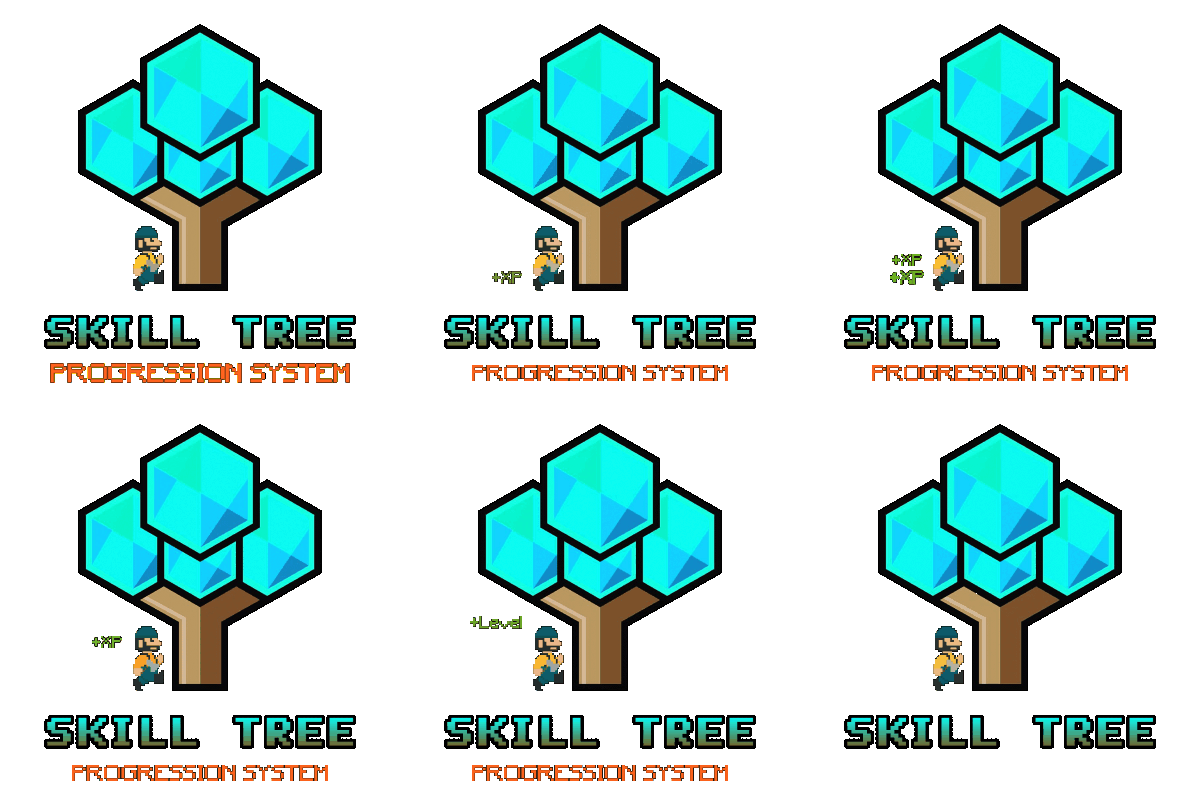
This plugin adds a character progression system to your server in the form of a leveling and skill tree system. Players gain xp by cutting trees, mining rocks, killing NPCs etc, and are rewarded with skill points when they level up. These points can be used to unlock perks and buffs across a number of different skill trees. The plugin is extremely customizable and server owners can change, move, scale or disable any perk to tailor the setup to their server. It features: 146 unique buff types across 163 skill nodes. 13 unique skill trees. 67+ sources of xp, along with custom xp settings for BotRespawn and NpcSpawn. An extremely large amount of xp options to really tweak the plugin for your server. A functional tree system that prevents unlocking/upgrading of nodes if the player has not invested enough skill points into a tree. Fun & unique ultimate abilities across most trees. Global yield settings for servers that want to run 2x/3x etc. Ability to create custom skill trees and nodes using permissions from other plugins. Considerable amount of options for persistent data through server wipes. A prestige system to reward your most hardcore players. SkillTree allows users to focus on multiple skill trees and unlock nodes in each tree as they level, to make their characters more powerful and unique. Plugins that work well with Skill Tree RaidableBases - SkillTree integrates with RaidableBases by rewarding raiders with xp (either handled via SkillTree directly or via RaidableBases directly). The raiding tree can also exclusively work with RaidableBases if servers don't allow raiding. Economics & ServerRewards - integrated as a way to pay for the respec cost. SurvivalArena - Rewards the winner of the event with xp. Cooking - adds new skills to the Cooking tree as well as xp rewards when successfully cooking meals. BotRespawn - Adds additional xp sources for each NPC profile. NpcSpawn - Adds additional xp sources for each NPC profile. UINotify - Shows notifications relevant to leveling etc. ZombieHorde - Provides xp for killing zombies generated by this plugin. LootDefender - Provides the ability for shared xp when killing BradleyAPC. Configured through LootDefender. EpicLoot - Adds a skill to the Scavenging tree FishingHotspots - Allows for modified XP gain while fishing in a hotspot. ZoneManager - Allows you to disable buffs while in a zone. skilltree.chat - required to use the chat commands to access the skill tree menu. skilltree.xp - required to obtain xp from xp sources. skilltree.tree - required to access and use the skill tree. skilltree.admin - required to use the admin commands. skilltree.all - allows user access to all trees. skilltree.Mining - allows the user to access the mining tree. skilltree.Woodcutting - allows the user to access the woodcutting tree. skilltree.Skinning - allows the user to access the skinning tree. skilltree.Harvesting - allows the user to access the harvesting tree. skilltree.Combat - allows the user to access the combat tree. skilltree.Medical - allows the user to access the medical tree. skilltree.Build_Craft - allows the user to access the build craft tree. skilltree.Scavenging - allows the user to access the scavenging tree. skilltree.Vehicles - allows the user to access the vehicles tree. skilltree.Cooking - allows the user to access the cooking tree. skilltree.bag.keepondeath - prevents the ExtraPockets bag from dropping on death. skilltree.notitles - Removes the level title from the player (Requires BetterChat) skilltree.noxploss - Prevents xp loss. skilltree.roguelike - If enabled via the config, will be required to participate in the Roguelike system. skilltree.teabonus - Ignores the config option preventing the yield increases from working with mining and woodcutting teas. skilltree.noscoreboard - Prevents players with this permission from being added to the scoreboard. skilltree.respec.bypass - removes the cost for respeccing skilltree.togglebc - required to toggle BetterChat titles on/off //Custom permission settings "Modified max skill points based on permissions [must be higher than default]": { "vip": 120 }, "Cost per point to respec based on permissions [must be lower than default]": { "vip": 10.0 }, "Maximum amount of xp a player can lose when they die based on permissions [must be less than default]": { "vip": 500.0 }, "Permissions to adjust xp gain modifiers (skilltree.<perm>) [1.0 is default modifier]": { "vip": 1.2 }, The permission for "vip" would be skilltree.vip Assigning this perm to players would override the default values for the respective settings (max skill points, respec cost, xp gain and xp loss). Command: st Description: Opens the skill tree menu. Requires skilltree.chat permissions. Command: updatexptable Description: Recalculates the xp table based on the config values. Requires Command: togglexpdrops Description: Toggles the xp popup when obtaining xp. Command: togglexphud Description: Toggles the xp hud on the players screen. Command: givexp Parameters: <name> <amount> <apply bonus true/false> Description: Gives the player matching the name parameter, xp equal to the amount parameter. Ignore modifiers will ignore all forms of xp boosts such as rested xp. Command: givesp Parameters: <name> <amount> Description: Gives the player matching the name parameter, skill points equal to the amount parameter. Command: resetdata Parameters: <name> Description: Resets the target players data. Command: turbo Description: Toggles the turbo on the boat if the player has the relevant perk. Command: togglebc Description: Toggles the BetterChat title on/off for the user. Command: movebar Description: brings up a ui that can be used to relocate the xp bar on the players screen. Command: stresetalldata Description: Resets all players data. Command: sb or score or scoreboard Description: Chat and console command that brings up the scoreboard, showing who has the most xp. Command: sttogglenotifications Description: Toggle notifications from buff triggers. Command: stgiveitem Parameters: <id> <shortname> <quantity> <skin ID> <optional: displayName> Description: gives an item to the target ID that matches the parameters. Command: givexpdebt Parameters: <id/name> <amount> Description: Gives the target player xp debt. Console Command: strespecallplayers Description: Resets skills for all online and offline players. Console Command: strespecplayer Parameters: <target name/userID> Description: Resets the target online/offline players skills. Console Command: givexptoall Parameters: <amount> <online only: true/false> Description: Will give the amount of xp to all players. If online only is true, it will only give it to those that are online. Console Command: givesptoall Parameters: <amount> <online only: true/false> Description: Will give the amount of skill points to all players. If online only is true, it will only give it to those that are online. Console Command: stremoveplayerdata Parameters: <userid> Description: Will remove the player data file for the specified userid. Console Command: sttogglebuffs Parameters: <true/false> Description: Disables/enableds buffs globally for all players. Experience can be gained from a number of different sources. The value for each source can be adjusted via the config. NodeHit - Hitting a stone, metal or sulfur mining node. NodeHitFinal - Finishing a stone, metal or sulfur mining node. TreeHit - Hitting a tree. TreeHitFinal - Knocking down a tree. SkinHit - Hitting an animal with a skinning tool. SkinHitFinal - Finishing off an animal with a skinning tool. CollectWildPlant - Collecting any map generated collectible, such as hemp, corn, pumpkin, stone, sulfur or metal. CollectGrownPlant - Collecting any player grown produce. BuildingBlockDeployed - Placing down a twig building block. FishCaught - Catching a fish. Crafting - Whenever a craft is successfully completed. XP is calculated based on the duration of the craft. ScientistNormal - Killing a blue scientist. ScientistHeavy - Killing a heavy scientists. SmallAnimal - Killing a small animal such as a chicken. MediumAnimal - Killing a medium animal such as a boar, wolf or stag. LargeAnimal - Killing a large animal such as a horse, shark or bear. Barrel - Destroying barrels. RoadSign - Destroying road signs. Scarecrow - Killing scarecrows or a zombie in ZombieHorde. Mission - Completing a mission in rust. BradleyAPC - Getting the last hit on Bradley. LootHackedCrate - First player to loot a locked crate. LootHeliCrate - First player to loot a heli crate. LootBradleyCrate - First player to loot a bradley crate. CookingMealXP - (Requires cooking plugin) XP is calculated per ingredient used. Example 2 tomatos and 8 bear meat would yield 100xp. RaidableBaseCompletion - Awards raiders of a RaidableBase xp upon the completion of the raid. Win_HungerGames - Awards xp to the winner of the Hunger Games arena. Win_ScubaArena - Awards xp to the winner of the Scuba arena. Win_Skirmish - Awards xp to the winner of the Skirmish arena. Gut_Fish - Awards xp when gutting a fish. default_botrespawn - default amount xp given when killing a bot made using botrespawn. Overriding values can be added to the config based on the bot group. crate_basic - when opening crates crate_elite - when opening crates crate_mine - when opening crates crate_normal - when opening crates carte_normal_2 - when opening crates crate_normal_2_food - when opening crates crate_normal_2_medical - when opening crates crate_tools - when opening crates crate_underwater_advanced - when opening crates crate_underwater_basic - when opening crates crate_ammunition - when opening crates crate_food_1 - when opening crates crate_food_2 - when opening crates crate_fuel - when opening crates crate_medical - when opening crates Harbor_Event_Winner - Winner of the Harbor event plugin Junkyard_Event_Winner - winner of the Junkyard event plugin PowerPlant_Event_Winner - winner of the Power plant event plugin Satellite_Event_Winner - winner of the Satellite event plugin Water_Event_Winner - winner of the Water event plugin Air_Event_Winner - winner of the Air event plugin. Armored_Train_Winner - winner of the Armored train plugin Convoy_Winner - winner of the Convoy event plugin. Supply_drop - first player that opens a supply drop. SurvivalArena_Winner - winning the SurvivalArena event. swipe_card_level_1 - using a green swipe card reader swipe_card_level_2 - using a blue swipe card reader swipe_card_level_3 - using a red swipe card reader boss_monster - killing an NPC from boss monster Zombie - Killing a ZombieHorde zombie UnderwaterDweller NPCs - NPCs in underwater labs JetPilot - JetPilot plugin ArcticBaseEvent_Winner - winner of the Arctic Base Event GasStationEvent_Winner - winner of the Gas Station Event SputnikEvent_Winner - winner of the Sputnik Event detect_diggable - triggered when a metal detector site is dig up. ShipWreckEvent_Winner - winner of the Ship Wreck Event pvp - when a player kills another player (default: off). Triangulation_Winner - winner of the triangulation event Caravan_Winner - winner of the Caravan event SupermarketEvent_Winner - winner of the Supermarket event LargeProduceAnimal - Killing cows or bulls MediumProduceAnimal - Killing sheep, lambs, calves or male calves. LandCritter - Killing Rabbits, squirrels, frogs, crabs or single crabs. SeaCritter - Killing sea turtles or jellyfish. Name: Mining Yield Description: Increases the amount of resources gained while mining. Name: Instant Mine Description: Gives the user a chance to instantly mine out a stone, sulfur or metal node. Name: Smelt On Mine Description: Gives the user a chance to smelt some of the ore as its mined from sulfur and metal nodes. Name: Mining Luck Description: Gives the user a chance to obtain items from the Mining luck loot table when they finish mining a node. Name: Mining Tool Durability Description: Decreses the durability loss of mining tools. Name: Woodcutting Yield Description: Increases the amount of resources gained while woodcutting. Name: Instant Chop Description: Gives the user a chance to instantly chop down a tree. Name: Woodcutting Coal Description: Gives the user a chance to obtain some charcoal while woodcutting. Name: Woodcutting Luck Description: Gives the user a chance to obtain items from the Woodcutting luck loot table when they finish cutting down a tree. Name: Woodcutting Tool Durability Description: Decreses the durability loss of woodcutting tools. Name: Skinning Yield Description: Increases the amount of resources gained while skinning. Name: Instant Skin Description: Gives the user a chance to instantly cut up an animal. Name: Skinning Tool Durability Description: Decreases the durability loss of skinning tools. Name: Skinning Cook Description: Gives the user a chance to received cooked meat, instead of raw meat, while skinning an animal. Name: Harvest Wild Yield Description: Increases the yield when harvesting map generated collectibles, such as berries, hemp, stone, sulfur and mushrooms. Name: Harvest Grown Yield Description: Increases the yield when harvesting player grown produce. Name: Extra Fish Description: Gives the user a chance of receiving an extra fish while fishing. Name: Double Bandage Heal Description: Doubles the healing power of cloth bandages. Name: Radiation Reduction Description: Reduces the amount of radiation damage taken by the player. Name: Extra Food Description: Increases the amount of calories the player receives when consuming food. Name: Fire Damage Reduction Description: Reduces the amount of fire damage received. Name: Fall Damage Reduction Description: Reduces the amount of fall damage received. Name: No Cold Damage Description: Removes all cold damage from the player. Name: Wounded Resist Description: Gives the player a chance to get straight back on their feet after entering the wounded state. Name: Animal Damage Resist Description: Reduces the damage taken by animals. Name: Riding Speed Description: Increases the speed of a horse while riding it. Name: Free Bullet Chance Description: Gives the player a chance to not expend a bullet when firing a gun. Name: Primitive Expert Description: Removes durability loss for primitive weapons. Name: Upgrade Refund Description: Gives the player a chance to receive their resources back when upgrading a building block. Name: Craft Speed Description: Increases the crafting speed of a player. Name: Research Refund Description: Gives the player a chance to receive their scrap back when researching an item on the research bench. Name: Craft Refund Description: Gives the player a chance to receive their crafting materials back when crafting an item. Name: Extra Scrap Barrel Description: Gives the player a chance to receive additional scrap when destroying a barrel. Name: Barrel Smasher Description: Allows the player to instantly smash a barrel with any weapon. Name: Extra Scrap Crate Description: Gives the player a chance to obtain extra scrap when looting a crate for the first time. Name: Component Chest Description: Gives the player a chance to obtain additional components when looting a crate for the first time. Name: Electronic Chest Description: Gives the player a chance to obtain additional electronics when looting a crate for the first time. Name: Component Barrel Description: Gives the player a chance to obtain additional components when smashing a barrel. Name: Electronic Barrel Description: Gives the player a chance to obtain additional electronics when smashing a barrel. Name: Melee Resist Description: Reduces the damage taken by melee weapons. Name: Iron Stomach Description: Allows the player to eat spoiled and raw food without being poisoned. Name: Boat Speed Description: Allows the user to activate a turbo boost while on a boat, increasing the boats speed. Name: Recycler Speed Description: Increases the speed of recycling for the player. Name: Smelt_Speed Description: Adds a chance for ore to smelt whenever wood is consumed, in addition to the standard smelt rate. Name: Heli_Fuel_Rate Description: Reduces the fuel consumption for your helicopters. Name: Boat_Fuel_Rate Description: Reduces the fuel consumption for your boats. Name: Vehicle_Mechanic Description: Allows the user to repair a vehicle at no cost. Name: Reviver Description: Brings a wounded player up with additional health if the reviving player has the buff. Name: Rationer Description: Provides the consumer a chance to receive their food/tea back once consumed. Name: PVP_Critical Description: Gives the attacker a chance to critically damage the target in PVP. Name: PVP_Damage Description: Increases the damage of all PVP attacks. Name: PVP_Shield Description: Reduces the damage of all incoming PVP attacks. Name: Metabolism_boost Description: Increases your calories and hydration above the maximum. Name: LootPickup Description: Chance to have the loot from destroyed barrels given moved directly to their inventory. Name: Node_Spawn_Chance Description: Chance to spawn a new node when a new one is mined out. Name: HealthRegen Description: Passively regenerates x health per second Name: AnimalTracker Description: Allows the user to use the /track command to find the direction of the closest animal. Name: ExtraPockets Description: Creates a backpack style storage system, providing players the ability to access the storage using a chat command (/pouch). Slots are given based on points spent. Name: Human_NPC_Damage Description: Increases damages against scientists. Name: Animal_NPC_Damage Description: Increases damages against animals. Name: Human_NPC_Defence Description: Decrease damage from scientist. Name: Craft_Duplicate Description: Chance to duplicate an item while crafting. Name: WaterBreathing Description: Breath underwater. Name: SharkResistance Description: Reduce damage taken from sharks. Name: SharkSkinner Description: Chance to receive random items while skinning sharks. Name: DeepSeaLooter Description: Chance to receive additional items while looting sunken crates. Name: InstantUntie Description: Instantly untie sunken crates. Name: UnderwaterDamageBonus Description: Increase damage to all living things while underwater (including underwater labs). Name: Permission Description: Used for permission based skills. Name: MaxRepair Description: Resets the max condition for any items that are repaired. Name: Durability Description: Reduces condition loss for all items that the player is using. Name: Regrowth Description: Provides a chance for a tree to respawn when cut down. Name: Skinning_Luck Description: Provides a chance to receive an item when skinning an animal. Name: Fishing_Luck Description: Provides a chance to receive an item when catching a fish. Name: Trap_Damage_Reduction Description: Reduces the damage received from traps. Name: Trap_Damage_Increase Description: Increases the damage done to traps. Name: Personal_Explosive_Reduction Description: Reduces the damage received from your own explosives. Name: Double_Explosion_Chance Description: Provides a chance for your explosives to trigger twice. Name: Lock_Picker Description: Provides a chance to open a locked entity that you do not have access to. Name: Explosion_Radius Description: Increases the explosion radius of your explosives. Name: Dudless_Explosive Description: Reduces the chance of your satchels and beancans being duds. Name: Woodcutting_Hotspot Description: Treats each hit on a tree as though you hit the hotspot. Name: Mining_Hotspot Description: Treats each hit on a node as though you hit the hotspot. Name: Extended_Tea_Duration Description: Increases the duration of tea buffs by x% per level. Name: Extended_Mag Description: Increases the magazine capacity of weapons by x% per level. Name: Tea_Looter Description: Provides you with a x% chance per level to find tea in certain containers. Name: Bite_Speed Description: Decreases the time it takes to hook a fish by x% per level. Name: Heli_Speed Description: Increases the max thrust speed of the heli by x% per level. Name: Sonar Description: Allows the user to run a command to find all nearby submerged objects (dive sites, sharks, scientists etc). Name: Comfort Description: Provides the player and all nearby team mates with a % of comfort per level. Name:Heal_Share Description: Provides surrounding team mates with a % of health received per level. Name:XP_Share Description: Provides surrounding team mates with a % of the xp you gain per level. Name: Tea_Share Description: Provides surrounding team mates with a % of tea buffs when you consume tea per level. Name: Metabolism_Share Description: Provides surrounding team mates with a % of hydration and calories received per level. Name: Human_Workbench Description: Creates a workbench aura on the player. The player and nearby team mates can use them as a workbench (the level of which is based on the skill level). Name: Recycler_Efficiency Description: Increases the recycler efficiency by x%. Name: Metal_Detector_Luck Description: Provides the player with a chance per level to obtain an additional item when they excavate metal detection sites. Name: Efficient_Digger Description: Provides the player with a chance per level to automatically dig up metal detection sites when they are flagged. Name: Magnetic_Digger Description: Provides the player with a chance per level to automatically collect dug up items. Name: RadiationBaseValue Description: Provides you with a base radiation resistance of % per level, even when naked. Name: RadiationResistModifier Description: Increases the effectiveness of your clothings radiation resistance by % per level. Name: BikeEnginePower Description: Increases the engine power of all bikes (peddal and motor) by x % per level. Name: DriverCollisionResistance Description: Decreases the damage taken from collisions while driving a vehicle by x% per level. Name: Harvesting_Luck Description: Provides a drop table when a player collects harvesting materials. Grown and wild collectibles have their own loot tables. Name: Awareness Description: This skill will show the nearby location of (configurable): npcs, animals, dropped items, droppted item containers, corpses within x meters. Name: Cooking_Speed Description: This skill reduces the amount of time it takes to cook items using the cooking workbench by x% per level. Name: Rocket_Velocity Description: This skill increases the velocity of all missiles launched by the player by x% per level. Name: Armor_Slots Description: Sets the minimum armor slots rolled based on level of skill (1 slot per level). Name: ShieldReflect Description: Provides a %X chance per level for projectile damage blocked by a shield to be reflected to the attacker. Name: Free_Repairs Description: Allow repairing of items for free. Name: Bradley_Damage_Bonus Description: Bonus damage to the bradley tank. Name: Heli_Damage_Bonus Description: Bonus damage to the patrol heli. Name: Loot_Spotter Description: Highlights nearby BoxStorage container entities. Name: Hatch_Speed Description: This skill reduces the time it takes for an egg to hatch in a chicken coop by x% per level. At 100% the egg will hatch. Name: Pet_Effectiveness Description: This skill increases the amount of love a chicken gains when you pet it by x% per level. Name: Coop_Capacity Description: This skill allows your chicken coops to hold x additional chickens per level. Name: Boat_Refund Description: This skill refunds x% per level of the materials used when placing boat building pieces. Name: Cannon_Damage Description: This skill increases the damage dealt by cannons by x% per level. Name: Sailing_Speed Description: This skill increases the speed of player-made boats by x% per level while you are at the helm. Name: Siege_Damage Description: This skill increases the damage dealt by catapults, battering rams and ballistas by x% per level. Name: Collectible_Respawn Description: This skill gives you a x% chance per level for a collectible to grow back after you pick it up. Name: Friendly_Fire_Reduction Description: This skill reduces the damage that you deal to your team mates by x% per level. Name: Livestock_Handling Description: This skill increases the rate at which livestock become familiar with you by x% per level. Name: Livestock_Calm Description: Livestock tolerate your presence. Bulls, rams and protective mothers will not threaten you unless provoked. Name: Husbandry_Yield Description: This skill increases the amount of milk and wool you receive when milking cows and shearing sheep by x% per level. Name: Husbandry_Cooldown Description: This skill reduces the time before a cow can be milked again, or a sheep's wool regrows, after you harvest it by x% per level. Name: Livestock_Offers Description: The livestock vendor makes you x additional offer(s) per level when you sell animals or wool. Name: Livestock_Sale_Value Description: The livestock vendor pays x% more per level for your animals and wool. Name: Woodcutting_Ultimate Description: Harvests the surrounding trees when cutting down a tree. Name: Mining_Ultimate Description: Provides access to a chat command to see all surrounding node locations. Name: Combat_Ultimate Description: Heals the player for a percentage of the damage that they deal to all sources. Name: Vehicle_Ultimate Description: Reduces damage dealt to the players mounted vehicle (default 100% deduction). Name: Harvester_Ultimate Description: Allows the player to set the genetic composition of plants. Name: Medical_Ultimate Description: Gives the player a chance to resurrect at their point of death if they choose to. Name: Skinning_Ultimate Description: Killing an animal with this buff active will provide the player with an enhanced ability for a period of time, depending on the animal killed. - Chicken: No fall damage. - Boar: Chance to find components while harvesting mushrooms and berries. - Wolf: Increased healing while near team mates. - Stag: Notification when a neutral player is nearby, and their last known location (configurable). - Bear: Scientists will not attack the player unless attacked. - Polarbear: Overshield. Name: Build_Craft_Ultimate Description: Use any coloured swipe cards in any reader. Name: Scavengers_Ultimate Description: Will automatically recycle components from barrels when they are broken. The xp table uses a common equation to calculate its levels and xp requirements. You can read more about the method here: https://blog.jakelee.co.uk/converting-levels-into-xp-vice-versa/ There is also a spreadsheet you can make a copy of and adjust the x value at the top of. Increasing the number minimizes the xp between levels. Find a good value, then put it in the "x" value under the "Leveling information" section in the config. It is recommended that you leave the y value at 2 or 3, and adjust the x value only. Rule of thumb: - 0.07: default - 0.04: grindy. API API documentation: https://codefling.com/files/documentation/11-skill-tree-api/$29.99- 1,669 comments
- 70 reviews
-
- 48
-

-

-

-
- #leveling
- #progression
- (and 19 more)
-
Version 1.0.0
15 downloads
Same bonus, none of the hotspot mini-game overhead. Optimizes resource gathering by removing the vanilla tree and ore hotspot minigames. Players automatically receive the maximum available bonus without needing to hit difficult to reach hotspots, while item specific bonus multipliers from tools remain fully supported without bugs. Perfect for high pop servers. This plugin does not use cheap gimmicks like the oxide hook OnTreeMarkerHit or by harmony patching the DidHitMarker. This plugin fully and completely recodes the vanilla logic to get that performance boost & remove the pesky annoying mini games from farming perfect for high pop servers! Key features Removes tree hotspot/X-marker system Removes ore shinny hotspot entity minigame Automatically applies maximum resource bonuses Preserves custom item bonus scales No hotspot entities to spawn or destroy Reduces CPU processing during harvesting Reduces hotspot-related network traffic Reduces entity churn and GC pressure Preserves tree crack sound effects Moves tree bird effects to tree death Preserves normal tree and ore behavior$10.00 -
Version 1.0.2
17 downloads
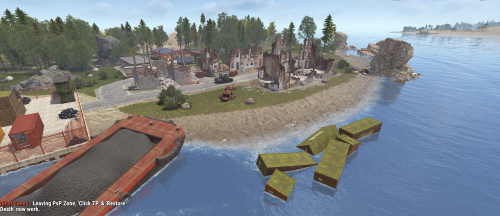
Node-Loot Island V2 Welcome to the next evolution of resource-rich gameplay. Node-Loot Island V2 is a condensed, feature-packed version of the original Node Island, rebuilt from the ground up to provide a more intense and rewarding experience for your players. Key Features Action-Packed Layout: While smaller in scale, this version is designed for high-stakes engagement. It features tight, close-quarters areas specifically built to fuel the fast-paced PvP action your players crave. Handcrafted Terrain: Every inch of the island is custom-made. Explore a diverse landscape filled with handcrafted dips, rock formations, and rolling hills that provide natural cover and tactical advantages. The Urban Guardian: A Bradley APC now patrols the central city area. Players will need to use strategy and teamwork to bypass or destroy this mechanical beast to reach the most valuable loot. Rich Resource Nodes: True to its name, the island remains a premier destination for resource gathering, perfectly balancing high-tier loot with high-risk combat. Optimized: Designed with performance in mind for high-population servers. For any Assistance or questions Please contact me on Discord @ https://discord.gg/THf6dGN8eW$5.00 -
Version 1.0.2
8 downloads
Introducing Rust Discord ChatMod, a simple rust chat logging bot. It will connect to your server through RCON, and log the message types you specify. (Global, Team, Clans /c chat, Clans /a chat, Cards (blackjack/slot chat)), and allow you to mute or unmute players you specify Developed and tested with NodeJS 22 LTS. Tested and fully compatible with Rust vanilla chat, and BetterChat. Tested while connected simultaneously to 10 different Rust servers NODEJS 22 OR HIGHER IS REQUIRED FOR USE MAKE SURE TO INSTALL THE NODE REQUIREMENTS! (This can be done by running the command `npm install` from the installation directory. If you are using a Pterodactyl egg or some other hosted service, the requirements are usually installed automatically on boot Key Features: Multi-Server RCON Integration – Connect to multiple Rust servers simultaneously. Offload web requests from plugins like BetterChat, ensuring your server stays performant while your Discord stays in sync. Customizable Chat Relay – Stream global, team, clan, ally, and cards (blackjack/slots) messages directly to the Discord channels of your choice. Configure per server settings, so each Rust server has its own dedicated chat feed. Discord-Based Moderation – Mute or unmute players directly from Discord. Every action is timestamped and logged, providing a reliable record of all moderation activity for easy reference. Role-Restricted Commands – Control who can moderate your servers chat with role-locked commands. Grant chat moderation powers to staff, even if they aren’t ingame. Default Config { "discord": { "guildId": "YOUR_DISCORD_GUILD_ID", "applicationId": "YOUR_DISCORD_BOT_APPLICATION_ID", "botToken": "YOUR_DISCORD_BOT_TOKEN", "roleIDs": [ "1342385755934167051", "DISCORD_ROLE_2", "DISCORD_ROLE_3" ] }, "servers": [ { "serverName": "UNIQUE_SERVER_NAME", "rconIP": "RCON_IP_OR_DOMAIN", "rconPort": "RCON_PORT", "rconPassword": "RCON_PORT", "globalChannelID": "CHANNEL_ID_TO_LOG_GLOBAL", "teamChannelID": "CHANNEL_ID_TO_LOG_TEAM_OR_CLAN", "cardChannelID": "CHANNEL_ID_TO_LOG_CARDS_CHAT", "clansChannelID": "CHANNEL_ID_TO_LOG_CLANS_CHAT_COMMAND", "allianceChannelID": "CHANNEL_ID_TO_LOG_ALLIES_CHAT_COMMAND", "prependServerName": true, "showChannelTag": true, "showPlayerTags": true, "logTeamChat": true, "logGlobalChat": true, "logCardChat": true, "logClansChat": true, "logAllyChat": true }, { "serverName": "UNIQUE_SERVER_NAME_2", "rconIP": "RCON_IP_OR_DOMAIN", "rconPort": "RCON_PORT", "rconPassword": "RCON_PORT", "globalChannelID": "CHANNEL_ID_TO_LOG_GLOBAL", "teamChannelID": "CHANNEL_ID_TO_LOG_TEAM_OR_CLAN", "cardChannelID": "CHANNEL_ID_TO_LOG_CARDS_CHAT", "clansChannelID": "CHANNEL_ID_TO_LOG_CLANS_CHAT_COMMAND", "allianceChannelID": "CHANNEL_ID_TO_LOG_ALLIES_CHAT_COMMAND", "prependServerName": true, "showChannelTag": true, "showPlayerTags": true, "logTeamChat": true, "logGlobalChat": true, "logCardChat": true, "logClansChat": true, "logAllyChat": true } ] }$10.00 -

Version 1.0.3
6 downloads
A fully automated giveaway bot for discord with direct tebex integration. Giveaways run on a loop based on your schedule — no commands needed. Users join with one click, and winners automatically receive tebex coupons via dm. You can even choose which specific tebex package the coupon is linked to. Everything is customizable — from embed messages to prize delivery. Just install, set your schedule, and let the bot handle the rest. FEATURES Automatic Giveaways On A Schedule (Using Cron) One-Click Entry With Discord Buttons Instantly Sends Tebex Coupons To Winners Via Dm Coupons Can Be Tied To Any Specific Tebex Package Supports Custom Embed Messages (Title, Image, Fields, Colors) Real-Time Participant Tracking Fully Hands-Off Once Installed Data Backup + Auto-Recovery Easy To Install And Configure CONFIG { "guildId": "", "channelId": "", "mentionRoleId": "", "requiredRoleId": "", "roleRequirementMessage": "No permission. Please link your Steam account at https://yourdomain.com/ then try again.", "giveawayCron": "*/2 * * * *", "drawOffset": "1", "tebexGiftId": "", "giveawayContent": " New Giveaway Started! <@&ROLE_ID_PLACEHOLDER>", "giveawayEmbed": { "title": "ANY SERVERS VIP++", "description": "Want to win **VIP++ for free**? Now’s your chance! \n **No restrictions** – Everyone can join!\n **Draw Time:** Every **Monday at 1 PM (UK Time)**\n **How to Enter:** Simply link your account first!\n\n [Link Your Account Now!](https://link.yourdomain.com/)\n\nGood luck!\n\n ", "color": 11141120, "image": "", "fields": [ { "name": "End Time", "value": "END_TIME_PLACEHOLDER", "inline": true }, { "name": "Participants", "value": "0", "inline": true } ] }, "dmEmbed": { "title": "Congratulations, You Won!", "description": "You have won **Giveaway Name**! Click the button below to claim your prize.", "color": 16766720 }, "configVersion": "1.0 (DO NOT MODIFY)" } Need help? Join the support Discord: https://discord.gg/j3eCwP7GaY$19.99-
- 1
-
-
- #giveaway
- #giveaways
- (and 2 more)
-

Version 1.1.2
905 downloads
Save time for your players and make them always hit the X hotspots on nodes and tree's while farming. Showcase Video Simple Config { "Enable atuo tree X farming": true, "Enable atuo node star farming": true }$4.99