Search the Community
Showing results for tags 'modded'.
-
Version 1.0.0
38 downloads
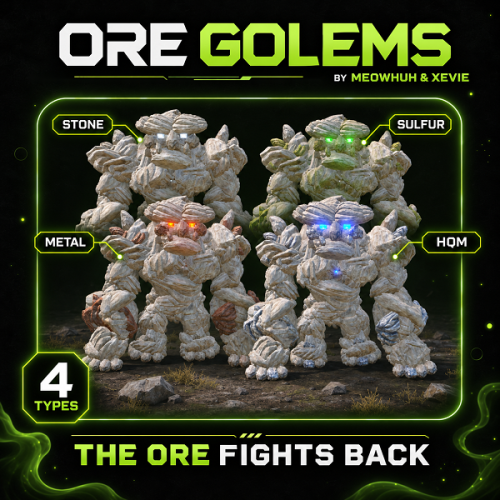
Turn ordinary ore nodes into massive, animated boss encounters in Rust. Mining resources should not always be a predictable activity. Sometimes, the rocks you are mining should fight back. OreGolems introduces powerful, animated ore golems that can awaken from resource nodes and attack nearby players. Each golem is constructed from Rust entities and features custom animations, multiple attack abilities, destructible armor, and rewarding loot when defeated. Server owners can customize different golem types, health, damage, spawn chances, attack behavior, fixed spawn locations, rewards, health bars, map markers, and performance settings. Perfect for PvE, PvP, Vanilla+, modded, RPG/RP, survival, custom progression, and boss-event Rust servers. Features Adds massive, animated ore golems that players can encounter while mining resources. Four configurable golem types: Stone, Sulfur, Metal, and HQM. Unique appearances for different golem types using matching ore nodes, collectables, and colored lights. Golems are assembled from Rust entities using a custom bone, model, and animation system. Natural spawning system with configurable awakening chances for each ore type. Ore nodes can shake and display warning effects before a golem awakens. Configurable number of warning hits before awakening. Configurable maximum number of active golems for automatic awakening. Optional fixed spawn points with configurable ore types and respawn delays. In-game admin commands to create, remove, and list fixed spawn points. Admin commands to spawn golems manually and remove active golems. Custom animations for walking, waking, punching, ground slamming, grabbing, throwing rocks, staggering, sleeping, and dying. Four configurable attack abilities: Grab and Throw, Rock Throw, Ground Slam, and Punch. Separate damage, range, and cooldown settings for each attack. Per-golem-type attack damage multipliers. Rock throwing with configurable projectile speed, size, and target movement prediction. Grab and Throw attack that can pick up players and throw them through the air. Ground Slam attack with configurable area damage and impact effects. Destructible armor that breaks away as the golem loses health. Configurable armor-breaking stages based on remaining health. Heavy hits can stagger golems and interrupt their attacks. Custom targeting, movement speed, chasing distance, and sleeping behavior. Golems can return to a sleeping ore node while preserving their remaining health. Custom reward ore nodes appear when a golem is defeated. Configurable reward node amounts and resource contents for each golem type. Reward crates with configurable skins and vanilla or custom loot. Custom loot supports item amounts, drop chances, skin IDs, names, and text. Optional economy payouts to the player credited with defeating a golem. Optional UltimateLeaderboard integration for recording golem victories. Configurable lifetimes for reward nodes, debris, and loot crates. Optional in-game health bar displaying the golem type and remaining HP. Optional map markers with configurable radius or shop-style icons. Configurable animation update rate and distance-based network update optimization. Automatic cleanup of golem entities, temporary objects, and expired rewards. Plugin hooks for controlling targeting, awakening, and defeated events. No additional NPC framework required. Golem Types OreGolems includes four different golem types, each with its own appearance, health, damage multiplier, rewards, and loot settings. Golem Type Default Health Resource Type Stone Golem 12,000 HP Stone Sulfur Golem 18,000 HP Sulfur Metal Golem 24,000 HP Metal Ore HQM Golem 32,000 HP High Quality Metal Ore Stone Golem The Stone Golem is the lowest-health default golem type. Health: 12,000 HP. Appearance: Stone ore body with standard industrial lights. Default reward: Stone resource nodes. Default crate loot: Normal crate loot. Sulfur Golem A stronger golem made from sulfur ore resources. Health: 18,000 HP. Appearance: Sulfur ore body with green industrial lights. Default reward: Sulfur Ore and Stones. Default crate loot: Normal crate loot. Metal Golem A powerful golem made from metal ore resources. Health: 24,000 HP. Appearance: Metal ore body with red industrial lights. Default reward: Metal Ore and Stones. Default crate loot: Normal crate loot. HQM Golem The strongest default golem type, offering a more challenging encounter. Health: 32,000 HP. Appearance: HQM ore body with blue industrial lights. Default reward: High Quality Metal Ore and Stones. Default crate loot: Elite crate loot. Tip Custom Golem Difficulty Each golem type has its own configuration for health, attack damage multiplier, reward nodes, reward items, loot crates, and awakening chance. This allows server owners to create different difficulty and reward levels for each resource type. Golem Attacks OreGolems includes four animated combat abilities with separate settings for damage, cooldowns, range, and additional attack behavior. Attack Default Damage Cooldown Range Grab and Throw 20 15 seconds 6.5 m Rock Throw 35 10 seconds 35 m Ground Slam 40 8 seconds 7 m Punch 25 4 seconds 7 m Grab and Throw The golem can grab nearby players and throw them away. Animated grabbing and throwing sequence. Configurable grab damage. Configurable attack range and cooldown. Configurable reach distance from the golem's hand. Adjustable forward and upward throwing speeds. Player throwing uses Rust's ragdoll mechanics. Rock Throw The golem can attack distant players by throwing large rocks. Animated rock pickup and throwing sequence. Configurable minimum and maximum attack ranges. Configurable rock damage and cooldown. Adjustable projectile speed. Configurable rock size. Target movement prediction to help aim at moving players. Rock impact detection and damage. Ground Slam The golem can slam the ground to damage nearby players. Animated ground slam attack. Configurable attack damage. Adjustable attack range and hit radius. Configurable cooldown. Ground impact visual effects. Optional custom impact effect prefab. Punch The golem can attack nearby players using animated punches. Animated punching sequence. Configurable damage and cooldown. Adjustable attack range. Configurable hit radius. Directional hit detection. Tip Example: Increase the Ground Slam damage to 60 and reduce its cooldown to 5 seconds to create a more aggressive boss encounter. Each attack can also be enabled or disabled separately in the configuration. Destructible Armor & Staggering OreGolems features an armor-breaking system that makes fights more visually dynamic as the golem takes damage. Instead of remaining visually unchanged throughout the fight, golems can lose parts of their outer armor as their health decreases. Armor Stage Remaining Health Stage 1 75% HP Stage 2 50% HP Stage 3 25% HP Armor pieces detach when configured health thresholds are reached. Detached pieces fall away from the golem. Armor stages can be customized in the configuration. Powerful hits can trigger a stagger animation. Configurable minimum hit damage required to stagger a golem. Configurable stagger cooldown. Staggering can interrupt the golem's current actions. Tip Example: Set [Armor] Damage in one hit needed to stagger the golem (0.04 = 4% of max health) to 0.04 to allow individual hits dealing at least 4% of the golem's maximum health to trigger a stagger, subject to the configured cooldown. For a Stone Golem with 12,000 HP, this means a hit dealing at least 480 damage can trigger a stagger. Awakening & Natural Spawning OreGolems can turn normal resource gathering into unexpected boss encounters. When a player mines an eligible ore node, the plugin can randomly select that node to become a sleeping golem. Once selected, the ore node begins displaying warning effects as the player continues mining. After the configured warning hits, the golem awakens and begins attacking. Awakening Settings Setting Default Wake chance per ore type 1% Warning hits before awakening 3 Maximum active golems 3 Target radius 30 meters Chase radius 40 meters Different wake chances can be configured for each ore type. Warning effects indicate that a selected ore node may awaken. Golems emerge from their corresponding ore nodes. Golems automatically search for nearby valid player targets. Natural awakening is limited by the configured maximum active golem count. The spawning system checks surrounding terrain and obstacles before selecting natural spawn locations. Note Natural Spawn Notes The default wake chance is 0.01, equal to 1%. The chance applies when an eligible ore node is first considered for awakening. Selected nodes display warning effects during subsequent mining hits. Natural spawn checks avoid unsuitable locations such as monuments, water, nearby Tool Cupboards, steep terrain, and obstructed areas. When fixed spawns are enabled, the plugin uses the fixed-spawn system instead of random awakening from ordinary ore nodes. Fixed Spawn Points Server owners can optionally create permanent golem encounter locations. Fixed spawn points create sleeping ore nodes at configured positions, allowing players to trigger golem encounters by mining them. Enable or disable fixed spawning. Create spawn points directly in-game. Select the ore type for each spawn point. Assign a unique name to each location. Automatically save spawn coordinates to the configuration. List all configured spawn locations. Remove unwanted spawn locations. Configurable respawn delay. Fixed spawn nodes can return after their encounter has ended. Fixed Spawn Commands /golem point add <name> [type] - Saves a fixed spawn point at your current position. /golem point remove <name> - Removes a saved spawn point. /golem point list - Lists all saved spawn points and their coordinates. Command Examples /golem point add StoneBoss stone /golem point add SulfurBoss sulfur /golem point add MetalBoss metal /golem point add HQMBoss hqm /golem point list /golem point remove StoneBoss Note Fixed Spawn Setup Fixed spawns are disabled by default. Set [Fixed Spawns] Enabled to true under Fixed spawns in the configuration. The default respawn delay is 900 seconds (15 minutes). You can create spawn points while the system is disabled, but they will not become active until fixed spawning is enabled and the plugin is reloaded. Golem Behavior OreGolems includes configurable movement and targeting behavior. Setting Default Target radius 30 m Chase radius 40 m Walk speed 1.3 m/s Time without target before sleeping 30 seconds Sleeping node lifetime 1,800 seconds Searches for nearby valid players. Moves toward its target using animated walking. Uses configured attacks depending on the player's distance. Limits how far it can chase players from its awakening location. Can return toward its original position. Can return to a sleeping ore node after losing its target. Preserves remaining health when returning to sleep. Sleeping nodes can awaken again when mined. Temporary sleeping nodes expire after their configured lifetime. Tip Example: Increase [Behavior] Walk speed (meters per second) to 2.0 and [Behavior] Maximum chase distance from where the golem woke up (meters) to 60 to make golems move faster and pursue players across a larger area. Rewards & Loot Defeating a golem can reward players with collectible resource nodes, loot crates, and optional economy payouts. Reward Ore Nodes Each golem type supports custom reward nodes containing configurable resource items. Golem Type Default Resource Contents per Node Stone 1,000 Stones Sulfur 600 Sulfur Ore + 300 Stones Metal 600 Metal Ore + 300 Stones HQM 60 HQM Ore + 300 Stones By default, each golem can produce up to 3 reward nodes when defeated, depending on available ore parts. Reward nodes can be mined to collect their configured resources. Loot Crates Each defeated golem also creates a reward crate. Configurable crate skin for each golem type. Option to use vanilla loot. Configurable vanilla loot source crate. Optional custom loot tables. Configurable item shortnames. Minimum and maximum item amounts. Individual item drop chances. Custom item skin IDs. Custom item display names. Custom item text, including personalized messages on notes. Tip Example: Configure a special HQM Golem reward crate using custom loot instead of the default elite crate loot. You can add valuable items, set custom chances, and customize how much loot players receive when defeating the boss. The default custom loot examples include Scrap with a configurable drop chance and a custom-named Golem Hunter's Note containing a message. Note Custom Loot Settings Each golem type has its own custom loot list. You can configure item shortnames, amounts, chances, skins, names, and text. The included examples contain Scrap with a 50% chance and a Golem Hunter's Note with a 100% chance. Standard Rust crate loot is enabled by default. Custom loot is used only when standard Rust loot is disabled for that golem type. Reward Lifetimes Reward Object Default Lifetime Reward ore nodes 900 seconds Golem debris 60 seconds Loot crates 900 seconds These values can be customized in the configuration. Economy & Leaderboard Integration OreGolems supports optional integrations for rewarding and tracking boss victories. Economy Payouts Server owners can configure economy rewards for each golem type. Configurable economy plugin name. Configurable balance addition hook. Separate payout amount for each golem type. Set the amount to 0 to disable economy rewards. Payouts are awarded to the player credited with defeating the golem. The default economy plugin name is Economics, using the Deposit hook. Other economy plugins can be configured using their supported balance hooks. UltimateLeaderboard OreGolems includes optional UltimateLeaderboard integration. When a golem is defeated, the plugin can record an event victory for the credited player through UltimateLeaderboard's API. Note Integration Notes Economy integration is optional. Economy payouts are disabled by default. UltimateLeaderboard integration is optional. The plugin determines the credited killer using recorded damage contributions. Both integrations require their respective plugins to be installed and compatible. Health Bar & Map Markers OreGolems includes optional visual information to help players identify and track active golems. Health Bar Configurable in-game health bar. Shows the golem's ore type. Displays current and maximum health. Automatically updates during combat. Configurable display distance. Shows nearby active golems without requiring a chat command. Default health bar distance: 50 meters. Map Markers Optional map markers for active golems. Supports a radius-style map marker. Optional shop-style map icon. Configurable marker radius. Markers are removed when the golem is defeated or removed. Note Default Settings Health bars are enabled by default. Map markers are disabled by default. Both features can be configured separately. Performance Settings OreGolems includes configurable performance settings for controlling animation and network updates. Configurable animation ticks per second. Distance-based update behavior. Reduced network update frequency for distant golems. Configurable distance for far update rates. Configurable distance beyond which pose network updates are suppressed. Automatic removal of temporary combat effects and objects. Configurable maximum active golem count for automatic awakening. Setting Default Animation ticks per second 20 Far update distance 80 m Far update rate 10 updates/second Network update cutoff distance 200 m Tip Performance Tip For servers expecting frequent boss encounters, adjust the maximum active golems, animation tick rate, and distance-based update settings to suit your server performance. Admin Commands /golem spawn <type> - Spawns the selected golem type in front of the admin. /golem play <sequence> - Plays an animation sequence on the nearest active golem. /golem clear - Removes all active golems. /golem point add <name> [type] - Creates a fixed spawn point at the admin's current location. /golem point remove <name> - Removes a fixed spawn point. /golem point list - Lists all configured fixed spawn points. Command Examples /golem spawn stone /golem spawn sulfur /golem spawn metal /golem spawn hqm /golem play wake /golem play punch /golem play slam /golem play grab /golem play rock /golem play stagger /golem play sleep /golem play death /golem play walk /golem clear /golem point add StoneBoss stone /golem point add SulfurBoss sulfur /golem point add HQMBoss hqm /golem point list /golem point remove StoneBoss Note Command Notes All /golem commands require oregolems.admin. The spawn command defaults to Stone when no ore type is provided. The play command targets the nearest active golem. The clear command removes active golems. Fixed spawn points are saved in the plugin configuration. The default ore type for new fixed spawn points is Stone. Console Commands oregolems.spawn <type> - Spawns the selected golem type in front of the player using the client console. oregolems.clear - Removes all active golems. Note Console Access The spawn console command requires a player context and oregolems.admin. The clear console command supports authorized players and the server console. Permissions oregolems.admin - Grants access to all OreGolems admin commands, including spawning, animation playback, clearing golems, and managing fixed spawn points. Normal players do not need permissions to encounter, fight, or collect rewards from ore golems. Installation OreGolems supports both Oxide (uMod) and Carbon. The downloaded ZIP contains two required files: OreGolems.cs - Main plugin file. data/OreGolems/Golem.json - Golem model, parts, poses, and animation data. Installation Steps Extract the downloaded ZIP archive. Upload OreGolems.cs to your server's plugin folder: Oxide: oxide/plugins/ Carbon: carbon/plugins/ Upload Golem.json to your server's data folder: Oxide: oxide/data/OreGolems/ Carbon: carbon/data/OreGolems/ Make sure both files are in the correct directories. Load or reload the OreGolems plugin. Edit the generated configuration: Oxide: oxide/config/OreGolems.json Carbon: carbon/configs/OreGolems.json Grant the admin permission if you want to use the management commands. Oxide File Structure oxide/ ├── plugins/ │ └── OreGolems.cs ├── data/ │ └── OreGolems/ │ └── Golem.json └── config/ └── OreGolems.json Carbon File Structure carbon/ ├── plugins/ │ └── OreGolems.cs ├── data/ │ └── OreGolems/ │ └── Golem.json └── configs/ └── OreGolems.json Warning Important Installation Requirement The Golem.json data file is required for OreGolems to function. This file contains the custom model and animation definitions used to construct and animate the golems. If the file is missing or cannot be loaded, the plugin will report an error and unload. Do not upload only the .cs file. Make sure to include the supplied data folder. Example Configuration { "Ore types": { "stone": { "[Ore] Wake chance on the first hit of a natural ore node (0.50 = 50%)": 0.01, "[Ore] Maximum health (HP)": 12000.0, "[Ore] Attack damage multiplier": 1.0, "[Ore] Maximum ore nodes dropped on death": 3, "Items in each dropped ore node": [ { "Item shortname": "stones", "Amount": 1000 } ], "Loot crate dropped on death": { "[Loot] Crate skin ID": 2538049119, "[Loot] Use standard Rust crate loot": true, "[Loot] Rust crate prefab to copy loot from (e.g. crate_normal)": "crate_normal", "Custom loot (used when standard Rust loot is disabled)": [ { "Item shortname": "scrap", "Minimum amount": 25, "Maximum amount": 50, "Chance to include this item (0.5 = 50%)": 0.5, "Skin ID": 0, "Custom name": "", "Custom text": "" }, { "Item shortname": "note", "Minimum amount": 1, "Maximum amount": 1, "Chance to include this item (0.5 = 50%)": 1.0, "Skin ID": 0, "Custom name": "Golem Hunter's Note", "Custom text": "You defeated an Ore Golem. The loot is yours!" } ] }, "Economy reward for the player who dealt the most damage": { "[Economy] Economy plugin name": "Economics", "[Economy] Economy plugin hook that adds to the player's balance": "Deposit", "[Economy] Reward amount (0 = no payout)": 0.0 }, "[Ore] Ore node prefab used for the golem body": "stone-ore", "[Ore] Ore collectible prefab used for body parts and thrown rocks": "stone-collectable", "[Ore] Lamp prefab used for the golem's eyes": "industrial.wall.lamp.deployed" }, "sulfur": { "[Ore] Wake chance on the first hit of a natural ore node (0.50 = 50%)": 0.01, "[Ore] Maximum health (HP)": 18000.0, "[Ore] Attack damage multiplier": 1.0, "[Ore] Maximum ore nodes dropped on death": 3, "Items in each dropped ore node": [ { "Item shortname": "sulfur.ore", "Amount": 600 }, { "Item shortname": "stones", "Amount": 300 } ], "Loot crate dropped on death": { "[Loot] Crate skin ID": 2517917450, "[Loot] Use standard Rust crate loot": true, "[Loot] Rust crate prefab to copy loot from (e.g. crate_normal)": "crate_normal", "Custom loot (used when standard Rust loot is disabled)": [ { "Item shortname": "scrap", "Minimum amount": 25, "Maximum amount": 50, "Chance to include this item (0.5 = 50%)": 0.5, "Skin ID": 0, "Custom name": "", "Custom text": "" }, { "Item shortname": "note", "Minimum amount": 1, "Maximum amount": 1, "Chance to include this item (0.5 = 50%)": 1.0, "Skin ID": 0, "Custom name": "Golem Hunter's Note", "Custom text": "You defeated an Ore Golem. The loot is yours!" } ] }, "Economy reward for the player who dealt the most damage": { "[Economy] Economy plugin name": "Economics", "[Economy] Economy plugin hook that adds to the player's balance": "Deposit", "[Economy] Reward amount (0 = no payout)": 0.0 }, "[Ore] Ore node prefab used for the golem body": "sulfur-ore", "[Ore] Ore collectible prefab used for body parts and thrown rocks": "sulfur-collectable", "[Ore] Lamp prefab used for the golem's eyes": "industrial.wall.lamp.green.deployed" }, "metal": { "[Ore] Wake chance on the first hit of a natural ore node (0.50 = 50%)": 0.01, "[Ore] Maximum health (HP)": 24000.0, "[Ore] Attack damage multiplier": 1.0, "[Ore] Maximum ore nodes dropped on death": 3, "Items in each dropped ore node": [ { "Item shortname": "metal.ore", "Amount": 600 }, { "Item shortname": "stones", "Amount": 300 } ], "Loot crate dropped on death": { "[Loot] Crate skin ID": 2509860100, "[Loot] Use standard Rust crate loot": true, "[Loot] Rust crate prefab to copy loot from (e.g. crate_normal)": "crate_normal", "Custom loot (used when standard Rust loot is disabled)": [ { "Item shortname": "scrap", "Minimum amount": 25, "Maximum amount": 50, "Chance to include this item (0.5 = 50%)": 0.5, "Skin ID": 0, "Custom name": "", "Custom text": "" }, { "Item shortname": "note", "Minimum amount": 1, "Maximum amount": 1, "Chance to include this item (0.5 = 50%)": 1.0, "Skin ID": 0, "Custom name": "Golem Hunter's Note", "Custom text": "You defeated an Ore Golem. The loot is yours!" } ] }, "Economy reward for the player who dealt the most damage": { "[Economy] Economy plugin name": "Economics", "[Economy] Economy plugin hook that adds to the player's balance": "Deposit", "[Economy] Reward amount (0 = no payout)": 0.0 }, "[Ore] Ore node prefab used for the golem body": "metal-ore", "[Ore] Ore collectible prefab used for body parts and thrown rocks": "metal-collectable", "[Ore] Lamp prefab used for the golem's eyes": "industrial.wall.lamp.red.deployed" }, "hqm": { "[Ore] Wake chance on the first hit of a natural ore node (0.50 = 50%)": 0.01, "[Ore] Maximum health (HP)": 32000.0, "[Ore] Attack damage multiplier": 1.0, "[Ore] Maximum ore nodes dropped on death": 3, "Items in each dropped ore node": [ { "Item shortname": "hq.metal.ore", "Amount": 60 }, { "Item shortname": "stones", "Amount": 300 } ], "Loot crate dropped on death": { "[Loot] Crate skin ID": 2446262619, "[Loot] Use standard Rust crate loot": true, "[Loot] Rust crate prefab to copy loot from (e.g. crate_normal)": "crate_elite", "Custom loot (used when standard Rust loot is disabled)": [ { "Item shortname": "scrap", "Minimum amount": 25, "Maximum amount": 50, "Chance to include this item (0.5 = 50%)": 0.5, "Skin ID": 0, "Custom name": "", "Custom text": "" }, { "Item shortname": "note", "Minimum amount": 1, "Maximum amount": 1, "Chance to include this item (0.5 = 50%)": 1.0, "Skin ID": 0, "Custom name": "Golem Hunter's Note", "Custom text": "You defeated an Ore Golem. The loot is yours!" } ] }, "Economy reward for the player who dealt the most damage": { "[Economy] Economy plugin name": "Economics", "[Economy] Economy plugin hook that adds to the player's balance": "Deposit", "[Economy] Reward amount (0 = no payout)": 0.0 }, "[Ore] Ore node prefab used for the golem body": "hqm-ore", "[Ore] Ore collectible prefab used for body parts and thrown rocks": "hqm-collectable", "[Ore] Lamp prefab used for the golem's eyes": "industrial.wall.lamp.blue.deployed" } }, "Wake-up settings": { "[Wake] Warning hits before a natural ore node wakes up": 3, "[Wake] Maximum golems awake at once": 3 }, "Fixed spawns": { "[Fixed Spawns] Enabled": false, "[Fixed Spawns] Respawn delay (seconds)": 900.0, "Saved spawn points": {} }, "Golem behavior": { "[Behavior] Distance to detect players (meters)": 30.0, "[Behavior] Maximum chase distance from where the golem woke up (meters)": 40.0, "[Behavior] Walk speed (meters per second)": 1.3, "[Behavior] Wait without a target before returning to sleep (seconds)": 30.0, "[Behavior] Time before a sleeping golem outside a fixed spawn disappears (seconds)": 1800.0 }, "Attacks": { "Grab and throw": { "[Attack] Enabled": true, "[Attack] Damage": 20.0, "[Attack] Wait before using this attack again (seconds)": 15.0, "[Attack] Maximum distance to start this attack (meters)": 6.5, "[Attack] Distance the hand can grab a player from (meters)": 4.0, "[Attack] Player throw speed forward (meters per second)": 12.0, "[Attack] Player throw speed upward (meters per second)": 9.0 }, "Rock throw": { "[Attack] Enabled": true, "[Attack] Damage": 35.0, "[Attack] Wait before using this attack again (seconds)": 10.0, "[Attack] Maximum distance to start this attack (meters)": 35.0, "[Attack] Minimum distance to throw a rock (meters)": 12.0, "[Attack] Rock speed (meters per second)": 24.0, "[Attack] How much to aim ahead of moving players (0 to 1)": 0.8, "[Attack] Rock size multiplier (1 = normal size)": 1.4 }, "Ground slam": { "[Attack] Enabled": true, "[Attack] Damage": 40.0, "[Attack] Wait before using this attack again (seconds)": 8.0, "[Attack] Maximum distance to start this attack (meters)": 7.0, "[Attack] Hit radius (meters)": 4.0 }, "[Slam] Extra ground slam effect prefab (leave blank to disable)": "assets/bundled/prefabs/fx/impacts/physics/phys-impact-stone-hard.prefab", "Punch": { "[Attack] Enabled": true, "[Attack] Damage": 25.0, "[Attack] Wait before using this attack again (seconds)": 4.0, "[Attack] Maximum distance to start this attack (meters)": 7.0, "[Attack] Hit radius (meters)": 3.0 } }, "Armor": { "[Armor] Remaining health levels where armor falls off (0.75 = 75%)": [ 0.75, 0.5, 0.25 ], "[Armor] Damage in one hit needed to stagger the golem (0.04 = 4% of max health)": 0.04, "[Armor] Minimum time between staggers (seconds)": 12.0 }, "Rewards": { "[Rewards] Time before dropped ore nodes disappear (seconds)": 900.0, "[Rewards] Time before golem debris disappears (seconds)": 60.0, "[Rewards] Time before the loot crate disappears (seconds)": 900.0 }, "Performance": { "[Performance] Use fewer network updates beyond this distance (meters)": 80.0, "[Performance] Network updates per second for distant golems": 10.0, "[Performance] Stop sending movement updates beyond this distance (meters)": 200.0 }, "Health bar": { "[Health Bar] Enabled": true, "[Health Bar] Distance at which players can see the health bar (meters)": 50.0 }, "Map markers": { "[Map Markers] Enabled": false, "[Map Markers] Use a shop icon (false = circle marker)": false, "[Map Markers] Circle marker size": 0.15 }, "[Animation] Updates per second": 20.0, "Config Version": { "Major": 1, "Minor": 0, "Patch": 0 } } Note Configuration Notes Ore Types: Configure individual golem health, wake chance, damage multipliers, rewards, crate loot, economy payouts, and appearance prefabs. Wake-up Settings: Control warning hits and the maximum number of automatically awakened golems. Fixed Spawns: Enable permanent encounter locations and configure their respawn delays. Golem Behavior: Configure targeting range, chasing distance, movement speed, and sleeping behavior. Grab and Throw: Configure grabbing range, damage, cooldown, and throwing force. Rock Throw: Configure projectile damage, range, speed, size, and target prediction. Ground Slam: Configure area damage, hit radius, cooldown, and impact effects. Punch: Configure melee damage, hit radius, and cooldown. Armor: Configure armor-breaking stages and stagger behavior. Rewards: Configure temporary reward node, crate, and debris lifetimes. Performance: Adjust distance-based network update behavior. Health Bar: Enable or disable the in-game boss health bar and configure its display distance. Map Markers: Enable optional map indicators for active golems. Animation Rate: Configure animation updates per second. Developer Hooks OreGolems exposes hooks that other plugins can use to control encounters or respond to golem events. CanOreGolemWake Called before a golem awakens. object CanOreGolemWake(BasePlayer player, string type, Vector3 position) Return false to prevent the golem from awakening. OnOreGolemWake Called when a golem awakens. void OnOreGolemWake(BasePlayer player, string type, Vector3 position) Useful for integrations such as event notifications or custom encounter tracking. CanOreGolemTarget Called when checking whether a player can be targeted by a golem. object CanOreGolemTarget(BasePlayer player, string type) Return false to exclude the player from golem targeting. OnOreGolemDefeated Called when a golem is defeated and its rewards are created. void OnOreGolemDefeated(BasePlayer killer, string type, Vector3 position) Useful for custom rewards, statistics, achievements, and event integrations. Note Hook Notes type identifies the golem type, such as stone, sulfur, metal, or hqm. The killer is determined using recorded player damage contributions. killer can be null when no valid credited player is available. These hooks allow other plugins to integrate with OreGolems without modifying its source code. Why Choose OreGolems? Mining in Rust should not always be a simple, predictable activity. OreGolems transforms ordinary resource nodes into unexpected boss encounters that challenge players and reward them for surviving. With four different golem types, custom animations, multiple attack abilities, destructible armor, dynamic spawning, configurable rewards, optional economy integration, and detailed behavior controls, OreGolems adds a new layer of danger and excitement to resource gathering. Whether you want rare boss encounters while mining, dedicated boss locations with fixed spawns, or challenging PvE content with valuable rewards, OreGolems gives server owners the flexibility to create memorable encounters using Rust's existing world and entities$29.99 -
Version 2.6.14
3,517 downloads
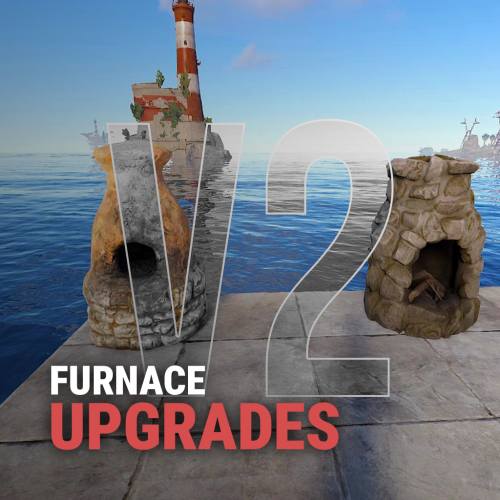
Furnace Upgrades Level up your smelting. Players upgrade each furnace on its own: faster smelting, faster fuel burn, more ore output and more charcoal. They pay with scrap, Economics or ServerRewards. Works on furnaces, large and electric furnaces, refineries, campfires, BBQs and even the Mixing Table. It replaces the classic "quick smelt" with a real progression. Every oven grows with the player who owns it. Video Showcase Features Upgrades Four upgrades per oven: Smelting speed: cooks faster. Fuel speed: burns fuel faster, so wood turns into charcoal quicker. Resource output: more metal per ore. Charcoal: more charcoal from wood. Unlimited levels. Add as many levels as you want, each with its own cost and multiplier. Per-oven settings. Every oven type has its own upgrade tree. Mixing Table speed. Mix faster, up to 100% quicker. Upgrades stay with the oven. Pick it up and place it again and it keeps its levels (optional). Quality of life Auto split. Ores spread evenly across the slots on their own. Auto fuel. Adds exactly the fuel needed for the batch, calculated from the oven's upgrades. Faster smelting also burns fuel faster, and Auto fuel accounts for that. Status panel. Shows the oven's levels, time left and fuel needed right on the oven screen. Server-wide defaults. Set a base speed and output for every oven, without upgrades. That's your quick smelt replacement. Charcoal chance. Control how often wood turns into charcoal. Control Pay how you like. Scrap (or any item, even skinned), Economics or ServerRewards. Owner or team only. Limit upgrades, or even turning the oven on and off, to the owner and their team. Permission-based levels. Each upgrade level can need its own permission, for example Level 3 for VIPs only. Feature permissions. Auto fuel, auto split, the upgrade button and the status panel can each be locked behind a permission. Turn any feature off you don't want. Notifications by chat, GameTip, Toastify or Notify, with an upgrade effect. Every message is in the lang file. Supported ovens Oven Short name Furnace furnace Large Furnace furnace.large Industrial Large Furnace industrial.furnace.large Electric Furnace electric.furnace Industrial Electric Furnace industrial_electric_furnace Legacy Furnace legacyfurnace Small Oil Refinery small.oil.refinery Campfire campfire BBQ bbq Mixing Table (own settings section) How it works Open a furnace. An UPGRADE button and a status panel appear on the oven screen. Click UPGRADE to see all four upgrades with the current level, the next level and the cost. Buy a level. The cost is taken and the oven upgrades at once. Turn on Auto split and Auto fuel in the same window if you have them. Tip Want quick smelt without upgrades? Leave the upgrades off and raise the values in Default Settings. Every oven on the server then smelts faster. Permissions Permission Allows furnaceupgrades.use Required. Buying upgrades furnaceupgrades.autofuel Using the Auto fuel option furnaceupgrades.autosplit Using the Auto split option furnaceupgrades.showupgrade Seeing the UPGRADE button (only when "Requires upgrade button permission" is on) furnaceupgrades.showstatus Seeing the status panel (only when "Requires show status permission" is on) furnaceupgrades.level2 / furnaceupgrades.level3 Buying those levels (only when permission-based upgrades are on) Note Permission-based upgrades: turn on Use permission based upgrade in General Settings, then set a permission on any level under Upgrades Settings. Leave it empty for no permission. Every permission you type is registered automatically, so you can create furnaceupgrades.vip, furnaceupgrades.mvp or whatever you like. Hosting partner Game hosting perfected, that's Physgun. Join the thousands of server owners using Physgun to take their game server communities to the top. Get your server at Physgun Installation Upload FurnaceUpgrades.cs to oxide/plugins. Grant the permissions: oxide.grant group default furnaceupgrades.use oxide.grant group default furnaceupgrades.autofuel oxide.grant group default furnaceupgrades.autosplit (Recommended) Install ImageLibrary to show the oven picture in the upgrade window. Open a furnace and click UPGRADE. Warning Using a stacks plugin? (StackModifier, StacksExtended, StackSizeController…) Set the stack size of every oven item to 1 (vanilla). If ovens stack, their upgrades are lost when they stack. The plugin warns you in console when it detects one of these plugins. Items to keep at stack 1: furnace, furnace.large, industrial.furnace.large, electric.furnace, industrial.electric.furnace, legacyfurnace, campfire, bbq, small.oil.refinery, mixingtable. Also use only one furnace splitter: the built-in Auto split or another plugin, not both. Configuration Every other oven (furnace.large, electric.furnace, industrial.furnace.large, industrial_electric_furnace, legacyfurnace, campfire, bbq, small.oil.refinery) has the same block under Upgrades Settings. Key settings explained Setting What it does Multiplier The value at that level: 2.0 = twice as fast, or twice as much Cost Price of that level in your currency Default Settings Base values for every oven before upgrades (1.0 = vanilla) Charcoal byproduct chance How often wood makes charcoal (0.5 = 50%, vanilla-like) Mixing Table Speed in % How much faster mixing gets at each level (max 100) Keep attributes when removing A picked-up oven keeps its upgrades Only Allow Oven Toggling by Owner & Team Only the owner and their team can turn the oven on or off Show furnace item cooking animation The vanilla cooking visuals on items in the oven Currency item Any item as payment, including a skinned one (Skin ID) Plugins Plugin Required? Used for ImageLibrary Recommended The oven picture in the upgrade window Economics Optional Paying with money ServerRewards Optional Paying with points Toastify / Notify Optional Pop-up notifications FAQ My upgrades disappear when I pick up a furnace. Your stacks plugin lets ovens stack. Set every oven item's stack size to 1. See the warning under Installation. Can I use it as a simple quick smelt? Yes. Raise Smelting speed and Resource output multiplier in Default Settings. Every oven gets that boost with no upgrades needed. Can I make the top level VIP only? Yes. Turn on Use permission based upgrade, put a permission like furnaceupgrades.vip on that level, and grant it to your VIP group. Can other players upgrade my furnace? Not by default. Only you and your teammates can. Set Only the owner can upgrade the furnace to make it owner only. Ores aren't splitting. Make sure the player has furnaceupgrades.autosplit and has the option turned on in the upgrade window. Don't run another furnace splitter plugin at the same time. Can I charge something other than scrap? Yes. Set Currency type to 1 for Economics or 2 for ServerRewards, or change Currency item to any item. Support Need help or found a bug? Open a support ticket on this page or join the Discord. Check out my other plugins$14.99 -

Version 1.0.0
27 downloads
Premium Betterloot loottable V.4 Compatible + November 2026 update! Elevate your Rust server's loot economy with this meticulously crafted BetterLoot v4 configuration, designed exclusively for 1.5x gather servers. Probability-driven drops ensure reasonable and fair loot without flooding the map with junk loot. This covers boxes, NPC and all other loot on rust. Key Balancing Features Precision 1.5x Scaling: Matches vanilla logic with custom percentage drop rates for every item, ensuring a perfectly balanced 1.5x progression. Balanced Probabilities: Barrels stay low-tier for early-game grind. Tested for wipe-long sustainability—no early-game god-rolls or late-game starvation. Unlike generic 'copy-paste' tables that simply slap a 1.5x multiplier on everything, this config features distinct loot tiers. You won’t find Heavy Scientist loot on a regular NPC, and you won't find endgame items in a roadside barrel. Every drop is manually weighted for logical progression. Perfect for servers seeking premium, player-approved loot without a lot of custom plugins. Full config JSON included with setup guide. I also have a 2x, 3x, 5x and 10x table based like this. Links: 2x, 3x, 5x and 10x Why choose this config? Setting up a balanced 1.5x server can be a real headache. I’ve spent countless hours fine-tuning these tables to ensure your players get a rewarding experience without breaking the progression. Save your time and focus on growing your community instead of fighting with config files! This configuration is backed by consistent positive feedback by a lot of servers, 5-STAR reviews and has been refined to ensure a stable, bug-free experience. Quality and reliability are my top priorities. You do not need to buy any plugin! BetterLoot is free to download.$7.98 -
Version 1.0.3
43 downloads
Premium Betterloot loottable V.4 Compatible + November 2026 update! Elevate your Rust server's loot economy with this meticulously crafted BetterLoot v4 configuration, designed exclusively for 5x gather servers. Probability-driven drops ensure reasonable and fair loot without flooding the map with junk loot. This covers boxes, NPC and all other loot on rust. Key Balancing Features Precision 5x Scaling: Matches vanilla logic with custom percentage drop rates for every item, ensuring a perfectly balanced 5x progression. Unlike generic 'copy-paste' tables that simply slap a 5x multiplier on everything, this config features distinct loot tiers. You won’t find Heavy Scientist loot on a regular NPC, and you won't find endgame items in a roadside barrel. Every drop is manually weighted for logical progression. Balanced Probabilities: Barrels stay low-tier for early-game grind. Tested for wipe-long sustainability—no early-game god-rolls or late-game starvation. Perfect for servers seeking premium, player-approved loot without a lot of custom plugins. Full config JSON included with setup guide. I also have a 2x,3x and 10x table based like this. Links: 2x,3x and 10x Why choose this config? Setting up a balanced 5x server can be a real headache. I’ve spent countless hours fine-tuning these tables to ensure your players get a rewarding experience without breaking the progression. Save your time and focus on growing your community instead of fighting with config files! This configuration is backed by consistent positive feedback and has been refined to ensure a stable, bug-free experience. Quality and reliability are my top priorities.$7.99-
- 1
-

-
- #5x 5x loot
- #loottable
- (and 21 more)
-
Version 1.0.4
319 downloads
Premium Betterloot loottable V.4 Compatible + November 2026 update! Elevate your Rust server's loot economy with this meticulously crafted BetterLoot v4 configuration, designed exclusively for 2x gather servers. Probability-driven drops ensure reasonable and fair loot without flooding the map with junk loot. This covers boxes, NPC and all other loot on rust. Key Balancing Features Precision 2x Scaling: Matches vanilla logic with custom percentage drop rates for every item, ensuring a perfectly balanced 2x progression. Balanced Probabilities: Barrels stay low-tier for early-game grind. Tested for wipe-long sustainability—no early-game god-rolls or late-game starvation. Unlike generic 'copy-paste' tables that simply slap a 2x multiplier on everything, this config features distinct loot tiers. You won’t find Heavy Scientist loot on a regular NPC, and you won't find endgame items in a roadside barrel. Every drop is manually weighted for logical progression. Perfect for servers seeking premium, player-approved loot without a lot of custom plugins. Full config JSON included with setup guide. I also have a , 3x, 5x and 10x table based like this. Links: 3x, 5x and 10x Why choose this config? Setting up a balanced 2x server can be a real headache. I’ve spent countless hours fine-tuning these tables to ensure your players get a rewarding experience without breaking the progression. Save your time and focus on growing your community instead of fighting with config files! This configuration is backed by consistent positive feedback by a lot of servers, 5-STAR reviews and has been refined to ensure a stable, bug-free experience. Quality and reliability are my top priorities. You do not need to buy any plugin! BetterLoot is free to download. Video of the loot table in action:$7.99- 6 reviews
-
- 2
-

-
-
- #rust configs x2 loot table
- ##2x loot config
- (and 23 more)
-

Version 1.0.0
9 downloads
Build a true 3X Rust economy without turning every container into an overflowing pile of random items. yNkes's BetterLoot 3X is a carefully balanced loot table designed for 3X gather servers, with individual attention given to item rarity, usefulness, progression and overall server economy. Instead of blindly multiplying every vanilla drop by three, the configuration uses controlled probabilities and category-based balancing. Valuable and rare items remain meaningful, while commonly used resources, components, ammunition, medical supplies and other progression items are adjusted where a 3X server actually needs them. Designed for a Better 3X Experience BetterLoot V4 compatible Built specifically around 3X server progression Carefully tuned drop chances and stack amounts Rare items remain rare instead of becoming disposable Reduced unnecessary and low-value loot clutter Balanced components, resources, ammo, meds and progression items Covers crates, barrels, NPC loot and other supported Rust loot containers Ready to use with the free BetterLoot plugin No paid plugin or additional dependency required Skip the Hours of Loot Balancing Building and testing a complete BetterLoot configuration from scratch means adjusting hundreds of entries, probabilities and quantities while trying not to break your server economy. This pack gives you a finished, structured 3X foundation that you can install and use immediately — while still being easy to customize further for your own server.$8.00 -

Version 1.0.0
11 downloads
About yNkes's BetterLoot 5X - Balanced Loot Table for BetterLoot V4 Build a true 5X Rust economy without turning every container into an oversized pile of random, economy-breaking loot. yNkes's BetterLoot 5X is a carefully balanced loot table built specifically for 5X gather servers, with individual attention given to item rarity, usefulness, progression speed and overall server economy. Instead of simply multiplying every vanilla drop by five, the configuration uses controlled stack sizes, item diversity and category-based balancing. Commonly used resources, components, ammunition, medical supplies and progression items are increased where a 5X server actually benefits from faster progression, while valuable weapons, explosives and rare items remain controlled enough to preserve meaningful progression. Designed for a Better 5X Experience BetterLoot V4 compatible Built specifically around 5X server progression Carefully tuned stack amounts and loot variety Faster progression without destroying item value Rare and high-tier items remain meaningful Reduced unnecessary and low-value loot clutter Balanced components, resources, ammo, meds and raid-related items Tier-appropriate loot pools for early, mid and endgame progression Covers crates, barrels, NPC loot and other supported Rust loot containers Ready to use with the free BetterLoot plugin No paid plugin or additional dependency required Skip the Hours of Loot Balancing Building a complete 5X loot economy from scratch is more complicated than simply increasing every stack. Hundreds of item quantities, container pools and progression-sensitive drops need to work together without making early-game loot useless or flooding the server with endgame gear. This pack gives you a finished, structured and carefully tuned 5X foundation that delivers faster progression while maintaining a rewarding loot hierarchy. Install it, start your server and get a properly balanced 5X loot economy immediately — while still keeping the configuration easy to customize further for your own server.$8.00 -
Version 1.0.0
5 downloads
About yNkes's BetterLoot 2X - Balanced Loot Table for BetterLoot V4 Build a true 2X Rust economy without losing the progression, rarity and reward structure that makes vanilla Rust satisfying. yNkes's BetterLoot 2X is a carefully balanced loot table built specifically for 2X gather servers, with individual attention given to item rarity, usefulness, progression speed and overall server economy. Instead of simply doubling every vanilla drop, the configuration uses controlled stack sizes, tier-appropriate loot pools and category-based balancing. Commonly used resources, components, ammunition, medical supplies and progression items are improved where a 2X server benefits from reduced grind, while valuable weapons, explosives and rare items remain carefully controlled. The result is a faster and more rewarding Rust experience that still preserves meaningful progression and the value of high-tier loot. Designed for a Better 2X Experience BetterLoot V4 compatible Built specifically around 2X server progression Carefully tuned stack amounts and loot variety Faster progression without losing the vanilla Rust feel Rare and high-tier items remain meaningful Reduced unnecessary and low-value loot clutter Balanced components, resources, ammo, meds and raid-related items Tier-appropriate loot pools for early, mid and endgame progression Designed to avoid excessive component and explosive flooding Covers crates, barrels, NPC loot and other supported Rust loot containers Ready to use with the free BetterLoot plugin No paid plugin or additional dependency required Skip the Hours of Loot Balancing Building a proper 2X loot economy is more complicated than simply multiplying every vanilla stack by two. Hundreds of item quantities, loot pools and progression-sensitive drops need to work together so the server feels noticeably faster than vanilla without turning into a 3X or 5X experience. This pack gives you a finished, structured and carefully tuned 2X foundation that reduces unnecessary grind while keeping monument progression, high-tier loot and raid progression meaningful. Install it, start your server and get a properly balanced 2X loot economy immediately, while still keeping the configuration easy to customize further for your own server.$8.00 -

Version 1.0.3
32 downloads
Description : - This plugin allows you to assign personalized advantages to players via a permissions system, each of which can be individually enabled or disabled from a CUI menu. Regeneration : Automatically restores a small amount of health every few seconds when out of combat. Strength : Instantly kills any NPC with a single hit. Resistance : Reduces all incoming damage from players by a configurable percentage. Fire Resistance : Grants complete immunity to fire. Fall Resistance : Grants complete immunity to fall damage. Cold Resistance : Grants complete immunity to cold damage. Breathing : Grants complete immunity to drowning damage. Ammo Refund : Gives a chance to refund one ammo round each time the player fires. Durability : Prevents all item condition loss, making gear last forever. Metabolism : Passively restores food and water over time. Settings : - HUD colors - Footer Text - Regeneration - Resistance - Metabolism - Ammo Refund Chat Commands : - /perks - /perk Permissions : - oxide.grant user <steamID/user> <perm> playerperks.regeneration playerperks.strength playerperks.resistance playerperks.fireresistance playerperks.fallresistance playerperks.coldresistance playerperks.breathing playerperks.ammorefund playerperks.durability playerperks.metabolism WuyZar's Discord : https://discord.gg/NVwRcQwGwh Game interface :$7.50- 8 comments
-
- 1
-
-
- #adventage
- #perks
- (and 23 more)
-

Version 2.0.0
220 downloads
This plugin allows you to launch quick gather rush events that temporarily multiply ore gather rates (stone, metal, sulfur, HQM, or all at once) for a chosen duration, with a live HUD and chat announcements for all players. Settings : - HUD colors - Event duration (in F1 commands) - Items (in F1 commands) - Multiplier (in F1 commands) - Server message (true/false) Server message = true (you need the ServerMessage.cs plugin, https://codefling.com/plugins/server-message) Server message = false (these messages will appear in the global chat, replacing the UI) F1 Commands : - or.start <items> <duration> <multiplier> - or.stop (Items : stone / metal / sulfur /hqm / all) Permissions : - ownerid <steamID/user> WuyZar's Discord : https://discord.gg/NVwRcQwGwhFree -
Version 2.0.1
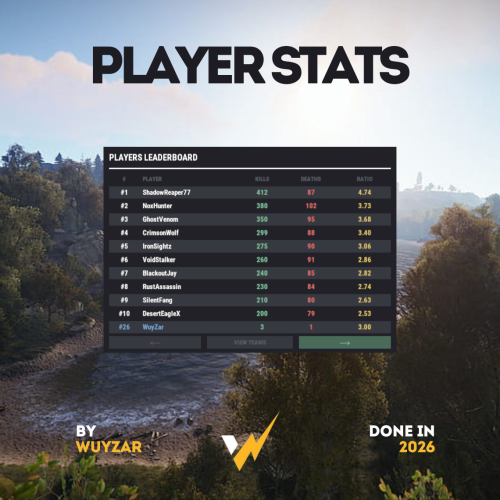
81 downloads
PlayerStats.cs Description : - This plugin offers a complete PvP stat tracking system for your Rust server, with real-time display of kills, deaths, and K/D ratio for each player. It includes a persistent interface displaying personal stats, a floating 3D leaderboard visible in the world showcasing the top 10 players, and a detailed interactive menu for this leaderboard. All player stats are automatically tracked and updated in real time. Settings : - Count suicide (true/false) - Show small KDR (next to the equipment bar) - Show floating leaderboard (true/false) - Floating leaderboard position (x, y, z) - Floating leaderboard view distance Chat Commands : - /stats (to open the leaderboard) WuyZar's Discord : https://discord.gg/NVwRcQwGwh Game interface :$11.50-
- 1
-
-
- #stats
- #leaderboard
- (and 16 more)
-
Version 1.0.2
26 downloads
Stop wasting weeks on configs and loot tables – get a pro server in minutes. This is a complete "Server-in-a-Box" designed for 3x Gather servers. It includes my Premium Loottable and a perfectly balanced suite of around 30 plugin configurations. Everything can be easily adjusted to fit your specific needs. If you ever run into issues or want to tweak a setting, I am here to help! TOP FEATURES: Merged Outpost & Bandit: Optimized for performance and convenience. All Bandit Camp shops and airwolf are integrated into the Outpost. Perfect Balance: 3x Wood/Stone/Sulfur. No junk in loot crates. Monument Upgrades: Recyclers & Drones added to Fishing Village, Ranch, and Barns. Optimized Speed: Faster smelting, crafting, and recycling. Time Control: 55m Days / 5m Nights and much more (Add the files that you want to use). Possible to get helispawn on road, rhib boats at coast and 50% upkeep by request. BetterLoot V.4: Optimized for 3x: This setup is perfectly balanced for a 3x experience with 5 star reviews. Need a different rate? Check out my 2x and 5x Server setup! WHAT YOU GET: Config & Data Folders: 30+ tuned files (Loot, Files for plugins, Monuments, etc.). Language Files: Clean chat messages and prefixes. Plugin explanation: BetterLoot: Custom 3x loot tables (August 2026 update). GatherManager: Optimized 3x gather rates. QuickSmelt: Faster furnace smelting. StackSizeController: Increased stack limits. CraftingController: Adjusted crafting speeds. AutoAuth: Shared TC, Turret & Lock access. BuildingWorkbench: Extended workbench radius. RecyclerSpeed: Faster recycling. BetterChat/Mute: Chat formatting & muting. PermissionsManager: GUI for permissions. AdminRadar: Admin tracking tool. CopyPaste: Building copy/paste tool. TimeOfDay: Custom day/night cycles. SignArtist: Custom images on signs. ImageLibrary: UI icon support. UnburnableMeat: Prevents burnt meat. LootBouncer: Refreshes containers by spawning new loot if not fully emptied. Godmode: Admin invincibility & protection. InventoryViewer: Remote player inventory inspection. MonumentAddons: Adds custom features to monuments. MonumentFinder: Required for locating monuments. And more! No extra costs for plugins! Easy Setup:Very little Knowledge Required: Designed to be as easy as it gets—perfect for both new and experienced server owners. Step-by-step README included. Also plugin explanation, links to all the plugins to make it as easy as it gets to get the server up n runing. NOTE: This is a Configuration-only pack. Plugin files (.cs) are not included to ensure you always use the latest versions from uMod/Codefling.Simply download the plugins and drop them in!$19.98 -
Version 1.0.2
76 downloads
Stop wasting weeks on configs and loot tables – get a pro server in minutes. This is a complete "Server-in-a-Box" designed for 2x Gather servers. It includes my Premium Loottable and a perfectly balanced suite of around 30 plugin configurations. Everything can be easily adjusted to fit your specific needs. If you ever run into issues or want to tweak a setting, I am here to help! TOP FEATURES: Merged Outpost & Bandit: Optimized for performance and convenience. All Bandit Camp shops and airwolf are integrated into the Outpost. Perfect Balance: 2x Wood/Stone, 1.5x Sulfur. No junk in loot crates. Monument Upgrades: Recyclers & Drones added to Fishing Village, Ranch, and Barns. Optimized Speed: Faster smelting, crafting, and recycling. Time Control: 55m Days / 5m Nights and much more (Add the files that you want to use). Possible to get helispawn on road, rhib boats at coast and 50% upkeep by request. BetterLoot V.4: Optimized for 2x: This setup is perfectly balanced for a 2x experience with 5 star reviews. Need a different rate? Check out my 3x and 5x Server setup! WHAT YOU GET: Config & Data Folders: 30+ tuned files (Loot, Files for plugins, Monuments, etc.). Language Files: Clean chat messages and prefixes. Plugin explanation: BetterLoot: Custom 2x loot tables (August 2026 update). GatherManager: Optimized 2x gather rates. QuickSmelt: Faster furnace smelting. StackSizeController: Increased stack limits. CraftingController: Adjusted crafting speeds. AutoAuth: Shared TC, Turret & Lock access. BuildingWorkbench: Extended workbench radius. RecyclerSpeed: Faster recycling. BetterChat/Mute: Chat formatting & muting. PermissionsManager: GUI for permissions. AdminRadar: Admin tracking tool. CopyPaste: Building copy/paste tool. TimeOfDay: Custom day/night cycles. SignArtist: Custom images on signs. ImageLibrary: UI icon support. UnburnableMeat: Prevents burnt meat. LootBouncer: Refreshes containers by spawning new loot if not fully emptied. Godmode: Admin invincibility & protection. InventoryViewer: Remote player inventory inspection. MonumentAddons: Adds custom features to monuments. MonumentFinder: Required for locating monuments. And more! No extra costs for plugins! Easy Setup: Very little Knowledge Required: Designed to be as easy as it gets—perfect for both new and experienced server owners. Step-by-step README included. Also plugin explanation, links to all the plugins to make it as easy as it gets to get the server up n runing. NOTE: This is a Configuration-only pack. Plugin files (.cs) are not included to ensure you always use the latest versions from uMod/Codefling.Simply download the plugins and drop them in!$19.99 -

Version 1.0.0
23 downloads
WelcomeMessage.cs Description : - This plugin allows you to display a welcome message on players' screens when they arrive on the server. They can also click a button to execute a command, such as opening a menu. Settings : - HUD colors - Display time (20s) - Welcome text (Welcome <player> !) - Button text (INFO) -Button command (say.chat /info) F1 Commands : - wm.test (to test the UI. Only admin) Permissions : - oxide.grant user <steamID/user> welcomemessage.use WuyZar's Discord : https://discord.gg/NVwRcQwGwh Game interface :$4.50 -
Version 2.0.0
52 downloads
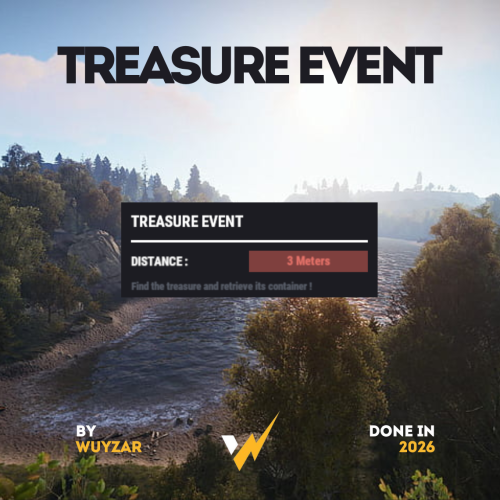
TreasureEvent.cs Description : - This plugin offers a complete treasure hunt event system for your Rust server, with real-time distance tracking and customizable loot rewards. Settings : - HUD colors - Event duration (in F1 commands) - Server message (true/false) - Items (customize everything you want in the treasure, even the skins of the items) Server message = true (you need the ServerMessage.cs plugin, https://codefling.com/plugins/server-message) Server message = false (these messages will appear in the global chat, replacing the UI) F1 Commands : - t.start <x> <z> <time> (the treasure appear in a specific location) - t.stop Permissions : - ownerid <steamID/user> WuyZar's Discord : https://discord.gg/NVwRcQwGwh$11.50 -

Version 1.0.1
15 downloads
Premium Betterloot loottable V.4 Compatible + Updated deep sea loot + August 2026 update! Elevate your Rust server's loot economy with this meticulously crafted BetterLoot v4 configuration, designed exclusively for 10x gather servers. Probability-driven drops ensure reasonable and fair loot without flooding the map with junk loot. This covers boxes, NPC and all other loot on rust. Key Balancing Features Precision 10x Scaling: Matches vanilla logic with custom percentage drop rates for every item, ensuring a perfectly balanced 10x progression. Unlike generic 'copy-paste' tables that simply slap a 10x multiplier on everything, this config features distinct loot tiers. You won’t find Heavy Scientist loot on a regular NPC, and you won't find endgame items in a roadside barrel. Every drop is manually weighted for logical progression. Balanced Probabilities: Barrels stay low-tier for early-game grind. Tested for wipe-long sustainability—no early-game god-rolls or late-game starvation. Perfect for servers seeking premium, player-approved loot without a lot of custom plugins. Full config JSON included with setup guide. I also have a 2x, 3x and 5x table based like this. Links: 2x,3x and 5x. Why choose this config? Setting up a balanced 10x server can be a real headache. I’ve spent countless hours fine-tuning these tables to ensure your players get a rewarding experience without breaking the progression. Save your time and focus on growing your community instead of fighting with config files! This configuration is backed by consistent positive feedback and has been refined to ensure a stable, bug-free experience. Quality and reliability are my top priorities.$7.99 -

Version 1.0.0
15 downloads
Premium Betterloot loottable V.4 Compatible + Updated deep sea loot + August 2026 update! Elevate your Rust server's loot economy with this meticulously crafted BetterLoot v4 configuration, designed exclusively for 2x gather servers. (This loot table is built without blueprint fragments) since its easy to get it in other ways (tables in keycard rooms etc.). If you want a regular table check out my 2x or other tables. Link: 2x. Probability-driven drops ensure reasonable and fair loot without flooding the map with junk loot. This covers boxes, NPC and all other loot on rust. Key Balancing Features Precision 2x Scaling: Matches vanilla logic with custom percentage drop rates for every item, ensuring a perfectly balanced 2x progression. Balanced Probabilities: Barrels stay low-tier for early-game grind. Tested for wipe-long sustainability—no early-game god-rolls or late-game starvation. Unlike generic 'copy-paste' tables that simply slap a 2x multiplier on everything, this config features distinct loot tiers. You won’t find Heavy Scientist loot on a regular NPC, and you won't find endgame items in a roadside barrel. Every drop is manually weighted for logical progression. Perfect for servers seeking premium, player-approved loot without a lot of custom plugins. Full config JSON included with setup guide. I also have a , 3x, 5x and 10x table based like this. Links: 3x, 5x and 10x Why choose this config? Setting up a balanced 2x server can be a real headache. I’ve spent countless hours fine-tuning these tables to ensure your players get a rewarding experience without breaking the progression. Save your time and focus on growing your community instead of fighting with config files! This configuration is backed by consistent positive feedback by a lot of servers, 5-STAR reviews and has been refined to ensure a stable, bug-free experience. Quality and reliability are my top priorities. You do not need to buy any plugin! BetterLoot is free to download.$7.98 -

Version 2.2.0
18 downloads
"MyHouse" is an extensive plugin for Rust that enhances and improves the house management system in the game. It offers players the ability to name, find, and manage their houses, as well as use additional features like doorbells and mailboxes. The plugin aims to enhance the social player experience in Rust by providing players with more opportunities to personalize their houses and interact with others. It adds an extra layer of community and competition to the game by encouraging players to build impressive houses and share them with others. Features: House Naming: Players can name their Tool Cupboards (TCs) to make their houses easier to identify. House Searching: Players can find named houses of other players on the map by searching for the player’s name. Doorbells: Install and manage doorbells with 7 different sound options. Mailboxes: Enhanced functionality for mailboxes, displaying information about the house. House Rating System: A complex rating system that considers various factors like player votes, house statistics, house age, and number of owners. UI System: A user-friendly interface for managing and displaying all house functions. Commands: /myhouse <name> - Names the Tool Cupboard the player is looking at. /rename <name> - Renames an already named Tool Cupboard. /removemyhouse - Removes the name from a Tool Cupboard, making it unsearchable by other players. /findhouse <player name> - Finds and marks the named houses of another player on the map. /myhousehelp - Opens the help menu with an overview of all commands. /addbell - Adds a doorbell at the location the player is looking at. /removebell - Removes an installed doorbell. /set bell [1-7] - Changes the doorbell sound. Permissions: myhouse.use - Allows basic use of the plugin (house naming, house searching). myhouse.doorbell - Allows installation and management of doorbells. myhouse.mailbox - Allows use of advanced mailbox functions. Config: The plugin settings can be adjusted in the MyHouse.json file in the config folder. Here you can change properties like cooldown times, sound effects, and default language. { "CooldownSeconds": 20.0, "EggActiveDuration": 20.0, "DefaultSound": "assets/prefabs/misc/easter/painted eggs/effects/egg_upgrade.prefab", "DefaultLanguage": "en" } Multilingual Support: The plugin supports multiple languages. Language files are located in the lang folder and can be edited or expanded as needed. Currently supported languages: default: EN DE | FR | ES | IT | TR | RU | UK Please note that the language files were translated using the DeepL Language Tool load, run, enjoy Join my Discord pick the Role -> Flash and find Free Plugins Support Discord$29.99 -


Version 2.14.2
43 downloads
BlackMarket is a complex plugin that awakens the dark dealings of the underground. It offers players a completely new gaming experience by introducing illegal trading activities with special currencies. Thanks to the various customization options, the plugin can be perfectly adapted to individual needs. ⇨ MoneyWash Dealer: ➤ The MoneyWash Dealer offers the possibility to exchange black money for a special currency. By default, Scrap is exchanged for Golden Scrap - my exclusive currency that is used on my server. Players can thus safely launder their illegal winnings to use them for other transactions. ⇨ Black Market Merchant: The Black Market Merchant provides access to various stores: ➤ Weapons Shop: Players can purchase exclusive weapons here. ➤ Ammoshop: A place to stock up on ammunition. ➤ Special Items & Fun Items: Players can purchase unique items or fun items that can only be paid for with special currencies such as Golden Scrap. You can, of course, customize the stores to suit your needs. ⇨ Dynamic dealer behavior: ➤ The two dealers don't stay in one place for long. To avoid being caught, they change their position every X minutes. As a result, they always remain hidden and ensure an immersive and dynamic gaming experience. ➤ no Commands ➤ blackmarket.moneywash - Allows basic use of the Money Wash Dealer. ➤ blackmarket.dealer - Allows basic use of the Black Market Dealer. ➤ The plugin offers numerous configuration options so that it can be easily customized to the needs of each server. See this one: How can I set up BlackMarket? load, run, enjoy Support Discord ⇽ Free Download GoldenScrap Plugin *Attention because there are frequent questions after the purchase I would like to explain 1-2 things here! If you buy the plugin, it is naked! You must define your monuments before putting it into operation. Since everyone has different needs, I have made the plugin simple so that everyone can adjust these settings with copy/paste and numbers. I have made you an example using airfield. You can set this for each monument. You make these settings only once! The dealers spawn at a map wipe regardless of the direction of the monument, how high it is or how it is inclined again at this point. Do the work for yourself. If you find great spots, please share them on discord via ticket. Maybe I’ll make a long list of choices if enough people get in touch$39.99 -
Version 1.0.0
50 downloads
ServerPeriods.cs Description : - This plugin offers a complete periodic event system for your Rust server, allowing you to create structured game phases with customizable restrictions. Each period can independently control PvP, raiding, gathering, and building permissions, providing a dynamic gameplay experience. It includes a persistent, real-time user interface displaying the current period name and remaining time, with an automatic "Next Period" indicator, and the execution of custom server commands for each period. Settings : - HUD colors - Custom periods (name/perms/time/commands) F1 Commands : - p.start (to start the periods) - p.stop (to stop the periods) - p.next (to move on to the next period) - p.prev (to move on to the previous period) Permissions : - ownerid <steamID/user> WuyZar's Discord : https://discord.gg/NVwRcQwGwh Chat messages : Game interface :$11.50- 4 comments
-
- 2
-
-
-
- #event
- #tournament
- (and 17 more)
-

Version 1.0.1
22 downloads
Stop wasting weeks on configs and loot tables – get a pro server in minutes. This is a complete "Server-in-a-Box" designed for 5x Gather servers. It includes my Premium Loottable and a perfectly balanced suite of 30+ plugin configurations. Everything can be easily adjusted to fit your specific needs. If you ever run into issues or want to tweak a setting, I am here to help! TOP FEATURES: Merged Outpost & Bandit: Optimized for performance and convenience. All Bandit Camp shops and airwolf are integrated into the Outpost. Perfect Balance: 5x Wood/Stone/Sulfur/Metal etc. No junk in loot crates. Monument Upgrades: Recyclers & Drones added to Fishing Village, Ranch, and Barns. Optimized Speed: Faster smelting, crafting, and recycling. Time Control: 55m Days / 5m Nights and much more (Add the files that you want to use). Possible to get helispawn on road, rhib boats at coast and 50% upkeep by request. BetterLoot V.4: Optimized for 5x: This setup is perfectly balanced for a 5x experience with 5 star reviews. Need a different rate? Check out my 2x and 3x Server setup! WHAT YOU GET: Config & Data Folders: 30+ tuned files (Loot, Files for plugins, Monuments, etc.). Language Files: Clean chat messages and prefixes. Plugin explanation: BetterLoot: Custom 5x loot tables (August 2026 update). GatherManager: Optimized 5x gather rates. QuickSmelt: Faster furnace smelting. StackSizeController: Increased stack limits. CraftingController: Adjusted crafting speeds. AutoAuth: Shared TC, Turret & Lock access. BuildingWorkbench: Extended workbench radius. RecyclerSpeed: Faster recycling. BetterChat/Mute: Chat formatting & muting. PermissionsManager: GUI for permissions. AdminRadar: Admin tracking tool. CopyPaste: Building copy/paste tool. TimeOfDay: Custom day/night cycles. SignArtist: Custom images on signs. ImageLibrary: UI icon support. UnburnableMeat: Prevents burnt meat. LootBouncer: Refreshes containers by spawning new loot if not fully emptied. Godmode: Admin invincibility & protection. InventoryViewer: Remote player inventory inspection. MonumentAddons: Adds custom features to monuments. MonumentFinder: Required for locating monuments. And more! No extra costs for plugins! Easy Setup: Very little Knowledge Required: Designed to be as easy as it gets—perfect for both new and experienced server owners. Step-by-step README included. Also plugin explanation, links to all the plugins to make it as easy as it gets to get the server up n runing. NOTE: This is a Configuration-only pack. Plugin files (.cs) are not included to ensure you always use the latest versions from uMod/Codefling.Simply download the plugins and drop them in!$19.98 -
Version 1.1.68
1,176 downloads
Ever wanted to be able to rain death on your enemies while being in what is essentially a flying tank!? The GunShip plugin allows you to spawn 16 different preconfigured customized vehicles allowing for new ways to play the game! Whether it is base raiding, pvp, or monument clearing youll always have the right tools, and the right firepower, to get the job done! The plugin itself requires one main dependency but has a few optional ones as well. After Entity Scale Manager is installed all vehicles will be able to be spawned in and used right out of the box! Support Please read through this as well as the extended documentation available on my discord before flagging a ticket! Open a support request here or join the discord and get in touch with me directly! I may not answer right away, please allow around 24 hours for me to be able to help you with your request! Dependency Setup REQUIRED DEPENDENCIES: Entity Scale Manager OPTIONAL DEPENDENCIES: Death Notes Sign Artist Server Rewards Economics Raidable Bases Entity Scale Manager (Required) Once downloaded, upload the plugin to the same directory as the GunShip plugin and check console to ensure it has loaded, once it has reload the GunShip plugin (if needed). OPTIONALLY you can change the following setting in the config file of Entity Scale Manager to make the scaling spheres disappear. // Change the below value to true if you would like to enable it in the EntityScaleManager.json config file. { "Hide spheres after resize (performance intensive)": false } Death Notes (Optional) Implementing Death Notes allows players to see custom death messages when a player kills something or gets killed by something on a server. When using Death Notes with the GunShip plugin you can see additional custom death messages for when a NPC / Player is killed by a GunShip vehicle. Near the end of the DeathNotes.json configuration file in the oxide/config directory you can add the following lines to enable the custom death messages! "muzzlebrake.entity": "Armed Sedan", "lasersight.entity": "Heavy Technical", "smoke_grenade.weapon": "Light Technical", "hammer.entity": "Apache Attack Helicopter", "spraycan.weapon": "Huey Attack Helicopter", "flare.weapon": "Viper Attack Helicopter", "detonator.entity": "Enforcer UAV", "supplysignal.weapon": "Cargo Truck" Append the above lines to the end of the 'Weapons' section of the config. It should look like something below. Sign Artist (Optional) Sign artist is used to load custom images onto signs from a url. In the GunShip plugin it is used to load the specified image to all signs by default when they are initially spawned in. Upload the the oxide/plugins directory and enjoy! Reseller Info As of version 1.0.5 the reseller framework has been added! This new feature allows server owners to optionally add the 'reseller' / salesman role into their servers allowing a assigned player to sell other players gunship vehicles. Additionally if enabled the assigned player can also make a comission of the configured currency for the sale depending on how much money they took off of the original price of the vehicle. For a reseller to be able to make commission the option for enable reseller comission must be enabled. If you want the ability to allow resellers to edit the price of the vehicle within the configured discount range enable the Allow Resellers to Modify Price option in the config file. The actual comission is based off of the amount that the reseller did not take off of the sale. For example, if the reseller ran /sellgs huey 15 false they would make 5% of the total sale meaning that the comission is (sale price) * ((configured discount max) - (specified discount)) = reseller commission amount Custom Item Info Land / Air Vehicles Item Shortname: box.wooden Water Vehicles Item Shortname: boogieboard Steam Skin IDs: Permission Info System Permissions gunship.vip - Enables VIP perks / settings for players with this permission. gunship.spawn - Required to spawn any gunship vehicle (just to use the /gunship command). gunship.nocooldown - Players with this permission do not have a spawn command cooldown. gunship.admin - Players get admin settings / perks. gunship.target_immune - Players with this permission cannot be targeted by GunShip managed AutoTurrets (Vehicle Auto Turrets). gunship.nowipefee - Players with this permission do not pay a wipe fee for any vehicle (Start of wipe fee). gunship.norespawnfee - Players with this permission do not pay a respawn fee to spawn their vehicle after paying the wipe fee. gunship.norecallfee - Removes the cost of using the /gunship.util recall vehicle_name command gunship.nohominglock - Players that have this permission cannot be locked onto by a gunship smart missile system (what the guardian uses) gunship.reseller - Allows a player to use the reseller commands and sell vehicle items to other players and make commission (if enabled) Vehicle Permissions gunship.apache - Huey Attack Helicopter gunship.guardian - Guardian Homing AA Helicopter gunship.stinger - Agile Missile Attack Helicopter gunship.viper - Agile Gunner Attack Helicopter gunship.cobra - AA Helicopter gunship.huey - Heavy Attack Helicopter gunship.reaper - Heavy Attack Helicopter gunship.technical - Light Armoured Ground Attack Vehicle gunship.heavy_technical - Heavy Armoured Ground Attack Vehicle gunship.cargo_truck - Heavy Armoured Ground Transport Vehicle gunship.sedan - Heavy Ground Attack Vehicle gunship.fighter - Agile Attack Helicopter gunship.stallion - Heavy Cargo Transport Helicopter gunship.cougar - Light Cargo Transport Helicopter gunship.enforcer - Tactical UAV gunship.attack_rhib - Light Gun Boat Command Info Player Commands: /gunship - USE: /gunship <vehicle_name> - The base GunShip command. Used for spawning vehicles. /gunship.help - USE: /gunship.help - Displays the help information for all vehicles. (Grey Names: No Permission, Yellow Names: Has Permission) /gunship.util - USE: /gunship.util <kill/recall/find> <vehicle_name> - Kill, recall, or find, the specified vehicle (if it is spawned) Admin Commands: /clearsave - USE: /clearsave - Wipe the save file in its entirety. /gunship.reloadconfig - USE: /gunship.reloadconfig - Reload the configuration values without reloading the plugin. /vehiclereport - USE: /vehiclereport - Get the information of the actively spawned vehicles. /checkstatus - USE: /checkstatus - View a report of the information relating to the vehicle you are looking at. /resetwf_all - USE: /resetwf_all - Reset the wipe fees of all players. /resetwf_player - USE: /resetwf_player <player_name> - Reset the wipe fees of the specified player. Debug Commands: /getlayer - USE: /getlayer - Return the layer information of the entity that you are currently looking at, prints to RCON console. /getparent - USE: /getparent - Return the information about the parent of the entity you are looking at (if any). /getname - USE: /getname - Return the name, item id, and skin id, of the currently held item. Reseller Commands (Requires gunship.reseller): /sellgs - USE: /sellgs <profile_name> <discount_percentage> <is_one_time_sale (true/false)> - Create a vehicle sale offer for the player you are facing /processsale - USE: /processsale <"confirm"/"cancel"> - Confirms or cancels the current sale offer and sends it to the customer Reseller Customer Commands: /buygs - USE: /buygs <"confirm"/"cancel"> - Confirms or cancels the given sale offer after being sent by a reseller Configuration File { "General Config": { "Chat Settings": { "Chat Message Icon": 0, // The default icon of all images sent by the plugin "Chat Message Prefix": "[<color=#d93d3d>GunShip</color>]" // The default chat prefix of all messages sent by the plugin }, "Sign Settings": { "Load Default Image on All Vehicle Signs": false, // Whether or not to load a default image when a vehicle is first spawned in "Sign URL Load (Requires Sign Artist)": "", // The URL of the default image to be loaded on the the sign "Load default image on vanilla vehicles": true }, "Vehicle Purchase Settings": { "Enable Wipe Fee": true, // Whether or not to enable the wipe fee "Enable Respawn Fee": true, // Whether or not to enable the respawn fee "Respawn Fee": 500.0, // The Respawn Fee amount "Recall Fee (To disable set to 0)": 200.0, // The recall fee amount "Payment Settings": { "Use Economics Plugin (Priority, will use this over SR if enabled)": false, "Use Server Rewards Plugin": false, "Use Custom Currency": true, // Whether or not to use a custom currency instead of SR or Economics "Points Name (when using SR or Economics)": "dollars", "Custom Currency Item Shortname (Specify item shortname [e.g scrap, or metal.refined])": "scrap", // Shortname of the custom currency "Custom Currency Skin (0 = Default Skin)": 0, // The Skin Id of the custom currency "Custom Currency Display Name (Leave empty for default item name)": "" // The display name of the custom currency } }, "PvP Settings": { "Enable PvE Mode (Disable all Damage between Players / Owned Entities and GunShip Vehicles)": false, // Enable the PvE Damage profile "Damage Options (Individual Settings)": { "Disable Gunship Damage to Owned Vehicles": false, "Disable Gunship Damage to Players": false, "Enable Friendly Fire": false, // Disable Friendly fire between teammates "Disable Player Damage to Gunships": false, "Disable Player Damage to All OWNED Vehicles (Global)": false, "Disable Global Fireball Damage": false, // Disable Fireball Damage to everything! "Disable Fireball Damage to GunShips": true,// Disable Fireball damage to gunships only (Above value overrides this) "Allow Fireball Damage in Raidable Base Raid Zones": true, "Disable Gunship To Building Damage": false, // Disable GunShip to OWNED player building damage "Disable GunShip Vehicle decay": true, "GunShips Override True PvE Damage Checks": false // Override the behaviour of TruePvE using the above damage settings for outgoing gunship damage "Building Damage Settings": { "Disable GunShip to Building Damage": true, "Allow Owned Building Damage (Players can damage their own buildings)": true, "Allow Friendly Fire Building Damage Between Teammates": true } } }, "Gunship System Targeting Settings": { "Allow GunShip Turrets to Target Sleepers": false, "Allow GunShip Turrets to Target Players": true, "Allow Gunship Sam Sites to target players": true, "Allow Gunship SAM Sites to target Patrol Helicopter": false, "Allow Non-GunShip SAM sites to target gunship vehicles": true, "Allow Gunship Homing Missiles to Lock onto Patrol Helicopter": true, "Allow Gunship Homing Missiles to Lock onto Bradley APC": true, "Enable Homing Lock PvP": true, // Enable the gunship smart missiles to lock onto players (Guardian Smart Missiles) "Enable Homing Lock Friendly Fire (between teammates)": false // Allow homing lock from smart missiles to friendly players (teammates) }, "Spawn Cooldown Time": 120.0, "Use Vehicle Locks Plugin to Manage Vehicle and Storage Access": false, "Drop items and fuel from GunShip vehicle on death": true, "Disable Auto Save Message": true }, "Spawn Point Config": { "Enable Spawn Point Config": false, "Spawn Point Data": { "Spawn Point List": { "default": { "Monument Prefab": "assets/bundled/prefabs/autospawn/monument/large/airfield_1.prefab", "Spawn Point Location (Local)": { "x": -87.03, "y": 0.3, "z": 37.91 }, "Spawn Point Rotation (Local)": { "x": 0.0, "y": 0.0, "z": 0.0 } } } } }, "VIP Permission Config": { "VIP Permission": "vip", "Enable VIP Cooldown Config (if false, uses default)": true, "VIP Perks Config": { "Enable VIP Perks (Set False to Disable All)": true, "VIP Vehicle Respawn Cooldown": 15, "VIP Respawn Fee Amount": 150 } }, "Permission Config": { "Spawn Permission": "spawn", "No Cooldown Permission": "nocooldown", "GunShip Turret Targeting System Immunity": "target_immune", "No Wipe Fee Permission": "nowipefee", "No Respawn Fee Permission": "norespawnfee", "No Recall Fee Permission": "norecallfee", "Administrator Permission (Enables Config from Admin Permission Config Settings)": "admin", "Homing Lock Immunity Permission": "nohominglock", "Admin Settings": { "Admin Default Minimum Permission Level -> Player Connection Level 0, 1, or 2": 2, "Admin Default Permissions (players with auth level >= configured level)": { "Auto Override Storage": true, "Auto Override Mount": true, "Admins Can be targeted by Gunship System": true, "Auto Override Spawn Cooldown": true, "Auto Overrride Wipe Fee": true, "Admin Override Respawn Fee": true, "Enable Wipe Fee Reset Commands (/resetwf_player & /resetwf_all)": true }, "Admin Permission Config (players with the gunship.admin permission)": { "Auto Override Storage": true, // Admins can open any gunship vehicle storage regardless of auth "Auto Override Mount": true, // Admins can mount any vehicle regardless of auth "Admins Can be targeted by Gunship System": true, // Allow admins to be targeted by gunship auto turrets "Auto Override Spawn Cooldown": true, "Auto Overrride Wipe Fee": true, "Admin Override Respawn Fee": true, "Enable Wipe Fee Reset Commands (/resetwf_player & /resetwf_all)": true } } }, "Vehicle Mod Config": { "Vanilla Vehicle Global Settings": { "Drop Dead Vehicle Items": true, "Scraptransport Helicopter Config": { "Add Radio to Scrap Transport Helicopter": true, "Add Sign to Scrap Transport Helicopter": true, "Add Boxes to Scrap Transport Helicopter": true, "Add Heater to Scrap Transport Helicopter": true, "Number of Boxes to Add (1-6)": 2 }, "Minicopter Config": { "Add Radio to Minicopter": true, "Add Sign to Minicopter": true, "Add Storage Box to Minicopter": true }, "Sedan Config": { "Add Radio to Sedan": true, "Add Boxes to Sedan": true }, "Attack Helicopter Config": { "Add Radio to Player Attack Helicopter": true, "Add Boxes to Player Attack Helicopter": false } } }, "Vehicle config": { "Vehicle Control Config": { "Disable remote turret control of gunship auto turrets": true }, "Apache Config": { "General Vehicle Settings": { "Vehicle Enabled": true, "Use Permission": true, "Vehicle Drops fuel": true }, "Vehicle Display Name": "Apache", "Vehicle Wipe Fee Price": 6500, "Vehicle Wipe Fee Price (VIP)": 0, "Vehicle Spawn Permission": "apache", "Infinite Machine Gun Ammo": false, "Mod Configuration": { "Add Radio to Scrap Transport Helicopter": true, "Add Sign to Scrap Transport Helicopter": true, "Add Heater to Scrap Transport Helicopter": true, "Number of Boxes to Add (1-6)": 2 }, "Engine Configuration": { "Thurst Multiplier (1 = Vanilla Default)": 1.0, "Lift Fraction Multiplier (0 = Vanilla Default)": 1.0, "Control Torque Multipler": { "x": 1.0, "y": 1.0, "z": 1.0 }, "Fuel Consumption (100 = Vanilla Default)": 1.0, "Fuel Config": { "Add Fuel to Vehicle": false, "Only add fuel on initial spawn": true, "Fuel Amount": 150, "Fuel Skin ID (0 = Default)": 0, "Fuel Custom Name (Leave blank for default)": "" } } }, "Minicopter Fighter Config": { "General Vehicle Settings": { "Vehicle Enabled": true, "Use Permission": true, "Vehicle Drops fuel": true }, "Vehicle Display Name": "Minicopter Fighter", "Vehicle Wipe Fee Price": 2800, "Vehicle Wipe Fee Price (VIP)": 0, "Vehicle Spawn Permission": "fighter", "Mod Configuration": { "Add Radio to Minicopter": true, "Add Sign to Minicopter": true, "Add Heater to Minicopter": true, "Add Back Light to Minicopter": true }, "Engine Configuration": { "Thurst Multiplier (1 = Vanilla Default)": 1.0, "Lift Fraction Multiplier (0 = Vanilla Default)": 1.0, "Control Torque Multipler": { "x": 1.0, "y": 1.0, "z": 1.0 }, "Fuel Consumption (100 = Vanilla Default)": 1.0, "Fuel Config": { "Add Fuel to Vehicle": false, "Only add fuel on initial spawn": true, "Fuel Amount": 150, "Fuel Skin ID (0 = Default)": 0, "Fuel Custom Name (Leave blank for default)": "" } } }, "Sedan Config": { "General Vehicle Settings": { "Vehicle Enabled": true, "Use Permission": true, "Vehicle Drops fuel": true }, "Vehicle Display Name": "Armed Sedan", "Vehicle Wipe Fee Price": 2000, "Vehicle Wipe Fee Price (VIP)": 0, "Vehicle Spawn Permission": "sedan", "Infinite Machine Gun Ammo": false, "Mod Configuration": { "Add Radio to Sedan": true, "Add Boxes to Sedan": true } }, "Technical Config": { "General Vehicle Settings": { "Vehicle Enabled": true, "Use Permission": true, "Vehicle Drops fuel": true }, "Vehicle Display Name": "Light Technical", "Vehicle Wipe Fee Price": 1900, "Vehicle Wipe Fee Price (VIP)": 0, "Vehicle Spawn Permission": "technical", "Mod Configuration": {}, "Engine Configuration": { "Engine Parts Config": { "Add Engine Parts": false, "Engine Parts Grade (0 = Low Quality, 1 = Medium Quality, 2 = High Quality)": 0, "Lock Engine when using added parts": true }, "Fuel Config": { "Add Fuel to Vehicle": false, "Only add fuel on initial spawn": true, "Fuel Amount": 150, "Fuel Skin ID (0 = Default)": 0, "Fuel Custom Name (Leave blank for default)": "" } } }, "Heavy Technical Config": { "General Vehicle Settings": { "Vehicle Enabled": true, "Use Permission": true, "Vehicle Drops fuel": true }, "Vehicle Display Name": "Heavy Technical", "Vehicle Wipe Fee Price": 2600, "Vehicle Wipe Fee Price (VIP)": 0, "Vehicle Spawn Permission": "heavy_technical", "Mod Configuration": {}, "Engine Configuration": { "Engine Parts Config": { "Add Engine Parts": false, "Engine Parts Grade (0 = Low Quality, 1 = Medium Quality, 2 = High Quality)": 0, "Lock Engine when using added parts": true }, "Fuel Config": { "Add Fuel to Vehicle": false, "Only add fuel on initial spawn": true, "Fuel Amount": 150, "Fuel Skin ID (0 = Default)": 0, "Fuel Custom Name (Leave blank for default)": "" } } }, "Cargo Truck Config": { "General Vehicle Settings": { "Vehicle Enabled": true, "Use Permission": true, "Vehicle Drops fuel": true }, "Vehicle Display Name": "Cargo Truck", "Vehicle Wipe Fee Price": 2800, "Vehicle Wipe Fee Price (VIP)": 0, "Vehicle Spawn Permission": "cargo_truck", "Add Default Image to Signs": true, "Mod Configuration": {}, "Engine Configuration": { "Engine Parts Config": { "Add Engine Parts": false, "Engine Parts Grade (0 = Low Quality, 1 = Medium Quality, 2 = High Quality)": 0, "Lock Engine when using added parts": true }, "Fuel Config": { "Add Fuel to Vehicle": false, "Only add fuel on initial spawn": true, "Fuel Amount": 150, "Fuel Skin ID (0 = Default)": 0, "Fuel Custom Name (Leave blank for default)": "" } } }, "Cougar Config": { "General Vehicle Settings": { "Vehicle Enabled": true, "Use Permission": true, "Vehicle Drops fuel": true }, "Vehicle Display Name": "Cougar", "Vehicle Wipe Fee Price": 4600, "Vehicle Wipe Fee Price (VIP)": 0, "Vehicle Spawn Permission": "cougar", "Mod Configuration": { "Add Radio to Scrap Transport Helicopter": true, "Add Sign to Scrap Transport Helicopter": true, "Add Heater to Scrap Transport Helicopter": true, "Number of Boxes to Add (1-6)": 2 }, "Engine Configuration": { "Thurst Multiplier (1 = Vanilla Default)": 1.0, "Lift Fraction Multiplier (0 = Vanilla Default)": 1.0, "Control Torque Multipler": { "x": 1.0, "y": 1.0, "z": 1.0 }, "Fuel Consumption (100 = Vanilla Default)": 1.0, "Fuel Config": { "Add Fuel to Vehicle": false, "Only add fuel on initial spawn": true, "Fuel Amount": 150, "Fuel Skin ID (0 = Default)": 0, "Fuel Custom Name (Leave blank for default)": "" } } }, "Stallion Config": { "General Vehicle Settings": { "Vehicle Enabled": true, "Use Permission": true, "Vehicle Drops fuel": true }, "Vehicle Display Name": "Stallion", "Vehicle Wipe Fee Price": 5200, "Vehicle Wipe Fee Price (VIP)": 0, "Vehicle Spawn Permission": "stallion", "Mod Configuration": { "Add Radio to Scrap Transport Helicopter": true, "Add Sign to Scrap Transport Helicopter": true, "Add Heater to Scrap Transport Helicopter": true, "Number of Boxes to Add (1-6)": 2 }, "Engine Configuration": { "Thurst Multiplier (1 = Vanilla Default)": 1.0, "Lift Fraction Multiplier (0 = Vanilla Default)": 1.0, "Control Torque Multipler": { "x": 1.0, "y": 1.0, "z": 1.0 }, "Fuel Consumption (100 = Vanilla Default)": 1.0, "Fuel Config": { "Add Fuel to Vehicle": false, "Only add fuel on initial spawn": true, "Fuel Amount": 150, "Fuel Skin ID (0 = Default)": 0, "Fuel Custom Name (Leave blank for default)": "" } } }, "Stinger Config": { "General Vehicle Settings": { "Vehicle Enabled": true, "Use Permission": true, "Vehicle Drops fuel": true }, "Vehicle Display Name": "Stinger Attack Minicopter", "Vehicle Wipe Fee Price": 4400, "Vehicle Wipe Fee Price (VIP)": 0, "Vehicle Spawn Permission": "stinger", "Infinite Rockets": false, "Mod Configuration": { "Add Radio to Minicopter": true, "Add Sign to Minicopter": true, "Add Heater to Minicopter": true, "Add Back Light to Minicopter": true }, "Engine Configuration": { "Thurst Multiplier (1 = Vanilla Default)": 1.0, "Lift Fraction Multiplier (0 = Vanilla Default)": 1.0, "Control Torque Multipler": { "x": 2.0, "y": 2.0, "z": 2.0 }, "Fuel Consumption (100 = Vanilla Default)": 1.0, "Fuel Config": { "Add Fuel to Vehicle": false, "Only add fuel on initial spawn": true, "Fuel Amount": 150, "Fuel Skin ID (0 = Default)": 0, "Fuel Custom Name (Leave blank for default)": "" } } }, "Huey Config": { "General Vehicle Settings": { "Vehicle Enabled": true, "Use Permission": true, "Vehicle Drops fuel": true }, "Vehicle Display Name": "Huey Attack Helicopter", "Vehicle Wipe Fee Price": 7600, "Vehicle Wipe Fee Price (VIP)": 0, "Vehicle Spawn Permission": "huey", "Infinite Rockets": false, "Infinite Machine Gun Ammo": false, "Mod Configuration": { "Add Radio to Scrap Transport Helicopter": true, "Add Sign to Scrap Transport Helicopter": true, "Add Heater to Scrap Transport Helicopter": true, "Number of Boxes to Add (1-6)": 2 }, "Engine Configuration": { "Thurst Multiplier (1 = Vanilla Default)": 1.0, "Lift Fraction Multiplier (0 = Vanilla Default)": 1.0, "Control Torque Multipler": { "x": 1.0, "y": 1.0, "z": 1.0 }, "Fuel Consumption (100 = Vanilla Default)": 1.0, "Fuel Config": { "Add Fuel to Vehicle": false, "Only add fuel on initial spawn": true, "Fuel Amount": 150, "Fuel Skin ID (0 = Default)": 0, "Fuel Custom Name (Leave blank for default)": "" } }, "Disable MiniGun Scaling (Enable No Sphere Setting in EntityScaleManager if visual issues)": false }, "Cobra Config": { "General Vehicle Settings": { "Vehicle Enabled": true, "Use Permission": true, "Vehicle Drops fuel": true }, "Vehicle Display Name": "Cobra AA Helicopter", "Vehicle Wipe Fee Price": 4600, "Vehicle Wipe Fee Price (VIP)": 0, "Vehicle Spawn Permission": "cobra", "Mod Configuration": { "Add Radio to Scrap Transport Helicopter": true, "Add Sign to Scrap Transport Helicopter": true, "Add Heater to Scrap Transport Helicopter": true, "Number of Boxes to Add (1-6)": 2 }, "Engine Configuration": { "Thurst Multiplier (1 = Vanilla Default)": 1.0, "Lift Fraction Multiplier (0 = Vanilla Default)": 1.0, "Control Torque Multipler": { "x": 1.0, "y": 1.0, "z": 1.0 }, "Fuel Consumption (100 = Vanilla Default)": 1.0, "Fuel Config": { "Add Fuel to Vehicle": false, "Only add fuel on initial spawn": true, "Fuel Amount": 150, "Fuel Skin ID (0 = Default)": 0, "Fuel Custom Name (Leave blank for default)": "" } } }, "Viper Config": { "General Vehicle Settings": { "Vehicle Enabled": true, "Use Permission": true, "Vehicle Drops fuel": true }, "Vehicle Display Name": "Viper Attack Minicopter", "Vehicle Wipe Fee Price": 4100, "Vehicle Wipe Fee Price (VIP)": 0, "Vehicle Spawn Permission": "viper", "Infinite Machine Gun Ammo": false, "Mod Configuration": { "Add Radio to Minicopter": true, "Add Sign to Minicopter": true, "Add Heater to Minicopter": true, "Add Back Light to Minicopter": true }, "Engine Configuration": { "Thurst Multiplier (1 = Vanilla Default)": 1.0, "Lift Fraction Multiplier (0 = Vanilla Default)": 1.0, "Control Torque Multipler": { "x": 1.0, "y": 1.0, "z": 1.0 }, "Fuel Consumption (100 = Vanilla Default)": 1.0, "Fuel Config": { "Add Fuel to Vehicle": false, "Only add fuel on initial spawn": true, "Fuel Amount": 150, "Fuel Skin ID (0 = Default)": 0, "Fuel Custom Name (Leave blank for default)": "" } } }, "Enforcer Config": { "General Vehicle Settings": { "Vehicle Enabled": true, "Use Permission": true, "Vehicle Drops fuel": true }, "Vehicle Display Name": "Enforcer Attack Drone", "Vehicle Wipe Fee Price": 6100, "Vehicle Wipe Fee Price (VIP)": 0, "Vehicle Spawn Permission": "enforcer" }, "Guardian Config": { "General Vehicle Settings": { "Vehicle Enabled": true, "Use Permission": true, "Vehicle Drops fuel": true }, "Vehicle Display Name": "Guardian AA Helicopter", "Vehicle Wipe Fee Price": 6100, "Vehicle Wipe Fee Price (VIP)": 0, "Vehicle Spawn Permission": "guardian", "Mod Configuration": { "Add Radio to Scrap Transport Helicopter": true, "Add Sign to Scrap Transport Helicopter": true, "Add Heater to Scrap Transport Helicopter": true, "Number of Boxes to Add (1-6)": 2 }, "Engine Configuration": { "Thurst Multiplier (1 = Vanilla Default)": 1.0, "Lift Fraction Multiplier (0 = Vanilla Default)": 1.0, "Control Torque Multipler": { "x": 1.0, "y": 1.0, "z": 1.0 }, "Fuel Consumption (100 = Vanilla Default)": 1.0, "Fuel Config": { "Add Fuel to Vehicle": false, "Only add fuel on initial spawn": true, "Fuel Amount": 150, "Fuel Skin ID (0 = Default)": 0, "Fuel Custom Name (Leave blank for default)": "" } } }, "Attack RHIB Config": { "General Vehicle Settings": { "Vehicle Enabled": true, "Use Permission": true, "Vehicle Drops fuel": true }, "Vehicle Display Name": "Attack RHIB", "Vehicle Wipe Fee Price": 3100, "Vehicle Wipe Fee Price (VIP)": 0, "Vehicle Spawn Permission": "attack_rhib" }, "Reaper Config": { "General Vehicle Settings": { "Vehicle Enabled": true, "Use Permission": true, "Vehicle Drops fuel": true }, "Vehicle Display Name": "Reaper Attack Helicopter", "Vehicle Wipe Fee Price": 6500, "Vehicle Wipe Fee Price (VIP)": 0, "Vehicle Spawn Permission": "reaper", "Mod Configuration": { "Add Radio to Scrap Transport Helicopter": true, "Add Sign to Scrap Transport Helicopter": true, "Add Heater to Scrap Transport Helicopter": true, "Number of Boxes to Add (1-6)": 2 }, "Engine Configuration": { "Thurst Multiplier (1 = Vanilla Default)": 1.0, "Lift Fraction Multiplier (0 = Vanilla Default)": 1.0, "Control Torque Multipler": { "x": 1.0, "y": 1.0, "z": 1.0 }, "Fuel Consumption (100 = Vanilla Default)": 1.0, "Fuel Config": { "Add Fuel to Vehicle": false, "Only add fuel on initial spawn": true, "Fuel Amount": 150, "Fuel Skin ID (0 = Default)": 0, "Fuel Custom Name (Leave blank for default)": "" } } } }, "Item Spawn Settings": { // For non-reseller spawn items, only for use with small wooden box spawn item "Enable Item Spawning": true, // Whether or not Item Spawning is Enabled "Require Vehicle Permission to Place Vehicle Item": false, // Require the player to have the associated permission for the vehicle to be able to spawn it with a item "Grant Vehicle Permission on Item Use (Recommended for Shop use)": true, // Grant the vehicle permission when the spawn item is deployed "Grant Vehicle Wipe fee On Use (Recommended for Shop use)": true, // Grant the vehicle wipe fee when the spawn item is deployed "Only Allow Wipe Fee to be Paid via a Reseller": false // Only allow wipe fee payments through a spawn item / reseller transaction }, "Reseller Config": { "Enable GunShip Vehicle Reselling": false, // Enable the Roleplay reselling framework "Sale Confirmation TTL (seconds)": 300, // The amount of time a transaction can take before it expires "Allow sale of a vehicle that a player already has": false, // Allow full vehicle sales even when a player already has the vehicle perm "Reseller Permission": "reseller", // The reseller pemission suffix -> gunship.reseller_permission_name "Reseller Price Editor Options": { "Allow Resellers to Modify Price": true, // Allow resellers to set a discount percentage "Enable Reseller Commission": true, // Allow resellers to be paid comission for the discount remainder percentage of the sale "Price Disount Percentage": 20.0, // The % amount the reseller can play around with in a sale "Sale Pricing Options": { "One Time Sale Price Options": { "Total Price Discount Percentage (0-99)": 40.0 // The initial % discount of a vehicle's wipe fee in a one-time-purchase sale }, "Full Sale Price Options (Grants Vehicle Permission)": { "Total Price Discount Percentage (0-99)": 0.0, // The initial % discount of a vehicle's wipe fee in a full vehicle sale "Enable item give on full sale": false } } } }, "Experimental Settings": { "Enable NoDismount on Vehicle Load Data": false, // Disable players getting dismounted from vehicles when the plugin reloads (not recommended) "Enable No Drone Sway for All modified drones": false // Enable No Sway Script for all drones w/ attatched entities (enabled for enforcer) }, "Debug Settings": { "Log Death": false, // Log Death Info "Log Vehicle Kill": false, // Log Vehicle Death Info "Log Vehicle Respawn Script": false, // Log Raw Respawn Script Output "Log Raw Save Data (Not Recommended to Turn on)": false, // Log Raw Save Messages "Log Pre-load info": false, "Enable Damage Logs": false, // Log Damage Output "Enable Gunship Item Logging": false, // Log Internal Item Logging "Enable Reseller Logging": false, // Log Internal Reseller Logging "Enable Engine Modifier Logging": false // Log info / changes related to the adjustment of vehicle's engines on spawn } } Monument Spawn Nodes (API / Command Implementation) The monument spawn node feature allows you to set up preset spots where you can spawn vehicles via a command (intended for use with a third-party plugin). Node Setup Enable the spawn node config by setting "Enable Spawn Point Config" to true Goto a spot within a monument where you want to have the vehicles spawn. Execute the /getspawnpoint command in chat, this will give you the closest monument’s prefab path as well as the relative position within the monument for use within the config file. The data from this command will also be printed to RCON as well. Either copy or directly edit the entire entry of the "default” preset in the "Spawn Point List” within the GunShip.json config file and change the name from "default” to whatever name you want to use to reference this spawn point later on. Change "Monument Prefab” to the prefab given by the command you ran in step 2 Change x, y, z entries within the "Spawn Point Location (Local)” entry to that of the coordinates that were given from the command in step 2 Confirm your changes and save the changes to your config file. Vehicle Spawning / Node Usage To actually spawn a vehicle at a created node run the following command via RCON or a hook (within a plugin, the arguments and usage will be the same) Command: SpawnVehicle_AtNode <node_name> <vehicle_name> <player_steam_id> Arguments: Node Name: The name of the node, (e.g "default”) Vehicle Name: The name of the vehicle (e.g "huey”) Player Steam Id: The steam id of the player you are spawning the vehicle for Example: > spawnvehicle_atnode "default” "huey” "81658972110849190” Use with a NPC Vendor By default the command will work similar to the /gunship or /gs command in that it will try to check if a player has paid the wipe fee (if enabled) for the specified vehicle, if not, charge them, and if they don’t have enough funds it will not spawn the vehicle. Additionally if the spawn node is blocked by another vehicle the new vehicle will not be spawned. As such it is recommended to not charge the user on a sale through a third party plugin such as through an npc vendor. However if this is not possible please refer to the below message. When using a third party plugin’s vendor it is recommended to do the following if you do not want the gunship plugin to check for a player’s purchase or for any vehicle obstructions to avoid the vehicle spawn being canceled. Change "Disable Vehicle Payment Processing" to true Change "Check For Spawn Node Obstructions" to false !! IMPORTANT !! The API does not assign the vehicle’s permission, and if "Disable Vehicle Payment Processing" is set to true the player will not have their wipe fee processed. If you want to have the player get the permission for the vehicle as well as have their wipe fee paid without having the gunship plugin charge them and potentially cancel the command if they do not have funds please add the following commands to the list of commands to be ran. > addplayervehicle <player_steam_id> <vehicle_name> > o.grant user <player_steam_id> gunship.<vehicle_permission> API bool CheckIfGunShip_API(NetworkableId entId) // Returns if whether or not the specified Net ID is a GunShip Vehicle bool GiveGunShipItem(BasePlayer player, string profilename) // Give the specified player a gunship spawn item bool SpawnGunShip(string profileName, ulong playerId, Vector3 position, Quaternion rotation, bool checkFunds, bool takeFunds, bool overridePermission, bool limitCheck) // Spawn a GunShip vehicle bool AddPlayerVehicle(string player, string profileName) // Add the specified vehicle to the list of purchased vehicles for that player bool RemovePlayerVehicle(string player, string profileName) // Remove the specified vehicle from the list of purchased vehicles for that player bool SpawnVehicle(string nodeName, string profileName, string playerID) // Spawn a vehicle at the specified node$32.99 -
Version 1.4.0
75 downloads
TheTorchHolder is a plugin designed to manage the protection of torches within a TorchHolder. Players receive the TorchHolder in the Frontier Packet! This plugin protects torches held by players within a TorchHolder from damage as long as they remain inside it. If a player takes a torch out of the holder and uses it, normal damage will still occur. This means that the plugin is performance-friendly and does not have to query as many hooks, which has a positive effect on the operation of the server! Features: - Protects torches from damage as long as they remain in the TorchHolder. - When torches are used outside of the TorchHolder, normal damage is incurred. New from version 1.4.0, compatible with Industrial update load, run, enjoy Support Discord *If you need a free alternative that follows a simple logic by making torches generally immortal, I would be happy if they use the NoTorchDamage plugin by my colleague Kaho.$1.99 -
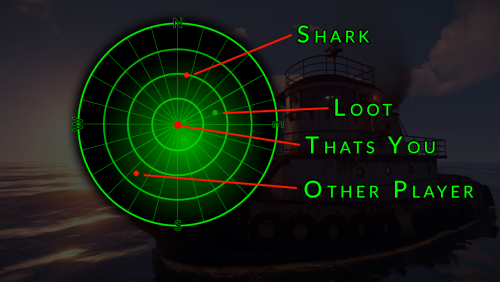
Version 1.0.0
13 downloads
Hey friends, welcome to my boat! Today I have something really nice for you: My plugin for the Tug boat offers you numerous additional options. It's perfect for farming, but also for monitoring your own protection! As soon as you start the engine, you have access to the boat radar. If you move away or switch off the engine, the radar is closed. You can use the radar to move through the world. The position and direction of travel are displayed based on the compass direction. You can also use the radar to scan the underwater world using sound - just like a real boater. Enemy players, sharks and, of course, underwater loot are displayed on your radar based on the position on the radar. Make the water world more interesting for your players! I hope you have a lot of fun with this plugin. If you want, you are welcome to join our support discord. This plugin works perfectly with our TugFarm plugin! Features: UI - A real-time radar Compass - Display of the compass direction Loot - Detection of underwatercrates Sharks - Detection of sharks NPCs - Uncovering NPCs Commands: You have no Commands Permissions: mytugboat.use Allows to use this Plugin. load, run, enjoy$10.99 -

Version 1.8.0
58 downloads
A little event for your players! Reward your players and give something back! With this plugin, you can make a random player happy! Functions You can start the VIP shuffle event with the following command: /flashvipshuffle From version 1.4.0 you can now create a shedule to start and automate the VIPShuffle at a specific time period: flashvipshuffle To start the event, you need the authorization: vipshuffle.check This permission is used to check if a player has the right to execute the VipShuffle command /flashvipshuffle. If a player does not have this permission, they are informed that they do not have the required permission. Config (new, You can now exclude certain user roles from the competition) If you want to pay out VIP for certain days via the console, you need the free plugin Timed Permissions. Load, run, enjoy Support Discord$7.99