Search the Community
Showing results for tags 'pass'.
Found 5 results
-
Version 2.2.1
193 downloads
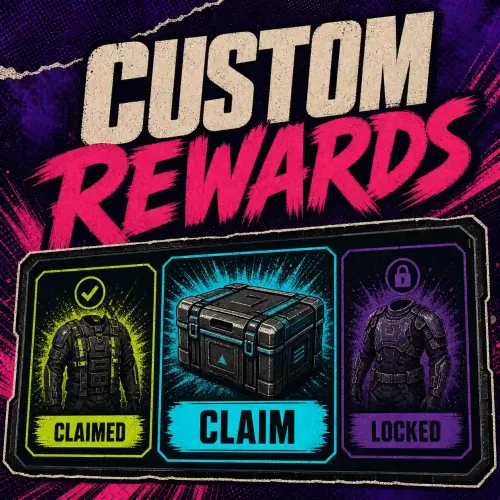
Give players rewards they can unlock Choose the rewards and how many points each one takes to unlock. Players earn points, for example by playing, then claim unlocked rewards in Rust. They keep their points after claiming a reward. Oxide and Carbon · Multiple reward catalogues on one server Open the PimpMyRust configurator → How it works in Rust The configurator’s Survival example awards 1 point for every 15 minutes of active play. At 1 point, the player unlocks 100 wood. At 2 points, after 30 minutes, the player also unlocks 50 cloth. They type /starter to open the menu and claim the rewards. After claiming both, they still have 2 points. They need one more to unlock 750 stones at the next milestone. The Survival catalogue at 2 points How players earn points Custom Rewards has three automatic ways to award points. Choose one per catalogue. Active playtime. Players earn the number of points you set for each interval of active play. Daily bonus. Players earn points once a day after reaching the amount of active playtime you set. Welcome bonus. Players earn points once, on their first connection with access to the catalogue. Manual awards. An admin can give points in Rust chat with /customrewards_give <catalogue> <player or SteamID> <points>. This command uses the customrewards.admin permission. Integrate other plugins. Use External mode to let another plugin handle automatic progression. A compatible or custom-built plugin can use the Custom Rewards API to award a player points in a catalogue of your choice. For example, an event plugin can award points after a challenge. Reward votes with Vote Reward The Vote Reward bundle includes Vote System and Custom Rewards. Vote System collects votes, Vote Reward opens the menu with /votes, and Custom Rewards delivers the rewards. The included catalogue unlocks rewards based on how many times the player votes. Create a catalogue in PimpMyRust Start with an example or create a catalogue. Choose how players progress and which command opens the menu. Add rewards and set their milestones. A reward can give out Rust items, grant access to a group, or run a command. Download the catalogue or send it to a connected server. You can also edit its JSON file directly. Five included menu layouts Pick a layout in the PimpMyRust configurator. Change titles, colors and illustrations to suit your server. Manual installation Extract the ZIP and merge its folders into oxide/ or carbon/. Load the included PimpMyCUI 1.4.0, then CustomRewards. Keep the manifest and five layouts together in data/PimpMyCUI/plugin-pages/customrewards/. On first load, CustomRewards creates data/CustomRewards_rewards/main.json. Review the sample reward, set Enabled to true and reload. Grant customrewards.main.use and test /rewards_main. PimpMyCUI and the included layout files are required for the reward menu. The installation guide covers migration from the separate Playtime Reward extension. You can edit the JSON directly or use the optional PimpMyRust configurator. Installation guide → · Codefling support →$5.99 -

Version 1.2.0
424 downloads
About Battle Pass Reborn A modern battle pass system for Rust that adds progression, missions, and rewards to your server. Players complete a wide variety of tasks — from PvP and farming to building and crafting — and earn experience (XP) to unlock unique rewards at each level. The plugin is fully customizable and integrates seamlessly with your server’s economy and other popular plugins. The plugin also supports a Premium Battle Pass, giving players access to exclusive rewards and accelerated progression. This not only increases player engagement but can also generate additional revenue for server owners through premium access sales. Key Features Fully customizable progression system — levels, XP, and rewards for completing missions. Configurable mission types — PvP, events, farming, crafting, and many other activities. Premium Battle Pass — exclusive rewards and faster progression for premium users. Flexible integration — works with server economy and other popular plugins. Increased player engagement — encourages activity and retention between wipes. Modern and polished UI/UX — intuitive interface for viewing levels, missions, and rewards. Commands /bp — opens the Battle Pass interface for the player (can be changed in the plugin config). /giveexp {steamid} {quantity} - adds the specified amount of XP to a player. /removeexp {steamid} {quantity} - removes the specified amount of XP from a player. /resetprogressall - resets the progress of all players on the server. /resetprogress {steamid} - resets the progress of a specific player. Mission Types Missions are loaded from a preset file (e.g., DefaultMissions.json) and can be customized with event types, conditions (e.g., item shortnames), target counts, and difficulties. XP rewards scale by difficulty (configurable: Easy=10, Medium=25, Hard=50). extract: Gather/extract a resource (e.g., wood, stone). craft: Craft specific items. pickup: Pick up items (e.g., from ground or collectibles). loot: Loot a container (e.g., crates, barrels). kill: Kill entities (players, animals, scientists, helicopters, bradleys). build: Build structures. quest: Complete quests (from other plugins). growup: Grow and harvest plants. upgrade: Upgrade building blocks (e.g., wood to stone). fishcatch: Catch fish. heal: Use healing items (e.g., syringes). mlrsrocketfire: Fire MLRS rockets. itemuse: Use/consume items (e.g., food, medical). cardswipe: Swipe keycards. purchasing: Purchase items from NPCs/vending machines. hit_area (Head, Chest, Stomach, Arm, Hand, Leg, Foot): Hit specific body parts on players. kill_with_weapon: Kill using a specific weapon. recycling: Recycle items. gambling: Win in gambling (e.g., slots, wheels, cards; tracks deposits, wins, profits). enter_zone: Enter specific zones (via ZoneManager or similar). events: The plugin awards progress/XP in supported events. In mission presets you can specify conditions like "RaidableBase_Easy", "SpaceEvent", "ArmoredTrainEvent" etc. Event Points Integration Supported events: Air Event Arctic Base Event Armored Train Event Boss Monster Caravan Event Convoy Event Dungeon Event Ferry Terminal Event (FerryEvent) Flying Cargo Event Gas Station Event GunGame Event Harbor Event Junkyard Event Paintball Event Plant Event (PowerPlantEvent) Raidable Bases Event (with difficulty modes: Easy, Medium, Hard, Expert, Nightmare) Satellite Dish Event (SatDishEvent) Shipwreck Event Space Event Sputnik Event Supermarket Event (MarketEvent) Survival Arena Event Triangulation Event Tugboat Pirates Event (Tugboat) Water Event Abandoned Base Event Airfield Event Reward Types Item Commands Configuration Main settings — BattlePassReborn.json Mission settings — DefaultMissions.json Level and reward settings — LevelsList.json UI Settings — UI.json$30.00- 19 comments
- 3 reviews
-
- 5
-

-
- #battlepass
- #battle pass
- (and 27 more)
-

Version 4.2.2
497 downloads
[ ✓ ] Works on any host. [ ✓ ] The plugin needs the free CrashExtensions library. Can't upload DLLs on your host? No problem: the zip includes a small installer plugin. Drop it in your plugins folder, run crashext.install, restart once, and you're done. Battle Pass is a seasonal battle pass for Rust. Players earn XP from what they already do (gathering, fishing, crafting, building, looting, raiding, killing players, scientists and animals, winning events) and climb a ladder of tiers, 100 by default, each with a reward on the free track and another on the premium track. Rewards are real Rust items with their skins, or console commands with your own card image for anything custom. Daily and seasonal challenges keep the season moving. Dailies refresh every day, seasonal challenges come in groups that unlock one after another, and survival streaks reset when the player dies. A season leaderboard ranks the whole server, and a HOW TO EARN XP guide in the menu lists every source of XP and what it pays. Premium is bought in game with scrap or any other item, Economics, ServerRewards, BankSystem or IQEconomic, or handed to a group by permission, and premium players earn 50% more XP by default. Version 4 rebuilt the whole interface: reward tracks, challenges, a tier-up popup, toasts and a HUD that each player sets up, with every text in the language file. Features of Battle Pass A free and a premium reward track over 100 tiers by default, with real items (skins included) or console commands as rewards XP for 20+ everyday actions: gathering, fishing, crafting, building and upgrading, looting crates and barrels, hacking crates, swiping cards, recycling, raiding, and killing players, NPCs, bosses and animals Three leveling modes: XP from gameplay, playtime (one tier per hour by default, AFK time does not count) or both Event XP for Raidable Bases (per difficulty), Convoy, Armored Train, Harbor, Sputnik and two dozen more event plugins, plus Zone Manager zones and SkillTree Daily challenges and seasonal challenge groups that unlock in sequence, survival streaks that reset on death, and finished challenges move to the bottom of the list A HOW TO EARN XP guide in the menu with every XP source and its payout Premium sold in game for an item, Economics, ServerRewards, BankSystem or IQEconomic, limited to Oxide groups if you like, or granted free by permission A season leaderboard with each player's kills, finished tasks and time survived A tier row in the game's own vitals stack with a progress ring, an optional tier bar every player can drag anywhere, and XP gain popups, each switchable per player with /bphud A tier-up popup, reward claimed toasts and challenge complete notices The Item Collector: a roaming NPC with a map marker who sells XP Tokens and pays XP for them, with your own orders, stock and outfit Optional Discord posts for tier-ups, reward claims, premium purchases and the leaderboard A web editor for every file, and every interface text in the language file Commands /battlepass, /bp - open the pass: season progress, both reward tracks, the challenges and the HOW TO EARN XP guide /leaderboard, /lb - the season leaderboard. Click a player for their details /bphud - personal HUD settings: the tier row, the tier bar (drag it anywhere and save the spot) and the XP gain popups Every chat command and its aliases are set in the config. Admin battlepass.addxp <player> <amount> - give XP. Tier-ups and their rewards follow battlepass.removexp <player> <amount> - take XP away battlepass.settier <player> <tier> - move a player straight to a tier battlepass.givepremium <player>, battlepass.revokepremium <player> - grant the premium pass or take it back battlepass.reset <player> - wipe one player's progress, claims and challenges battlepass.resetall confirm - start a new season: resets every stored player battlepass.leaderboard - post the leaderboard to your Discord webhook now battlepass.reloadimages, battlepass.pruneimages [days] - fetch the interface images again, or clear cached images older than that (30 days by default) battlepass.killorphanvendors - remove Item Collector vendors an older build left behind Run them from the server console (F1 or RCON). In game they need auth level 2 or the battlepass.admin permission. <player> is a name, a partial name or a SteamID, and works on offline players too. Permissions battlepass.premium - the premium reward track, free (while "Allow Premium By Permission" is on, the default) battlepass.admin - the admin commands without auth level 2 battlepass.xpboost - the premium XP multiplier without the premium rewards (while "XP Boost By Permission" is on, off by default) Example: oxide.grant group vip battlepass.premium Included Season 100 tiers with their XP curve, from 1,000 XP for the first tier 200 rewards - a free reward and a premium reward on every tier Daily and seasonal challenges, seasonal groups and survival streaks included The XP table - a value for every action and every supported event All of it lives in oxide/data/BattlePass/ as plain JSON: change any of it, or build your own season from scratch. Showcase Every screen below is the plugin running in game The pass Every reward card says what it is and when it unlocks Claiming a reward Reward claimed toasts Seasonal challenge groups The HOW TO EARN XP guide Buying the premium pass in game The season leaderboard A challenge completed in game Per-player HUD settings and the tier bar Video Web Editor No hand-editing of JSON needed. Our web editor opens your Battle Pass files in the browser with item and colour pickers and a search over every setting: load a file, edit it, download it back over yours and run oxide.reload BattlePass. To get access, send your CodeFling order in our Discord and we unlock it for you. The editor is optional, and every setting stays a plain JSON file. Configuration Everything lives in oxide/config/BattlePass.json and oxide/data/BattlePass/: BattlePass.json - season name and end date, the premium cost (an item, skins included, Economics, ServerRewards, BankSystem or IQEconomic; several costs add up), who may buy it, premium by permission, the premium XP multiplier, the chat commands, the wipe on a new map save and the video the WATCH GUIDE button plays Leveling Mode (in BattlePass.json) - XP, Playtime or Both, the minutes per tier, the playtime XP per minute for Both and the AFK minutes before the clock stops Rewards.json - the XP every action and event pays, the XP each tier needs and the free and premium rewards of every tier, each with an item, a custom image and one or more console commands run in order on claim Challenges.json - the daily and seasonal challenges and their groups UI.json - the card colour (see-through or solid), an image on every reward card, the HUD row, the tier bar, the toasts and every animation on its own switch Discord.json - the webhook posts, off until you turn them on, with every title, line and colour ItemCollectorNPC.json - the Item Collector: how many spawn, how fast they walk, what they wear, what they sell and the XP each token pays TEST SERVER Try Battle Pass before you buy: it runs on our test server next to every other Venux plugin. Join and play with it in game. Once in, pick it from the welcome menu or type /battlepass. client.connect 103.106.58.173:7047 FAQ Q: Do I need an economy plugin? A: No. Premium costs 1,000 scrap by default, and any item works, skins included. Economics, ServerRewards, BankSystem or IQEconomic take one config entry, and several costs add up. Q: Can I give premium to my VIPs? A: Yes. Grant battlepass.premium to their group and they get the premium track for free. To sell premium only to some groups, list them in "Restrict Premium Purchase To These Oxide Groups". Q: Can a season run longer than a wipe? A: Yes. The season ends on the date you set, and progress is kept across map wipes unless you turn on "Wipe Data On New Map Save". Q: What happens when the season ends? A: The menu shows the season as finished and XP stops. battlepass.resetall confirm starts the next one. Q: Do my players have to download anything? A: No. Reward cards use the game's own item icons. On its first start the plugin downloads its 23 small interface images from our image server and caches them, and each player receives them once. Q: Can I translate it? A: Yes. Every interface text is in oxide/lang/en/BattlePass.json. Copy it to oxide/lang/<code>/BattlePass.json under the game's language code (Spanish is es-ES, Brazilian Portuguese pt-BR) and translate it: each player sees the language their game runs in. The season name, challenges, rewards and Discord posts are texts you write in your own files. Q: Does it work on Carbon? A: Yes. The extension goes into carbon/extensions instead of RustDedicated_Data/Managed, and everything else is the same. Q: Can I make the cards solid or use my own image? A: Yes. In oxide/data/BattlePass/UI.json, "Card Background Color" sets the colour of every panel, card and pop-up (set its last number to 1 for solid cards), and "Reward Card Background Image" puts your image on every reward card, from oxide/data/BattlePass/images/ or an https link. Q: I run 4.0.x. What changes when I update? A: From 4.0.4, replace BattlePass.cs; replacing the extension with the one in the zip (v1.12.11) and restarting once is recommended. From 4.0.1, replace the extension first (4.1.0 needs v1.11.9 or newer) and restart once. Your config, rewards, challenges and player progress stay as they are, new options are added at their defaults and your own texts are kept. Q: I am coming from 3.x. What do I need to do? A: Install the extension, drop in the new BattlePass.cs and restart once. Your config and player data carry over: the plugin rewrites its own files and removes the settings that no longer exist. API / Hooks // API: BattlePass?.Call("AddXP", player, amount) // tier-ups and their rewards follow, like battlepass.addxp void AddXP(BasePlayer player, int amount) Questions, ideas or bug reports? Join our Discord.$45.00- 46 comments
- 7 reviews
-
- 6
-

-
-

-
- #battlepass
- #web
- (and 25 more)
-

Version 1.37.13
1,280 downloads
Creates quests/missions that players complete to get rewards (currency, items, etc.). Players spend the currency they receive to open cases. The interface is nice and user-friendly. Features: Beautiful user interface Logging of purchases and balance top-ups (to the console and to a file) Versatility (can work with various economy plugins) Performance (plugin is faster than existing competitors) Interesting idea Any text in the interface can be customized Preview Commands addfirstcurrency {userid} {amount} (give the player the first currency) addsecondcurrency {userid} {amount} (give the player a second currency) battlepass.wipedata (clear player progress) pass (open interface) battlepass.migrate (migrate to PlayerDatabase) battlepass.convert.128 (convert from 1.28.0) Item Types Item Command Plugin Mission Types Gather Kill Craft Look Build Upgrade Fishing LootCrate Swipe RaidableBases RecycleItem HackCrate PurchaseFromNpc ArcticBaseEvent GasStationEvent SputnikEvent ShipwreckEvent HarborEvent JunkyardEvent SatDishEvent WaterEvent AirEvent PowerPlantEvent ArmoredTrainEvent ConvoyEvent SurvivalArena KillBoss Web Config Editor Manage the Battlepass settings in our web config editor. You change the config in a browser form instead of editing files on the server by hand. P.S. The web config editor is open to members of the "Battlepass" group in our Discord server. Join at https://discord.gg/mevent and ask for the group. FAQ How to use multiple NPCs in one mission Loot Hackable Crates (config example) Default Config$21.95 -
Version 1.2.0
370 downloads
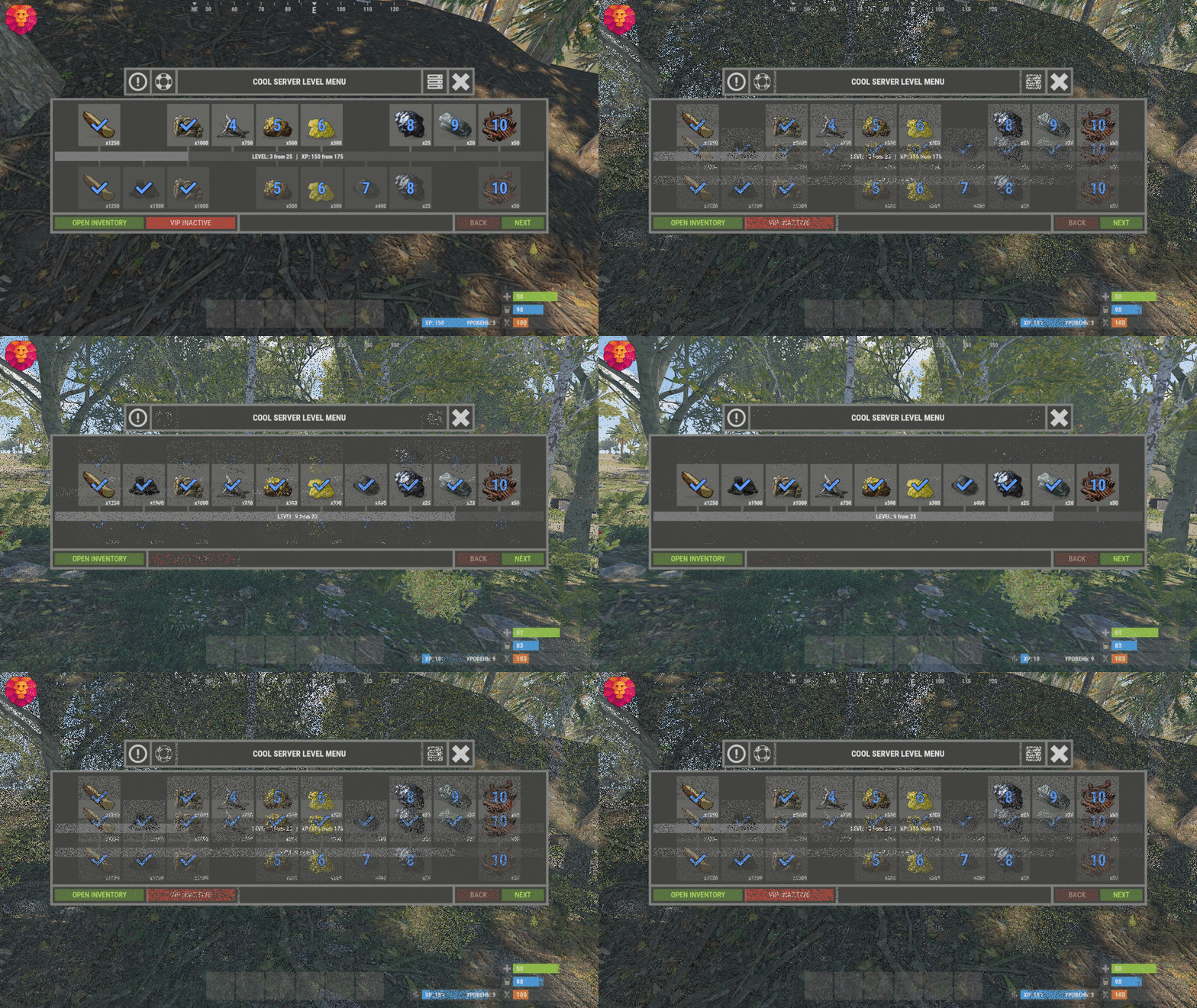
XLevels (BattlePass) - levels and awards for your server. - Optimization of the interface for different monitor resolutions. - Storing player data in - oxide/data/XDataSystem/XLevels - There is a lang ru/en/uk/es. - Sound effects when interacting with the menu. - Setting the number of levels and XP to increase the level. - Setting up the level reward. [ Item, Custom Item, Command ] [ You can customize the rewards for a specific level. For example 5, 10, 20, 30. The rest will be without rewards ] - Configuring the issuance of XP by permissions for online. - Setting the XP multiplier by permissions. - Setting up coupons. [ Exchange for XP ] - Configuring boxes and the chance to spawn coupons. - Configuring the issuance of XP. [ Loot, kill, break barrels, open boxes, pick from the ground, harvest ] - Possibility to enable/disable the system of coupons. - Possibility to enable/disable VIP levels. - Chat prefix with player level. - Mini-panel with pumping progress. - Inventory with received awards. - Two options to get into the level menu. [ Command | NPC shops/keepers ] - Setting the increase in the amount of required XP with each pumped level. - The ability to accumulate XP if the maximum level is reached. [ Useful for top players ] - The ability to exchange coupons for XP if the maximum level is reached. [ Useful for top players ] - Top players. [ Level | XP ] - The ability to level up and receive rewards again after the maximum level has been reached. [Level and XP reset to zero. ] - Rank system. [ Setting in config. Display in the chat (prefix) and in the menu. ] - Possibility to hide the reward. [ The reward will not be displayed until the player reaches the required level. ] -> Overview - YouTube <- Shortnames for config settings. WORK WITH BetterLoot For the correct spawning of coupons in the crate, in the BetterLoot plugin, remove/comment out the following line of code. 630 - container.inventory.capacity = container.inventory.itemList.Count; Permissions xlevels.vip - access to VIP rewards. xlevels.top - access to the top players. Commands Open the level menu - /level, /lvl, /pass Give XP - level_give_xp <SteamID> <Amount XP> API int API_GetLevel(BasePlayer player) - returns the player's level. int API_GetLevel(ulong userID) - returns the player's level. void API_GiveXP(BasePlayer player, float XPAmount) - give the player XP. string API_GetPlayerPrefix(BasePlayer player) - get a ready-made player prefix with all the settings. string API_GetPlayerPrefix(ulong userID) - get a ready-made player prefix with all the settings. Hooks void OnXLevelsXPGained(BasePlayer player, float xp) - called when the player gains XP. void OnXLevelsUP(BasePlayer player, int level) - called when the player level up. Config { "General settings": { "XP for the pickup of resources": true, "XP for harvest": true, "XP for bonus resources": true, "XP for kill": true, "XP for opening crates": true, "Include messages of received rewards in chat": true, "Include level up messages in chat": true, "Enable coupons": true, "Enable VIP rewards": true, "Get VIP reward - [ True - only with permission | False - without permission ]": true, "Take VIP Reward - [ True - take only with permission | False - take at any time without permission ]": true, "Add XP if the maximum level is already reached - [ Suitable for top players ]": false, "Exchange coupons if you have already reached the maximum level - [ Suitable for top players ]": false, "Reset the level and XP of the player after reaching the maximum level - [ Players will re-open levels and receive rewards ]": false, "There is a plugin for custom loot": false, "Profile SteamID for custom avatar": 0, "List of commands to open the menu": [ "level", "lvl", "pass" ], "Enable prefix in chat - [ Set to False if the prefix should be disabled or the prefix is used by a third party chat plugin ]": true, "Display the level in prefix": true, "Display the rank in prefix": true, "List of available ranks - [ Level - Rank ] ( If the list is empty, then the rank will not be displayed in the menu )": { "0": "CAP-Х", "1": "IRON-1", "2": "IRON-2", "3": "IRON-3", "4": "BRONZE-1", "5": "BRONZE-2", "6": "BRONZE-3", "7": "SILVER-1", "8": "SILVER-2", "9": "SILVER-3", "10": "GOLD-1", "11": "GOLD-2", "12": "GOLD-3", "13": "PLATINUM-1", "14": "PLATINUM-2", "15": "PLATINUM-3", "16": "DIAMOND-1", "17": "DIAMOND-2", "18": "DIAMOND-3", "19": "IMMORTAL-1", "20": "IMMORTAL-2", "21": "IMMORTAL-3", "22": "RADIANT-1", "23": "RADIANT-2", "24": "RADIANT-3", "25": "GOD" } }, "Vendings settings": { "Open the level menu. [ True - Immediately after the opening of the NPC shop | False - UI button ]": false, "Access to the level menu is only through the NPC shops. [ True - NPC shop | False - Command ]": false, "List of NPC shops in which you can open the level menu (shop name)": [ "Black Market" ] }, "XP multiplier": { "Enable XP multiplier when exchanging coupons - [ This parameter affects only the multipliers for the exchange of coupons ]": false, "Setting up permissions for XP multipliers for the exchange of coupons and other actions. [ Permission | XP multiplier ]": { "xlevels.125p": 2.25, "xlevels.75p": 1.75, "xlevels.10p": 1.1 } }, "Issuing XP for online": { "Enable issuing XP to online players": false, "XP issue interval (in sec.)": 15.0, "Setting up permissions. [ Permission | XP ]": { "xlevels.default": 5.0 } }, "Mini-bar location / Main menu settings": { "AnchorMin": "1 0", "AnchorMax": "1 0", "OffsetMin": "-403 16", "OffsetMax": "-210 42", "Show mini-bar": true, "Color background_1": "0.517 0.521 0.509 0.95", "Color background_2": "0.217 0.221 0.209 0.95", "Display reward container - [ True - Only when there is a reward in the level | False - Always ]": false, "Display required reward level": true, "Display required VIP reward level": true }, "Settings levels": { "Maximum level": 25, "Number of XP to upgrade one level": 100.0, "How much to increase the number of XP with each level": 25.0 }, "XP settings | Shortname : ValueXP": { "XP for the pickup of resources": { "stones": 10.0, "sulfur.ore": 15.0, "metal.ore": 12.5 }, "XP for harvest": { "potato.entity": 2.5, "corn.entity": 1.75, "hemp.emtity": 0.25 }, "XP for bonus resources": { "stones": 5.0, "sulfur.ore": 10.0, "metal.ore": 7.5 }, "XP for kill / destroy barrel": { "boar": 10.0, "loot-barrel-1": 7.5, "heavyscientist": 2.5 }, "XP for opening crates": { "crate_normal": 5.0, "crate_normal_2": 1.0, "crate_tools": 3.5 } }, "Coupons for XP": [ { "Coupon name": "Coupon 5XP", "Coupon text": "Coupon for 5XP\n\nExchange them and get XP to level up!\n\nCommand for exchange - /level", "Coupon skin": skinID, "XP amount": 5, "Setting the chance of falling out of crates/barrels": [ { "Name crate/barrel": "crate_normal_2", "Drop chance": 50.0, "Minimum amount of coupons": 1, "Maximum number of coupons": 3 } ] }, { "Coupon name": "Coupon 10XP", "Coupon text": "Coupon for 10XP\n\nExchange them and get XP to level up!\n\nCommand for exchange - /level", "Coupon skin": skinID, "XP amount": 10, "Setting the chance of falling out of crates/barrels": [ { "Name crate/barrel": "crate_normal_2", "Drop chance": 50.0, "Minimum amount of coupons": 1, "Maximum number of coupons": 3 } ] }, { "Coupon name": "Coupon 25XP", "Coupon text": "Coupon for 25XP\n\nExchange them and get XP to level up!\n\nCommand for exchange - /level", "Coupon skin": skinID, "XP amount": 25, "Setting the chance of falling out of crates/barrels": [ { "Name crate/barrel": "crate_normal_2", "Drop chance": 50.0, "Minimum amount of coupons": 1, "Maximum number of coupons": 2 } ] }, { "Coupon name": "Coupon 50XP", "Coupon text": "Coupon for 50XP\n\nExchange them and get XP to level up!\n\nCommand for exchange - /level", "Coupon skin": skinID, "XP amount": 50, "Setting the chance of falling out of crates/barrels": [ { "Name crate/barrel": "crate_normal_2", "Drop chance": 50.0, "Minimum amount of coupons": 1, "Maximum number of coupons": 2 } ] }, { "Coupon name": "Coupon 100XP", "Coupon text": "Coupon for 100XP\n\nExchange them and get XP to level up!\n\nCommand for exchange - /level", "Coupon skin": skinID, "XP amount": 100, "Setting the chance of falling out of crates/barrels": [ { "Name crate/barrel": "crate_normal_2", "Drop chance": 50.0, "Minimum amount of coupons": 1, "Maximum number of coupons": 1 } ] }, { "Coupon name": "Coupon 200XP", "Coupon text": "Coupon for 200XP\n\nExchange them and get XP to level up!\n\nCommand for exchange - /level", "Coupon skin": skinID, "XP amount": 200, "Setting the chance of falling out of crates/barrels": [ { "Name crate/barrel": "crate_normal_2", "Drop chance": 50.0, "Minimum amount of coupons": 1, "Maximum number of coupons": 1 } ] }, { "Coupon name": "Coupon 500XP", "Coupon text": "Coupon for 500XP\n\nExchange them and get XP to level up!\n\nCommand for exchange - /level", "Coupon skin": skinID, "XP amount": 500, "Setting the chance of falling out of crates/barrels": [ { "Name crate/barrel": "crate_normal_2", "Drop chance": 50.0, "Minimum amount of coupons": 1, "Maximum number of coupons": 1 } ] } ], "Level reward": { "1": { "Item shortname / custom reward name [ Must not be empty ]": "wood", "Reward display name": "Wood", "Item quantity": 1250, "Item skin": 0, "Command": "", "Link to custom image": "", "Hide reward - [ Reward will not be displayed until the player reaches this level ]": false }, "2": { "Item shortname / custom reward name [ Must not be empty ]": "charcoal", "Reward display name": "Charcoal", "Item quantity": 1500, "Item skin": 0, "Command": "", "Link to custom image": "", "Hide reward - [ Reward will not be displayed until the player reaches this level ]": false }, "3": { "Item shortname / custom reward name [ Must not be empty ]": "metal.ore", "Reward display name": "Metal ore", "Item quantity": 1000, "Item skin": 0, "Command": "", "Link to custom image": "", "Hide reward - [ Reward will not be displayed until the player reaches this level ]": false }, "4": { "Item shortname / custom reward name [ Must not be empty ]": "metal.fragments", "Reward display name": "Metal fragments", "Item quantity": 750, "Item skin": 0, "Command": "", "Link to custom image": "", "Hide reward - [ Reward will not be displayed until the player reaches this level ]": false }, "5": { "Item shortname / custom reward name [ Must not be empty ]": "sulfur.ore", "Reward display name": "Sulfur ore", "Item quantity": 500, "Item skin": 0, "Command": "", "Link to custom image": "", "Hide reward - [ Reward will not be displayed until the player reaches this level ]": false }, "6": { "Item shortname / custom reward name [ Must not be empty ]": "sulfur", "Reward display name": "Sulfur", "Item quantity": 300, "Item skin": 0, "Command": "", "Link to custom image": "", "Hide reward - [ Reward will not be displayed until the player reaches this level ]": false }, "7": { "Item shortname / custom reward name [ Must not be empty ]": "gunpowder", "Reward display name": "Gunpowder", "Item quantity": 400, "Item skin": 0, "Command": "", "Link to custom image": "", "Hide reward - [ Reward will not be displayed until the player reaches this level ]": false }, "8": { "Item shortname / custom reward name [ Must not be empty ]": "hq.metal.ore", "Reward display name": "HQM ore", "Item quantity": 25, "Item skin": 0, "Command": "", "Link to custom image": "", "Hide reward - [ Reward will not be displayed until the player reaches this level ]": false }, "9": { "Item shortname / custom reward name [ Must not be empty ]": "metal.refined", "Reward display name": "HQM", "Item quantity": 20, "Item skin": 0, "Command": "", "Link to custom image": "", "Hide reward - [ Reward will not be displayed until the player reaches this level ]": false }, "10": { "Item shortname / custom reward name [ Must not be empty ]": "scrap", "Reward display name": "Scrap", "Item quantity": 50, "Item skin": 0, "Command": "", "Link to custom image": "", "Hide reward - [ Reward will not be displayed until the player reaches this level ]": false } }, "VIP level reward": { "1": { "Item shortname / custom reward name [ Must not be empty ]": "wood", "Reward display name": "Wood", "Item quantity": 1250, "Item skin": 0, "Command": "", "Link to custom image": "", "Hide reward - [ Reward will not be displayed until the player reaches this level ]": false }, "2": { "Item shortname / custom reward name [ Must not be empty ]": "charcoal", "Reward display name": "Charcoal", "Item quantity": 1500, "Item skin": 0, "Command": "", "Link to custom image": "", "Hide reward - [ Reward will not be displayed until the player reaches this level ]": false }, "3": { "Item shortname / custom reward name [ Must not be empty ]": "metal.ore", "Reward display name": "Metal ore", "Item quantity": 1000, "Item skin": 0, "Command": "", "Link to custom image": "", "Hide reward - [ Reward will not be displayed until the player reaches this level ]": false }, "4": { "Item shortname / custom reward name [ Must not be empty ]": "metal.fragments", "Reward display name": "Metal fragments", "Item quantity": 750, "Item skin": 0, "Command": "", "Link to custom image": "", "Hide reward - [ Reward will not be displayed until the player reaches this level ]": false }, "5": { "Item shortname / custom reward name [ Must not be empty ]": "sulfur.ore", "Reward display name": "Sulfur ore", "Item quantity": 500, "Item skin": 0, "Command": "", "Link to custom image": "", "Hide reward - [ Reward will not be displayed until the player reaches this level ]": false }, "6": { "Item shortname / custom reward name [ Must not be empty ]": "sulfur", "Reward display name": "Sulfur", "Item quantity": 300, "Item skin": 0, "Command": "", "Link to custom image": "", "Hide reward - [ Reward will not be displayed until the player reaches this level ]": false }, "7": { "Item shortname / custom reward name [ Must not be empty ]": "gunpowder", "Reward display name": "Gunpowder", "Item quantity": 400, "Item skin": 0, "Command": "", "Link to custom image": "", "Hide reward - [ Reward will not be displayed until the player reaches this level ]": false }, "8": { "Item shortname / custom reward name [ Must not be empty ]": "hq.metal.ore", "Reward display name": "HQM ore", "Item quantity": 25, "Item skin": 0, "Command": "", "Link to custom image": "", "Hide reward - [ Reward will not be displayed until the player reaches this level ]": false }, "9": { "Item shortname / custom reward name [ Must not be empty ]": "metal.refined", "Reward display name": "HQM", "Item quantity": 20, "Item skin": 0, "Command": "", "Link to custom image": "", "Hide reward - [ Reward will not be displayed until the player reaches this level ]": false }, "10": { "Item shortname / custom reward name [ Must not be empty ]": "scrap", "Reward display name": "Scrap", "Item quantity": 50, "Item skin": 0, "Command": "", "Link to custom image": "", "Hide reward - [ Reward will not be displayed until the player reaches this level ]": false } } }$24.49