Search the Community
Showing results for tags 'entity'.
Found 16 results
-
Version 1.0.3
243 downloads
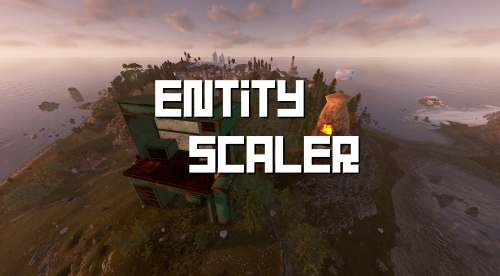
Entity Scaler Entity Scaling. Change scale of entities on the spot using a command. Features Persistent scaling after server reboot. Command to set entity scale based on multiplier. Just look at the entity you want to scale. Command to reset entity to original scale if saved. Command to check current scale of entity. Permissions entityscaler.admin - Required for command resetscaledata . Grants permission for all other commands. entityscaler.scale Required for command scale and resetscale. entityscaler.check Required for command checkscale. Commands /scale <amount> - Change the scale of the entity you are looking at. Amount is a multiplier, for example 2x, 3.5x, or 10x. /resetscale - Reset the scale of the entity you are looking at if there is saved entity data. /checkscale - View the current scale of the entity you are looking at. /resetscaledata - Admin command to backup and reset the Entity Scaler data file.Free- 6 comments
- 1 review
-
- 4
-

-
- #entity scaler
- #entity scaling
- (and 5 more)
-
Version 2.3.8
3,431 downloads
The purpose of this plugin is to restrict the entities that players can build. You can limit any entity based on its prefab. To get the full list of supported prefabs, use the limitentities.list console command. There are three types of limits available: global, building, and radius. For building limit checks, if a cupboard is placed, the limits of the cupboard owner will apply. If no cupboard is present, the restrictions of the first block's owner will be used. When you run the plugin for the first time, no players will be restricted. To apply limits, you must assign one or more permissions from your config file to a player or group. The plugin also tracks permission changes, so you won't need to restart it after granting a player new permissions or adding them to a VIP group, for example. This plugin is designed to be efficient and performant, even on heavily loaded servers. The plugin now supports Entity Groups, and group names are translatable. All newly created groups are automatically added to the language files when the plugin loads. You can create as many groups as you like or remove them entirely. Just keep in mind that if you add an entity to a group, you cannot also add it to Limits Entities — you must use the Group name instead. Extended Power Lights (Deluxe Christmas Lights) support has been added: a new group of limits is now included in the config. The default values are set to -1, meaning no limits. Adjust them according to your needs. Radius Limits allow you to restrict the number of specific entities within a certain radius. This feature is designed for static deployable entities (like turrets or lights) and helps prevent spam placement in concentrated areas. ZoneManager integration (may affect performance): IncludeMode means, limits apply only inside the specified zones, if IncludeMode = false, limits apply only outside those zones. Note: Radius limits only work for static entities (entities that don't move after placement). This feature can be resource-intensive if used with very large radius values or too many entities, so use it judiciously. Note: If you want to have "beautiful" names even on English only, please, install Rust Translation API plugin or you will have short prefab names only. ## Permissions limitentities.immunity -- Allows player to not being limited by this plugin limitentities.admin -- Allows player to check other player limits and execute console command More permissions with limits are created in config file (see Configuration section below) ## Commands /limits <player name | steamid> (optional) -- Get current limits list for a player. If player doesn't have admin permission or player name/id is empty - current player limit will be shown limitentities.list (console only) - print all tracked prefabs list into log file. Requires admin rights (can be used in server console/RCON) ## Configuration You can remove unnecessary default permissions and also add as many permissions as you want. For cases where the player has more than one, the permission with the higher priority will be applied. Note: For better performance, grant permissions only to players you want to limit, or use an immunity permission to disable limits entirely. Enable or disable notifications and logging. Set the Building Detection Range to be used when a building is not specified (e.g., not a decay entity). Do not set this value too high — it may significantly impact performance! Enable or disable tracking (and limiting) for Power Lights (Deluxe Christmas Lights). Enable or disable tracking (and limiting) for Growable Entities. Set the SteamIDIcon to a specific SteamID to customize the account icon in chat messages. Define the commands list (defaults are limits and limit). Set the percentage (%) at which limit notifications appear. If set to 0, notifications will only show when the limit is reached. Add entity prefab names to the Excluded List to make the plugin completely ignore those prefabs. Add entity skin ID to the Excluded skin IDs to make the plugin completely ignore prefabs with those skin IDs. Enable or disable integration with the ZoneManager plugin. May impact performance! When IncludeMode is true, limits apply only to players/entities inside the specified zones. When IncludeMode is false, limits apply only to players/entities outside those zones. Enabling Prevent Excessive Merging of buildings may affect performance, so use it at your own risk! Use Entity Groups to combine entities and set a shared limit for the entire group. Note: The same entity cannot be listed in both Group Entities and Limits Entities at the same time. ## Localization Plugins phrases are available on 3 languages out of the box: English, Ukrainian and Russian Plugin supports Rust Translation API which allows you to have entities names on any language Rust supports There is a free version on uMod, why do you even need this plugin? First of all, this plugin was designed to be efficient and performant. It uses unique caching system that should not consume no additional server resources Much more efficient building limit control system even without cupboard placed More accurate mechanism for notification messages Allows you to prevent entities placement if limit is set to 0 Supports Rust Translation API so you can have full support of any language Rust supports Supports Entity Groups ! Supports checks to prevent excessive merging of buildings Supports Abandoned Bases plugin Supports advanced limits for Power Lights (Deluxe Christmas Lights) Supports setting advanced building detection range Advanced radius-based limiting system for area control Supports Zone Manager plugin Chest Stacks plugin support (v1.4.6+) PlaceryExtended plugin support (v1.2.5+)$25.00 -
Version 1.4.4
69 downloads
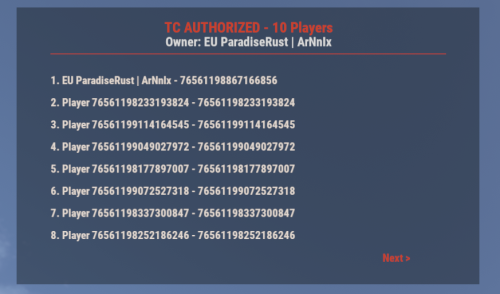
UI for displaying authorized players on the Tool Cupboard, Auto Turret, and Code Lock, including the entity owner. This plugin adds a simple, clean UI that shows you exactly who is authorized on the building or deployable you're looking at. Features: - Tool Cupboard: Displays a list of all authorized players and the owner. - Auto Turret: Displays a list of all authorized players and the owner. - Code Lock: Displays the owner, the lock code, and a list of whitelisted (Main) and Guest players. - Other Entities: If you look at any other player-placed entity (furnace, box, etc.), it will display the owner's name. - Pagination: If the list of players is longer than 8, you can use the "Next" and "Previous" buttons to browse. - Copyable Text: All information displayed in the UI (player names, Steam IDs, codes) can be selected and copied by the admin for easy use. - Player Team Info: If you look at a player, the UI will display their team information, including the team leader, all team members, and their Steam IDs. - Permission-based: Use the permission `adminauth.use` to control who can see the UI. How to use: 1. Grant the permission to a player or a group. 2. The player types the chat command `/aauth` to toggle the UI on or off. 3. Simply look at a Tool Cupboard, Turret, Code Lock, any other entity, or a player. The UI will appear with the relevant information. 4. To copy any information (like a Steam ID or Name), simply select the text in the UI with your mouse and copy it (Ctrl+C). Commands: - /aauth - Toggles the AdminAuthorizedUI on and off. Permissions: - adminauth.use - Required to use the /aauth command and see the UI.$13.80 -

Version 3.0.0
31 downloads
BUILDERS UTOPIA – 3500K HIGH PERFORMANCE CREATIVE RUST MAP Builders Utopia is a well balanced, great performance, builder-friendly 3500k Rust map loaded with All Facepunch Monuments included and 13 custom build spots. Designed for smooth performance, creative freedom, and competitive gameplay. Perfect if you have players who like to build and great for server owners because of its low entity count and map size, this is great for lower ram servers! What Makes It Special: Endless Custom Buildable areas that players will love! Diverse terrain: forests, deserts, coasts, cliffs, valleys & plateaus Perfect for solos, clans and builders! Custom Build Zones Low-prefab, FPS-friendly buildables: Custom caves Creative Structures Unique build pockets All Facepunch Monuments Included Launch Site • Military Base • Military Tunnels • Nuclear Missile Silo • Airfield • Large Harbor • Outpost • Excavator • Large Oil Rig • Small Oil Rig • Small Harbor • Dome Sphere Tank • Satellite Dish • Ferry Terminal • Sewer Branch • SuperMarket • TrainYard • PowerPlant • Gas Station • Warehouse • Arctic Research Base • Lighthouse • HQM Quarry • Sulfur Quarry • Stone Quarry • Fishing Village • RadTown • JunkYard Map Info Size: 3500 Prefabs: ~8835 Support Discord: DarkoRust$24.99-
- 1
-
-
- #cave
- #buildable monument
- (and 16 more)
-

Version 1.0.3
15 downloads
xBannedPlayersEntityCleaner xBannedPlayersEntityCleaner is a an efficient Rust plugin designed to automatically clean up all entities owned by players when they are banned. This helps maintain server performance and prevents clutter caused by banned users’ structures, deployables, and other entities. It also includes a manual cleanup command that allows admins with proper permission to trigger entity removal for specific players when needed. Features Automatically removes entities owned by banned players. Optional manual cleanup command with permission control. Adjustable cleanup speed and batch size to minimize lag. Silent or visible destruction modes. Efficient entity queue system for large-scale cleanups. Console Command xbannedplayersentitycleaner.clean <steamid64 or playername> - Manually trigger cleanup for a specific player. Permission xbannedplayersentitycleaner.use - Allows a user to manually trigger the cleanup command. Config { "SilentMode": true, "EntitiesPerCleanupInterval": 100, "CleanupInterval": 0.2, "LogToConsole": true } SilentMode → If enabled (true), entities are destroyed quietly without gibs or visual effects. EntitiesPerCleanupInterval → Number of entities processed per cleanup cycle (CleanupInterval) CleanupInterval → Time in seconds between each cleanup batch execution. LogToConsole → Enables or disables console logging for cleanup events and summaries.$5.99 -
Version 1.1.11
245 downloads
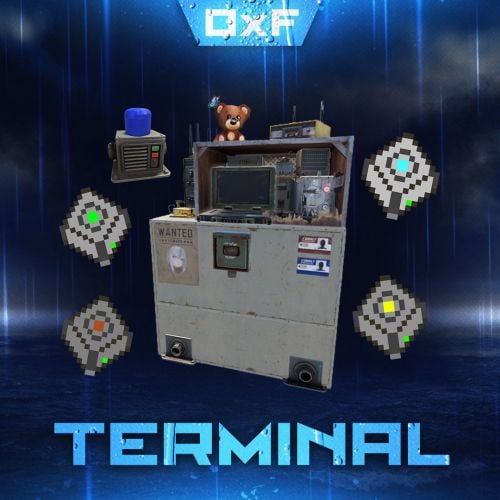
Terminal is an indispensable item that will allow players to manage the resources of the house in one place! Just as importantly, it is not just a conditional button on the screen or something similar, but a complete new item that is placed in the house, which gives a nice user experience to any player that likes interaction. Its multifunctionality will allow the player to use it for a variety of purposes, from simple resource management to building a terminal-only resource factory. Interested? Then let's get to the details. Examples of uses: Getting remote access to resources, the ability to take resources from several storages at once, as well as put them in them. The ability to use the terminal as one big chest thanks to the cells of different levels, available import and export pipes will allow to realize the delivery of resources to the production tools Building a plant powered by terminal alone Many other clever uses, like a chest in the buffer of the house connected to the terminal. Combining uses Features: Similar type items are displayed combined in one slot, where you can see the total quantity and take the required quantity. Two modes of operation: wireless and cellular. Full-featured new placeable item Works with industrial pipes Ability to create different cells (by standard there are 4 levels) Cells have their own stack size just for them. Intelligent movement that will not allow you to store more items in the boxes than allowed The terminal has a convenient search for items in the user's language, not only in English Demo Video: Installation instructions Installing dependencies CustomEntities. Go to Github, click Clone -> Download ZIP, then transfer CustomEntities.cs to the folder with plugins. CustomItemDefinitions. Go here, download and install in the plugins folder. Download purchased this plugin and install it in the plugins folder the same way. Done Quick Start: Prompt commands: give terminal give storage_cell.level1 give storageadaptor.wireless Place terminal, put the cell in the cell storage, install the adapter on the chest, enjoy. More about items: [Terminal] Terminal is a placeable item, with the ability to be placed both outside and in the house, serves for convenient management of all resources in the house. It has a certain amount of health (default 500), as well as the ability to pick up with a loss of strength. It has 2 modes of operation, wireless and cell, can work with industrial, by means of pipes to import and export items from cells. The server owner can decide where to get this item from, it has its own short name and can be used in all plugins, the best option is to craft it. The shortname of the item - terminal Command to give: give terminal How to pick up a terminal? For this we must have authorization in the cabinet. Holding a mallet in your hand, point at the part of the terminal where the inscription Authorize appears, press the R button and select Turn. How to switch modes of operation? It is possible to do this by pressing the switch on the left side of the laptop, it looks like this: What is needed to work in wireless mode? To start working you need the item "Wireless Storage Adapter”, this item is part of the plugin. Can be obtained by any method of the server owner's choice. The short name of the item - storageadapter.wireless. Command to give out: give storageadaptor.wireless Next, install the wireless storage adapter on the storage item you need. Such as: chests, furnaces, refineries, etc. Next, select the wireless mode on the terminal by pressing the switch. After entering the laptop, it will display all the items that are connected to the adapter in the range of the wireless mode of the terminal (customizable). What is needed to work in the cell mode? The first thing you need are the cells themselves, they can be obtained in any way the server owner chooses. The short name of the item - storage_cell.{name from the config, by default it is level1-4} Command to give out: give storage_cell.level1 Cells should be put in the terminal cell storage, it looks like this: It is recommended to put any kind of lock on the cell storage, otherwise they can be stolen! Next, select the cell mode on the terminal by pressing the switch. After entering the laptop, where you can now see what is in the cells, how many slots are available and you can put things there. [Wireless Storage Adaptor] Used for the wireless mode of the terminal. Installed on all storage items for which a regular storage adapter is available. Does not require additional connection. The server owner can decide where to get this item from, it has its own short name and can be used in all plugins, the best option is to craft it. The short name of the item - storageadapter.wireless. Command to give out: give storageadapter.wireless [Storage Cells] Cells hold items, have a certain number of slots and a maximum stack in each slot. These are special slots and only in them items can be stacked to their maximum. The maximum stack works on the principle of 1 type - 1 slot. That is, if the maximum stack is 5000 and the player puts there 10 new machine guns, they will occupy 1 slot and such can be put another 4990, if he puts a slightly broken machine gun, it will take another slot and will store the same machine guns. This is how it works with all items. Another example; a level 1 cell has a maximum stack of 5000 and 8 slots, and if you store only sulfur in it, you can eventually store 40000 sulfur in it. Higher level cells have more stacks and slots. Don't worry, the configured max stack won't be knocked down, items will unstack when they are laid down and taken out of the cell. The server owner can decide where to get this item from, it has its own short name and can be used in all plugins, the best option is to craft it. The short name of the item - storage_cell.{name from the config, by default it is level1-4} Command to give out: give storage_cell.level1$40.00 -

Version 1.0.4
53 downloads
xAutoPurge - Automatically purges all entities owned by players which are inactive for X days. - xAutoPurge can retroactively detect and track players who haven’t connected to your server (Even before plugin was installed). - Config: InactiveDays - Defines when a players gets purged if not online for X days. (Default: 7 days) PurgeCheckIntervalSeconds - Defines how often it should be checked for inactive players. (Default: 1 hour) AnnouncePurge - Players can now be notified: "Optimizing server performance, brief lag may occur." LogToConsole - Defines if purging activities are getting logged to the console. (Default: true) ExcludedSteamIDs - Defines an exception list for specific SteamIDs, entered SteamIDs doesn't get purged. (Default: none) ResetDataOnWipe - Resets data on wipe automatically, so it doesn't happen that someone gets purged after wipe. (Default: true) Default Config { "InactiveDays": 7, "PurgeCheckIntervalSeconds": 3600, "AnnouncePurge": false, "LogToConsole": true, "ExcludedSteamIDs": [], "ResetDataOnWipe": true } Console Commands purge.run [Triggers the purging immediately with its configurations] purge.player PLAYERNAME/STEAMID [Purges a specific player immediately (ignoring configuration) - Example usage: purge.player xNullPointer95] purge.retroactively - Scans the server database and detects all SteamIDs that have ever connected to your server, adds them to the xAutoPurge data file (if not already there), and sets their lastSeen value to the current date and time, so on next purge schedule they are deleted (depending on config 'InactiveDays').$8.99 -

Version 1.0.4
35 downloads
xWirelessPower xWirelessPower transforms how players interact with electrical devices (IO Entities). Instead of running back to switches, rewiring circuits, or building complex control rooms, players can directly toggle supported powered entities simply by looking at them and using a command or even with doing a clap gesture - Creating a smoother, more responsive way to manage base systems. In short: You can simply use electrical item (IO Entities) like ceiling light, sprinkler, auto turret etc. without requireing any wire or power. Features Instant Wireless Control Turn configured devices (IO Entities) ON or OFF just by looking at them with using a command or even using the clap gesture - No switches or wiring changes needed. Optional Team Access Let teammates manage shared systems for easier group gameplay. Perfect for Base Management Quickly control turrets, lights, signs, sprinklers, and more without running around your base. Faster Reaction During Raids Activate defenses or adjust systems instantly when every second counts. Fully Customizable Server owners can choose which devices are controllable and how the system behaves through config or even with chatcommadn "whoami". ShortPrefabName gets printed and saves it automatically to the confing with default value "false". Permission Support Grant access to specific groups like VIPs, admins, or trusted players. Optional Auto Power On Devices can automatically turn on when placed for smoother setup. Performance Friendly Runs efficiently with minimal impact on server performance. Plugin Preview Chat Commands /power - Toggle the IOEntity you’re looking at. /powerall - Toggles all IO entities you’re looking at. For example, when powerall is turned on and you look at an auto turret, all auto turrets will be turned off. /whoami - Prints the looked-at entity’s ShortPrefabName and adds it to your IOEntities list in config (default value = true). Permission xwirelesspower.toggle - If 'UsePermission' is true, permission is needed. Config { "ToggleCommand": "power", "PowerAllCommand": "powerall", "GetItemNameCommand": "whoami", "UsePermission": false, "PermissionName": "xwirelesspower.toggle", "AllowTeamToggle": false, "RequireToolCupboard": false, "MaxDistanceToggle": 5.0, "AutoTurnOn": true, "TurnOnOffWithClappingGesture": true, "IOEntities": { "autoturret_deployed": true, "ceilinglight.deployed": true, "neonsigntr.deployed": true, "electric.sprinkler.deployed": true }, "PermissionBasedIOEntities": { "xwirelesspower.vip": [ "fridge.deployed" ], "xwirelesspower.vip2": [ "electricfurnace.deployed", "electricfurnace.io" ] } } - You can add as many IOEntities as you want, to get the correct name of it, just spawn/place it -> Look at it -> Use ChatCommand '/whoami' and add that shortname to your IOEntities list. ToggleCommand - Chat command players use to turn IO Entity on/off. PowerAllCommand - Chat command players can toggle to turn all IO Entities from same name on/off. GetItemNameCommand - Admin command to see the IO Entity internal name (ShortPrefabName), also saves that viewed at IOEntity automatically to config with default value "false". UsePermission - If ON, only players with permission has access to this wireless power system. PermissionName - The permission name. AllowTeamToggle - Lets teammates toggle each other’s IO Entities. RequireToolCupboard - Wirless Power does only work if within a tool cupboard. MaxDistanceToggle - How close you must be to toggle (in meters). AutoTurnOn - Devices turn on automatically when placed. TurnOnOffWithClappingGesture - As the config says, use any gesture to toggle IO Entity. IOEntities - List of devices that wireless power works with (true = enabled). Localization (If you want to disable a message just use empty value "") { "NotAllowed": "You are not allowed to use this command.", "LookAtEntity": "You're not looking at an entity.", "AddedConfigEntries": "Added to config with default value true: {0}", "DetectedShortnames": "Detected shortnames: {0}", "PowerAllNoEntity": "You're not looking at a valid wireless entity, or you lack the required permission.", "PowerAllNoMatches": "No matching IOEntities could be toggled.", "PowerAllResult": "{0}: {1} entities are now {2}.", "NoEnabledEntity": "No enabled wireless IO entity was found for that deployable, or you lack the required permission.", "NotOwner": "You can only toggle your own IOEntity.", "NoEntitiesToggled": "No IOEntities could be toggled.", "ToggleAllResult": "{0}: {1} entities are now {2}.", "ToggleSingleResult": "{0} is now {1}.", "DisabledInConfig": "{0} is disabled in config.", "CupboardRequired": "A nearby tool cupboard is required to use wireless power." }$11.99 -

Version 0.0.6
293 downloads
Limits, by prefab shortname, the amount of entities that players are allowed to deploy or build. Limits building blocks and deployables. The config file contains 2 lists named limitedPrefabs and VIPlimitedPrefabs where the limits are saved. The purpose of the excludedSkinIDs list is to prevent limiting items with custom skinIDs, such as catapults, sentries, recyclers, etc. Limits can be added, removed or listed with the console command 'entitylimit', command usage examples: entitylimit add default foundation.triangle 50 - Adds the shortname 'foundation.triangle' to the 'default' list with a limit of 50. entitylimit add default chair.deployed 3 - Adds the shortname 'chair.deployed' to the 'default' list with a limit of 3. entitylimit add vip chair.deployed 30 - Adds the shortname 'chair.deployed' to the 'VIP' list with a limit of 30. entitylimit remove vip chair.deployed - Removes the shortname ´chair.deployed ´ from the 'VIP' list. entitylimit limits - Lists every limited prefab from default and VIP lists and the excluded skinIDs. entitylimit playerentities <steamID> - Lists every player's amount of entities, or optionally list only one steamID. entitylimit addskin 12345 - Adds the item skinID 12345 to the excluded skinIDs list. entitylimit removeskin 12345 - Removes the item skinID 12345 from the excluded skinIDs list. Permissions: entitylimit.bypass - Allows player to bypass any entity limits set by this plugin. entitylimit.console - Allows player to use the console command, not needed for players with ownerid. entitylimit.vip - Allows player to build and deploy using the limits from the VIP list. Notes: Setting a prefab's limit to 0 blocks its placement. If a prefab's VIP limit is accidentally set lower than its default limit, the default limit will be applied for both default and VIP players. If a prefab shortname does not exist in the default list, that prefab will not be limited for VIP players even if it exists in the VIP list.$4.00 -

Version 1.1.8
1,074 downloads
Drop Bags tracks items dropped into the rust world. When there are high-volume drops, they are combined into a single "drop bag.” This method enhances performance by streamlining the handling of item drops and reducing item physics. Stop server stalls and freezing from item spam Works on craft spam, dropped item spam, gutted shark spam and horse dung! Light weight and easy to use Easy config DropBags uses one light weight hook to track dropped items. Dependent on how many items are dropped in a given radius those items get placed into a drop bag. This stops mass item spam effecting your server performance. { "Area Size - How far away items can be moved into a container": 7, "Max drops before moving items to container": 36, "Time to wait before moving items": 5.0, "Vischeck - checks items are visable before moving to container": true, "Calculate despawntime from drop bag items": true, "Reset dropbag despawn time on loot": false, "Override drop bag despawn time (seconds), 0 = false": 0.0 }$14.99- 17 comments
- 7 reviews
-
- 2
-
-

-
- #dropbags
- #drop bags
- (and 26 more)
-
Version 1.0.6
158 downloads
This plugin allows server admins to create permission based entity limits. Everything can be configured in a user-friendly UI. Features: Permission based entity limits Create groups to limit multiple entities User friendly UI Configurable permissions Commands: entitylimit - Open the entity limit UI. Requires the entitylimitui.admin permission Permissions: entitylimitui.admin - Required to use the UI entitylimitui.default - Default permission for limits How it works: Every permission has a priority. The plugin will always select the limit based on the highest player permission. Limits for the same entity with a lower permission will be ignored. If there are multiple groups containing the same entity with the same permission, the highest limit will be used.$25.00- 28 comments
- 5 reviews
-
- 2
-
-
- #entitylimit
- #entity
- (and 3 more)
-

Version 1.0.64
2,630 downloads
Having trouble fitting larger entities into your compound? By combining PlaceAnything with EntityScaleManager you can downsize big entities. Vehicles can be directly added to the player's inventory, allowing them to deploy the vehicles whenever needed. Vehicles can be picked up by players (optional). Deployable trees and bushes, perfect for pve servers! pre-configured data file with some trees and bushes Entities.json With the help of the CopyPaste plugin, you can sell pre-built bases for players to deploy. • How can I pick up items? Deployed structures can be picked up by hitting it with hammer. Items can be picked up only by owner. • How to upload custom icons? Custom icons can be uploaded with Steam workshop uploader. WorkshopUploader.zip original repository • How to use CopyPaste plugin with PlaceAnyting? In data file Entities.json, put 'copypaste/buildingName' instead of prefab path. • Where I can find list of all prefabs? Here is full updated list but not every prefab can be spawned from there and some of them you might not be able to destroy, I do not recommend testing this on live server. Commands (admin only) CHAT /gimme CONSOLE placeanything <steamid> "<item display name>" • Known issues and limitations - some prefabs cannot be damaged thus can be used to grief players. (recycler, slotmachine, test generator...etc) - hitting gambling wheel with hammer will make wheel disappear, game issue cant be fixed Please note that PlaceAnything is a simple plugin that only spawns entities, similar to using the 'spawn' command in the console. It does not manage the behavior of entities after they are spawned. If you are unsure about the functionality of a specific entity, spawn it in-game as an admin and test it yourself before making purchase Plugin comes with 19 pre-configured items. Use /gimme chat command in game to get those items for testing.$5.50 -

Version 1.1.7
488 downloads
Multi permission based entity limit system Limit number of entities per player/group/team/clan UI config setup options Auto updating player permissions Chat Commands: /limits: Opens the user interface (UI) for managing entity limits Console Commands: ael.createnew <advancedentitylimit.NAME> <optional: copy from advancedentitylimit.NAME>: Adds new permissions for entities. Optionally, you can copy permissions from an existing entity limit. Player Permissions: advancedentitylimit.ui: Allows players to seethe UI. advancedentitylimit.default: Applies the default entity limits advancedentitylimit.vip: Applies the vip entity limits You can create custom permission groups to have various limits per group. Admin Permissions: advancedentitylimit.setlimit: Grants permission to set limits for entities. advancedentitylimit.createperm: Allows the creation of new permissions for entities. advancedentitylimit.admin: Provides full access. { "Auto-fill missing entities?": true, "Chat prefix": "<color=red>[Limits]</color>: ", "A message when the player reaches the maximum limit of objects": "You have <color=red>reached</color> the limit of this object ({0})", "Use teams for sum them constructions": false, "Use clans?": false, "Clans plugin for sum player constructions (Mevent, k1lly0u)": "Mevent" } Credit to @MuB-Studios the original author of this plugin$15.99- 80 comments
- 14 reviews
-
- 5
-
-

-
- #limit
- #advanceentitylimit
- (and 21 more)
-

Version 1.0.0
62 downloads
This plugin allows you to trigger commands based on the server entity count. Usage Check interval In Seconds - The amount of seconds the plugin check the server entities count. Execute One Trigger Per Check - Executes only one trigger every entities count check. Triggers [Count] - The server entities count for the trigger. Triggers [Enabled] - The trigger state. Triggers [Priority] - The trigger priority the lower the number is the higher the priority is, meaning it will run first if the conditions are met. Triggers [Type] - The type of the trigger "Equal" to the set entities count or "Equal Or Greater" than the set entities count. Triggers [Run Once] - Runs the trigger only one time if the conditions are met, meaning it will not run again even if the conditions are met. Triggers [Commands] - The commands that will be executed when the trigger conditions are met. Configuration { "Check Interval In Seconds": 60, "Execute One Trigger Per Check": true, "Triggers": { "100000": { "Enabled": true, "Priority (The lower the higher)": 1, "Type (0 = Equal, 1 = Equal Or Greater)": 1, "Run Once": false, "Commands": [ "say Server has reached 100,000 entities!" ] }, "120000": { "Enabled": true, "Priority (The lower the higher)": 2, "Type (0 = Equal, 1 = Equal Or Greater)": 1, "Run Once": false, "Commands": [ "say Server has reached 120,000 entities!" ] }, "135000": { "Enabled": true, "Priority (The lower the higher)": 3, "Type (0 = Equal, 1 = Equal Or Greater)": 0, "Run Once": false, "Commands": [ "say Server has reached 135,000 entities!" ] } } }Free -

Version 0.1.6
584 downloads
What is it? Player Entity Remover gives player/admin with permission ability to remove all entities of any other player. You can also set in config to delete player's entities after he gets banned. Usage If someone spammed entities on the map, you can easily clean them like this OR if you have it set in config then just ban him and it will auto-delete his entities. Permissions playerentityremover.use -- Gives player permission to use the command. playerentityremover.bypass -- Gives you a protection when a one of these hooks get called: OnPlayerBanned, OnPlayerDeath Commands /entremove (playerName/playerID) - Chat command entremove (playerName/playerID) - Console command Localization { "NoPerms": "You don't have permission to use this command!", "Syntax": "Syntax: /entremove playerName", "NoPlayer": "Player not found!", "RemoveMessage": "Removing {0}'s entities...({1})", "NoEnts": "No entities found for this player." } Configuration { "Remove player's entities if banned": true, "Remove player's entities on death": false }Free -
Version 1.0.0
1 download
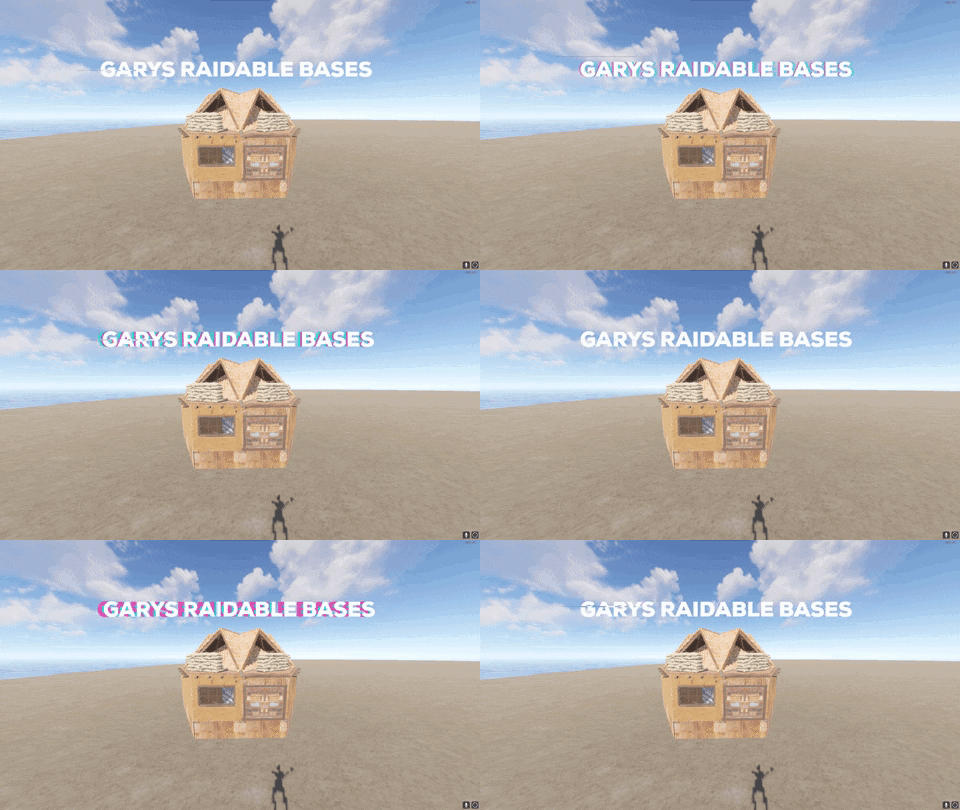
2 easy raidable bases wood or metal doors tier 2 workbench profit so your players don't rage quit when seeing loot 2 Medium raidable bases shotgun traps garage doors secret spot on the roof tier 2 workbench profit so your players don't rage quit when seeing loot I will be coming out with some hard raidable bases for a cheap price ETA : 8/22 - 8/30$2.99




.thumb.png.f676fcb4237b0d630285499251bcf88e.png)
.thumb.png.ccf8a947948c9eb1445ad21a7931247b.png)