

How to add a waitlist to Carrd
Put a LaunchList signup form on a Carrd site with two lines of code in Carrd's Embed element, which needs Carrd Pro Standard or higher.
Carrd's Embed element runs raw HTML, so a LaunchList form goes into a Carrd site with two lines, in about three minutes. Change the form's fields later and the live form updates itself, with nothing to re-paste.
The Embed element needs Carrd Pro Standard or higher. Carrd's Free and Pro Lite plans have no embeds and no forms, so on those, link a button to your LaunchList hosted page instead.
Before you start#
You need a Carrd site on Pro Standard or higher that you can edit, and a LaunchList project with at least one form. If you signed up and skipped setup, your project already has a waitlist form waiting for you. (A Carrd form of your own that sends to an outside URL needs Pro Plus or higher. This guide uses the Embed element instead.)
Copy your embed snippet#
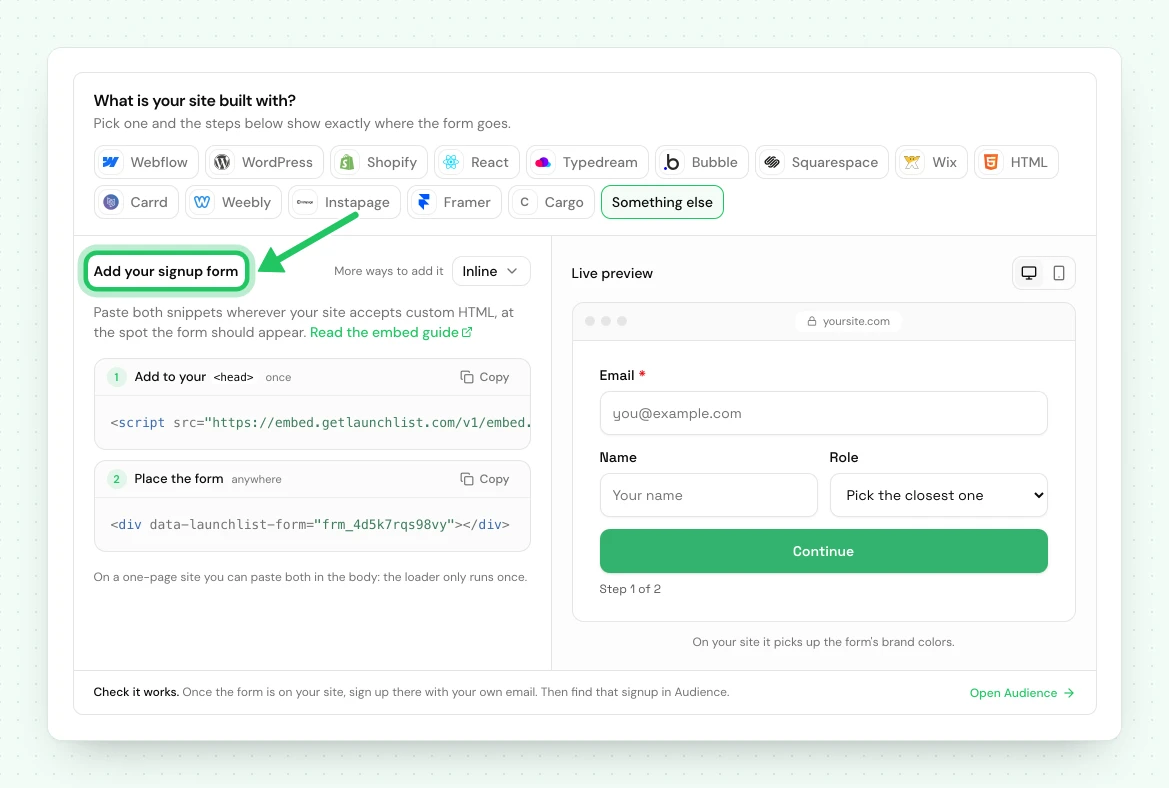
Two pieces go onto your Carrd site: a target element that marks where the form belongs, and the runtime that fills it in.
- In LaunchList, open Embed & API and choose the Your website tab.
- Under What is your site built with?, choose Carrd. Pick the form you want if you have more than one; the Inline snippet is the one shown.
- Copy the snippet.
<!-- frm_8Kd2Qm4Rp9 is an example ID; use your own from Embed & API → Your website -->
<div data-launchlist-form="frm_8Kd2Qm4Rp9"></div>
<script src="https://embed.getlaunchlist.com/v1/embed.js" async></script>
The data-launchlist-form value is your form's public ID. It is safe to publish: it identifies the
form but grants no access to your audience.
Add the Embed element in Carrd#
- Open your Carrd site in the editor and click + to add an element.
- Choose Embed from the element list.
- Set Type to Code and Style to Inline.
- Paste the snippet into the Code box, then close the panel.
Publish and test#
Publish the Carrd site, open the live URL, and submit a real address. The signup appears in Audience within a second, tagged with the page it came from.
Every signup captured this way runs the full pipeline: deduplication against your existing contacts, referral credit if the visitor arrived on a referral link, a trust verdict marking it real or fake, and the verification email if you have that switched on.
Match your site's styling#
The form renders inside a shadow root, so your Carrd styles cannot leak in and break it, and its styles cannot leak out and break your page. To restyle it, use Design in the LaunchList form editor rather than CSS on the Carrd side.
If something is not working#
| What you see | What to do |
|---|---|
| Nothing renders on the live site | Carrd strips <script> from an Embed set to Text. Set Type to Code. |
| The form appears twice | The signup <div> is on the page twice; each one renders its own form. Remove the duplicate. A repeated loader <script> is harmless. |
| Submits but nothing lands in Audience | Check the form is published. A draft form accepts nothing and logs a clear error to the browser console. |
| Layout is cramped on mobile | Set the Embed element's width to 100% and remove any fixed pixel width on its container. |
Prefer to build the markup yourself? The headless embed gives you the same pipeline with your own HTML, and the contacts API covers server-side capture.
Using the classic LaunchList dashboard#
A waitlist made in the classic LaunchList dashboard has its own snippet: a <div class="launchlist-widget"> with widget.js in an Embed element, or a Carrd form whose action is getlaunchlist.com/s/ with its form key. That snippet
keeps working for now and sends signups to the classic dashboard's waitlist, not to a project here.
A classic form key does not work with the snippet on this page.
To bring that waitlist here, import it into a project, then replace the classic snippet on your Carrd site with the one from Embed & API → Your website. Your signups are copied, and the classic waitlist is not changed.
Common questions
Does adding a waitlist to Carrd require a paid Carrd plan?
Yes, for a form on the page. Carrd's Embed element needs Pro Standard or higher, and Carrd's Free and Pro Lite plans have no embeds and no forms. On those, link a button to your LaunchList hosted page instead, which needs no code.
Why does the form not appear in the Carrd editor?
Carrd renders Embed elements as a gray placeholder while you are editing. The form appears once you publish the site or open the live preview.
Can I style the LaunchList form to match my Carrd site?
Yes, from the LaunchList form editor, where you pick its design, accent color, fonts and corners under Design. The form renders inside a shadow root, so Carrd's CSS cannot reach it and your own CSS on the Carrd side will not apply.
