HUD, a shortened acronym meaning Heads-Up Display, refers to on-screen elements or overlays almost always shown to a player in most videogames. In WolfQuest, the main HUD is the player's wolf badge with its vital survival information, the compass, and scent information in scent view among others.
- For the information relating to the player's pack, see Pack Info#Anniversary Edition.
In WolfQuest: Anniversary Edition, the HUD has received a refreshing makeover and a new style. All on-screen elements and interfaces can be toggled at any time by pressing the  key, in addition to what's available to the player via the Game Settings interface, which itself accessible from the Options menu while in-game.
- For the information relating to the player's pack, see Pack Stats#Classic.
In WolfQuest: Classic, the player can toggle the HUD at any time by pressing the ⎋ Esc key to open the Options menu and selecting the Game Settings button to access its interface. There is no quick keyboard keybind to toggle it mid-game.
Availability and functionality of features, stats and elements may change between single-player episodes and the multiplayer game type being played.
- For the information relating to the player's pack, see Pack Stats#Legacy.
Wolf Badge[]
- Main article: Wolf Badge#Anniversary Edition
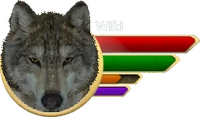
Wolf badge as it appears in a new game with default attributes.
In the Anniversary Edition, the Wolf Badge or avatar badge is an important aspect of the HUD. It is shown in the upper-left corner after loading into a game world, and is responsible for displaying vital information about the player's wolf avatar during a session.
The player will always have four core stats: Health, Stamina, Hunger/Food and Wakefulness. Additional stats or changes may occur after various stages of progression have been made over the course of gameplay.
- Main article: Wolf Badge#Classic
In Classic, the Wolf Badge is an important aspect of the HUD. It is shown in the upper-left corner after loading into a game world, and is responsible for displaying vital information about the player's wolf avatar during a session. The player will begin with two base stats during the first episode, and gradually expands to four meters during the second episode.


- Main article: Wolf Badge#Legacy
In Legacy versions, the Wolf Badge is an important aspect of the HUD. It is shown in the upper-left corner after loading into a game world, and is responsible for displaying vital information about the player's wolf avatar during a session. The player will begin with two base stats during the first episode and four during the second episode.
Compass[]
- Main article: Compass#Anniversary Edition
In the Anniversary Edition, the Compass is displayed under the wolf badge. As is traditional for compasses, it displays cardinal directions relative to the orientation of each game map, and its display rotates with the player-wolf when they turn. Player-defined marker waypoint shapes assigned from the world map interface are displayed on the compass once set. All waypoint iconography displayed on the compass measures distance using opacity, reflecting how near (more opaque) or far away (less opaque) something is from the player-wolf.

- Main article: Compass#Classic
In Classic, the compass is displayed under the wolf badge. In addition to the cardinal directions, the compass rotates as the player-wolf turns. Various icons appear to guide the player towards various points of interest. Opacity can be used to measure distance from waypoint iconography, with more opaque icons being closer to the player-wolf, and transparency being further away. Wind

- Main article: Compass#Legacy
In Legacy versions, the compass is displayed under the wolf badge. In addition to the cardinal directions, the compass rotates as the player-wolf turns. Various icons appear to guide the player towards various points of interest. Opacity can be used to measure distance from waypoint iconography, with more opaque icons being closer to the player-wolf, and transparency being further away.

Territory[]
In the Anniversary Edition, the small hex-shaped icon attached dead-centre at the top of the compass is an indicator representing wolf territory; if the player-wolf enters a hex claimed by any pack including their own, its color will change to match that of the pack it is claimed by. the strength of every wolf pack's territorial claim is shown while standing inside a claimed hex. Its opacity denotes its current strength, with a border indicating strong and borderless indicating moderate to weak. This is more easily referenced in the hex mounted above the compass and is carried over into the world map interface.
While raising a pack, a scent post locator, icons for discovered den sites after establishing territory hexes of their own or while a relocation subquest is active, and icons for rendezvous sites will be displayed on the compass, with their opacity being representative of their distance. After confirming a den or rendezvous site and settling there, only that location's icon will appear on the world map and compass.
This information is also valid for certain multiplayer missions.


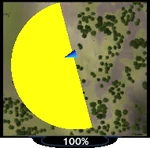
Territory minimap with strongly marked wedges.
Territory minimap with strongly marked wedges.
Notifications & Alerts[]
In the Anniversary Edition, the screen space directly under the compass as well as the usual bottom-center and bottom-right message windows are reserved for in-game notifications and alerts.
Den Locator
If the player enters a node with a den they have not yet discovered, a hot-and-cold den site radar will appear. This serves as a loose assist towards helping the player find the site in the area. The warmer the color, the closer the player is to finding the site. The colder the color, the further away the player is from the site.


Den icons will continue to appear for as long as there are undiscovered den sites in the game world during and beyond the Establish Your Territory quest.
Pup Predators
- Main article: Wolf pup/Predation
After pups are born, the game will occasionally warn the player when their pups are in danger. Alerts appear in the space beneath the Compass, and may pop up at the same time when the player woofs their pups into hiding if a passing predator or encroaching competitor happens to be nearby regardless of whether the attacker itself is actually visible to the player.


Multiple alerts can fire off at once, though two seems to be the maximum. This is intentional game behavior and the player will be expected to fend off two predators at the same time. The likelihood of multiple attacks is influenced by the active difficulty setting.
Hiding Ungulate
When newborn ungulates are born, this icon will appear when the player-wolf enters the radius of a mother ungulate with her newborn calf or fawn is hidden in the pinegrass surrounding her. It does not appear for mobile newborns. It was added in 2.0.1e to display as a visual cue alongside the pre-existing musical cue that plays. If the player leaves the mother's vicinity, the icon disappears until they re-enter it. It persists for as long as mother and baby remain spawned.

In Classic, other than pup death notifications, no other notifications or alerts appear.
- See also: Camera#Legacy.
In Legacy versions, a small collection of notifications and alerts appear within the game's screen space. Most of what was seen in its Legacy predecessor have been removed.
Golden Eagle
When the golden eagle spawns for a scripted attack opportunity during the Final Journey mission, the camera will briefly pan up towards it.
Predator Alerts
When a pup predator appears, or when the player returns home and a predator has been queued for an attack event, the camera will briefly pan the camera over to the encroaching predator or competitor. After a short delay, it begins its attack.
Displays[]
In the Anniversary Edition, these displays are toggleable via control inputs or combinations of inputs.
Packmate Health
Packmate Health as it appears in-game.
 +
+  simultaneously. This provides the player with a more intuitive method of keeping track of their packmates' health during hunts and fights.
In Legacy versions, these displays appear when needed.
Patrol Wolf


Patrol wolf cam.
Scent Identifier[]
- See also: Scent#Anniversary Edition.


Scent identifier for a potential den.

 wolf nose icon above it will appear in the upper-right corner. Passing or wandering up to and inspecting various scent spores, trails, or footprints will display pertinent information about the creature. For instance, the species the scent belongs to, its sex, how old the trail is, and either the pack name for wolves, or the herd name for flocking animals such as elk herds.
- See also: Scent#Classic.
In Classic, while in scent view, a label appears in the upper-right corner of the game's screen space. Passing or wandering up to and inspecting various scent spores or trails will display pertinent information about the creature. For instance, the creature whom the scent belongs to, its sex, how old the trail is, and the pack name for wolves belonging to rival packs.
.png "HUD scentview territoryID (2.7).png (26 KB)")
.png "HUD scentview coyote (2.7).png (26 KB)")
- See also: Scent#Legacy.
In Legacy versions, while in scent view, a label appears in the upper-right corner of the game's screen space. Passing or wandering up to and inspecting various scent spores or trails will display pertinent information about the creature. For instance, the creature whom the scent belongs to, its sex, how old the trail is, and the pack name for wolves belonging to rival packs.
Bugs[]
Anniversary Edition Bugs
Classic Bugs
Legacy Bugs
- Scent read-outs sometimes will not display its information, even while directly following a trail.
Trivia[]
Anniversary Edition Trivia
- As of late January or early February 2024, nametags are now independent from the HUD interface toggle.[1]
- The hiding newborn ungulate icon is credited in its patch note entry. The base asset was made by Loach.
Classic Trivia
- The minicam was cut from the game. It was replaced by many stranger wolf entities who appear in single-player and multiplayer's Raise Pups modes, all of whom will perform aggressive/hostile emotes. An invisible boundary prevents the player from getting too close.
- It was once possible to bypass the boundary. Doing so would prove these entities are all bark and no bite. (They are only programmed to emote and follow along the border within a certain radius if there are players in range. They cannot attack and present no threat to any pups also brought beyond the boundary.)
Classic and Legacy Trivia
- Only during the second episode will the player's experience be shown in the badge. In episode 1, it is absent.
- Early Legacy teasers showed that it was present in earlier Amethyst builds in place of the wolf name. Why it was changed is unknown.
Legacy Trivia
References & External Links[]

| Interfaces | ||
|---|---|---|
| User Interfaces | Compass • Heads-Up Display • Graphical User Interfaces • Tutorials • Quest List • Wolf Badge | |
| Interactive | Account • Controls • Game Settings • Load Game • Options • Pack Stats • Pack Info • Save Game • World Map | |
| Developer Interfaces | Bugs & Feedback (Bugs and Glitches) • Shortcuts | |
| Survival | ||
|---|---|---|
| Vitals & Senses | Health (disease, injury) • Energy or Stamina (rest) • Hunger (sustenance) • Wakefulness (sleep) • Scents (view, spores, posts) • Wolf Badge | |
| Skills & Stats | Affinity • Attributes • Commands • Experience (elder, perks, ranks) • Hunting (scavenging) • Personality | |
| Game Modes | Campaign • Single-player • Multiplayer • Ironwolf | |
| Sustenance | Carcasses • Hydration | |
| Territory | Den sites • Pack (territory) • Rendezvous sites • Wolves • Wolf Packs • Wolf territories | |
| Environment | Time • Vegetation • Weather | |
| Interfaces | Compass • Heads-Up Display • Map (world map) • Pack Info • Pack Stats • Tutorial | |


.png)


