Contact Sales & After-Sales Service

Contact & Quotation

  • Inquire: Call 0086-755-23203480, or reach out via the form below/your sales contact to discuss our design, manufacturing, and assembly capabilities.
  • Quote: Email your PCB files to [email protected] (Preferred for large files) or submit online. We will contact you promptly. Please ensure your email is correct.
Drag & Drop Files, Choose Files to Upload You can upload up to 3 files.

Notes:
For PCB fabrication, we require PCB design file in Gerber RS-274X format (most preferred), *.PCB/DDB (Protel, inform your program version) format or *.BRD (Eagle) format. For PCB assembly, we require PCB design file in above mentioned format, drilling file and BOM. Click to download BOM template To avoid file missing, please include all files into one folder and compress it into .zip or .rar format.

PCB Assembly / Satellite PCB
Satellite PCB · engineering & manufacturing

Satellite PCB Procurement: Separate Ground, Engineering and Flight Builds

A satellite-related PCB inquiry should state where the board belongs and which procurement requirements apply. Ground equipment, engineering models and flight hardware can require very different supply routes and evidence packages.

Bare boards · PCB assembly · prototype and production enquiries

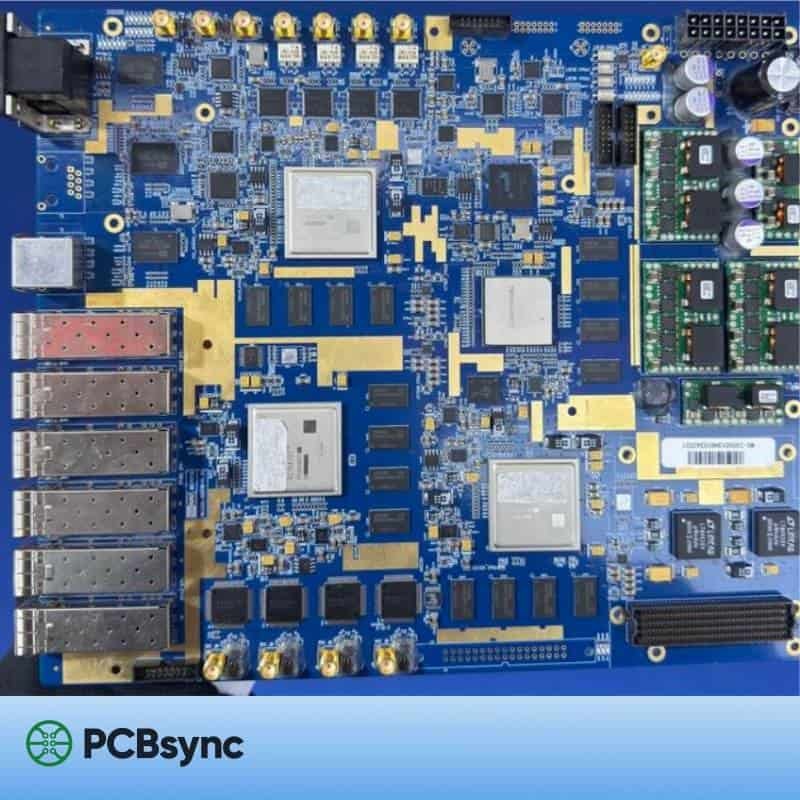
Populated board with shielding, connectors and power modules.
The design decision

The application name does not establish qualification. Identify the board construction, applicable project requirements and approval authority before committing to a build.

Choose the relevant path

Where the board fits in your product

Ground equipment

Commercial or programme-specific board requirements.

Define the actual product acceptance basis.

Engineering model

Prototype questions and controlled configuration.

Identify which evidence is needed at this stage.

Flight procurement

Project-approved construction and supplier route.

Verify the applicable qualification scope.

Delivery records

Batch and configuration evidence.

Use the designated acceptance process.

Work with your own inputs

Satellite PCB project tools

Check the release information and calculate the scenario relevant to this board. Add the result to your inquiry so engineering can review the same assumptions.

Satellite PCB workbench

PCBSync Engineering Tools · no account required · calculations run in your browser

Mark what you have prepared

Decisions before fabrication

What to resolve before the first build

01

Name the procurement category

State whether the board is for a ground terminal, laboratory equipment, an engineering model or a project-controlled flight build. Identify the responsible design and procurement organisations.

Keep initial inquiries non-sensitive and focused on scope. Resolve required supplier eligibility and the permitted transfer route before providing controlled technical files.

02

Distinguish design and procurement requirements

ECSS publishes separate standards for PCB design and PCB qualification/procurement. The applicable project documents determine the required versions and any approved tailoring.

Prepare a requirement-to-evidence list with named owners. A general reference to ECSS does not define which construction, records or approvals the purchase actually requires.

03

Review the delivered configuration

Control material identity, board construction, PCB assembly variants and relevant process requirements. Identify the evidence that applies to the proposed configuration and any differences that need review.

Treat changes to material or manufacturing route as explicit review items. Do not infer qualification from a similar board, a product photograph or the presence of a familiar material brand.

04

Make open evidence actionable

Record missing documents, unreviewed results and nonconformances separately. Agree the review and disposition route before the planned release.

The evidence tool organises declared counts and transfers the scenario into an inquiry. It does not inspect a dossier, confer flight approval or predict mission performance.

Physical board details

Real boards: construction and connection details

Real PCBSync media-library photographs show visible board construction and interconnect details. They are not evidence of flight heritage, radiation testing or space qualification.

Engineering handoff

The information that moves a quote forward

A useful quotation starts with a controlled revision and clear open questions. Prepare these items, and mark anything still being decided.

Build an inquiry brief
  1. Ground/engineering/flight procurement category
  2. Applicable project documents and revisions
  3. Required supplier and construction evidence
  4. Controlled configuration and material identity
  5. Required inspection and delivery records
  6. Approved data-transfer and acceptance route
Before you enquire

Satellite PCB: practical questions

Does this page claim PCBSync flight heritage or space qualification?

No. Any required status must be supported by current evidence applicable to the specific construction and project.

Are ground-equipment boards subject to the same requirements as flight boards?

Do not assume so. Use the actual product and procurement requirements.

Can I request a scope discussion before sending files?

Yes. Start with the procurement category, quantities and required documentation, then confirm the appropriate next step.

PCBSync project review

Request your Satellite PCB scope review

Tell us what needs to be built

Start with the board’s procurement category, quantity, document references and required supplier evidence. Identify whether the request concerns ground equipment, engineering models or a project-controlled flight build.

Confirm supplier eligibility and the agreed data-transfer route before sharing controlled files. Detailed manufacturing commitments depend on review of the applicable construction, qualification and acceptance requirements.

[email protected]
+86-755-23203480

Your inquiry requests a review; it does not place an order.

Drag & Drop Files, Choose Files to Upload You can upload up to 3 files.