Contact Sales & After-Sales Service

Contact & Quotation

  • Inquire: Call 0086-755-23203480, or reach out via the form below/your sales contact to discuss our design, manufacturing, and assembly capabilities.
  • Quote: Email your PCB files to [email protected] (Preferred for large files) or submit online. We will contact you promptly. Please ensure your email is correct.
Drag & Drop Files, Choose Files to Upload You can upload up to 3 files.

Notes:
For PCB fabrication, we require PCB design file in Gerber RS-274X format (most preferred), *.PCB/DDB (Protel, inform your program version) format or *.BRD (Eagle) format. For PCB assembly, we require PCB design file in above mentioned format, drilling file and BOM. Click to download BOM template To avoid file missing, please include all files into one folder and compress it into .zip or .rar format.

PCB Assembly / PCB Stencil
PCBSync · Assembly engineering & project planning

PCB Stencil: Specify, Compare and Request a Manufacturing Quote

Prepare a PCB stencil request with the correct paste data, board side and printing arrangement. Use the reference budget and aperture geometry tool to organize the inputs that need review.

Prototype through production · scope and schedule confirmed after file review

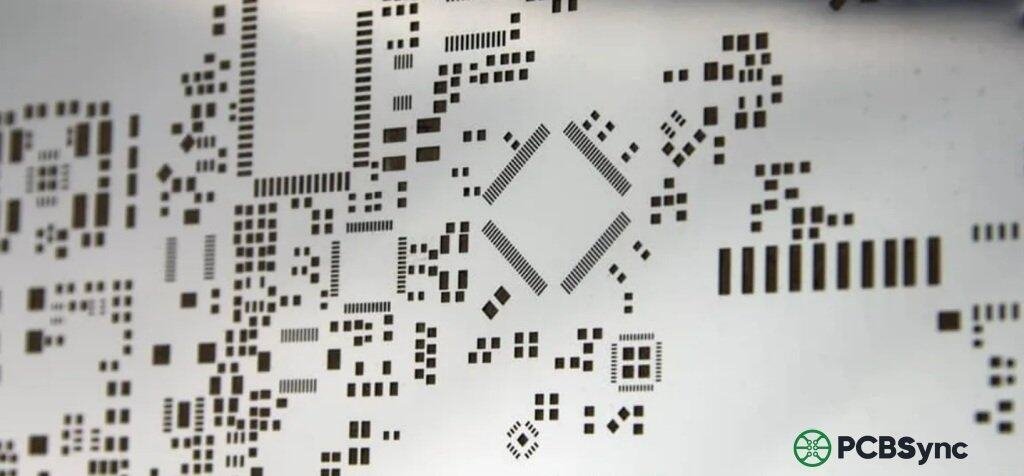
Close view of a metal solder-paste stencil with a range of aperture shapes and sizes.
At a glance: A solder-paste stencil controls where paste is deposited before placement; its openings and thickness are designed for the printing process, not simply copied from solder-mask openings.
Prepare a clearer project request

PCB Stencil tools

PCB Stencil workbench

PCBSync Engineering Tools · no account required · calculations run in your browser

Stencil reference budget from the existing PCBSync planning model. Frame size, step regions, surface treatment, quantity of stencil sets and delivery requirements need a reviewed quotation; these inputs do not create a live order.

PCBSync engineering tools

PCB assembly & stencil quote planner

Configure the build. See the scope behind the budget.

REFERENCE BUDGET · USD
Bare PCB planner →
Assembly processing + stencil

Choose a supply arrangement. Component procurement and PCB fabrication are reviewed separately from this processing budget.

How this reference budget works

The planner uses the existing PCBSync assembly processing model. Its stencil allowance is USD 35 for a one-side set or USD 60 for a both-side set, multiplied by the number of sets. These are uncalibrated planning allowances, not published selling prices. Frame size, apertures, coating and custom construction require review. Assembly quantity means individual boards, not panels.

The displayed ±12% spread is illustrative, not a validated accuracy claim. Special requirements are listed separately and do not silently enter the total. Turnkey selection does not price your BOM. A final quotation requires engineering review of the actual files and material availability.

Valid planner settings can be retained in this browser tab for up to two hours; assembly and fabrication planners share the board quantity. Contact details and uploaded design files are not stored by this planner.

Match the scope to the decision

PCB Stencil: requirements that change the build

Decision / stageWhat to defineEvidence or next action
DeliverableSide, sets, frame and formatPrinter-compatible specification
DesignOpenings, thickness and paste needsReviewed aperture strategy
QuoteStandard reference and special workConfirmed scope and exclusions
Practical engineering and purchasing guidance

Plan the work before releasing the files

Specify the stencil deliverable

Identify the paste-layer revision, board side, quantity of stencil sets and the intended printer or manual frame arrangement. State the required format and any customer-specific dimensions.

A framed, frameless or stepped stencil represents a different scope. Confirm compatibility with the printing equipment rather than choosing a format only from a general product description.

Review the component mix and deposition needs

Consider fine-pitch openings, large pads and packages needing a tailored paste pattern. Review aperture shape, thickness, paste and printing conditions together.

When the component mix calls for different foil thicknesses, use the step stencil ordering worksheet to identify local regions, transition clearances and printer requirements. Before releasing the order, review the supplier proposal with the stencil aperture acceptance matrix and record approved deviations from the paste data.

The geometry tool accepts ideal rectangular or circular openings. It distinguishes cavity volume from a deposit scenario using your entered transfer percentage; it does not predict paste rheology, rounded-corner effects or process yield.

Keep budget and engineering decisions separate

The stencil tab provides an explicitly labeled reference for the selected scope. Special formats, coatings, tooling and process-development requirements may need engineering quotation.

Send paste data, outline, side identification and the equipment requirements for review. Do not approve a stencil solely because one calculated ratio exceeds a general guideline; representative printing evidence is still relevant.

Specify both the outer size and usable printing area

The frame or foil must fit the printer, while the complete paste pattern must fit the usable print window. Supply your equipment drawing, clamping margins, fiducials and desired image location rather than giving only the PCB outline.

For two board sides, say whether you need separate foils or a combined layout. Identify stepped regions, polishing or coating requests as options for review. Include the destination and required arrival date so manufacturing and transit can be quoted separately.

Keep the review concrete

Include these requirements in your enquiry

01

Paste data and board revision match

02

Top and bottom sides are identified

03

Frame or format requirements are stated

04

Stencil thickness is selected for review

05

Difficult apertures are identified

06

Special treatments and acceptance are specified

Mark unresolved items explicitly. Ask the quotation to identify proposed exceptions, required customer approvals and any inspection or special-process charges that remain open.

See the physical construction

Stencil openings, mounting formats and physical examples

Compare the visible aperture pattern and mounting arrangement with your own printing requirements. These are existing media-library photographs; final thickness, aperture tolerances and process acceptance belong in the reviewed drawing.

Answers before requesting a quote

PCB Stencil FAQ

Can I use the solder-mask layer as stencil data?

Do not assume it is suitable. Provide the intended paste layer and review the aperture design.

Is the displayed stencil cost a final quote?

No. It is a reference model; the actual format and requirements need confirmation.

Does the aperture tool predict deposited solder volume?

No. It reports ideal cavity geometry, not actual paste transfer or the final solder joint.

Technical links checked 2 October 2026. Apply the current documentation and project-specific acceptance requirements. Planners do not certify manufacturability or validate uploaded design files.

From planning to a reviewed quotation

Discuss your PCB Stencil requirements

Send the scope you want reviewed

Add a project brief or reference budget from the tools above. Include your assembly revision, requested quantity, required timing and open engineering questions.

For a stencil quotation, provide top and/or bottom paste layers, the board or panel outline, approved aperture exceptions, requested foil/frame dimensions and your printer interface requirements. State the number of stencil sets and required delivery timing. For paste or printing investigations, add the exact material and measured defect records. Need an NDA or a specific file-transfer route? Contact us before sharing files.

Email: [email protected]
Phone: +86-755-23203480

Review the message and attachments before sending. An enquiry does not place an order.

Drag & Drop Files, Choose Files to Upload You can upload up to 3 files.