Contact Sales & After-Sales Service

Contact & Quotation

  • Inquire: Call 0086-755-23203480, or reach out via the form below/your sales contact to discuss our design, manufacturing, and assembly capabilities.
  • Quote: Email your PCB files to [email protected] (Preferred for large files) or submit online. We will contact you promptly. Please ensure your email is correct.
Drag & Drop Files, Choose Files to Upload You can upload up to 3 files.

Notes:
For PCB fabrication, we require PCB design file in Gerber RS-274X format (most preferred), *.PCB/DDB (Protel, inform your program version) format or *.BRD (Eagle) format. For PCB assembly, we require PCB design file in above mentioned format, drilling file and BOM. Click to download BOM template To avoid file missing, please include all files into one folder and compress it into .zip or .rar format.

PCB Assembly / PCB Stencil / Stencil Gerber
PCBSync · Assembly engineering & project planning

Stencil Gerber: Release the Correct Paste Layers and Alignment Data

Prepare stencil Gerber files that preserve side, orientation and revision. Use the release checklist to identify missing outline, fiducial and aperture information before requesting a stencil quotation.

Prototype through production · scope and schedule confirmed after file review

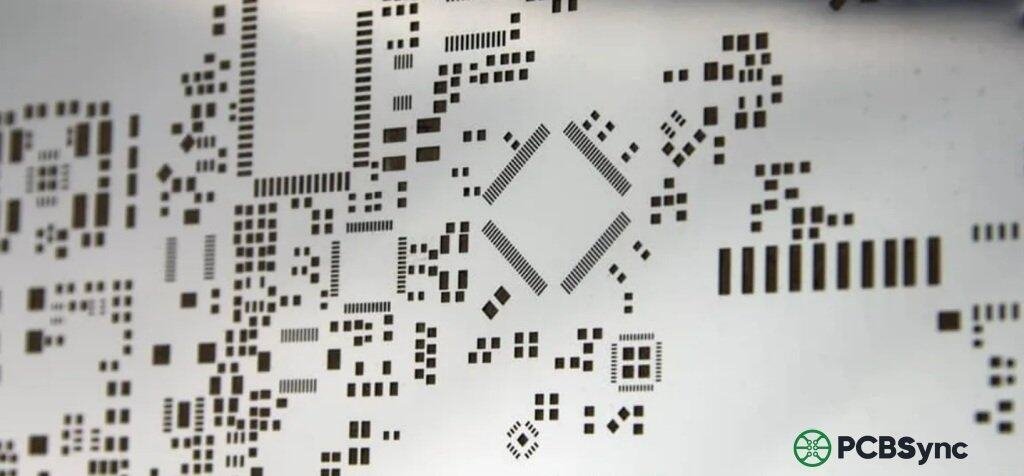
Close view of a metal solder-paste stencil with a range of aperture shapes and sizes.
At a glance: A stencil Gerber describes the intended paste openings; solder mask, copper and paste layers serve different purposes and must not be substituted without an explicit engineering decision.
Prepare a clearer project request

Stencil Gerber tools

Stencil Gerber workbench

PCBSync Engineering Tools · no account required · calculations run in your browser

Mark what you have prepared

Match the scope to the decision

Stencil Gerber: requirements that change the build

Decision / stageWhat to defineEvidence or next action
Paste layersCorrect side, units and revisionLayer readme and viewer check
AlignmentOutline, panel repeat and fiducialsAgreed viewing and mounting convention
ReleaseExceptions and controlling drawingApproved stencil revision
Practical engineering and purchasing guidance

Plan the work before releasing the files

Export the intended paste layers

Export top and bottom paste data from the approved design revision. Include the board or panel outline and an unambiguous readme identifying each layer, units and intended side. Check that do-not-populate or paste-exclusion requirements are reflected in the released data.

Do not rename an unrelated copper or mask layer and assume it becomes usable stencil artwork. Any aperture modifications made outside the CAD design need their own controlled release, so a later export cannot silently overwrite the manufacturing decision.

Check alignment before discussing production

Overlay the paste data with the copper and outline in a suitable viewer. Examine small-pitch packages, large exposed pads and the positions used for printer alignment. A view from the bottom can look reversed, so define the viewing convention rather than relying on a screenshot alone.

For a panel, specify board repetitions and any tooling or edge rails. Ask the stencil supplier to confirm the final mounting orientation against the printer requirements; mirroring an already mirrored file can produce the wrong physical stencil.

Send a complete stencil release package

Provide the requested PCB stencil foil or frame arrangement, outer dimensions, usable print area and proposed thickness. State whether fiducials should be through-cut, half-etched or another agreed construction; these are manufacturing details requiring supplier confirmation.

List special regions and aperture exceptions in the drawing. The file-readiness tool records your declared preparation only and does not parse the uploaded Gerber. Attach the actual data through the agreed enquiry route after reviewing the message.

Separate checking from approving

A consistent-looking export is not proof of printability. If a prototype PCB assembly run will evaluate the print result, identify the stencil revision and inspection evidence required for that run. Keep the original CAD release, the approved modified aperture file and the final stencil revision distinguishable. Ask who approves changes and which drawing controls conflicting information.

For a replacement stencil, identify exact repeat versus design change. Identify the paste-layer revision and agreed aperture edits in stencil release record. Define the print evidence to review during first article inspection before treating a new stencil as interchangeable with the previous one.

Keep the review concrete

Include these requirements in your enquiry

01

Top and bottom paste layers are identified

02

Board or panel outline is included

03

Units and viewing convention are documented

04

Fiducials and image location are specified

05

Aperture exceptions have an approval owner

06

Stencil and PCB revisions are traceable

Mark unresolved items explicitly. Ask the quotation to identify proposed exceptions, required customer approvals and any inspection or special-process charges that remain open.

See the physical construction

Physical stencil and assembly examples

These media-library examples illustrate physical construction and process equipment. The photograph alone does not establish inspection results, certifications or the capability required by your particular project.

Answers before requesting a quote

Stencil Gerber FAQ

Which Gerber layer is needed for a PCB stencil?

Provide the intended solder-paste layer for each side, with outline and alignment information. Confirm the supplier file requirements.

Can this page inspect my Gerber?

No. Its checklist captures what you have prepared; an engineering review of the actual file remains necessary.

Technical links checked 2 October 2026. Apply the current documentation and project-specific acceptance requirements. Planners do not certify manufacturability or validate uploaded design files.

From planning to a reviewed quotation

Discuss your Stencil Gerber requirements

Send the scope you want reviewed

Add a project brief or reference budget from the tools above. Include your assembly revision, requested quantity, required timing and open engineering questions.

For a stencil quotation, provide top and/or bottom paste layers, the board or panel outline, approved aperture exceptions, requested foil/frame dimensions and your printer interface requirements. State the number of stencil sets and required delivery timing. For paste or printing investigations, add the exact material and measured defect records. Need an NDA or a specific file-transfer route? Contact us before sharing files.

Email: [email protected]
Phone: +86-755-23203480

Review the message and attachments before sending. An enquiry does not place an order.

Drag & Drop Files, Choose Files to Upload You can upload up to 3 files.